Vue.js | コンポーネントと親子間のデータ送受信
コンポーネントを使うと、サイトをヘッダー、メニュー、商品一覧、検索フォーム、個別の商品項目などの再利用可能な部品へ分けられる。
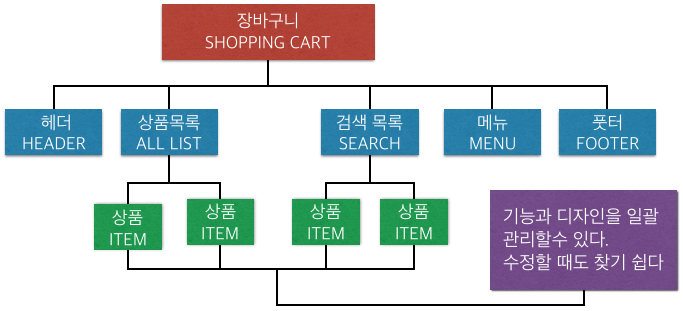
UIをコンポーネント化すると、JavaScriptとHTML/CSSを分けて管理でき、保守性が上がり、必要な画面で同じ部品を再利用できる。
コンポーネントを作成する
コンポーネントでは、ルートのnew Vue()に渡すオプションと同じように、データ、メソッド、テンプレートを定義する。
Vue.component("my-component", {
  template: "<p>example</p>"
});
Vue.componentで登録するとグローバルコンポーネントになり、どこからでも利用できる。特定のコンポーネントやルートインスタンスだけで使う場合は、componentsオプションへ登録する。
var myComponent = { template: "<p>example</p>" };
new Vue({
  components: {
    "my-component": myComponent
  }
});
Vue.extendでサブクラスを作り、それをコンポーネントとして登録することもできる。
var myComponent = Vue.extend({ template: "<p>example</p>" });
コンポーネントを呼び出す
コンポーネントを表示したい場所にカスタムタグを書く。
<div id="app">
  <my-component></my-component>
</div>
classなどの属性は、コンポーネントテンプレートのルート要素と結合される。条件によってコンポーネントを切り替えたい場合はisを使う。
<div is="my-component"></div>
<div :is="currentComponent"></div>
dataは関数にする
コンポーネントのdataは、オブジェクトを返す関数として書く。これにより、コンポーネントインスタンスごとにデータが分離される。
Vue.component("my-component", {
  template: "<p>{{ message }}</p>",
  data: function() {
    return { message: "hello!" };
  }
});
親から子へデータを渡す
親のデータを子コンポーネントに表示するには、属性として渡す。通常の属性は文字列を渡し、v-bindまたは:を使うとデータ値や式を渡せる。
<child-component val="message"></child-component>
<child-component :val="message"></child-component>
子はpropsで値を受け取る。
Vue.component("child-component", {
  template: "<p>{{ val }}</p>",
  props: {
    val: String
  }
});
propsは親から借りている値なので、子が直接書き換えるべきではない。変更を親へ伝えたい場合はイベントを発行する。
子から親へデータを送る
子が親へ通知したり値を渡したりする場合は、カスタムイベントと$emitを使う。
<child-component @childs-event="parentsMethod"></child-component>
this.$emit("childs-event", "hello!");
親のメソッドは、子から送られた値を受け取れる。
new Vue({
  methods: {
    parentsMethod: function(message) {
      alert(message);
    }
  }
});
インライン式で受ける場合、子が渡した値は$eventとして利用できる。
親子間通信の例
実用的な形として、親のデータはpropsで子へ渡し、子のデータはカスタムイベントで親へ返す。
<child-component
  :parent-message="parentMessage"
  @send-message="getChildMessage"></child-component>
var childComp = Vue.extend({
  props: { parentMessage: String },
  data: function() {
    return { childMessage: "This is child data" };
  },
  created: function() {
    this.$emit("send-message", this.childMessage);
  }
});
明確な理由がない限り、$parentや$childrenへ強く依存するのは避ける。propsとイベントを使うと、コンポーネントの結合を弱く保てる。
インタラクティブなコンポーネント
より実用的な例として、友人一覧をリストコンポーネントとプロフィールコンポーネントに分けられる。「いいね」をクリックするとプロフィールコンポーネントからイベントが発行され、親がカウントを増やし、算出プロパティでカウント順に並べ替える。
<friends-profile
  v-for="(friend, idx) in sortedFriends"
  v-bind="friend"
  :key="friend.id"
  @count-trigger="countUp(idx)">
</friends-profile>
var friendsList = Vue.extend({
  data: function() {
    return {
      friends: [
        { id: 1, name: "Cat", color: "#e69313", count: 0 },
        { id: 2, name: "Fox", color: "#a7a264", count: 0 },
        { id: 3, name: "Raccoon", color: "#bbbbbb", count: 0 }
      ]
    };
  },
  computed: {
    sortedFriends: function() {
      return this.friends.sort(function(a, b) {
        return b.count - a.count;
      });
    }
  },
  methods: {
    countUp: function(idx) {
      this.friends[idx].count++;
    }
  }
});
カスタムコンポーネントに書いたイベントはカスタムイベントとして扱われる。通常のDOMイベントを受けたい場合は.native修飾子を使う。
<my-comp @click.native="handleClick"></my-comp>
コンポーネントでv-modelを使う
コンポーネントはv-modelを使うことでフォーム部品のように扱える。コンポーネントがinputイベントを発行すると、親の値が更新される。
<my-select v-model.number="current"></my-select>
this.$emit("input", newid);
少し凝ったカスタムフォーム部品を作るときに便利である。
Vue.extendについて
Vue.extendはコンストラクタを返す。newでインスタンスを作成し、独立した要素へマウントできる。単体テストや、モーダルウィンドウのようなライブラリ機能を作る場合によく使える。
拡張コンポーネントを独立してマウントすると、それ自体がルートになる。既存インスタンスの子として扱いたい場合は、parentオプションを渡すか、同じstoreを渡す。
this.sub1 = new ChildComp({ el: "#sub1", parent: this });
this.sub2 = new ChildComp({ el: "#sub2", store: store });