Vue.js | Components and Parent-Child Data Communication
Components let you split a site into reusable parts such as headers, menus, product lists, search forms, and individual product items.
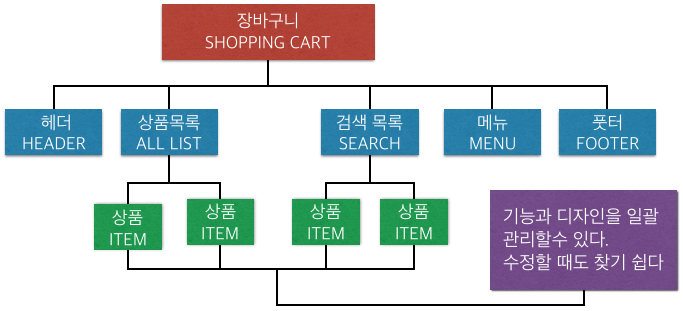
By componentizing the UI, JavaScript and HTML/CSS can be managed separately, maintainability improves, and the same parts can be reused on different screens.
Creating Components
A component defines data, methods, and a template, much like the options passed to the root new Vue() instance.
Vue.component("my-component", {
  template: "<p>example</p>"
});
Registering with Vue.component makes the component global. To make it available only inside a particular component or root instance, register it in the components option.
var myComponent = { template: "<p>example</p>" };
new Vue({
  components: {
    "my-component": myComponent
  }
});
Vue.extend can also create a subclass and register it as a component.
var myComponent = Vue.extend({ template: "<p>example</p>" });
Calling Components
Use a custom tag where the component should be displayed.
<div id="app">
  <my-component></my-component>
</div>
Attributes such as class are merged with the root element of the component template. When a component needs to be selected dynamically, use is.
<div is="my-component"></div>
<div :is="currentComponent"></div>
Data Must Be a Function
Component data is written as a function that returns an object. This keeps data separate for each component instance.
Vue.component("my-component", {
  template: "<p>{{ message }}</p>",
  data: function() {
    return { message: "hello!" };
  }
});
Passing Data from Parent to Child
To display parent data in a child component, pass it as an attribute. A plain attribute passes a string, while v-bind or : passes a data value or expression.
<child-component val="message"></child-component>
<child-component :val="message"></child-component>
The child receives the value through props.
Vue.component("child-component", {
  template: "<p>{{ val }}</p>",
  props: {
    val: String
  }
});
Props are values borrowed from the parent. A child should not rewrite them directly. If the child needs to request a change, it should emit an event.
Sending Data from Child to Parent
Use custom events and $emit when a child needs to notify the parent or send data upward.
<child-component @childs-event="parentsMethod"></child-component>
this.$emit("childs-event", "hello!");
The parent method receives the value emitted by the child.
new Vue({
  methods: {
    parentsMethod: function(message) {
      alert(message);
    }
  }
});
When using an inline expression, the child value is available as $event.
Parent-Child Communication Example
A practical pattern is to pass parent data down with props and receive child data through a custom event.
<child-component
  :parent-message="parentMessage"
  @send-message="getChildMessage"></child-component>
var childComp = Vue.extend({
  props: { parentMessage: String },
  data: function() {
    return { childMessage: "This is child data" };
  },
  created: function() {
    this.$emit("send-message", this.childMessage);
  }
});
Avoid relying on $parent and $children unless there is a clear reason. Props and events keep components loosely coupled.
Interactive Components
As a more realistic example, a friend list can be split into a list component and a profile component. Clicking “Like” emits an event from the profile component, the parent increments the count, and a computed property sorts friends by count.
<friends-profile
  v-for="(friend, idx) in sortedFriends"
  v-bind="friend"
  :key="friend.id"
  @count-trigger="countUp(idx)">
</friends-profile>
var friendsList = Vue.extend({
  data: function() {
    return {
      friends: [
        { id: 1, name: "Cat", color: "#e69313", count: 0 },
        { id: 2, name: "Fox", color: "#a7a264", count: 0 },
        { id: 3, name: "Raccoon", color: "#bbbbbb", count: 0 }
      ]
    };
  },
  computed: {
    sortedFriends: function() {
      return this.friends.sort(function(a, b) {
        return b.count - a.count;
      });
    }
  },
  methods: {
    countUp: function(idx) {
      this.friends[idx].count++;
    }
  }
});
Events written on a custom component are custom events. Native DOM events require the .native modifier.
<my-comp @click.native="handleClick"></my-comp>
Using v-model with Components
Components can work like form controls with v-model. The component emits an input event, and the parent value is updated.
<my-select v-model.number="current"></my-select>
this.$emit("input", newid);
This is useful when building richer custom form controls.
About Vue.extend
Vue.extend returns a constructor. You can create instances with new and mount them to independent elements. This is often useful for testing or for library features such as modal windows.
When an extended component is mounted independently, it becomes its own root. If it should behave as a child of an existing instance, pass the parent option or the same store.
this.sub1 = new ChildComp({ el: "#sub1", parent: this });
this.sub2 = new ChildComp({ el: "#sub2", store: store });