SyntaxHighlighter | Customization | Change the Striped Background Colors of Even and Odd Lines
SyntaxHighlighter originally allows different settings for even and odd lines, but by default all lines use the same background color. This article sets different background colors for even and odd lines.
Change the Striped Background Colors of Even and Odd Lines
This example uses the Default theme. Other themes can be configured in the same way. Open the shCoreDefault.css file or shThemeDefault.css file in a text editor and find the following content.
.syntaxhighlighter .line.alt1 {
  background-color: white !important;
}
.syntaxhighlighter .line.alt2 {
  background-color: white !important;
}
The setting for even lines is .syntaxhighlighter .line.alt1, and the setting for odd lines is .syntaxhighlighter .line.alt2. Currently, both background colors are set to white. This time, only the background color of even lines will be changed to gray (#f0f0f0).
Because modifying the library file itself can cause problems, write separate CSS and override the setting as follows.
<style>
  .syntaxhighlighter .line.alt1 {
    background-color: #f0f0f0 !important;
  }
</style>
Before and after the change, it is displayed as follows.
- Before the change
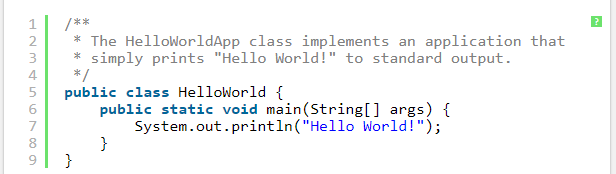
- After the change
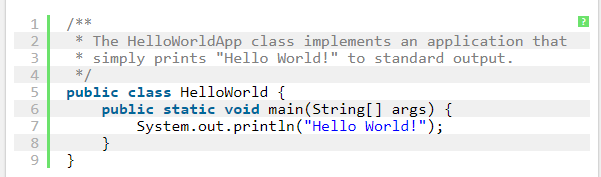
Because the theme itself is changed, the same setting applies to all source code displayed on the same page.