D3.js adding elements - append()
Adding elements
This page explains how to add elements to the screen with D3.
If you write the following code inside the <script> tag, a <p> tag is added inside the <body> tag.
d3.select("body").append("p").text("Hello!");
<!DOCTYPE html>
<html>
  <head>
    <meta charset="utf-8">
    <title>D3 Test</title>
    <script src="https://d3js.org/d3.v7.min.js"></script>
  </head>
  <body>
    <script>
      // Write code here.
      d3.select("body").append("p").text("Hello!");
    </script>
  </body>
</html>
Modify the file as shown above, save it, and then refresh the page in Google Chrome.
Do you see the text Hello! on the screen?
If you also inspect the document body in Google Chrome Developer Tools, you can see that a <p> tag has been added in addition to the script written in the <script> tag, as shown below.
<p>Hello!</p>
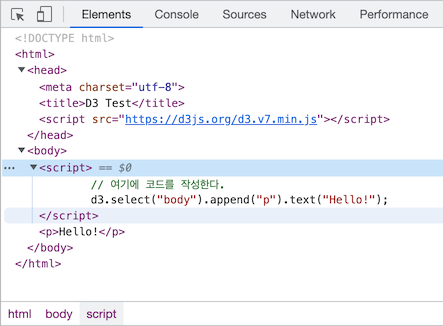
So far, you have seen how to add an element in D3. Here only one element was added, but later you will learn how to add elements for 10 or 100 pieces of data.
Method details
Now take a closer look at the script added to create the <p> tag.
d3.select("body").append("p").text("Hello!");
Like jQuery, D3 uses a technique called chaining. By connecting methods (functions) with periods (.), multiple actions can be executed in a single line of code.
The script above can be divided into three methods.
d3.select("body")
  .append("p")
  .text("Hello!");
Incidentally, JavaScript ignores line breaks and whitespace, so the code works even if it is written this way.
When a CSS selector is passed to select() and executed, a reference to the first matching element is returned.
.select("body")
Use selectAll() when selecting multiple elements at once. This will be explained later. Here, body is referenced and passed to the next method.
Next, the specified element is created, here "p", and added to the end inside the referenced element.
.append("p")
In this example, the <p> tag is inserted at the very end inside the <body> tag. This method passes a reference to the newly created element to the next method.
The next method, text(), inserts the specified string into the referenced tag.
.text("Hello!")
Here, "Hello!" is inserted between the <p> tag and the </p> tag. Existing content is overwritten.
Depending on the situation, you can also rewrite the code without using chaining, as follows:
var body = d3.select("body");
var p = body.append("p");
p.text("Hello!");
This style is useful when calling many functions.