HTML Introduction | Getting Started with HTML | HTML Element Structure
HTML Element Structure
An HTML element can have several attributes, and these attributes provide additional information about that element.
Also, an HTML element starts with an opening tag and ends with a closing tag.
Korean
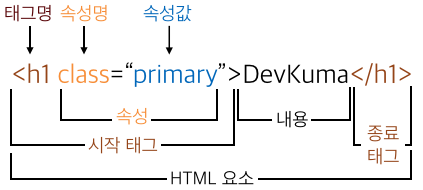
English
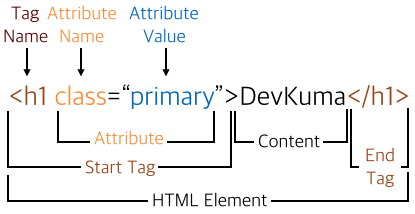
Syntax
<tagname attribute="attribute value">content</tagname>
Element
In HTML, this refers to all commands consisting of an opening tag and a closing tag.
Tag
A tag is part of an element and comes in two types: opening tags and closing tags.
An opening tag starts an element, and a closing tag ends it.
Some tags do not have closing tags.
The concepts of element and tag are often mixed and not clearly distinguished. In HTML, you may not need to use the word element strictly, but in CSS and JavaScript, element is a very important term.
Attribute
An attribute is used inside an element’s opening tag and represents a more specific command system.
Attributes are always defined only inside the opening tag of an HTML element and are expressed as an attribute name and attribute value.
Always write attribute names in lowercase.
The HTML5 standard does not distinguish uppercase and lowercase letters in attribute names.
However, W3C recommends writing attribute names in lowercase whenever possible.
Also, XHTML more strictly requires attribute names to be lowercase only.
Always wrap attribute values in quotes.
The HTML5 standard does not force quotation marks for attribute values. However, if attribute values are not wrapped in quotes, unexpected errors like the following can occur.
Example
<img src="noimage.jpg" alt="이미지가 없습니다">
<img src="noimage.jpg" alt=이미지가 없습니다>
As in the example above, if an attribute value contains spaces, only the part before the first space may be recognized, so the attribute value may not be applied correctly. Therefore, you should use quotes to store the exact value.
Double quotes, ", are usually used to wrap attribute values, but single quotes, ', can also be used.
The alt attribute of the <img> tag can set the text shown instead of the image when the image cannot be loaded.