CSS Introduction | CSS Box Model | Box Model
All HTML elements are structured as boxes, and this is called the box model. The box model divides an HTML element into padding, border, margin, and content.
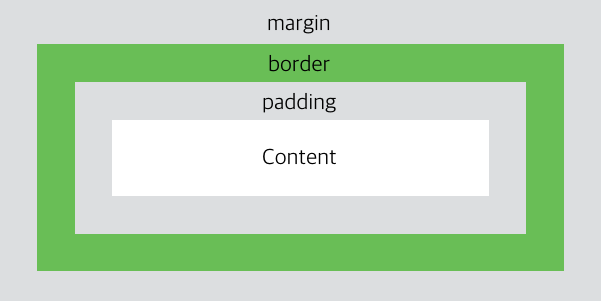
- Content: The actual content area of the box, where text or images are placed.
- Padding: The space between the content and the border. Padding is not visible.
- Border: The border that surrounds the content and padding.
- Margin: The space between the border and neighboring elements. Margin is not visible.
<style>
    div {
        background-color: red;
        padding: 50px;
        border: 20px solid maroon;
        margin: 50px;
    }
</style>
Understanding height and width
To represent HTML elements accurately in every web browser, you need to understand exactly how the box model works.
When CSS height and width properties are set, the size they refer to applies only to the content area.
The height and width set on an HTML element do not include the size of padding, border, or margin.
<style>
    div {
        width: 320px;
        padding: 10px;
        border: 5px solid maroon;
        margin: 0;
    }
</style>
Calculating the Height and Width of an HTML Element
[css box size]
In the figure above, the total width is calculated as follows.
width(70px) + left margin(10px) + left padding(5px) + right padding(5px) + right margin(10px) = 100px.
In other words, the formula for calculating the total width of an HTML element is:
width + left padding + right padding + left border + right border + left margin + right margin.
The formula for calculating the total height of an HTML element is:
height + top padding + bottom padding + top border + bottom border + top margin + bottom margin.
At this point, the size of the margin area may not be immediately visible. This is because margin is the space between the border and neighboring elements and is not affected by the background color. However, it is still included in the space occupied by the HTML element.
In Internet Explorer 8 and earlier, the width or height set with the width or height property includes the size of padding and borders.
To remove this difference, you must insert the <!DOCTYPE html> tag in the HTML document.