HTML Introduction | Dividing HTML Space | HTML Layout
HTML layout
Layout is the work of arranging elements such as text and images effectively within a specific space so that they are easy to view. The layout of a web page is a very important factor that determines the appearance of a website.
In HTML, you can create layouts in the following ways.
- Layout using div elements
- Layout using HTML5 semantic elements
- Layout using table elements
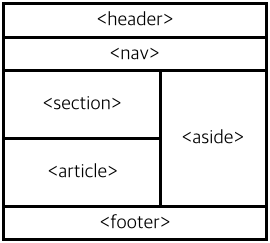
Layout using div elements
Because div elements can easily have CSS styles applied, they were often used in the past to create layouts. Recently, layouts using HTML5 semantic elements are recommended over div-based layouts.
<div id="header">Header</div>
<div id="nav">Nav</div>
<div id="section">
  Section
  <div id="article">Article</div>
</div>
<div id="aside">Aside</div>
<div id="footer">Footer</div>
Layout using HTML5 semantic elements
HTML5 provides new separate elements only for web page layout. These elements are called semantic elements.
Semantic elements do not add functionality, but they clarify meaning and were added to create structures that computers can understand and logically infer. They play an important role in search engine optimization (SEO).
<header>Header</header>
<nav>Nav</nav>
<section>
  Section
  <article>Article</article>
</section>
<aside>Aside</aside>
<footer>Footer</footer>
The semantic elements provided by HTML5 only for layout are as follows.
| Semantic element | Description |
|---|---|
<header> |
Defines the header for an HTML document or section. |
<nav> |
Defines navigation links in an HTML document. |
<section> |
Defines the main content of an HTML document. |
<article> |
Defines an article section in an HTML document. |
<aside> |
Defines an independent article area in an HTML document. |
<footer> |
Defines content outside the page section in an HTML document. |
Layout using table elements
Creating layouts with table elements is an old method and is rarely used today. The table element was not designed for creating layouts, so layouts written with tables are very difficult to modify. Therefore, you should avoid creating layouts with table elements when possible.
<table width="100%" style="text-align:center; border:none;">
  <tr>
    <td colspan="2" style="background-color:#ddd;margin:4px;padding:4px;">Header</td>
  </tr>
  <tr>
    <td colspan="2" style="background-color:#ddd;margin:4px;padding:4px;">Nav</td>
  </tr>
  <tr>
    <td style="background-color:#ddd;width:280px;">
      Section
      <p style="background-color:#efefef;width:265px;margin:10px;">Article</p>
    </td>
    <td style="background-color:#ddd;height:60px;">Aside</td>
  </tr>
  <tr>
    <td colspan="2" style="background-color:#ddd">Footer</td>
  </tr>
</table>