jQuery Introduction | Element Dimensions | Element Size .width() .height()
Element Size
jQuery provides various methods that make it easy to get or set information about the size of selected elements.
| Method | Description |
|---|---|
| .width() | Returns the width of the first element in the selected element set, or sets the width of selected elements to the value passed as an argument. |
| .height() | Returns the height of the first element in the selected element set, or sets the height of selected elements to the value passed as an argument. |
| .innerWidth() | Returns the width of the first element in the selected element set, including the padding area. |
| .innerHeight() | Returns the height of the first element in the selected element set, including the padding area. |
| .outerWidth() | Returns the width of the first element in the selected element set, including the padding area and border. If true is passed as an argument, it also includes the margin area. |
| .outerHeight() | Returns the height of the first element in the selected element set, including the padding area and border. If true is passed as an argument, it also includes the margin area. |
Inner and Outer
In jQuery, an element’s size is structured as follows.
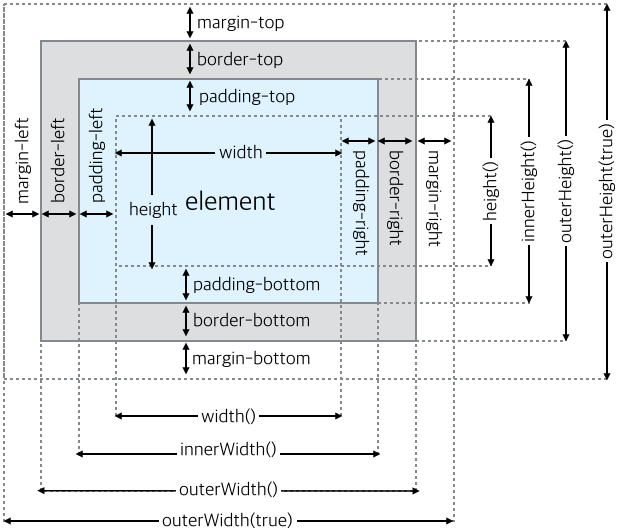
Methods with the inner prefix return size information that includes the padding area of the selected element.
Methods with the outer prefix return size information that includes not only the padding area but also the border area.
If true is passed as an argument to a method with the outer prefix, it returns size information that includes the padding, border, and margin areas.
The summary is as follows.
| Method | Return value |
|---|---|
| .width() | Element width |
| .height() | Element height |
| .innerWidth() | Element width + padding width |
| .innerHeight() | Element height + padding height |
| .outerWidth() | Element width + padding width + border width |
| .outerHeight() | Element height + padding height + border height |
| .outerWidth(true) | Element width + padding width + border width + margin width |
| .outerHeight(true) | Element height + padding height + border height + margin height |
.width() and .height() Methods
The .width() method returns the width of the first element in the selected element set, or sets the width of selected elements to the passed value.
The .height() method returns and sets the height of an element in the same way as .width().
Returning Element Size
The .width() and .height() methods return the size of the selected element.
The following example gets the width and height of an element.
$("button").on("click", function() {
  $("p").html("Element width: " + $("div").width() + "px<br/>Element height: " +  $("div").height() + "px" );
});
Setting Element Size
If arguments are passed to .width() and .height(), they set the size of the element.
The following example sets the width and height of an element.
$("button").on("click", function() {
  $("div").width(400);
  $("div").height(200);
});
Returning the Viewport
You can also use these methods to find the size of the browser viewport or the HTML document.
Example
$("button").on("click", function() {
  var str = "";
  str += "The document width is " + $(document).width() + "px and the height is " + $(document).height() + "px,<br>";
  str += "The window width is " + $(window).width() + "px and the height is " + $(window).height() + "px.";
  $("p").html(str);
});
Methods That Return Various Size Information
The following example checks the differences among the methods that return size information described above.
var text = "Width: " + $("div").width() + "px, height: " +  $("div").height() + "px - element size<br/>"
text += "Width: " + $("div").innerWidth() + "px, height: " +  $("div").innerHeight() + "px - element size + padding<br/>";
text += "Width: " + $("div").outerWidth() + "px, height: " +  $("div").outerHeight() + "px - element size + padding + border<br/>";
text += "Width: " + $("div").outerWidth(true) + "px, height: " +  $("div").outerHeight(true) + "px - element size + padding + border + margin<br/>";
$("p").html(text);
References
- http://api.jquery.com/width
- http://api.jquery.com/height
- http://api.jquery.com/innerwidth/
- http://api.jquery.com/innerheight/
- http://api.jquery.com/outerwidth/
- http://api.jquery.com/outerheight/