HTML Tutorial | HTML5 Graphics | Canvas vs SVG
Canvas vs SVG
The canvas element and the svg element behave similarly and can produce almost the same results.
In some cases, it is better to use the canvas element, while in other cases it is better to use the svg element.
Selection Criteria by Work Environment
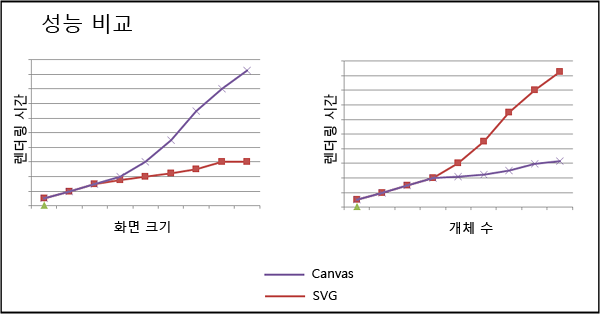
The following figure shows rendering time by screen size and number of pixels.
Rendering refers to the process of creating an image or screen from a model by using a program.
Therefore, rendering time means the time it takes to execute code and display the result on the screen.
Performance comparison between Canvas and SVG
- The canvas element performs well when the screen is small or the number of pixels is large (>10k).
- The svg element performs well when the screen is large or the number of pixels is small (<10k).
Therefore, it is best to choose the graphics element that fits each work environment.
Selection Criteria by Type of Work
The following figure presents criteria for choosing between the canvas element and the svg element.
- The canvas element is well suited to complex, high-performance animation work or video manipulation.
- The svg element is well suited to high-quality document work or static image manipulation.
Therefore, it is best to choose the graphics element that fits each type of work.
Differences Between Canvas and SVG
| Canvas | SVG |
|---|---|
| Pixel-based | Shape-based |
| Single HTML element | Multiple graphics elements that become part of the DOM |
| Can be modified only through scripts. | Can be modified through scripts and CSS. |
| Suitable for games where graphics are the main task. | Suitable for applications with a large rendering area. |