Docker Overview
What Is Docker?
Docker is virtualization technology developed by Docker, Inc. based on Linux container technology, and it is an open-source container runtime. Docker lets you deliver code to users quickly and accurately.
This page briefly explains Docker itself. For detailed explanations, refer to the official Docker documentation.
- Docker is container-based virtualization technology.
- Previously, because the OS itself was virtualized, a guest OS had to be installed on top of the host OS. This approach is very heavy and slow, and has many limitations.
- To overcome this, technologies such as Docker emerged, which virtualize through containers that isolate processes.
- Kubernetes appeared to manage containers run through Docker.
Docker Characteristics
(1) Lightweight
The first characteristic is that downloading and running it is very lightweight.
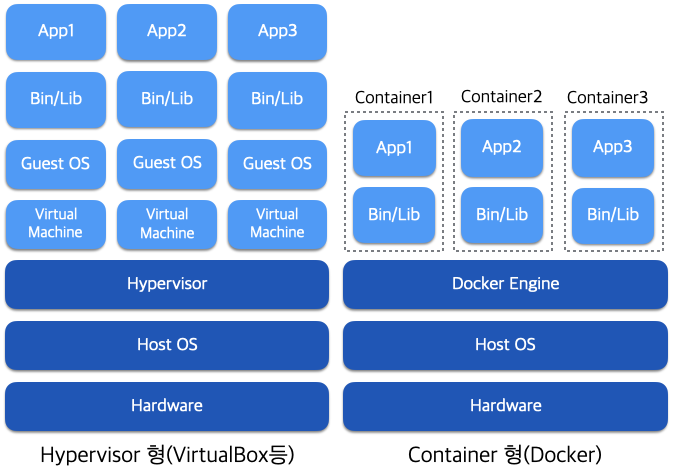
Existing hypervisor virtual machines such as VirtualBox create virtual machines from software called a hypervisor on the host OS and then run guest OSes on top of them. This has the advantage of separating the host OS and guest OS, but the guest OS and virtual machine increase image size and overhead, making operation slower.
In contrast, with the containers adopted by Docker, each application runs in an isolated namespace while Linux container technology shares the host OS kernel. The Docker Engine in the diagram does not emulate a virtual machine or kernel, so image sizes are small and it runs lightly, close to bare metal.
The term bare metal originally refers to a state where no software is installed on the hardware. A bare-metal server provides the physical server as-is, without a hypervisor OS for virtualization. Therefore, direct hardware control and OS configuration are possible.
Note 1: A container is the state where a Docker image has been started and an application is running inside it.
Docker also works to reduce data size by sharing multiple image data layers. Specifically, a container itself is composed of multiple layers, and container operations such as package installation or file creation are performed in each layer. Because of this layered structure, when fetching or uploading images, only the layer differences need to be processed. As a result, the amount of image data handled is reduced and operation is lighter.
For example, the AppB and AppC containers in the diagram below are composed of three layers, as shown on the right. AppB and AppC were created with common operations up to Layer 2, so they are shared up to Layer 2. Therefore, after uploading the AppB image first, when uploading the AppC image, only Layer 3 needs to be uploaded. This reduces both the amount of new image data uploaded and the amount of data read by Docker Engine.
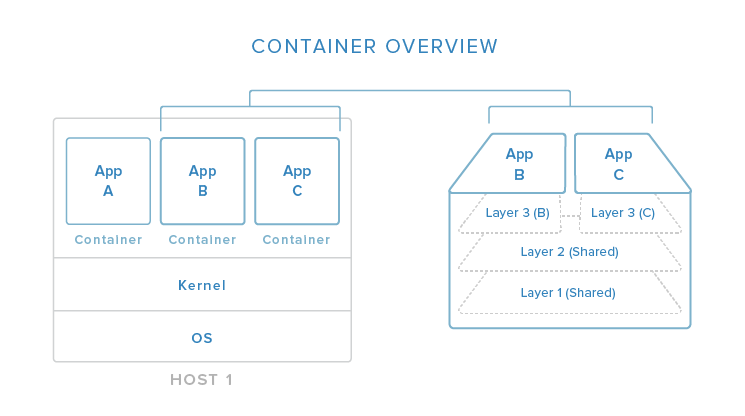
The diagram above is quoted from DigitalOcean - The Docker Ecosystem: An Introduction to Common Components.
(2) Rich Ecosystem: Deployable to Various Environments
Docker was originally virtualization technology developed by Docker, Inc., but today it is organized as an industry-standard specification through the Open Container Initiative, launched by many companies including Microsoft, Intel, Red Hat, Google, and AWS. By supporting many PaaS environments, it has become established as a standard method for deploying applications.
Major OSes such as Linux, Windows, and Mac, as well as major PaaS providers such as AWS, Google Cloud, and Azure, support Docker. Once an application is created as a Docker container image, the environment has been prepared so it can run as-is on various platforms. Because of this, Docker images are being actively used as a means of application deployment. This reduces the effort of building environments for each platform and allows teams to focus more on application development itself.
Note 3: On Windows and Mac, the configuration starts a hypervisor-based virtual machine on the host OS and runs Docker Engine in that guest OS. When the host is not Linux, note that you cannot fully enjoy Docker’s lightweight advantages.
(3) Rich Tools
Another major advantage of Docker is that it provides APIs and tools. You can use a variety of free tools that cover practical use cases. It may feel difficult at first because there are many tools, but try using them one by one and get familiar with them.
- Docker Engine
- Includes a server for running and managing Docker container images and a CLI (Command Line Interface) for operations. Cluster management functionality was also integrated in v1.12.0.
- Docker Compose
- A tool for running and managing multiple containers.
- Docker Registry
- Server software for storing and distributing images.
Also, as the number of users increases, Docker Registry, which is an image management server, needs to consider distributed load and data backup. In such situations, the following options are available.
- Docker Hub
- A PaaS version of Docker Registry operated by Docker, Inc. It can be used for free.
- It is suitable for projects that can publish images, such as open-source software communities.
- Docker Trusted Registry
- Docker Registry for commercial support as on-premises software.
- It is suitable when distributing Docker images in a closed environment such as inside a company.
Differences from Virtual Machines
Docker provides functionality quite similar to virtual machines (VMs), but can be deployed in a much lighter form than virtual machines.
The difference from Docker is as follows.
- Virtual Machine: Runs multiple virtual OSes on a single OS and runs applications on top of them.
- Docker: Starts Docker Engine on a single OS and runs multiple containers.
Docker has the following advantages over virtualization.
- Lightweight resources
- Because it does not use a separate OS, the OS image and kernel overhead are reduced, so processor and memory consumption are lower.
- Reduced storage usage
- A typical OS image is around 10 GB, while a Docker image is around 1 to 2 GB.
- Fast startup time
- There is no need to load a kernel.
- Convenient operation across multiple environments
- If Docker is running, it can be used in any environment.
Advantages and Disadvantages of Docker
- Advantages
- You can build execution environments easily and quickly.
- Hardware resources are saved.
- It provides shared environments such as Docker Hub.
- Disadvantages
- Overhead occurs in the early stage of development.
- It is Linux-friendly.
Use in DevOps
In traditional development, the flow from development to operations deployment was as follows.
- Developers write code.
- Infrastructure engineers build the production environment.
Because these procedures depend on the environment, something may work in the development/test environment but not in the production environment.
Docker has the advantage of avoiding environmental differences because the development team can package code and libraries and deliver them to infrastructure engineers.
References
Introduction to Docker | Cho Dae-hyup’s Blog