What is Helm? Kubernetes Project Management and Use Cases
What is Helm?
Helm is a tool that automates the creation, packaging, configuration, and deployment of Kubernetes applications by combining Kubernetes configuration files into a single reusable package.
In a microservices architecture, as an application grows, the number of microservices increases and management becomes difficult. Using Kubernetes, an open-source container orchestration technology, you can simplify the process by grouping multiple microservices into a single deployment. However, when managing the development lifecycle of Kubernetes applications, several unique problems still arise, such as version management, resource allocation, updates, and rollbacks.
One of the easiest solutions to these problems is Helm. With Helm, you can improve deployment consistency, repeatability, and stability.
Simplifying Kubernetes Management with Helm
Containers are lightweight software components that package an application and its dependencies into a single image file. Containers are highly portable across different environments, reduce application startup time, and can scale quickly.
Kubernetes deployments use YAML configuration files. When deployments are complex and updated frequently, tracking every version of these files is difficult. Helm is a convenient tool that can manage a deployment YAML file and version information. With this file, you can configure and manage complex Kubernetes clusters with simple commands. Here, we will look at Helm’s components and how to use them to simplify Kubernetes management.
What is a Helm chart?
A Helm chart is a package that contains all resources required to deploy an application to a Kubernetes cluster. The package includes various YAML configuration files for deployments, services, secrets, and configuration maps that define the state of a specific application.
Helm charts package these YAML files and templates, allowing additional configuration files to be generated according to parameterized values. In this way, configuration files can be customized for different environments or reused across multiple deployments. Also, because each Helm chart can be versioned individually, it is easy to manage multiple versions of applications with different configurations.
config file
A config file contains application settings. It is usually stored as a YAML file, and resources in the Kubernetes cluster are deployed according to these values.
release
An instance that runs a Chart is called a release. When the helm install command is executed, Helm takes the config file and chart files and deploys all Kubernetes resources.
Architecture
Once you understand Helm’s concepts, it is time to look at its architecture. Helm architecture has two main components: the client and the library.
The Helm client is a command-line utility for end users that handles local chart development, repository management, and release management. Just as you use a MySQL database client to run MySQL commands, you use the Helm client to run Helm commands.
The Helm library is responsible for all major processing. This library contains the actual code that executes the processing specified by Helm commands. The Helm library processes the combination of config and chart files and creates releases.
Helm architecture improved significantly from version 2 to version 3. In version 2, the Tiller server acted as an intermediary between the Helm client and the Kubernetes API server. It also tracked all resources created by Helm. Version 3 moved toward a client-only architecture, removed the Tiller server, and interacts with the Kubernetes API server through direct API connections.
How Helm Works
The Helm application library can define, create, install, and upgrade Kubernetes applications using charts. With Helm charts, you can control clusters without using the Kubernetes command-line interface and manage Kubernetes manifests without remembering complex Kubernetes commands.
Consider a realistic scenario where Helm is useful. Suppose you deploy an application with 10 replicas in production. You specify this in the application’s YAML file and run the deployment with the kubectl command.
Next, you run the same application in a staging environment. However, the staging environment needs three replicas and should run an internal application build. In this case, you update the replica count and Docker image tag in the deployment YAML file and use the updated file in the staging Kubernetes cluster.
The more complex an application becomes, the more YAML files it has. Updating many YAML files to deploy one app to different environments is cumbersome, and the number of configuration fields in those YAML files inevitably grows. With Helm, fields can be parameterized by environment. In the previous example, instead of specifying static values for the replica count and Docker image, those values are specified in another file. That file is values.yaml.
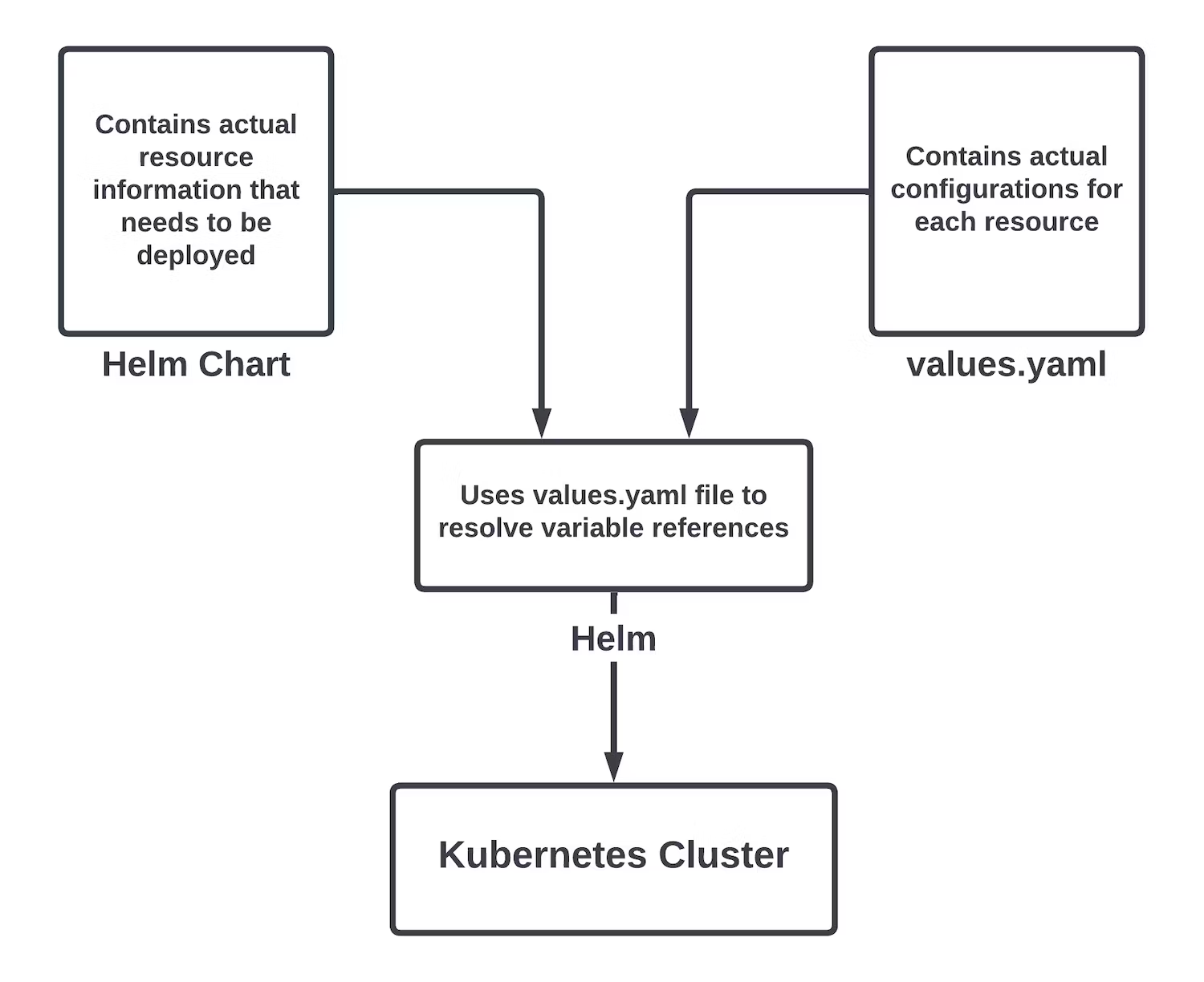
With this approach, you prepare values files for each environment and set appropriate values in each file. Helm allows you to separate the actual YAML settings from management of configuration field values.
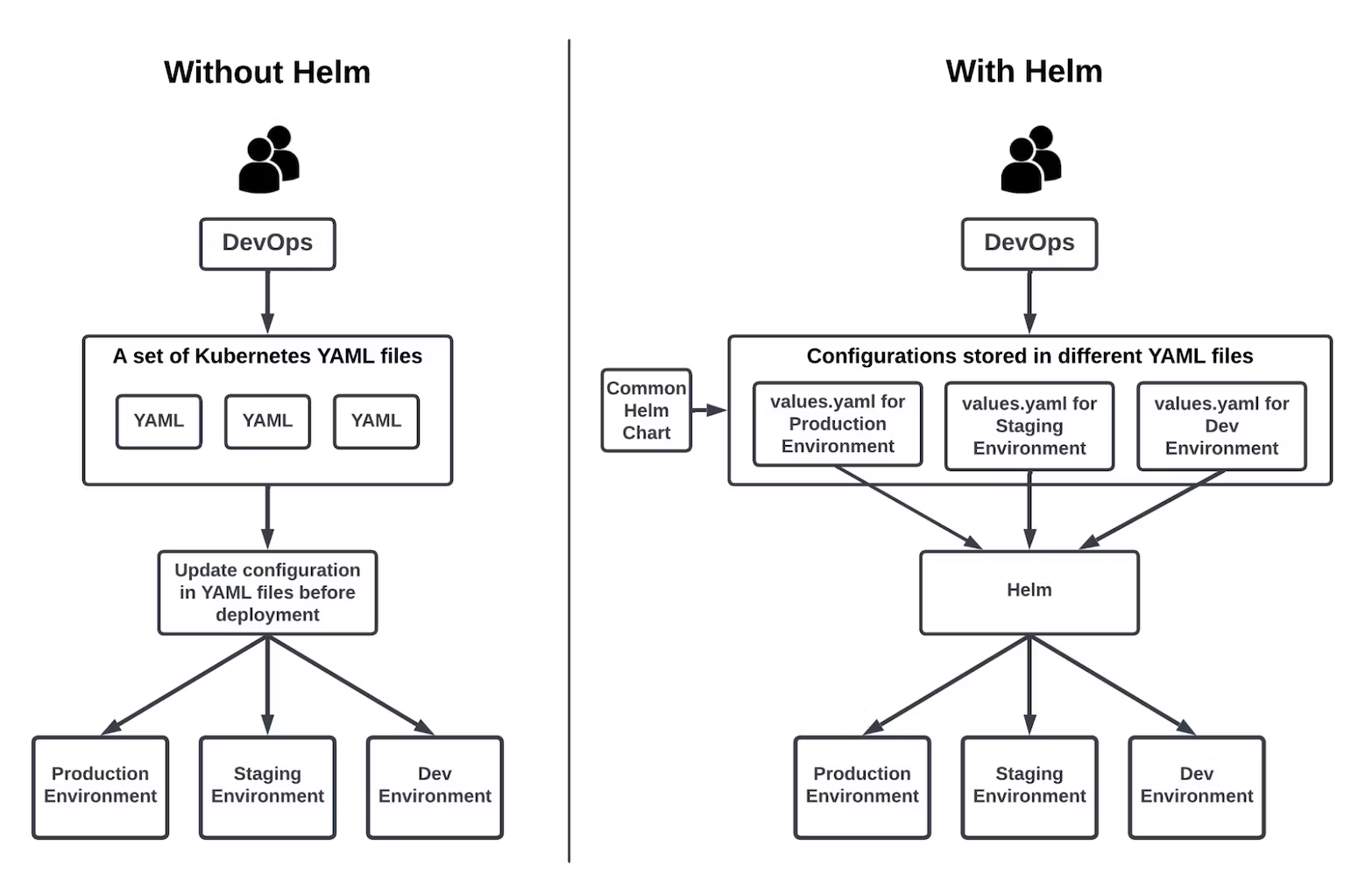
Helm Repository
A Helm repository is a place where Helm charts can be uploaded. You can create a private repository to share charts within an organization, and you can also search and install charts for many purposes through the global Helm repository called Artifact Hub. Simply put, Artifact Hub is to Helm charts what Docker Hub is to Docker images.
Deployment and Rollback with Helm
After creating a Helm chart, deploying an app is very simple. You only need to run two or three Helm commands to deploy all Kubernetes resources.
As a practical example, suppose you are running an application in a Kubernetes cluster deployed with Helm charts. Now configure a monitoring solution such as Prometheus for this application. There are two options.
- If you create all deployments and services for the Prometheus application from scratch, it will take a long time.
- Find the Prometheus chart in Artifact Hub, update the settings according to your requirements, and install it. This is similar to finding an existing Docker image in Docker Hub and specifying it in the FROM statement of a Dockerfile.
You can install the desired Helm chart with the following steps.
- Register a Helm repository locally so the Helm library can determine where to fetch Helm charts from.
- Fetch all available Helm charts from the configured repository.
- Update the
values.yamlfile as needed, then install a specific Helm chart with thehelm installcommand.
Another advantage of using Helm is that rollback is simple.
Helm operates at the application level. In other words, it maintains the state, or release, of a running application. If you deploy a new version of an application and it does not work as expected, you can use the helm rollback command to return to the previous stable release. This command rolls back all deployments, services, and Kubernetes resources.
Without Helm, rollback would not be this easy. You would have to roll back each Kubernetes resource individually, making complex applications harder to manage.
Helm and CI/CD
Using Helm makes building and testing Kubernetes applications much easier in CI/CD (Continuous Integration & Continuous Delivery) pipelines. Applications can be deployed automatically to arbitrary environments, reducing build time. Using self-hosted runners in the pipeline can improve flexibility in build and test environments.
With CircleCI self-hosted runners, CI/CD jobs can run in user-managed environments. That means a standalone virtual machine or a full cluster such as Kubernetes can be used as the execution environment. With container runners, containerized workloads can be deployed to private Kubernetes clusters using Helm charts, and the environment can be scaled as needed.
Advantages and Disadvantages of Using Helm
Helm has use cases where it is helpful and use cases where it is not. This section checks where Helm helps and where it does not, and presents several points for distinguishing whether Helm is useful.
When Helm is suitable
Helm is useful for projects that run complex applications with many microservices on Kubernetes. With Helm, application deployment and management can be automated more easily, reducing manual work and improving system reliability and stability. In addition, repositories of preconfigured packages make it easy to add new features to applications.
By organizing application components into modular charts that are easy to install and upgrade, Helm can simplify the component management process. It also reduces manual work required for application maintenance, helping prevent errors and inconsistencies that occur when complex systems are managed manually.
Helm supports deploying containers across multiple environments, such as development, staging, and production, so it helps manage the container lifecycle throughout the development process.
When Helm is not suitable
Helm is not suitable for projects where only one container needs to be deployed to a server. In this case, there is no need to manage container deployment with Helm, and using Helm may make the process more complex. Helm was created to manage deployments of multiple containers as one unit, so this scenario is not appropriate.
Helm is also not very helpful if you can manually manage a small number of Kubernetes applications without using a package manager.
Also, Helm may not be usable in environments with strict security policies that prohibit the use of third-party tools such as Helm.
Why Adopt Helm?
There are several points that can help determine whether using Helm in a project is useful. For example, if a project contains multiple Kubernetes applications and they need to be managed and deployed together, Helm can package these applications into a single chart, making management and deployment easier.
Helm is also helpful when a project frequently updates and deploys Kubernetes applications, because it provides tools to manage the application lifecycle, such as deployment, updates, and rollbacks. This makes application update management and deployment much easier.
Finally, when multiple teams and members participate in a project and need to jointly develop and deploy Kubernetes applications, Helm’s version management and chart sharing features help collaboration between teams and make it easier to maintain consistency between deployments.