Kubernetes Overview
Before learning Kubernetes, you should first understand Docker. If you do not know Docker yet, read about Docker first.
What is Kubernetes?
According to the official Kubernetes documentation, Kubernetes, abbreviated as k8s, is an open-source system and a “foundation tool for managing containers.”
It is useful when handling containers across multiple hosts, and it helps make application development and management easier and safer.
It is open source software (OSS) written in Go, started by Google in June 2014.
The difference between docker run and docker-compose is whether you manage a single container or multiple containers on the same host. With this configuration, if the host stops, the containers also stop. Therefore, a “Container Orchestration tool” creates multiple hosts and assigns multiple containers to those host groups. Kubernetes is the most widely used tool of this kind.
Kubernetes Features
Kubernetes, also known as k8s, provides basic functions such as deploying, scaling, load balancing, logging, and monitoring containerized applications.
Application operations require attention to many issues, such as responding to abnormal conditions caused by high load, scaling out, and automatic failover.
In a configuration that uses VMs, management ultimately has to be performed at the VM level, so scale-out and automatic failover settings can only be configured at the VM level.
With Kubernetes, you can manage at the container level or application level, and scale-out and failover can also be configured at the application level.
Why Use Kubernetes?
Kubernetes is needed to implement a microservices architecture.
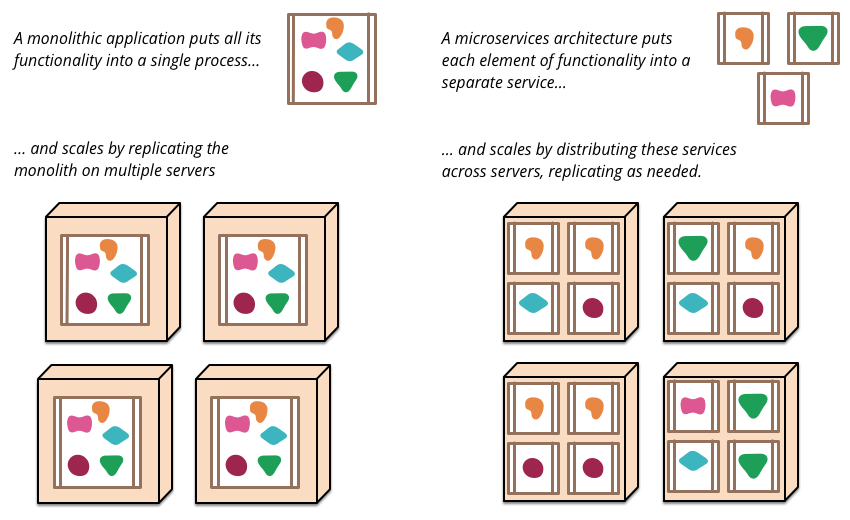
Figure 1: Monoliths and Microservices - https://martinfowler.com/articles/microservices.html
Let’s look more concretely at how the system structure changes.
In the past, most systems were built as monolithic architectures composed of multifunctional processes.
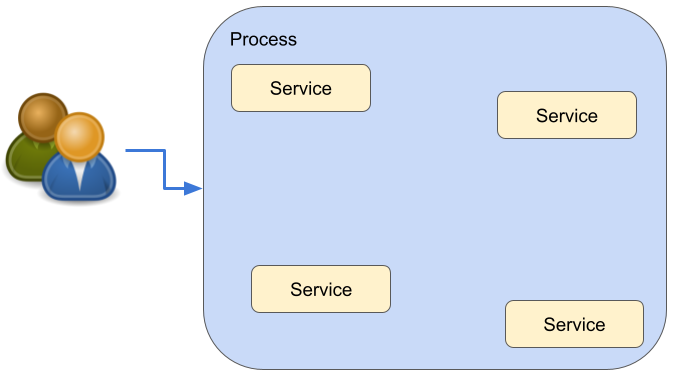
Then, a microservices architecture like the following was introduced.
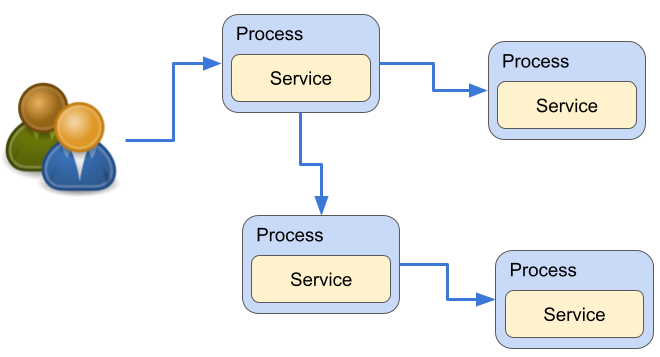
Then microservices changed again into a container architecture.
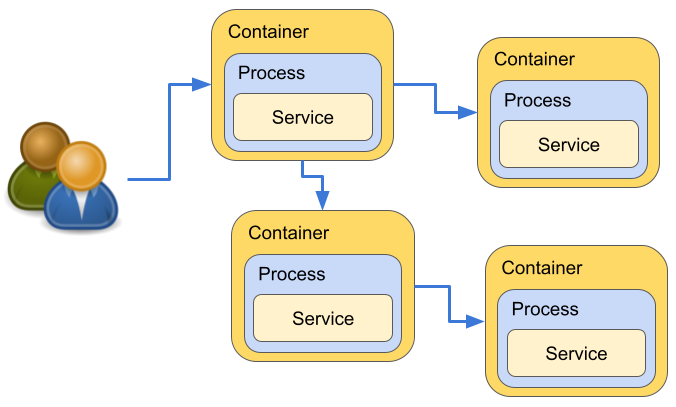
As a result, deployment units became more granular, and updates and feature additions became easier.
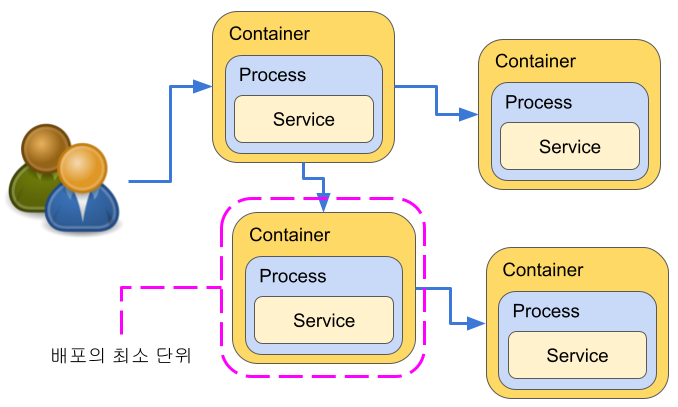
Looking only at this, it may seem like there are only advantages, but on the other hand, the structure becomes more complex and management becomes more difficult.
- Starting containers is cumbersome.
- Controlling communication between containers is complex.
- How should container data persistence be managed?
- How should recovery be handled when a container fails or stops?
Kubernetes solves these inconveniences. The benefits of using Kubernetes in this kind of microservices architecture are as follows.
- You can load balance and distribute workloads across multiple containers on multiple hosts.
- Even if one Pod, or container, stops, it can recover automatically.
- You can perform zero-downtime updates, such as rolling updates.
- You can scale up and scale down while the application is running.
Kubernetes Functions
Kubernetes provides the following functions.
-
Clustering
- Multiple systems can be clustered and their resources pooled.
- Machines that make up a cluster are called Nodes.
-
Declarative resource management through manifests
- Various application-related elements are managed as resources.
- Resource definitions are described in YAML.
- This is called a manifest.
- It describes only the definition, not resource operations. That is why it is called declarative.
-
Resource types
- Container: a single container. It cannot be defined directly.
- Pod: manages containers together. Similar to a VM. The smallest unit of deployment.
- Deployment: handles Pod scaling.
- Service: works like a virtual router and load balancer.
- ConfigMap, Secret: represent configuration files and similar data inside containers. Secret is encrypted.
- PersistentVolume: persistent volume, such as a host directory or NFS share.
-
Declarative resource management
- When a resource definition is registered, Kubernetes makes the actual resource state match the definition.
- If you want to change a Pod’s container image:
- You can delete the old container and instruct Kubernetes to start a new container.
- If that is difficult, overwrite it with a Pod definition in which the container image name has been rewritten.
-
Virtual flat network
- Each Pod is deployed across multiple nodes, but all Pods are in the same segment of the virtual network.
- The interface for container communication through the Kubernetes virtual network is standardized as CNI, the Container Network Interface.
- Various plugins exist.
- Weave Net: VXLAN
- Calico: BGP
- Flannel
-
DNS inside the virtual network
- Services that act as load balancers receive DNS names.
- These DNS names can be resolved to IP addresses by DNS inside the virtual network.
- In other words, by placing Pods behind a Service, Pods can be accessed by DNS name.
- Pod IP addresses change dynamically, so access through Service paths is the default.
-
Logical resource division, or grouping
- Resources such as Pods and Services can be grouped with a resource called Namespace.
- Namespaces do not isolate access by themselves; they are used for management purposes.
-
Container liveness monitoring and auto healing
- You can define liveness monitoring for containers.
- Kubernetes periodically performs one of the following and determines liveness from the result.
- HTTP polling
- TCP ping
- Arbitrary command
- If Kubernetes determines that a container has stopped, it restarts it.
-
Other features
- Pod replication
- Pod rolling updates
- One-shot tasks, or Jobs
- Periodic tasks, or CronJobs
- Per-Pod and per-Namespace resource limits for CPU and memory
- Virtual network access policy, or NetworkPolicy
References
- Kubernetes official documentation
- Video course | Kubernetes series
- Kubernetes #1 - Introduction | Cho Dae-hyup’s blog