What Is GitOps?
What Is GitOps?
GitOps is a term first used by Weaveworks Inc. in 2017, and it refers to one of the practical approaches to DevOps in a project. Among DevOps practices, it focuses especially on continuous deployment for cloud-native applications.
As the word suggests, GitOps means converting every element related to application deployment and operation into code and managing those elements in Git.
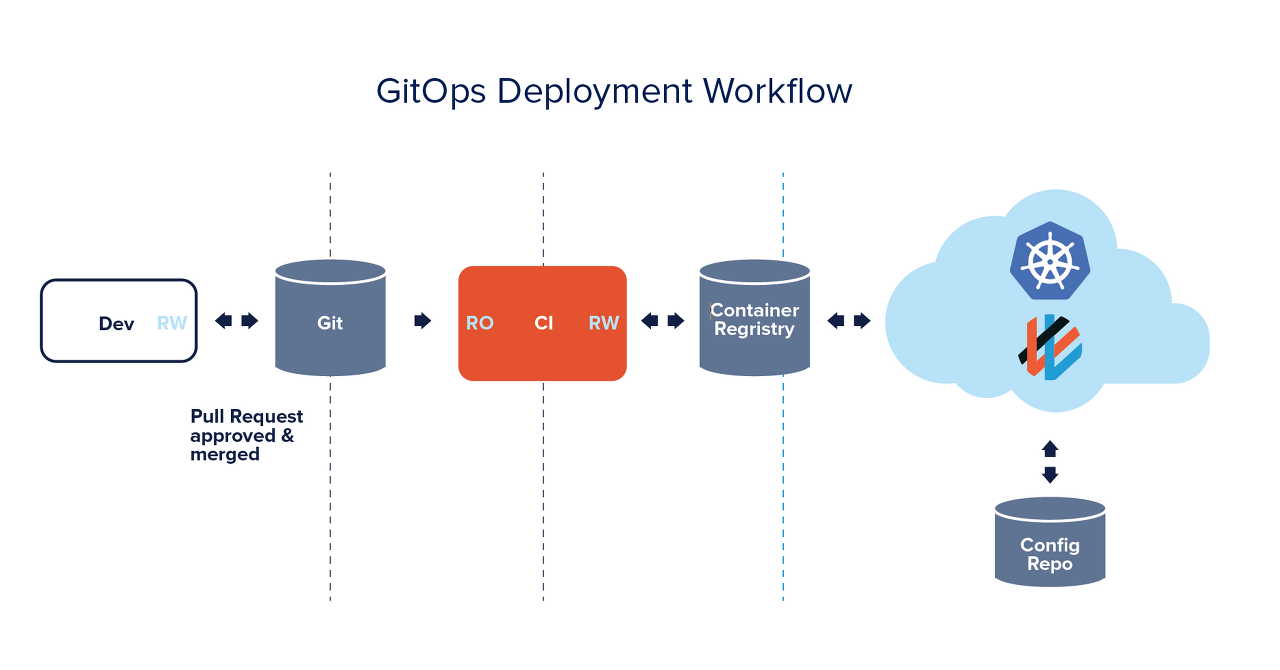 Source: Weaveworks
GitOps is an operational framework that applies DevOps best practices used in application development, such as version control, collaboration, compliance, and CI/CD, to infrastructure automation.
The essence of GitOps is the idea and practice of managing the code for an entire system, including both infrastructure and applications, by using Git. GitOps uses the Git version control system to manage infrastructure configuration files, or IaC, which stands for Infrastructure as Code.
Here, the infrastructure generally assumes Kubernetes. In simple terms, GitOps means managing Kubernetes manifest files in Git and deploying to a cluster by using the manifests stored in Git.
GitOps Principles
Every system should be declared declaratively
- “Declarative” means the system is guaranteed to consist of a set of facts rather than a set of commands.
- Kubernetes manifests are written declaratively. When they are managed in Git, the system gains Git benefits such as versioning and also owns an SSOT, or single source of truth.
The system state follows the version in Git
- Because systems are deployed based on Kubernetes manifests stored in Git, if you want to deploy a previous version of the system, you can use a command such as
git revert.
Approved changes are automatically applied to the system
- Once declared manifests are registered and managed in Git, every change, such as code modification, should be automatically applied to the system. Credentials should not be required each time the system is deployed to the cluster.
If deployment fails, users should be alerted
- When the system state is declared and maintained under version control, there should be a system that alerts users when deployment fails.
Benefits of GitOps
The benefits of using GitOps can be broadly divided into the following four areas.
Productivity
- When Git changes, the repository’s IaC settings change, allowing Kubernetes cluster updates and feature management to be performed through Git.
- Operations through deployment can be handled with Git, and the state of the production environment can be compared with IaC in Git so mismatches can be detected and corrected.
Stability
- Introducing a GitOps workflow makes it possible to automatically retrieve audit logs for changes made externally to Kubernetes clusters.
- Because logs show who did what and when, troubleshooting becomes easier.
Reliability
- When infrastructure is managed manually, command mistakes such as applying
kubectl applyin the wrong direction can occur. In GitOps, those mistakes do not occur. Operations such as rollback are also managed through Git, enabling stable and reproducible operations.
Security
- Deployment using CI/CD tools generally pushes changes to the cluster with
kubectl, so credentials must be exposed outside the cluster. This may be undesirable from a security perspective. Such a structure is needed when CI and CD functions are not separated. - GitOps separates and manages CI and CD. Because deployments can be performed through pull-based changes without exposing credentials outside the cluster, security risks can be reduced.
GitOps Workflow
The following diagram shows a GitOps pipeline introduced in the official Weaveworks blog.
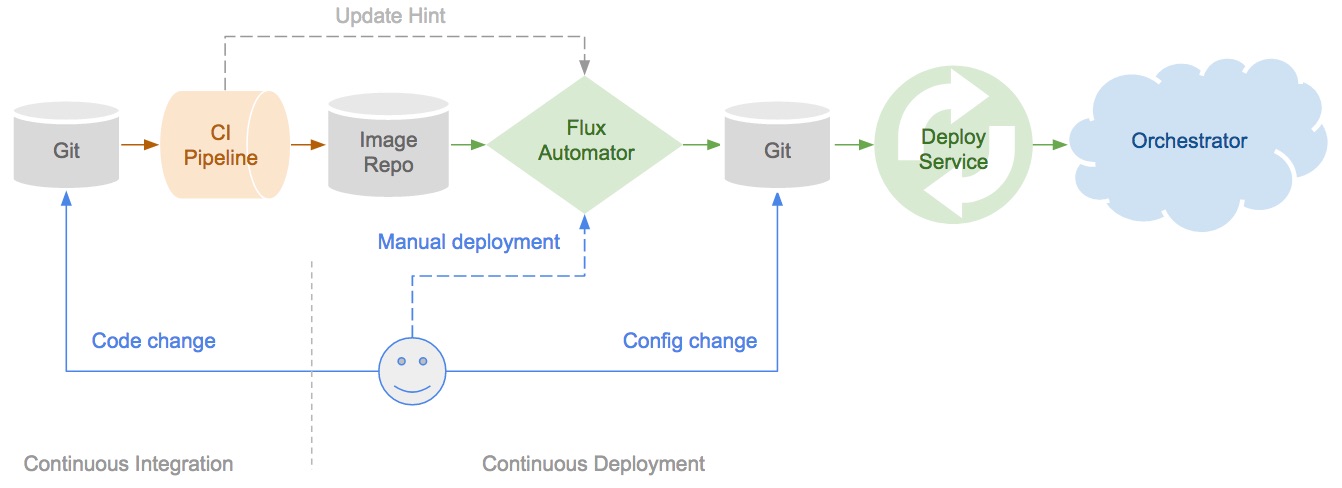
As the diagram shows, both CI and CD manage code in Git, but the CI and CD functions are separated.
GitOps Repository
When designing a GitOps pipeline, it is generally recommended to use two Git repositories: one for application code and one for infrastructure environment configuration.
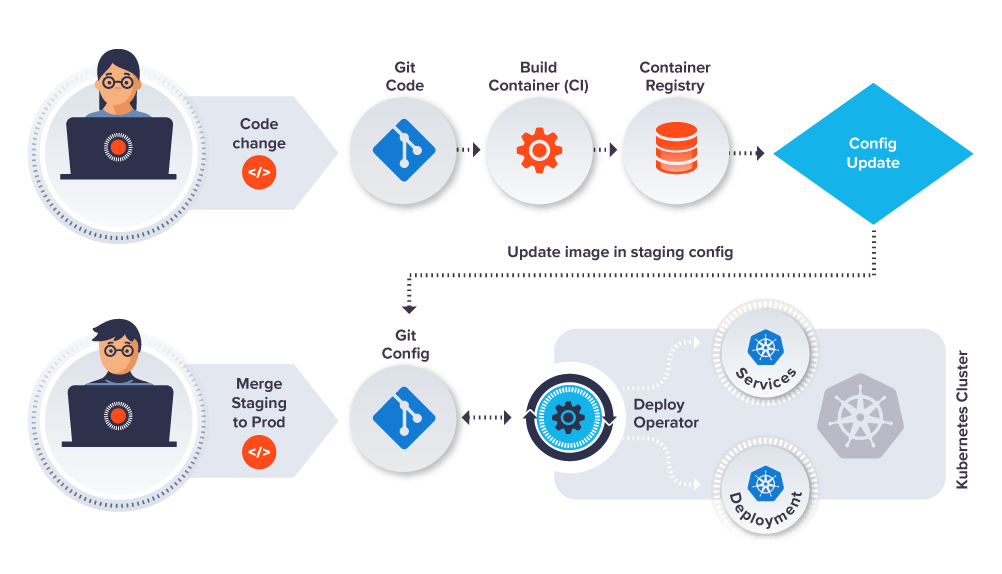
Source: https://www.gitops.tech/#push-based-deployments
- Application Repository (Git Code)
- Contains application source code and manifest files for deployment, such as deployment configuration files and Kubernetes YAML.
- Repository for infrastructure environment configuration (Git Config)
- Contains all manifests for deployment environments, such as monitoring, services, and message queues, including which versions are configured and how they are configured.
GitOps Deployment Strategies
GitOps has two types of deployment strategies: push-based pipelines and pull-based pipelines. The difference between these two types is how they synchronize manifests in the repository with the state of the deployment environment.
In general, the pull-based deployment strategy is considered relatively safer from a security perspective and is often preferred.
Most CI/CD tools used today use a push-based model. A push-based pipeline starts from code in the CI system and continuously pushes changes to a Kubernetes cluster through a series of encoded scripts, often by directly using kubectl.
The reason teams may avoid using deployment features in CI systems or performing deployment manually from the command line is that credentials may be exposed outside the cluster. CI/CD scripts and command lines can be protected, but they still operate outside the cluster’s trust domain. This is generally not a good practice, and CI systems can become known external intrusion paths into production.
Push Pipeline
A push-based pipeline has a structure where the deployment pipeline is executed when a manifest file in the Git repository changes.
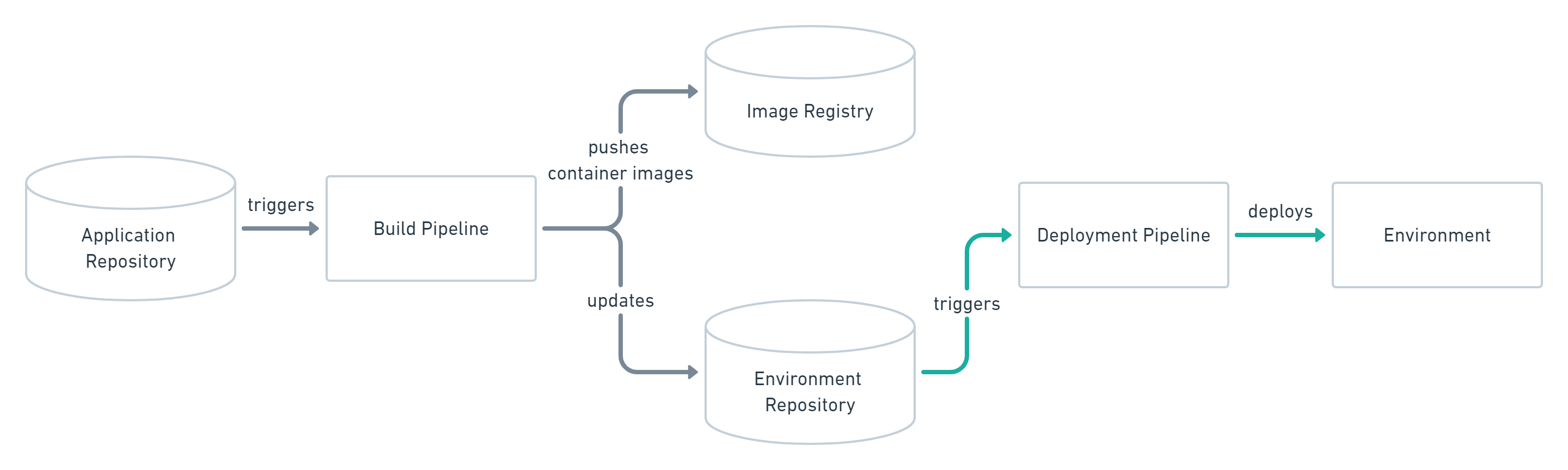
Source: https://www.gitops.tech/#push-based-deployments
It is not affected by the number of deployment environments, and deployment environments can be added or changed simply by adding or modifying connection information. The architecture is easy to understand, so it is used in many places.
In general, push pipelines have the disadvantage that read/write permissions exist outside the cluster, usually in CI, so security information can be exposed externally.
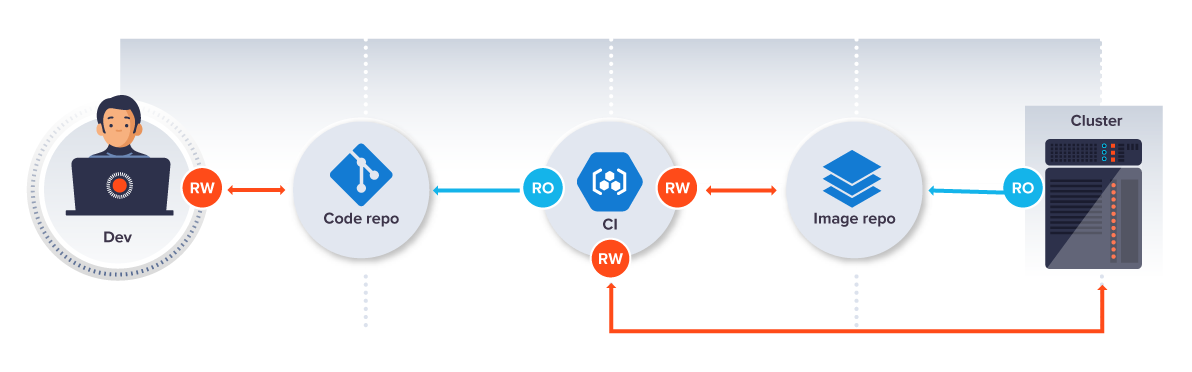
Source: https://www.weave.works/technologies/gitops/#a-diy-gitops-pipeline
Pull-Based Pipeline
This structure uses a separate operator located in the cluster to perform deployment on behalf of the pipeline.
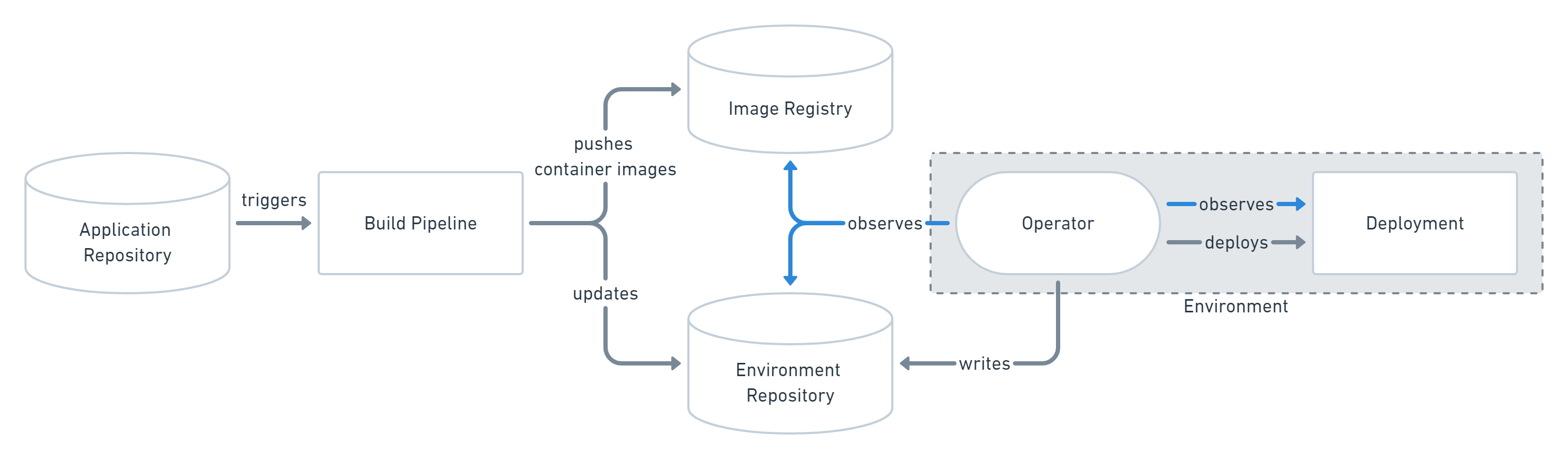 Source: https://www.gitops.tech/#pull-based-deployments
The operator continuously compares the manifests in the Git repository with the deployment environment. When a difference occurs, it keeps the cluster aligned with the manifests in the Git repository.
In a pull-based pipeline, GitOps tools pull images and credentials are kept inside the cluster, so execution can proceed without exposing security information externally.
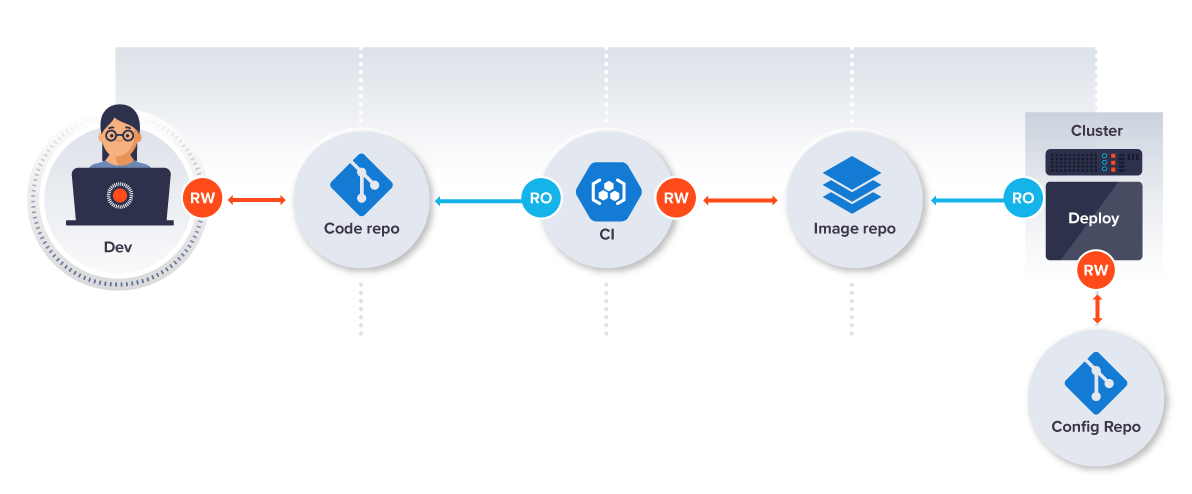
Figure: https://www.weave.works/technologies/gitops/#a-diy-gitops-pipeline
GitOps Tools
The three tools currently used most often are as follows.
Argo CD
- Argo CD provides an easy-to-understand GUI.
- All operations, including manual sync, can be performed through the GUI.
- Related sites
- Source code: https://github.com/argoproj/argo-cd/
- Documentation: https://argo-cd.readthedocs.io/en/stable/
Flux CD
- Flux CD is a tool from Weaveworks, the company that proposed GitOps. It is simple and lightweight, but it does not provide a GUI.
- Related sites
- Source code: https://github.com/fluxcd/flux2
- Documentation: https://fluxcd.io/flux/
Jenkins X
- Jenkins X is a tool from the well-known Jenkins ecosystem. It can build pipelines that support CI/CD.
- Argo CD and Flux CD support only CD.
- It is highly flexible, but its architecture is complex, so the learning cost is also high.
- Related sites
- Source code: https://github.com/jenkins-x/jx-cli
- Documentation: https://jenkins-x.io/v3/about/