AWS (Amazon Web Services)
EC2 (Elastic Compute Cloud)
- A representative Amazon service.
- EC2 is a service that rents independent computers to users.
- It lets users build as many virtual servers as they need and manage security, network configuration, and storage.
- Instances can be turned on and off as needed, and users pay only for the time used.
EC2 pricing policies
- On-Demand: Pay for computing power measured by hour or second depending on the running instance.
- No commitment. Used when you want to try EC2 or use it flexibly.
- Spot Instance: Buy and use spare market capacity cheaply through an auction-like method.
- Up to about 90% cheaper, but you do not know when it must be returned. Useful when start and stop are flexible or when additional computing power is needed.
- Reserved Instance (RI): Commit in advance for a fixed period, usually one to three years, similar to a savings plan.
-
Up to about 75% cheaper. Used when demand can be predicted and a commitment period is acceptable for cost savings.
Usually On-Demand and Spot Instance are used.
-
EC2 instance types
- General purpose: Balanced use of all resources.
- t2: Low-cost general purpose. Web servers and databases.
- m2: General purpose. Application servers.
- Compute optimized: Uses high-performance processors.
- c5: Compute optimized. Applications and databases where CPU performance matters.
- F1: Hardware acceleration. Genetic research, financial analysis, and big data analysis.
- Memory optimized: Handles large-scale data.
- r4: Memory optimized. Applications and databases where memory performance matters.
- x1e: Memory optimized. Spark.
- p3: Graphics optimized. Machine learning and Bitcoin.
- Storage optimized: Handles high disk throughput.
- h1: Disk throughput optimized. Hadoop and MapReduce.
- i3: Disk speed optimized. NoSQL and data warehouses.
- d2: Disk optimized. File servers, data warehouses, and Hadoop.
EBS (Elastic Block Store)
- EBS provides persistent block storage volumes for EC2 instances.
- Simply put, EBS can be considered a hard disk. Use EBS when an instance running on AWS needs disk space.
- Capacity can be purchased as needed and preserved permanently until the user deletes it.
- Because data is replicated internally in real time, the probability of losing data is said to be much lower than with a hard disk.
- In simple terms, EBS can be attached to EC2 and used like a USB drive.
AMI (Amazon Machine Image)
- An AMI can be thought of as a template image containing all software information needed to create an instance.
- It is an image with an OS, applications, server program settings, and similar items preconfigured.
- When starting an EC2 instance, using an AMI means there is no need to separately install the OS or configure server software.
Three AMI types
- AWS AMI: An AMI provided by AWS. It is the default AMI shown when configuring an AMI during instance launch.
- AWS Marketplace: A method where software companies create and sell AMIs. Use this type when a company uses specific software.
- AWS Custom AMI: The user creates an AMI and launches servers with that AMI.
For example, an EC2 instance currently running in production can be made into a custom AMI so another EC2 instance with the same environment can be started quickly.
ELB (Elastic Load Balancer)
- ELB automatically distributes incoming traffic across multiple targets such as EC2 instances, containers, and IP addresses in two or more availability zones.
- In other words, it distributes load appropriately, manages servers so they do not fail, automatically detects instance status, and excludes faulty instances from distribution targets.
EIP (Elastic IP)
- An EC2 instance server does not have a fixed IP by default.
- When an instance runs, it receives a public IP address. If the instance is stopped or becomes unused, the IP address disappears. When it starts again, it receives a new IP address.
The reason a new IP address is received each time is that usable IP addresses are limited. About four billion IP addresses can be used, which means only about four billion users can use the internet. Therefore, IP addresses are reassigned each time.
Because receiving a new IP address each time makes service operation difficult, Elastic IP is used to solve this. Elastic IP assigns a fixed IP address. The IP remains fixed even when unused. However, charges apply if the Elastic IP is allocated but not attached to an EC2 instance. This is because holding an Elastic IP without using it reduces opportunities for others to use it.
Auto Scaling
Auto Scaling is a service that automatically increases or decreases system capacity.
For example, when users gather on a service, CPU usage of participating servers rises. When CPU usage exceeds 80%, an instance is created using a prepared image (AMI), connected to ELB, and traffic is distributed to the newly created EC2 instance.
When traffic decreases and CPU usage falls below 20%, EC2 instances are removed sequentially.
VPC (Virtual Private Cloud)
- VPC is a virtual network dedicated to a user’s AWS account.
- In cloud services such as AWS, many instances physically run on the same network or equipment, and VPC logically separates them completely.
- Networks can be configured by VPC, and each VPC can have different network settings.
VPN (Virtual Private Network)
- VPN is a service that creates a highly secure private network connecting computers distributed across a large organization, or connects remote networks over the internet with encryption for more stable and secure communication.
For example, remote workers use VPN to access office networks and files over the internet as if they were working in the office.
IAM (Identity and Access Manager)
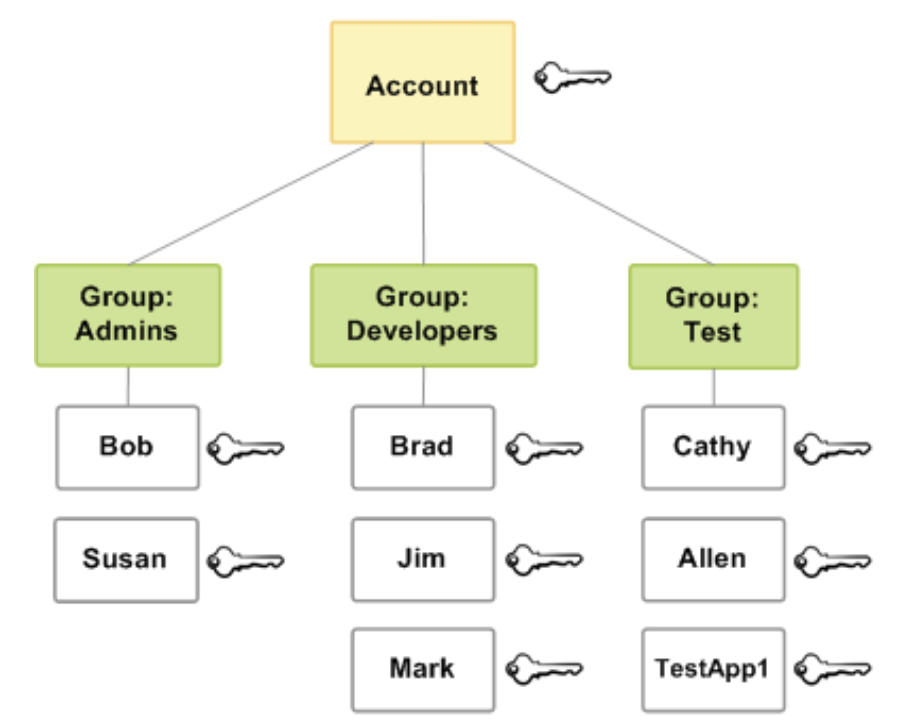
IAM is an authorization solution that can grant individual permissions for all AWS solution services and resources.
CloudTrail
- CloudTrail records activity in an AWS account.
- It records who did what in AWS.
- CloudTrail can record, monitor, and retain operations related to account activity in AWS infrastructure, and logs are stored in S3.
CloudWatch
- CloudWatch focuses on AWS service and resource activity and reports status and performance.
- CloudWatch is a monitoring service for AWS resources and applications.
Route 53
- Computers communicate with numeric IP addresses. Because IP addresses are not easy to remember, DNS assigns domain names to IP addresses so they are easier to remember. Route 53 is Amazon’s DNS service.
The core functions of Route 53 are acting as a domain registrar and renting name servers.
CloudFront
-
CloudFront is a CDN service provided by AWS.
-
It acts as cache and a Content Delivery Network, aiming to provide faster transfer speeds to users through caching.
-
It provides efficient content delivery through Edge Locations distributed worldwide.
-
Edge Locations are collections of cache servers for CloudFront.
-
Origin Server
- The server that holds the original data.
- In AWS, origin servers are usually S3 or EC2 instances.
- The server that holds the original data.
-
Edge Server = Edge Location
- Servers distributed worldwide and provided by AWS.
- Edge servers provide caching so the same requested data can be returned quickly.
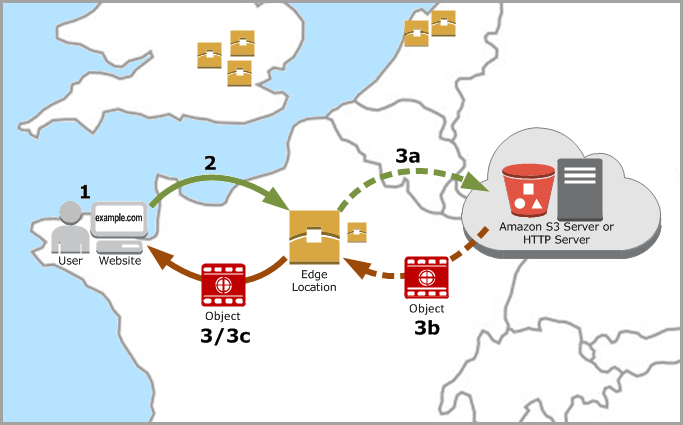
- A user accesses a website and requests image and HTML files.
- DNS routes the request to an Edge Location that can respond as quickly as possible.
- The Edge Location checks whether the requested file exists in its cache.
- If the file is not in the cache, the request is sent to the origin server.
- The origin server sends the file back to the Edge Location, and the file is added to the cache.
- The Edge Location sends the file to the user.
Security Group
- A security group acts as a virtual firewall that controls inbound and outbound traffic for instances.
- This service can allow a user to connect to a database while working remotely.