Kubernetes Architecture
Understanding the Architecture
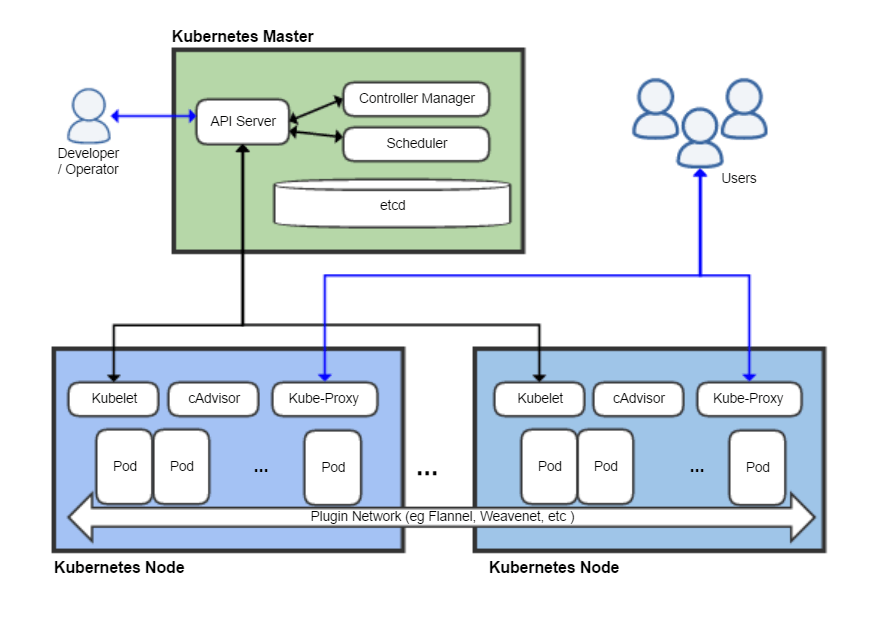
Kubernetes architecture diagram - Source: Wikipedia
When you deploy Kubernetes, a cluster is deployed. This Kubernetes cluster is a set of worker machines called Nodes that run containerized applications. The components of an application are called Pods, and as shown in the diagram above, these Pods are deployed across one or more nodes. Node control is performed by an agent called kubelet, and access to nodes is handled through a proxy called kube-proxy.
The component called the Control Plane controls the cluster.
Kubernetes Nodes
In Kubernetes, there is a Master Node, which acts as the controller that manages the entire cluster, and Worker Nodes, which are virtual machines or physical server machines where containers are deployed.
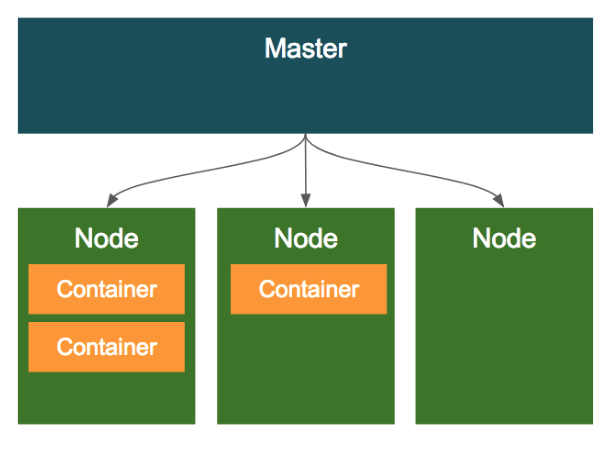
The structure is that a client sends commands to the Master Node, which plays a role similar to a Docker daemon, and the Master Node sends commands to Worker Nodes.
The roles of the Master Node, or Control Plane, are as follows.
- Control the cluster
- Manage and control worker node status
- Scheduling and lifecycle monitoring
- Load balancing and automatic recovery
- Single master
- Multi master, such as 3 or 5 master nodes
The roles of Worker Nodes are as follows.
- Servers where containers run
- Run containers through the Docker platform and provide the actual service
- Form a cluster with multiple nodes
- Create and delete Pods according to commands from the Master Node
Each component communicates over HTTPS to form the cluster.
The client enters execution commands in the console. In Kubernetes, the kubectl command is used to create files containing various settings called manifests, or to command the Master Node to perform resource operations based on manifest files.
Control Plane Components, or Master Components
- kube-apiserver
- Provides an external REST API for manipulating Kubernetes resource definitions.
- The front end of the Kubernetes control plane.
- etcd
- A database where kube-apiserver stores resource definitions and similar data.
- Since it is a distributed database, it is usually configured as a cluster.
- A consistent and highly available key-value store.
- The storage for all Kubernetes cluster information.
- kube-scheduler
- Checks whether a node is assigned to a Pod and assigns one if needed.
- kube-controller-manager
- Uses the kube-apiserver API to monitor Pod definition creation and decide where to deploy Pods.
- Runs multiple controller processes that monitor notifications and the number of Pods.
- Observes Pods and guarantees their number.
- cloud-controller-manager
- Monitors various resource definitions through the kube-apiserver API and makes the state of actual resources match the definitions.
- Runs controllers that interact with the underlying cloud provider.
Worker Node Components
Worker node components manage and monitor Pods or containers.
- kubelet
- An agent that runs on each node in the cluster.
- Watches Pod definitions through the kube-apiserver API and connects with Docker to start and stop containers.
- Has an HTTPS port that receives API calls from kube-apiserver, and can also return container logs.
- Ensures that each container is running in a Pod.
- Runs as a daemon.
- kube-proxy
- A network proxy that runs on each node in the cluster.
- Watches Service definitions through the kube-apiserver API and configures the host OS to forward communication to Services.
- Configures iptables rules.
- Container runtime
- The engine that runs containers.
- docker, containerd, runc.
Tools for Building a Kubernetes Cluster Yourself
- kubeadm
- The cluster creation and management tool officially provided by Kubernetes.
- The official Kubernetes installation tool, or Kubernetes admin.
- kubespray
- An open project for deploying Kubernetes clusters.
- Can configure Kubernetes clusters in many formats.
- Useful for operating service clusters on-premises.
Objects
Objects are the most important part for understanding Kubernetes. Kubernetes consists of Basic Objects, which are the most basic units of configuration, and Controllers, which provide additional functions to create and manage those Basic Objects. In addition to the specs, or settings, of these objects, they are also composed of metadata, which is additional information.
Running app on Kubernetes
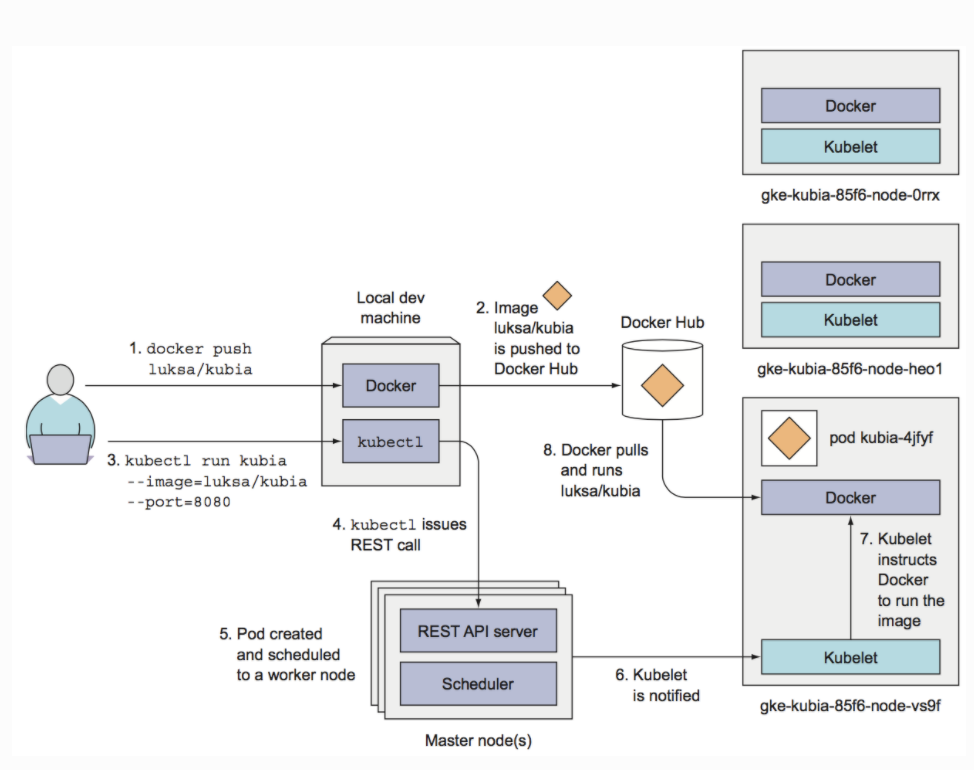
Object Spec
All objects are defined by an Object Spec, which describes the object’s characteristics, or configuration information. When creating an object, you can define it by passing arguments through the command line or by defining the spec in a YAML or JSON file.
Basic Object
The most basic objects deployed and managed by Kubernetes describe the workloads of containerized applications. There are four types: Pod, Service, Volume, and Namespace. Briefly, you can think of a Pod as a containerized application, Volume as disk, Service as a load balancer, and Namespace as something like a package name. Let’s look at each one in more detail.
Labels
… In progress …
Controllers
… In progress …
Add-ons
- Network add-ons
- CNI - weave, calico, faneld, kube-route …
- DNS add-on
- coreDNS
- Dashboard add-on
- Container resource monitoring
- cAdvisor
- Cluster logging
- Collect and centralize container logs and k8s operation logs.
- ELK(ElasticSearch, Logstash, Kibana), EFK(ElasticSearch, Fluentd, Kibana), DataDog