Apache | Access Permissions | Configuring Basic Authentication (AuthType)
Authentication settings
This article explains how to configure basic authentication with a user name and password for files or URLs in a specific directory. Authentication requires several settings, so each one is explained in order.
AuthType authentication-method
AuthName authentication-realm
AuthUserFile password-file
The authentication methods available in Apache are Basic authentication and Digest authentication. First, specify which authentication method to use with AuthType. The setting for Basic authentication is as follows.
AuthType Basic
Next, specify the authentication realm name. This is used to distinguish authentication realms. When the realm name is the same during authentication, the browser sends the same Authorization header.
The string written as the realm name is displayed in the authentication dialog. To display “Enter your user name and password,” write the following. Although it can be written this way, the original meaning is a realm name, so it is preferable to use different strings for different authentication areas. Depending on the browser, it may not be displayed.
AuthName "사용자명과 비밀번호를 입력하세요."
Next, specify the file where user names and passwords for user authentication are registered with AuthUserFile. In this example, the password file is C:\apache\passwd\passfile.
AuthUserFile "C:/apache/password/pw"
Specifying allowed users
You can allow access to all users who pass authentication, or you can specify the users who are allowed. The user must pass authentication and match an allowed user. Use Require to configure allowed users.
Require option user1 user2 ...
The option is either user or group. Specify user when permission is granted by user, and group when permission is granted by group.
Then write the user names to allow, separated by spaces. For example, to allow three users, devkuma, kimkc, and araikuma, write the following.
Require user devkuma kimkc araikuma
To allow access to every user who passes authentication, write the following.
Require valid-user
In this way, you can create one password file containing user names and groups, then specify the users and groups allowed to access each separate directory.
Displaying the authentication dialog
Before creating the password file, check that the authentication dialog is displayed.
First, create a directory named admin in the document root and create admin.html.
<html>
<body>
<h1>Admin</h1>
This is Admin page.
</body>
</html>
Then configure Basic authentication. Add the following content somewhere in httpd.conf.
<Directory "${SRVROOT}/htdocs/admin">
    AuthType Basic
    AuthName "사용자명과 비밀번호를 입력하세요."
    AuthUserFile "C:/apache/passwd/passfile"
    Require valid-user
</Directory>
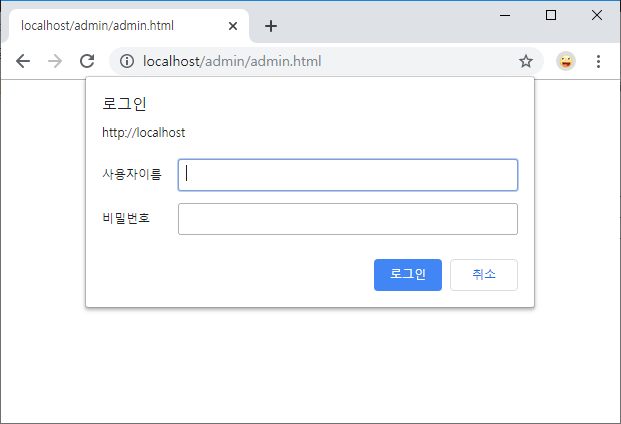
Restart Apache and access http://localhost/admin/admin.html.
When accessed from Chrome:
When accessed from Microsoft Edge:
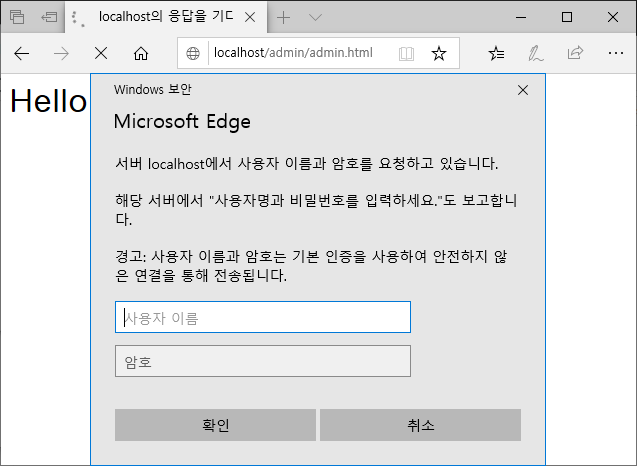
The authentication dialog asking for a user name and password is displayed.
The next page explains how to create the password file that registers user names and passwords.