JSP/Servlet | Creating a GAE Application | Understanding the Project Structure
When you create the project, a folder named “MyGaeApp” is created in the vertical area on the left side of the window. Click the triangle mark to the left of this folder to expand it, and you can see that various files and folders have been created inside. This “MyGaeApp” folder is the project you created. The files in this folder contain all the functionality needed for the GAE web application we will build.
The long area on the left is a view called “Project Explorer”. A “view” is like a component placed inside part of the Eclipse screen. If you look at the Eclipse screen, you can see that it is made up of several rectangular areas. Each of these areas is a “view”. Eclipse lets you work by arranging the views needed for the current development task and situation on the screen. By default, views needed for typical server-side Java development are arranged so they can be used.
The Project Explorer view on the left displays and manages files, libraries, and other contents inside the project. From here, you can organize files and folders, and double-click files to open and edit them.
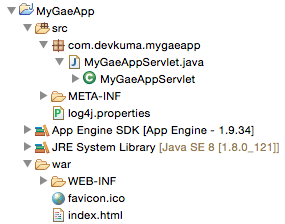
First, open the “MyGaeApp” folder in Project Explorer and look at the items inside. You should see the following.
-
src folder: This is where Java source code files are placed. If you expand it, a folder named “com.devkuma.mygaeapp” appears, and if you expand that further, you should see a Java source code file named “MyGaeAppServlet.java”. This is sample code that is automatically generated by default. We will not use it now, but remember that when you create Java classes, you place the source code here.
-
App Engine SDK: This is the GAE SDK library used by the project. GAE includes many classes provided by Google for using Google services. This library is prepared so those classes can be used. You do not operate on this directly. It is automatically included in a GAE project, so leave it alone.
-
JRE System Library: This is the Java system library. It is the basic Java library, and without it, the main Java features cannot be used. It is automatically included in Java-based projects, so leave this alone as well.
-
war folder: This is the folder that is actually deployed to the server. Files used on the web, such as HTML, style sheets, images, and scripts, are placed in this folder.
The folder you will use first in the project is the “war” folder. You place HTML files and similar files here and connect to the server. Later, when you start writing Java programs, you will use the “src” folder. You really do not need to manipulate the other two libraries.
war folder
The folder that is actually installed on the server as a web application is the “war” folder. Various folders and files are created in it by default. Let’s summarize their roles.
-
index.html: This is an HTML file created by default as a sample file. When you access the web application address, this file is displayed first. You can create the first page by editing the contents of this file.
-
favicon.ico: This is the application icon file. By default, it contains a small GAE mark. You can replace it with an image you made yourself.
-
WEB-INF folder: This is a “non-public folder” inside the web application folder. Files placed inside it are not published on the server and cannot be accessed. Important information for the web application is stored here.
-
lib folder: This is a folder inside WEB-INF. It stores various library files used by the web application. By default, it includes GAE-related libraries. Of course, if you need another library, you can add the file here and use it.
-
appengine-web.xml: This XML file describes all settings related to the GAE web application. This file is specific to GAE and does not exist in ordinary Java web applications. You can configure various settings here.
-
logging.properties: This file describes GAE log settings. This file also does not exist in ordinary web applications other than GAE. You will rarely edit it.
-
web.xml: This XML file describes various information about the web application. This file can be used not only in GAE but also in ordinary Java web applications.
Roughly speaking, a web application built with server-side Java has the following structure.
-
HTML files are placed normally in the application folder to be deployed. This is the same as an ordinary website.
-
Inside it, there is a folder named “WEB-INF”. This is a server-side Java feature, and this folder cannot be accessed from outside.
-
Inside WEB-INF, there is “web.xml”, which describes information about the web application, and a “lib” folder where libraries are placed. In ordinary Java web applications, Java program class files are also stored here.