Javadoc Basics
Documents Generated by Javadoc
Before looking at how to use Javadoc, first look at an example of documentation actually generated by Javadoc.
Open the JDK API documentation page. It can be either a local copy or the online version.
https://docs.oracle.com/javase/8/docs/api/
The page below is the specification for the Boolean class.
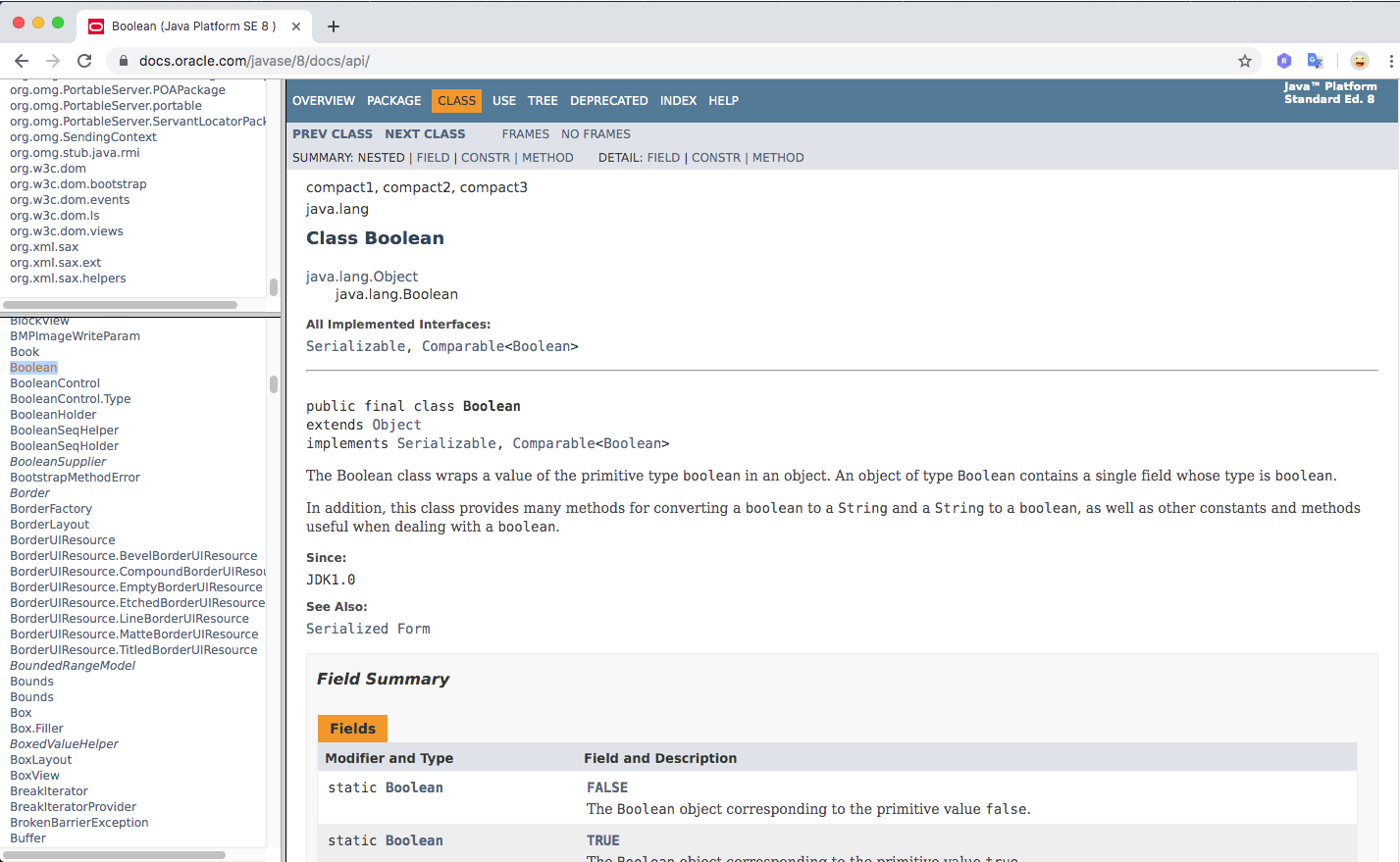
This HTML page shown in the API documentation is a document generated by Javadoc. The document was generated by Javadoc from comments written in Java source code.
In the same way, if you write comments in your own source code using the Javadoc format, you can later generate documentation for the classes and other elements you create. The Javadoc format is also simple and natural enough to read as ordinary comments.
How to Write Comments Targeted by Javadoc
Let’s review how to write comments. This section explains how to write comments in Java, and among them, how to write comments that are targeted by Javadoc.
How to Write Comments in Java
There are two ways to write comments in Java source code.
Block Comments
A block comment is the part enclosed by /* and */. It can include multiple lines, and it can also be used on a single line.
/*
  Comment
  Comment
*/

/* Comment */
Single-Line Comments
For comments on a single line, you can also use //. In this case, everything from // to the line break is a comment.
// Comment
How to Write Comments Targeted by Javadoc
Even when using Javadoc, comments written in Java source code follow the same Java rules. However, to make a comment a target for Javadoc document generation, write it as follows.
/**
  Comment
  Comment
*/

/** Comment */
The part written from /** to */ becomes the target of Javadoc.
The opening delimiter is /**, which has one more * than the ordinary comment delimiter /*. From Java’s point of view, it is still a comment because it is equivalent to a * appearing immediately after /*. You can think of Javadoc as targeting only comments that start with /**.
Also, when writing multi-line comments in Javadoc, if * is written at the beginning of each line, that * is excluded and only the text after it is treated as the comment body. Spaces and tabs written before the * are also excluded. Therefore, Javadoc comments are often written as follows.
/**
 * Comment
 * Comment
 * Comment
 */
The comment above is processed by Javadoc in the same way as the following comment.
/**
 Comment
 Comment
 Comment
 */
Creating Javadoc Documents
Now create an actual document. The following is a simple Java sample.
public class Sample01 {
  private int w;
  private int h;

  public Sample01() {
    w = 0;
    h = 0;
  }

  public void setSize(int width, int height) {
    w = width;
    h = height;
  }

  public int getWidth() {
    return w;
  }

  public int getHeight() {
    return h;
  }
}
Here is an example of adding Javadoc comments to this sample code.
/**
 * Class for Javadoc testing
 *
 * @author devkuma
 * @version 1.0
 */
public class Sample01 {

    /**
     * Width
     */
    private int w;

    /**
     * Height
     */
    private int h;

    /**
     * Default constructor
     */
    public Sample01() {
        w = 0;
        h = 0;
    }

    /**
     * Sets the size
     *
     * @param width width
     * @param height height
     */
    public void setSize(int width, int height) {
        w = width;
        h = height;
    }

    /**
     * Returns the width
     *
     * @return width
     */
    public int getWidth() {
        return w;
    }

    /**
     * Returns the height
     *
     * @return height
     */
    public int getHeight() {
        return h;
    }
}
Details about comments will be covered on other pages.
Save the source code above as Sample01.java, then run the following command in the directory where it was saved.
$ javadoc -private -d doc Sample01.java
$ javadoc -private -d doc Sample01.java
Loading source file Sample01.java...
Constructing Javadoc information...
Creating destination directory: "doc/"
Standard Doclet version 1.8.0_161
Building tree for all the packages and classes...
Generating doc/Sample01.html...
Generating doc/package-frame.html...
Generating doc/package-summary.html...
Generating doc/package-tree.html...
Generating doc/constant-values.html...
Building index for all the packages and classes...
Generating doc/overview-tree.html...
Generating doc/index-all.html...
Generating doc/deprecated-list.html...
Building index for all classes...
Generating doc/allclasses-frame.html...
Generating doc/allclasses-noframe.html...
Generating doc/index.html...
Generating doc/help-doc.html...
In the directory where the command was executed, a directory named doc is created, and you can confirm that files like the following have been generated.
$ ls -al
total 176
drwxr-xr-x  17 kimkc  staff    578 10  8 23:49 .
drwxr-xr-x   4 kimkc  staff    136 10  8 23:49 ..
-rw-r--r--   1 kimkc  staff  10937 10  8 23:49 Sample01.html
-rw-r--r--   1 kimkc  staff    633 10  8 23:49 allclasses-frame.html
-rw-r--r--   1 kimkc  staff    613 10  8 23:49 allclasses-noframe.html
-rw-r--r--   1 kimkc  staff   3507 10  8 23:49 constant-values.html
-rw-r--r--   1 kimkc  staff   3457 10  8 23:49 deprecated-list.html
-rw-r--r--   1 kimkc  staff   7892 10  8 23:49 help-doc.html
-rw-r--r--   1 kimkc  staff   5448 10  8 23:49 index-all.html
-rw-r--r--   1 kimkc  staff   2744 10  8 23:49 index.html
-rw-r--r--   1 kimkc  staff   3684 10  8 23:49 overview-tree.html
-rw-r--r--   1 kimkc  staff    740 10  8 23:49 package-frame.html
-rw-r--r--   1 kimkc  staff      1 10  8 23:49 package-list
-rw-r--r--   1 kimkc  staff   3906 10  8 23:49 package-summary.html
-rw-r--r--   1 kimkc  staff   3693 10  8 23:49 package-tree.html
-rw-r--r--   1 kimkc  staff    827 10  8 23:49 script.js
-rw-r--r--   1 kimkc  staff  12842 10  8 23:49 stylesheet.css
Many HTML files, CSS, and JavaScript files are generated. Among them, open index.html in a browser.
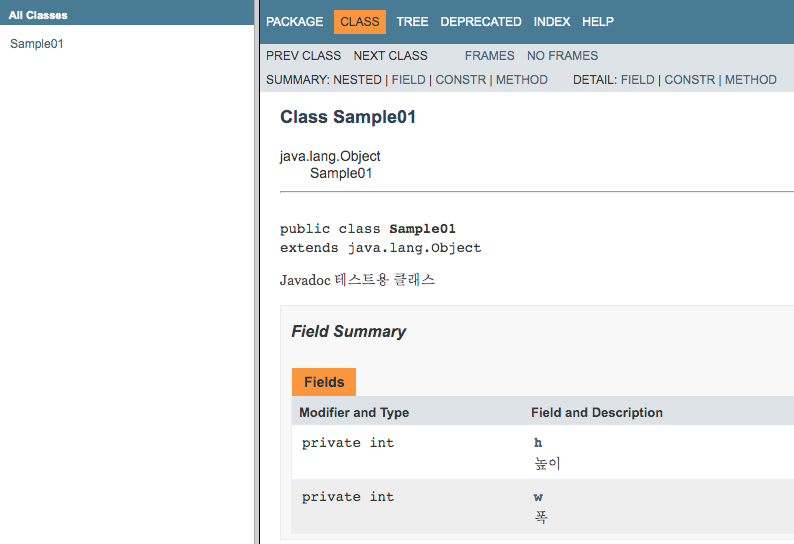
As shown above, documentation was created based on the comments written in the source code. Because you can immediately create class and method specifications simply by adding comments in a Javadoc-compatible format, Javadoc is very convenient.