Specifying Javadoc Options
The -help Option
The -help option displays online help. It shows how to use the javadoc command and describes the available options.
Run it as follows.
$ javadoc -help
The execution result is displayed as follows.
$ javadoc -help
Usage: javadoc [options] [packagenames] [sourcefiles] [@files]
  -overview <file>                 Read overview documentation from HTML file
  -public                          Show only public classes and members
  -protected                       Show protected/public classes and members (default)
  -package                         Show package/protected/public classes and members
  -private                         Show all classes and members
  -help                            Display command line options and exit
  -doclet <class>                  Generate output via alternate doclet
  -docletpath <path>               Specify where to find doclet class files
  -sourcepath <pathlist>           Specify where to find source files
  -classpath <pathlist>            Specify where to find user class files
  -cp <pathlist>                   Specify where to find user class files
  -exclude <pkglist>               Specify a list of packages to exclude
  -subpackages <subpkglist>        Specify subpackages to recursively load
  -breakiterator                   Compute first sentence with BreakIterator
  -bootclasspath <pathlist>        Override location of class files loaded
                                   by the bootstrap class loader
  -source <release>                Provide source compatibility with specified release
  -extdirs <dirlist>               Override location of installed extensions
  -verbose                         Output messages about what Javadoc is doing
  -locale <name>                   Locale to be used, e.g. en_US or en_US_WIN
  -encoding <name>                 Source file encoding name
  -quiet                           Do not display status messages
  -J<flag>                         Pass <flag> directly to the runtime system
  -X                               Print a synopsis of nonstandard options and exit

Provided by Standard doclet:
  -d <directory>                   Destination directory for output files
  -use                             Create class and package usage pages
  -version                         Include @version paragraphs
  -author                          Include @author paragraphs
  -docfilessubdirs                 Recursively copy doc-file subdirectories
  -splitindex                      Split index into one file per letter
  -windowtitle <text>              Browser window title for the documentation
  -doctitle <html-code>            Include title for the overview page
  -header <html-code>              Include header text for each page
  -footer <html-code>              Include footer text for each page
  -top    <html-code>              Include top text for each page
  -bottom <html-code>              Include bottom text for each page
  -link <url>                      Create links to javadoc output at <url>
  -linkoffline <url> <url2>        Link to docs at <url> using package list at <url2>
  -excludedocfilessubdir <name1>:.. Exclude any doc-files subdirectories with given name.
  -group <name> <p1>:<p2>..        Group specified packages together in overview page
  -nocomment                       Suppress description and tags, generate only declarations.
  -nodeprecated                    Do not include @deprecated information
  -noqualifier <name1>:<name2>:... Exclude the list of qualifiers from the output.
  -nosince                         Do not include @since information
  -notimestamp                     Do not include hidden time stamp
  -nodeprecatedlist                Do not generate deprecated list
  -notree                          Do not generate class hierarchy
  -noindex                         Do not generate index
  -nohelp                          Do not generate help link
  -nonavbar                        Do not generate navigation bar
  -serialwarn                      Generate warning about @serial tag
  -tag <name>:<locations>:<header> Specify single argument custom tags
  -taglet                          The fully qualified name of Taglet to register
  -tagletpath                      The path to Taglets
  -charset <charset>               Charset for cross-platform viewing of generated documentation.
  -helpfile <file>                 Include file that help link links to
  -linksource                      Generate source in HTML
  -sourcetab <tab length>          Specify the number of spaces each tab takes up in the source
  -keywords                        Include HTML meta tags with package, class and member info
  -stylesheetfile <path>           File to change style of the generated documentation
  -docencoding <name>              Specify the character encoding for the output
If the English output is hard to read, see the translated version below.
Usage: javadoc [options] [packagenames] [sourcefiles] [@files]
-overview <file>                  Load overview documentation from an HTML file
-public                           Show only public classes and members.
-protected                        Show protected/public classes and members. (default)
-package                          Show package/protected/public classes and members.
-private                          Show all classes and members.
-help                             Display command-line options and exit.
-doclet <class>                   Generate output through an alternate doclet.
-docletpath <path>                Specify where to find doclet class files.
-sourcepath <pathlist>            Specify where to find source files.
-classpath <pathlist>             Specify where to find user class files.
-exclude <pkglist>                Specify a list of packages to exclude.
-subpackages <subpkglist>         Specify subpackages to load recursively.
-breakiterator                    Compute the first sentence with BreakIterator.
-bootclasspath <pathlist>         Override the location of class files loaded by the bootstrap class loader.
-source <release>                 Provide source compatibility with the specified release.
-extdirs <dirlist>                Override the location of installed extensions.
-verbose                          Output messages about what Javadoc is doing.
-locale <name>                    Locale to use, such as en_US or en_US_WIN.
-encoding <name>                  Source file encoding name.
-quiet                            Do not display status messages.
-J <flag>                         Pass <flag> directly to the runtime system.
-X                                Print a synopsis of nonstandard options and exit.

Provided by the standard doclet:
-d <directory>                    Destination directory for output files.
-use                              Create class and package usage pages.
-version                          Include @version paragraphs.
-author                           Include @author paragraphs.
-docfilessubdirs                  Recursively copy doc-file subdirectories.
-splitindex                       Split the index into one file per letter.
-windowtitle <text>               Browser window title for the documentation.
-doctitle <html-code>             Include a title on the overview page.
-header <html-code>               Include a header on each page.
-footer <html-code>               Include a footer on each page.
-top <html-code>                  Include top text on each page.
-bottom <html-code>               Include bottom text on each page.
-link <url>                       Create links to javadoc output at <url>.
-linkoffline <url> <url2>         Link to docs at <url> using the package list at <url2>.
-excludedocfilessubdir <name1>:.. Exclude all doc-files subdirectories with the specified names.
-group <name> <p1>:<p2>..         Group specified packages on the overview page.
-nocomment                        Suppress descriptions and tags, and generate only declarations.
-nodeprecated                     Exclude @deprecated information.
-noqualifier <name1>:<name2>...   Exclude the list of qualifiers from output.
-nosince                          Exclude @since information.
-notimestamp                      Exclude the hidden timestamp.
-nodeprecatedlist                 Do not generate the deprecated list.
-notree                           Do not generate the class hierarchy.
-noindex                          Do not generate the index.
-nohelp                           Do not generate the help link.
-nonavbar                         Do not generate the navigation bar.
-serialwarn @serial               Do not generate warnings for the tag.
-tag <name>:<locations>:<header>  Specify a custom tag with a single argument.
-taglet                           Register the fully qualified name of a taglet.
-tagletpath                       Taglet path.
-charset <charset>                Cross-platform character encoding for generated documents.
-helpfile <file>                  Include the target file for the help link.
-linksource                       Generate source in HTML format.
-sourcetab <tab length>           Specify the number of spaces for source tab characters.
-keywords                         Include package, class, and member information in HTML meta tags.
-stylesheetfile <path>            File for changing the style of generated documents.
-docencoding <name>               Output encoding name.
We will continue by looking at several important options.
The -d Option
The -d option specifies the destination directory for generated documents. The directory can be specified with a relative path or an absolute path.
Use it as follows.
$ javadoc -d {output directory or target file}
For example, run it as follows.
$ javadoc -d doc Sample.java
$ javadoc -d sample/doc Sample.java
$ javadoc -d /Users/devkuma/javadoc/doc Sample.java
The first and second examples specify relative paths. The first creates a doc directory in the directory where the javadoc command is executed and stores the output inside it. The second creates a directory named sample\doc and stores the output inside it. The third specifies an absolute path and stores the output in /Users/devkuma/javadoc/doc.
-d Option Practice
Let’s try a simple example.
/**
 * Class for Javadoc testing
 * It can be written across multiple lines.
 */
public class Sample02 {

    /**
     * Sets the size
     *
     * @param width width
     * @param height height
     */
    public void setSize(int width, int height) {

    }
}
Save the source code above as Sample02.java, then run the following command in the directory where it was saved.
$ javadoc -d doc/html Sample02.java
The execution result is as follows.
$ javadoc -d doc/html Sample02.java
Loading source file Sample02.java...
Constructing Javadoc information...
Creating destination directory: "doc/html/"
Standard Doclet version 1.8.0_161
Building tree for all the packages and classes...
Generating doc/html/Sample02.html...
Generating doc/html/package-frame.html...
Generating doc/html/package-summary.html...
Generating doc/html/package-tree.html...
Generating doc/html/constant-values.html...
Building index for all the packages and classes...
Generating doc/html/overview-tree.html...
Generating doc/html/index-all.html...
Generating doc/html/deprecated-list.html...
Building index for all classes...
Generating doc/html/allclasses-frame.html...
Generating doc/html/allclasses-noframe.html...
Generating doc/html/index.html...
Generating doc/html/help-doc.html...
As shown below, a directory named doc/html is created in the directory where javadoc was executed, and the generated HTML files are stored inside it.
$ ls -al doc/html/
total 176
drwxr-xr-x  17 kimkc  staff    578 10 14 00:24 .
drwxr-xr-x  33 kimkc  staff   1122 10 14 00:24 ..
-rw-r--r--   1 kimkc  staff   8256 10 14 00:24 Sample02.html
-rw-r--r--   1 kimkc  staff    633 10 14 00:24 allclasses-frame.html
-rw-r--r--   1 kimkc  staff    613 10 14 00:24 allclasses-noframe.html
-rw-r--r--   1 kimkc  staff   3507 10 14 00:24 constant-values.html
-rw-r--r--   1 kimkc  staff   3457 10 14 00:24 deprecated-list.html
-rw-r--r--   1 kimkc  staff   7892 10 14 00:24 help-doc.html
-rw-r--r--   1 kimkc  staff   4190 10 14 00:24 index-all.html
-rw-r--r--   1 kimkc  staff   2744 10 14 00:24 index.html
-rw-r--r--   1 kimkc  staff   3684 10 14 00:24 overview-tree.html
-rw-r--r--   1 kimkc  staff    740 10 14 00:24 package-frame.html
-rw-r--r--   1 kimkc  staff      1 10 14 00:24 package-list
-rw-r--r--   1 kimkc  staff   3943 10 14 00:24 package-summary.html
-rw-r--r--   1 kimkc  staff   3693 10 14 00:24 package-tree.html
-rw-r--r--   1 kimkc  staff    827 10 14 00:24 script.js
-rw-r--r--   1 kimkc  staff  12842 10 14 00:24 stylesheet.css
The -author Option
The -author option specifies that the author written with the @author tag should be output in the generated document. If the -author option is not specified, the author is not output in the generated document even if the @author tag is written in the comment.
For the @author tag, see the @author tag page.
Use it as follows.
$ javadoc -author [target file]
For example, run it as follows.
$ javadoc -author Sample.java
-author Option Practice
Let’s try a simple example.
/**
 * Class for Javadoc testing
 *
 * @author devkuma
 */
public class Sample05_1 {

    /**
     * Sets the size
     *
     * @param width width
     * @param height height
     */
    public void setSize(int width, int height) {

    }
}
Save the source code above as Sample05_1.java, then run the following command in the directory where it was saved.
$ javadoc -d doc -author Sample05_1.java
Open the generated Sample05.html file in the doc directory with a browser.
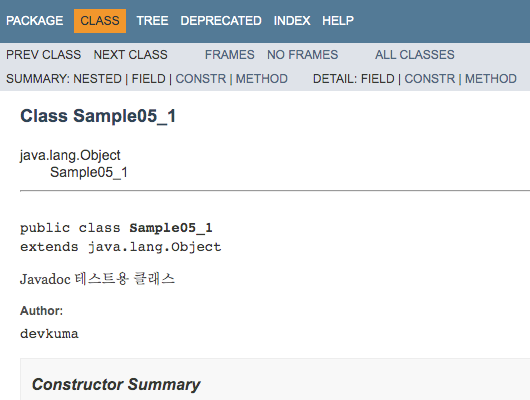
As shown above, the author specified with the @author tag is displayed.
Now run the same source file without specifying the -author option.
$ javadoc -d doc Sample05_1.java
Open the generated Sample05_1.html file in the doc directory again with a browser.
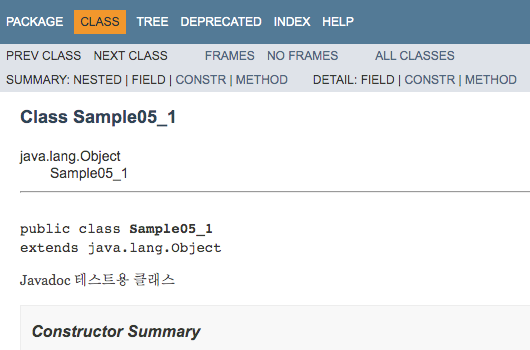
This time, even though the @author tag is written, the author is not displayed.
The -version Option
The -version option specifies that the version written with the @version tag should be output in the generated document. If the -version option is not specified, the document version is not output even if the @version tag is written in the comment.
For the @version tag, see the @version tag page.
Use it as follows.
$ javadoc -version [target file]
For example, run it as follows.
$ javadoc -version Sample.java
-version Option Practice
Let’s try a simple example.
/**
 * Class for Javadoc testing
 *
 * @version 1.0
 */
public class Sample06_1 {

    /**
     * Sets the size
     *
     * @param width width
     * @param height height
     */
    public void setSize(int width, int height) {

    }
}
Save the source code above as Sample06_1.java, then run the following command in the directory where it was saved.
$ javadoc -d doc -version Sample06_1.java
Open the generated Sample06_1.html file in the doc directory with a browser.
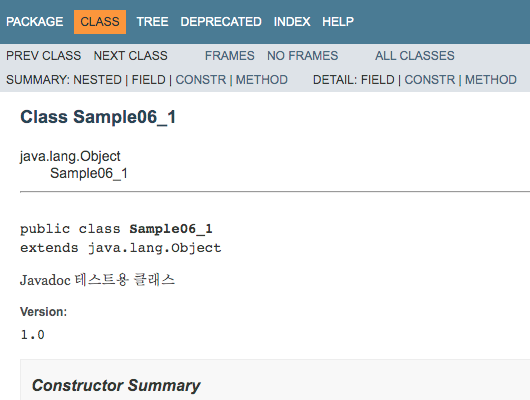
As shown above, the version specified with the @version tag is displayed.
Now run the same source file without specifying the -version option.
$ javadoc -d doc Sample06_1.java
Open the generated Sample06_1.html file in the doc directory again with a browser.
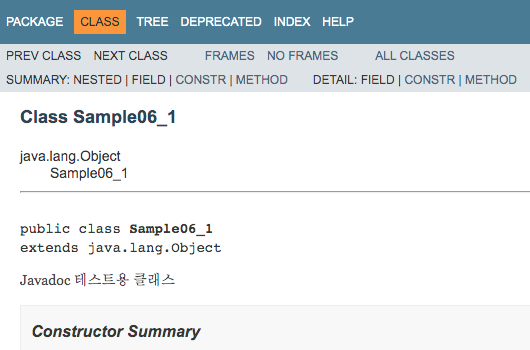
This time, even though the @version tag is written, the version is not displayed.