Javadocオプションの指定
-helpオプション
-helpオプションはオンラインヘルプを表示する。javadocコマンドの使い方とオプションの説明が表示される。
次のように実行する。
$ javadoc -help
実行結果は次のように表示される。
$ javadoc -help
Usage: javadoc [options] [packagenames] [sourcefiles] [@files]
  -overview <file>                 Read overview documentation from HTML file
  -public                          Show only public classes and members
  -protected                       Show protected/public classes and members (default)
  -package                         Show package/protected/public classes and members
  -private                         Show all classes and members
  -help                            Display command line options and exit
  -doclet <class>                  Generate output via alternate doclet
  -docletpath <path>               Specify where to find doclet class files
  -sourcepath <pathlist>           Specify where to find source files
  -classpath <pathlist>            Specify where to find user class files
  -cp <pathlist>                   Specify where to find user class files
  -exclude <pkglist>               Specify a list of packages to exclude
  -subpackages <subpkglist>        Specify subpackages to recursively load
  -breakiterator                   Compute first sentence with BreakIterator
  -bootclasspath <pathlist>        Override location of class files loaded
                                   by the bootstrap class loader
  -source <release>                Provide source compatibility with specified release
  -extdirs <dirlist>               Override location of installed extensions
  -verbose                         Output messages about what Javadoc is doing
  -locale <name>                   Locale to be used, e.g. en_US or en_US_WIN
  -encoding <name>                 Source file encoding name
  -quiet                           Do not display status messages
  -J<flag>                         Pass <flag> directly to the runtime system
  -X                               Print a synopsis of nonstandard options and exit

Provided by Standard doclet:
  -d <directory>                   Destination directory for output files
  -use                             Create class and package usage pages
  -version                         Include @version paragraphs
  -author                          Include @author paragraphs
  -docfilessubdirs                 Recursively copy doc-file subdirectories
  -splitindex                      Split index into one file per letter
  -windowtitle <text>              Browser window title for the documentation
  -doctitle <html-code>            Include title for the overview page
  -header <html-code>              Include header text for each page
  -footer <html-code>              Include footer text for each page
  -top    <html-code>              Include top text for each page
  -bottom <html-code>              Include bottom text for each page
  -link <url>                      Create links to javadoc output at <url>
  -linkoffline <url> <url2>        Link to docs at <url> using package list at <url2>
  -excludedocfilessubdir <name1>:.. Exclude any doc-files subdirectories with given name.
  -group <name> <p1>:<p2>..        Group specified packages together in overview page
  -nocomment                       Suppress description and tags, generate only declarations.
  -nodeprecated                    Do not include @deprecated information
  -noqualifier <name1>:<name2>:... Exclude the list of qualifiers from the output.
  -nosince                         Do not include @since information
  -notimestamp                     Do not include hidden time stamp
  -nodeprecatedlist                Do not generate deprecated list
  -notree                          Do not generate class hierarchy
  -noindex                         Do not generate index
  -nohelp                          Do not generate help link
  -nonavbar                        Do not generate navigation bar
  -serialwarn                      Generate warning about @serial tag
  -tag <name>:<locations>:<header> Specify single argument custom tags
  -taglet                          The fully qualified name of Taglet to register
  -tagletpath                      The path to Taglets
  -charset <charset>               Charset for cross-platform viewing of generated documentation.
  -helpfile <file>                 Include file that help link links to
  -linksource                      Generate source in HTML
  -sourcetab <tab length>          Specify the number of spaces each tab takes up in the source
  -keywords                        Include HTML meta tags with package, class and member info
  -stylesheetfile <path>           File to change style of the generated documentation
  -docencoding <name>              Specify the character encoding for the output
英語が読みづらい場合は、下の翻訳文を見てみよう。
使用法: javadoc [options] [packagenames] [sourcefiles] [@files]
-overview <file>                  HTMLファイルから概要ドキュメントをロードする
-public                           publicクラスとメンバーだけを表示する。
-protected                        protected / publicクラスとメンバーを表示する。(デフォルト)
-package                          package / protected / publicクラスとメンバーを表示する。
-private                          すべてのクラスとメンバーを表示する。
-help                             コマンドラインオプションを表示して終了する。
-doclet <class>                   代替docletを通して出力を生成する。
-docletpath <path>                docletクラスファイルを探す場所を指定する。
-sourcepath <pathlist>            ソースファイルの場所を指定する。
-classpath <pathlist>             ユーザークラスファイルの場所を指定する。
-exclude <pkglist>                除外するパッケージ一覧を指定する。
-subpackages <subpkglist>         再帰的にロードするサブパッケージを指定する。
-breakiterator                    BreakIteratorで最初の文を計算する。
-bootclasspath <pathlist>         bootstrapクラスローダーによってロードされるクラスファイルの場所を再定義する。
-source <release>                 指定したリリースとのソース互換性を提供する。
-extdirs <dirlist>                インストール済み拡張機能の場所を再定義する。
-verbose                          Javadocの動作に関するメッセージを出力する。
-locale <name>                    en_USやen_US_WINなど、使用するロケール。
-encoding <name>                  ソースファイルのエンコーディング名。
-quiet                            状態メッセージを表示しない。
-J <flag>                         <flag>を実行システムに直接渡す。
-X                                非標準オプションの概要を出力して終了する。

標準docletによって提供されるもの:
-d <directory>                    出力ファイルの対象ディレクトリ。
-use                              クラスおよびパッケージの使用ページを作成する。
-version                          @version段落を含める。
-author                           @author段落を含める。
-docfilessubdirs                  doc-fileサブディレクトリを再帰的にコピーする。
-splitindex                       1文字につき1つのファイルに索引を分割する。
-windowtitle <text>               ドキュメントのブラウザウィンドウタイトル。
-doctitle <html-code>             概要ページにタイトルを含める。
-header <html-code>               各ページにヘッダーを含める。
-footer <html-code>               各ページにフッターを含める。
-top <html-code>                  各ページ上部のテキストを含める。
-bottom <html-code>               各ページ下部のテキストを含める。
-link <url>                       <url>にあるjavadoc出力へのリンクを作成する。
-linkoffline <url> <url2>         <url2>にあるパッケージ一覧を使用して<url>のdocsにリンクする。
-excludedocfilessubdir <name1>:.. 指定した名前のdoc-filesサブディレクトリをすべて除外する。
-group <name> <p1>:<p2>..         指定したパッケージを概要ページでグループ化する。
-nocomment                        説明とタグを抑制し、宣言だけを生成する。
-nodeprecated                     @deprecated情報を除外する。
-noqualifier <name1>:<name2>...   出力から限定子一覧を除外する。
-nosince                          @since情報を除外する。
-notimestamp                      隠しタイムスタンプを除外する。
-nodeprecatedlist                 deprecated一覧を生成しない。
-notree                           クラス階層を生成しない。
-noindex                          索引を生成しない。
-nohelp                           ヘルプリンクを生成しない。
-nonavbar                         ナビゲーションバーを生成しない。
-serialwarn @serial               タグに関する警告を生成しない。
-tag <name>:<locations>:<header>  単一引数を持つカスタムタグを指定する。
-taglet                           tagletの完全修飾名を登録する。
-tagletpath                       tagletのパス。
-charset <charset>                生成されるドキュメントのクロスプラットフォーム文字エンコーディング。
-helpfile <file>                  ヘルプリンクの対象ファイルを含める。
-linksource                       HTML形式でソースを生成する。
-sourcetab <tab length>           ソースのタブ文字のスペース数を指定する。
-keywords                         HTMLのmetaタグにパッケージ、クラス、メンバー情報を含める。
-stylesheetfile <path>            生成されたドキュメントのスタイルを変更するためのファイル。
-docencoding <name>               出力エンコーディング名。
重要ないくつかのオプションについて、続けて確認してみよう。
-dオプション
-dオプションは、生成されたドキュメントの対象ディレクトリを指定する。ディレクトリは相対パスまたは絶対パスで指定する。
使い方は次のとおりである。
$ javadoc -d {出力するディレクトリまたは対象ファイル}
たとえば次のように実行する。
$ javadoc -d doc Sample.java
$ javadoc -d sample/doc Sample.java
$ javadoc -d /Users/devkuma/javadoc/doc Sample.java
1番目と2番目は相対パスで指定している。1番目はjavadocコマンドを実行したディレクトリにdocディレクトリを作り、その中に保存する。2番目はsample\docというディレクトリを作り、その中に保存する。3番目は絶対パスで指定し、/Users/devkuma/javadoc/docというディレクトリに保存する。
-dオプションの実習
簡単な例を試してみよう。
/**
 * Javadocテスト用クラス
 * 複数行で書くことができる。
 */
public class Sample02 {

    /**
     * サイズを設定する
     *
     * @param width 幅
     * @param height 高さ
     */
    public void setSize(int width, int height) {

    }
}
上のソースコードをSample02.javaというファイル名で保存し、保存したディレクトリで次のように実行する。
$ javadoc -d doc/html Sample02.java
実行結果は次のとおりである。
$ javadoc -d doc/html Sample02.java
Loading source file Sample02.java...
Constructing Javadoc information...
Creating destination directory: "doc/html/"
Standard Doclet version 1.8.0_161
Building tree for all the packages and classes...
Generating doc/html/Sample02.html...
Generating doc/html/package-frame.html...
Generating doc/html/package-summary.html...
Generating doc/html/package-tree.html...
Generating doc/html/constant-values.html...
Building index for all the packages and classes...
Generating doc/html/overview-tree.html...
Generating doc/html/index-all.html...
Generating doc/html/deprecated-list.html...
Building index for all classes...
Generating doc/html/allclasses-frame.html...
Generating doc/html/allclasses-noframe.html...
Generating doc/html/index.html...
Generating doc/html/help-doc.html...
次のように、javadocを実行したディレクトリにdoc/htmlというディレクトリを作り、その中に生成されたHTMLファイルを保存する。
$ ls -al doc/html/
total 176
drwxr-xr-x  17 kimkc  staff    578 10 14 00:24 .
drwxr-xr-x  33 kimkc  staff   1122 10 14 00:24 ..
-rw-r--r--   1 kimkc  staff   8256 10 14 00:24 Sample02.html
-rw-r--r--   1 kimkc  staff    633 10 14 00:24 allclasses-frame.html
-rw-r--r--   1 kimkc  staff    613 10 14 00:24 allclasses-noframe.html
-rw-r--r--   1 kimkc  staff   3507 10 14 00:24 constant-values.html
-rw-r--r--   1 kimkc  staff   3457 10 14 00:24 deprecated-list.html
-rw-r--r--   1 kimkc  staff   7892 10 14 00:24 help-doc.html
-rw-r--r--   1 kimkc  staff   4190 10 14 00:24 index-all.html
-rw-r--r--   1 kimkc  staff   2744 10 14 00:24 index.html
-rw-r--r--   1 kimkc  staff   3684 10 14 00:24 overview-tree.html
-rw-r--r--   1 kimkc  staff    740 10 14 00:24 package-frame.html
-rw-r--r--   1 kimkc  staff      1 10 14 00:24 package-list
-rw-r--r--   1 kimkc  staff   3943 10 14 00:24 package-summary.html
-rw-r--r--   1 kimkc  staff   3693 10 14 00:24 package-tree.html
-rw-r--r--   1 kimkc  staff    827 10 14 00:24 script.js
-rw-r--r--   1 kimkc  staff  12842 10 14 00:24 stylesheet.css
-authorオプション
-authorオプションは、生成されたドキュメントに@authorタグで指定された著者を出力するように指定する。-authorオプションが指定されていない場合、コメントに@authorタグが書かれていても、生成されるドキュメントに著者は出力されない。
@authorタグについては、@authorタグページを参照してほしい。
使い方は次のとおりである。
$ javadoc -author [対象ファイル]
たとえば次のように実行する。
$ javadoc -author Sample.java
-authorオプションの実習
簡単な例を試してみよう。
/**
 * Javadocテスト用クラス
 *
 * @author devkuma
 */
public class Sample05_1 {

    /**
     * サイズを設定する
     *
     * @param width 幅
     * @param height 高さ
     */
    public void setSize(int width, int height) {

    }
}
上のソースコードをSample05_1.javaというファイル名で保存し、保存したディレクトリで次のように実行する。
$ javadoc -d doc -author Sample05_1.java
生成されたdocディレクトリにあるSample05.htmlファイルをブラウザで確認してみよう。
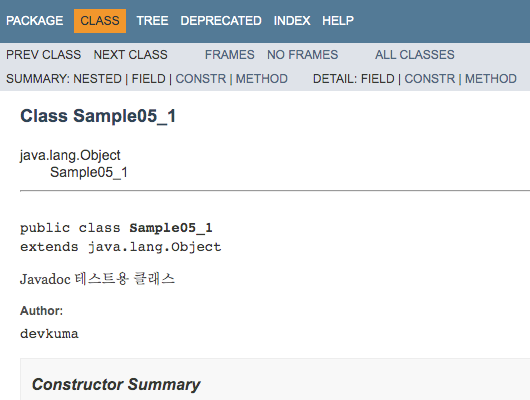
このように、@authorタグで指定した著者が表示される。
それでは同じソースファイルで、-authorオプションを指定せずに次のように実行してみよう。
$ javadoc -d doc Sample05_1.java
生成されたdocディレクトリにあるSample05_1.htmlファイルをブラウザでもう一度確認してみよう。
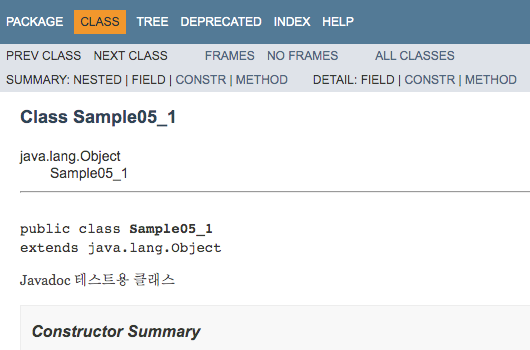
今回は、@authorタグが書かれていても著者は表示されない。
-versionオプション
-versionオプションは、生成されたドキュメントに@versionタグで指定されたバージョンを出力するように指定する。-versionオプションが指定されていない場合、コメントの中に@versionタグが書かれていても、生成されるドキュメントにバージョンは出力されない。
@versionタグについては、@versionタグページを参照してほしい。
使い方は次のとおりである。
$ javadoc -version [対象ファイル]
たとえば次のように実行する。
$ javadoc -version Sample.java
-versionオプションの実習
簡単な例を試してみよう。
/**
 * Javadocテスト用クラス
 *
 * @version 1.0
 */
public class Sample06_1 {

    /**
     * サイズを設定する
     *
     * @param width 幅
     * @param height 高さ
     */
    public void setSize(int width, int height) {

    }
}
上のソースコードをSample06_1.javaというファイル名で保存し、保存したディレクトリで次のように実行する。
$ javadoc -d doc -version Sample06_1.java
生成されたdocディレクトリにあるSample06_1.htmlファイルをブラウザで確認してみよう。
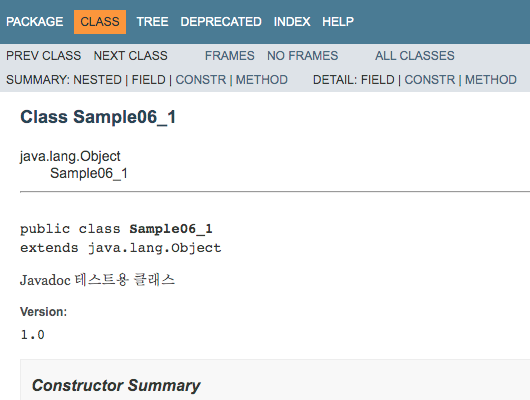
このように、@versionタグで指定したバージョンが表示される。
それでは同じソースファイルで、-versionオプションを指定せずに次のように実行してみよう。
$ javadoc -d doc Sample06_1.java
生成されたdocディレクトリにあるSample06_1.htmlファイルをブラウザでもう一度確認してみよう。
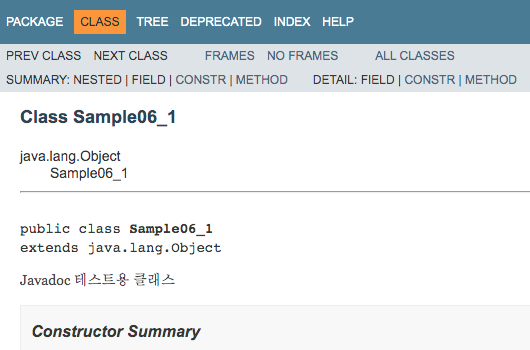
今回は、@versionタグが書かれていてもバージョンは表示されない。