Kotlin Testing Framework - Kotest
What is Kotest?
In Java, JUnit has long been widely used for testing. Kotlin can also use JUnit for testing, and it is commonly used. JUnit is a testing framework implemented in Java, but Kotest is a testing framework implemented in pure Kotlin. By using the Kotest testing framework, you can use Kotlin syntax more naturally than with JUnit, which can reduce the amount of code. It also has the advantage of allowing nested test cases.
The details are organized on the official site, but to introduce it briefly, one major feature is that 10 kinds of classes called Specs are provided, and you can choose the Spec you want to write tests. Each Spec is influenced by various languages and testing frameworks, so people who started Kotlin from another language can choose a test Spec familiar from their original language.
Many other features, including experimental features, as well as assertions and extensions, are also available.
This article summarizes Kotest’s basic syntax and also explains libraries that support Kotest.
What was Kotest originally?
It is a testing framework that can be used with Kotlin. It was previously named KotlinTest, but from release 4.0 it was renamed Kotest to avoid confusion with packages provided by JetBrains.
First, let’s look at sample code. The following is official sample test code.
class MyTests : StringSpec({
    "length should return size of string" {
        "hello".length shouldBe 5
    }
    "startsWith should test for a prefix" {
        "world" should startWith("wor")
    }
})
Adding dependencies
First, to use Kotest, you need to add dependencies.
dependencies {
    testImplementation("io.kotest:kotest-runner-junit5-jvm:5.6.2")
    testImplementation("io.kotest:kotest-framework-datatest:5.6.2")
}
If you only use Kotest, the dependency above is enough, but data-driven tests are provided as a separate module, so the two dependencies above are added.
Setting up a Kotest environment in IntelliJ IDEA
To run Kotest in IntelliJ IDEA, you need to install the Kotest plugin.
Go to [Setting]-[Plugins], search for Kotest, and install it.
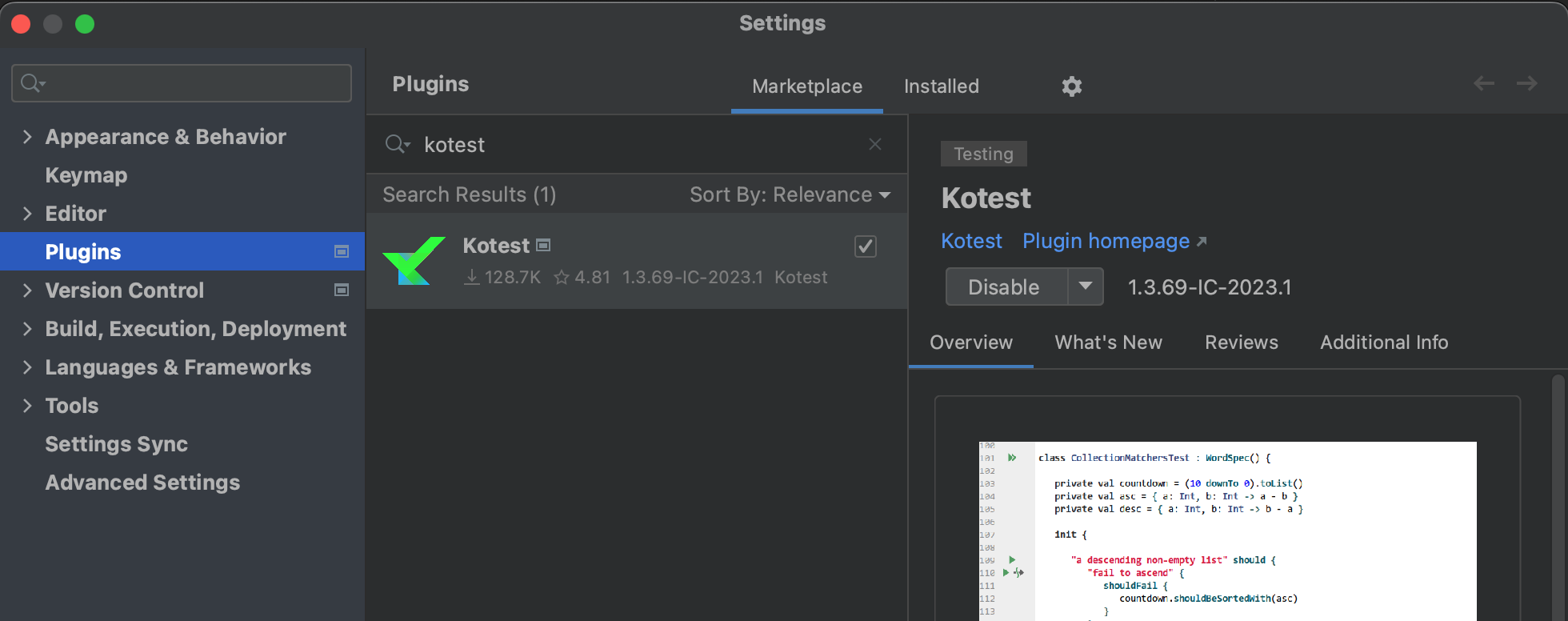
Basic Kotest usage
First, let’s quickly check that it works.
Test class - testing with StringSpec
Here, we will explain the style of using StringSpec for test code.
In Kotest, the way tests are written differs depending on which Spec the test class inherits. Other specs include WordSpec, FunSpec, and ShouldSpec. The differences between Specs are described on the official page, so this explanation is omitted here.
As mentioned earlier, the writing style differs depending on the Spec, but StringSpec has the following two approaches.
Passing a lambda to the StringSpec constructor
class CalcTest : StringSpec({
    // write tests here
})
The code below is a very simple way to write a test with StringSpec.
package com.devkuma.kotest

import io.kotest.core.spec.style.StringSpec
import io.kotest.matchers.shouldBe

class CalcTest : StringSpec({
    "test" {
        1 + 1 shouldBe 2
    }
})
You write tests by inheriting the desired Spec class in the test class and passing a processing block to the constructor argument.
Writing with an init block
class CalcTest : StringSpec(){
    init {
      // write tests here
    }
}
The test code above can also be written by wrapping it in an init block as shown below.
class CalcTest : StringSpec() {
    init {
        "test" {
            1 + 1 shouldBe 2
        }
    }
}
Either method is fine, but when code nesting becomes deep, readability can suffer, so the former is recommended.
Here, we will use the style of passing a lambda to the constructor.
For assertions, this article uses shouldBe provided by Kotest. In JUnit terms, you can think of it as almost the same as assertThat. It is used often.
Match functions
The class under test for testing match functions with Kotest is written as follows.
class Calc {
    fun plus(a: Int, b: Int): Int {
        return a + b
    }

    fun divide(a: Int, b: Int): Int {
        return a / b
    }
}
Now let’s write the actual tests.
Basic assertion - shouldBe
As in the test below, you can use shouldBe to check whether a value is correct.
When inheriting StringSpec, the test description is expressed as a string, and the actual test is written in the part enclosed by {}.
class CalcTest : StringSpec({
    "1 + 1 is 2" {
        val calc = Calc()
        calc.plus(1, 1) shouldBe 2
    }

    "10 + 3 is 13" {
        val calc = Calc()
        calc.plus(10, 3) shouldBe 13
    }
})
There is also shouldNotBe, which expresses the negative of “the value should be like this”, similar to shouldBe.
    "1 + 4 is not 4." {
        val calc = Calc()
        calc.plus(1,4) shouldNotBe 4
    }
As the function name indicates, the value is not the value passed as the argument, so the test succeeds.
Exception tests - shouldThrow
To test exceptions, use shouldThrow.
    "Exception occurs when divided by 0." {
        val calc = Calc()
        shouldThrow<ArithmeticException> {
            calc.divide(10, 0)
        }
    }
Because shouldThrow returns the exception object that occurred, you can also write tests for the exception object as follows.
        val exception = shouldThrow<ArithmeticException> {
            calc.divide(10, 0)
        }
        exception.message shouldBe "/ by zero"
However, note that shouldThrow succeeds if the specified exception or a subclass of it occurs.
To verify that a specific exception occurred exactly, use shouldThrowExactly.
Data Driven Testing
Data-driven testing is a method of running tests by writing patterns of input values and expected output values. Because it is data-driven, the main work is to prepare these data patterns first, and the assertion part only needs to call the function.
Checking data-driven test behavior
It is easier to understand by looking at an example, so a simple data-driven test looks like this.
package com.devkuma.kotest

import io.kotest.core.spec.style.FunSpec
import io.kotest.datatest.withData
import io.kotest.matchers.shouldBe

enum class Operator {
    ADD, SUBTRACTION, MULTIPLICATION, DIVIDE
}

fun calculate(num1: Int, num2: Int, operator: Operator): Int {
    return when (operator) {
        Operator.ADD -> num1 + num2
        Operator.SUBTRACTION -> num1 - num2
        Operator.MULTIPLICATION -> num1 * num2
        else -> num1 / num2
    }
}

internal class DataDrivenTest : FunSpec({
    context("test calculate") {
        data class TestPattern(val num1: Int, val num2: Int, val operator: Operator, val result: Int)
        withData(
            TestPattern(1, 1, Operator.ADD, 2),
            TestPattern(3, 1, Operator.SUBTRACTION, 2),
            TestPattern(2, 3, Operator.MULTIPLICATION, 6),
            TestPattern(10, 5, Operator.DIVIDE, 2),
        ) { (num1, num2, operator, result) ->
            calculate(num1, num2, operator) shouldBe result
        }
    }
})
This tests a function that returns a result calculated from the numbers and operator specified as arguments. First, when writing data-driven tests with Kotest, the Spec must support nesting, so you need to choose a Spec other than StringSpec. Any suitable Spec is fine, but here FunSpec is selected.
With FunSpec, a data table that includes inputs and expected outputs is represented as a data class inside a context block. Here, it stores the three arguments of the calculate method and the expected return value.
The withData function provides data patterns using the data class defined in its arguments. Once all patterns to test are written, processing is executed in the lambda whose parameters are all arguments of the data class.
This gives the following result.
Test Results
  com.devkuma.kotest.DataDrivenTest
    test calculate
      V TestPattern(num1=1, num2=1, operator=ADD, result=2)
      V TestPattern(num1=3, num2=1, operator=SUBTRACTION, result=2)
      V TestPattern(num1=2, num2=3, operator=MULTIPLICATION, result=6)
      V TestPattern(num1=10, num2=5, operator=DIVIDE, result=2)
This can be written much more concisely than creating each test method individually. In a real project, the function may not have such simple inputs and outputs, but if there are multiple input and output patterns like this, data-driven testing is useful.
Now let’s add one test pattern to the calculate function above.
internal class DataDrivenTest : FunSpec({
    context("test calculate") {
        data class TestPattern(val num1: Int, val num2: Int, val operator: Operator, val result: Number)
        withData(
            TestPattern(1, 1, Operator.ADD, 2),
            TestPattern(3, 1, Operator.SUBTRACTION, 2),
            TestPattern(2, 3, Operator.MULTIPLICATION, 6),
            TestPattern(10, 5, Operator.DIVIDE, 2),
+           TestPattern(5, 0, Operator.DIVIDE, 0) // by zero
        ) { (num1, num2, operator, result) ->
            calculate(num1, num2, operator) shouldBe result
        }
    }
})
If you run this, division by zero occurs and an ArithmeticException is thrown.
/ by zero
java.lang.ArithmeticException: / by zero
	at com.devkuma.kotest.DataDrivenTestKt.calculate(DataDrivenTest.kt:16)
	at com.devkuma.kotest.DataDrivenTest$1$1$1.invokeSuspend(DataDrivenTest.kt:30)
Naming test cases
By default, the data class’s toString() is displayed as the test name. If you want to change this display, there are several ways. First, you can change the display by having the data class inherit WithDataTestName.
internal class DataDrivenTest : FunSpec({
    context("test calculate") {
        data class TestPattern(val num1: Int, val num2: Int, val operator: Operator, val result: Int) : WithDataTestName {
            override fun dataTestName(): String =
                "when num1: $num1 num2: $num2 operator: $operator, result is $result"
        }
        withData(
            TestPattern(1, 1, Operator.ADD, 2),
            TestPattern(3, 1, Operator.SUBTRACTION, 2),
            TestPattern(2, 3, Operator.MULTIPLICATION, 6),
            TestPattern(10, 5, Operator.DIVIDE, 2),
        ) { (num1, num2, operator, result) ->
            calculate(num1, num2, operator) shouldBe result
        }
    }
})
When executed, it is displayed as follows.
Test Results
  com.devkuma.kotest.DataDrivenTest
    test calculate
      V when num1: 1 num2: 1 operator: ADD, result is 2
      V when num1: 3 num2: 1 operator: SUBTRACTION, result is 2
      V when num1: 2 num2: 3 operator: MULTIPLICATION, result is 6
      V when num1: 10 num2: 5 operator: DIVIDE, result is 2
This can also be written as follows.
internal class DataDrivenTest : FunSpec({
    context("test calculate") {
        data class TestPattern(val num1: Int, val num2: Int, val operator: Operator, val result: Int)
        withData(
            nameFn = { "when num1: ${it.num1} num2: ${it.num2} operator: ${it.operator}, result is ${it.result}" },
            TestPattern(1, 1, Operator.ADD, 2),
            TestPattern(3, 1, Operator.SUBTRACTION, 2),
            TestPattern(2, 3, Operator.MULTIPLICATION, 6),
            TestPattern(10, 5, Operator.DIVIDE, 2),
        ) { (num1, num2, operator, result) ->
            calculate(num1, num2, operator) shouldBe result
        }
    }
})
You can also use map to specify the test name as the key.
internal class DataDrivenTest : FunSpec({
    context("test calculate") {
        data class TestPattern(val num1: Int, val num2: Int, val operator: Operator, val result: Int)
        withData(
            mapOf(
                "1 + 1 = 2" to TestPattern(1, 1, Operator.ADD, 2),
                "3 - 1 = 2" to TestPattern(3, 1, Operator.SUBTRACTION, 2),
                "2 x 3 = 6" to TestPattern(2, 3, Operator.MULTIPLICATION, 6),
                "10 / 5 = 2" to TestPattern(10, 5, Operator.DIVIDE, 2)
            )
        ) { (num1, num2, operator, result) ->
            calculate(num1, num2, operator) shouldBe result
        }
    }
})
When executed, it is displayed as follows.
Test Results
  com.devkuma.kotest.DataDrivenTest2
    test calculate
    V 1 + 1 = 2
    V 3 - 1 = 2
    V 2 x 3 = 6
    V 10 / 5 = 2