JVM Garbage Collection
What Is Garbage Collection?
Garbage collection (GC) is a JVM task that automatically releases memory no longer used by a Java process.
Objects stored in the heap area at Java runtime continue to accumulate if they are not cleaned up, which can cause an OutOfMemoryError (OOME). To prevent this, the JVM periodically collects and cleans up unused objects through GC.
In languages such as C, memory must be allocated and released manually with functions such as malloc() and free(). Java removes this inconvenience by using GC technology to release memory automatically, freeing developers from manual memory management.
Java code does not explicitly specify and release memory. Some developers set objects to null or call the System.gc() method. Setting an object to null is not a major problem, but calling System.gc() can have a very large impact on system performance, so the System.gc() method should never be used.
To understand JVM GC, you first need to understand the JVM memory structure. For the JVM memory structure, refer to this page.
Unnecessary Memory Areas
If an application is built without considering memory usage, unused garbage data is created.
For example, suppose there is a class like the following.
class TreeNode {
    public TreeNode left, right;
    public int data;
    TreeNode(TreeNode l, TreeNode r, int d) {
        left = l; right = r; data = d;
    }
    public void setLeft(TreeNode l) { left = l;}
    public void setRight(TreeNode r) {right = r;}
}
Create TreeNode objects with the following processing.
TreeNode left = new TreeNode(null, null, 13);
TreeNode right = new TreeNode(null, null, 19);
TreeNode root = new TreeNode(left, right, 17);
In this state, the root node references the left node and the right node.
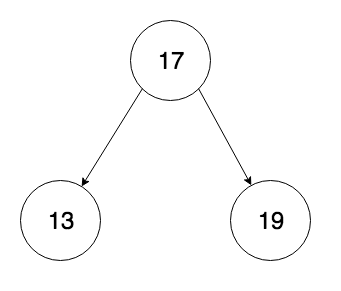
Now suppose processing is added to replace the right node.
root.setRight(new TreeNode(null, null, 21));
Then the node with value 19 that was originally in the right node is no longer referenced by anything, resulting in the state shown below.
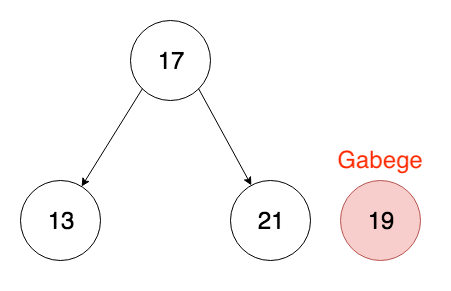
In this state, the TreeNode instance with data=19 is an object that is not referenced from anywhere. In other words, it becomes an unreachable object and therefore garbage.
If unused data continues to be created, unnecessary memory accumulates and eventually reaches the capacity limit. To prevent this in advance, GC (garbage collection), a mechanism that automatically releases unnecessary memory in the heap area, became necessary.
GC and the Role of the Heap Area
As mentioned earlier, GC is a mechanism that releases memory that is no longer needed.
It examines data in memory. If there is a reference, the data remains as valid data; if there is no reference, it is judged unnecessary and released. However, checking all memory space in a simple way is inefficient, so memory is internally divided and managed according to how long data exists.
Newer data is called Young Generation, older data is called Old Generation, and data judged in advance to be difficult to change is called Permanent Generation.
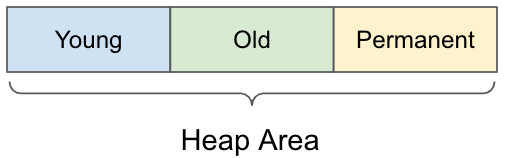
Basically, memory allocation occurs frequently, but most data is assumed to become unreferenced, so it is divided into short-lived data (Young Generation) and long-lived data (Old Generation). This allows GC to efficiently check only the data included in the Young Generation.
There is also an area called Permanent Generation, which stores data that is more or less guaranteed not to change, such as information about loaded classes.
The Permanent Generation memory area disappeared with Java 8, and the Metaspace area was introduced. For details about the Metaspace area, refer to this page.
Reference: OpenJDK documentation
GC Cycle
The heap area used by an application is broadly divided by GC execution area into the Young area (Eden, Survivor1, Survivor2) and the Old (Tenured) area.
The Young area of the heap is divided into Eden and Survivor as shown below, and GC is performed by using each area appropriately.
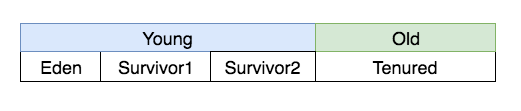
Each area has the following role.
- Eden
- The memory area allocated immediately after a Java object is created.
- Objects that survive regular garbage collection move to Survivor.
- Survivor1, Survivor2
- Data that is not released after GC and does not go to Old. There are two areas for convenience, simply named 1 and 2.
- Tenured
- Data that survives a specified number of GCs is moved to Old.
GC is divided into Minor GC and Major GC (Full GC) depending on the area where GC is performed.
- GC in the Young area is called Minor GC.
- GC in the Old area is called Full GC (or Major GC).
When Full GC occurs, stop-the-world happens, momentarily stopping the Java application. Because it is relatively slow, it can have a major impact on performance and stability.
Minor GC
GC that targets only the Young Generation is called Minor GC. It has the following characteristics.
- Processing time is short.
- It occurs when Eden becomes full.
- If an object becomes a GC target a certain number of times, it moves to Old.
- During GC, process execution stops (Stop the world).
Since diagrams are easier than text for this topic, it will be explained with diagrams.
When newly allocated memory fills the Eden area, Minor GC occurs.
Data without references is deleted, but valid data is copied to the Survivor area. The Eden area then becomes empty.
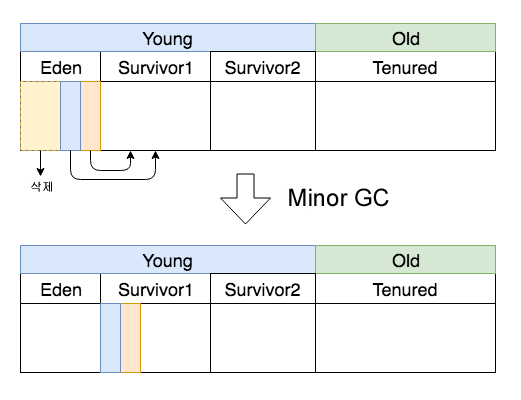
Then, if the Eden area becomes full again in this state, another Minor GC occurs and the result is as shown below.
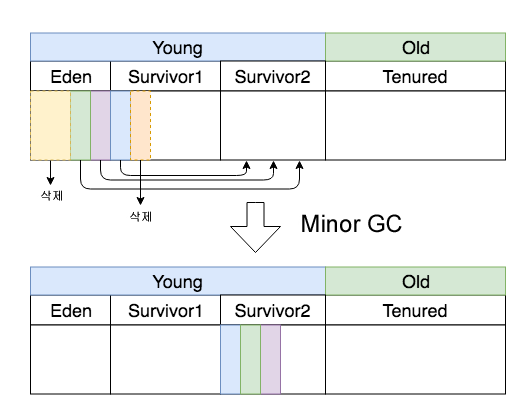
This time, after GC, all surviving data entered the Survivor2 area. Survivor data is copied to whichever Survivor area is empty, moving back and forth between 1 and 2. Therefore, one of Survivor1 and Survivor2 is always kept empty.
Also, as with the Eden area, data in the Survivor area that is no longer referenced is deleted.
Next is promotion to the Old area. Each time GC occurs, the count is recorded for data in the Young area, and when it exceeds a certain number, it moves to Old.
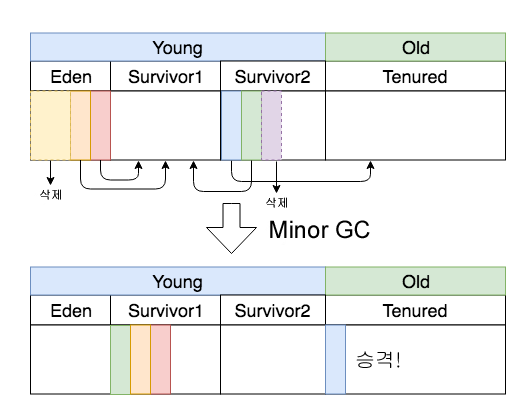
As GC is repeated several times like this, movement from the Young area to the Old area occurs. This count can be specified with an option, and the frequency of moving to the Old area can be controlled with the option below.
-XX:MaxTenuringThreshold=N
Full GC
We have now seen the structure where data moves from the Young area to the Old area. If this were all, the capacity of the Old area would always increase and eventually reach its limit. At that point, Full GC occurs. Full GC occurs when allocation to the Old area fails, and it cleans memory including both the Old area and the Young area.
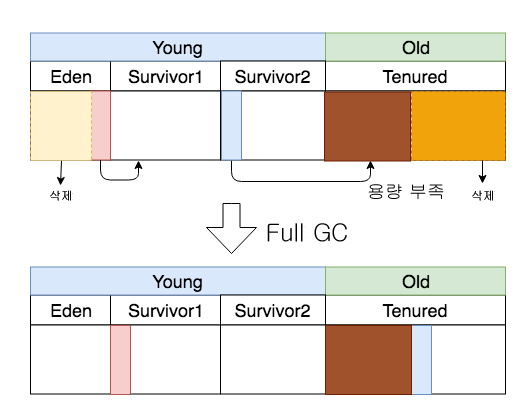
This secures space that is no longer needed in the Old area and makes it possible to copy data from the Survivor area.
As with Minor GC, the application stops during Full GC. Because the pause time becomes longer in proportion to the amount of data in the Old area, it is important to release memory as much as possible in the Young area and minimize Full GC occurrences.
GC Cycle Summary
The GC cycle can be summarized as follows.
- When the Eden area becomes full, Minor GC occurs.
- Minor GC releases the Young area, and objects are promoted to Old if they satisfy the conditions.
- When the Old area becomes full, Full GC occurs.
- Full GC releases the Old area and secures space for promotion.
Automatic Garbage Collection
Let’s look at the garbage collection process.
Automatic Garbage Collection is the process of identifying which objects in heap memory are in use and which are not, then removing unused objects. An object in use or referenced means that some part of the program still maintains a pointer to that object.
In programming languages such as C, memory must be manually allocated or released, but in Java, memory is automatically released by the Garbage Collector. Let’s look at the basic process of Automatic GC.
Step 1: Marking
Marking is the process of identifying memory in pieces.
The garbage collector checks referenced objects (reachable/live objects) in memory and marks which objects are unreferenced (unreachable objects).
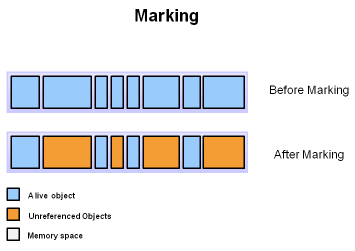
Referenced objects are shown in blue, and the rest are shown in orange. Every object is scanned during the marking process to make this decision. This process is time-consuming because every object in the system must be scanned.
Step 2: Normal Deletion
Normal Deletion is the process of deleting unreferenced objects.
The garbage collector deletes unreferenced objects (unreachable objects).
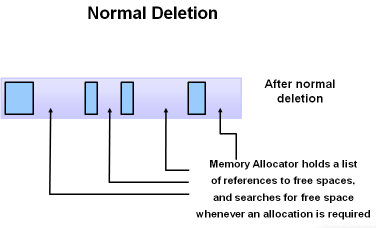
After deleting unreferenced objects, it leaves pointers to referenced objects and free space. The memory allocator keeps references to free space for newly allocated objects.
Step 2a: Deletion with Compacting
To improve deletion performance, this process deletes unreferenced objects and also compacts the remaining spaces.
Some garbage collectors delete unreferenced objects (unreachable objects) while also performing compaction to use memory more effectively.
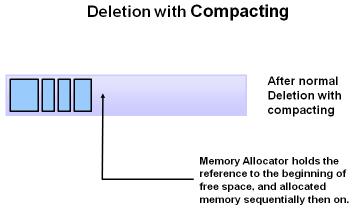
By gathering objects in one place, new memory allocation becomes easier and faster. The Memory Allocator only needs to keep the start address of free space. New objects are then allocated sequentially.
Source: Oracle official documentation: Java Garbage Collection Basics
GC Algorithms
There are several GC algorithms. The four representative ones are as follows.
- Serial GC
- Parallel GC
- CMS (Concurrent Mark & Sweep) GC
- Garbage First GC (G1GC)
GC algorithms are classified by considering throughput and responsiveness.
- Application-stop type
- Serial GC, Parallel GC
- Default GC for single-core and multi-core environments
- Focuses on throughput, but because the time stopped by GC can become long, it may not satisfy response time requirements.
- Concurrent processing type in parallel with the application
- CMS, G1GC
- Chosen in multi-core environments when Parallel GC cannot satisfy response time requirements
- Throughput may decrease.
There is a method of dividing GC into two stages and suppressing maximum application pauses.
- A stage where GC runs concurrently with the application
- A stage where the application stops and GC runs
Serial GC
As the word “Serial” suggests, Serial GC is a sequential GC method.
It was the default garbage collector in Java SE 5 and 6, and it mainly runs as a single thread on 32-bit JVMs.
Mark-sweep and compaction are executed with a single thread.
It was used in single-core environments.
As shown in the image below, because the GC thread performs GC as a single thread, execution time is long.
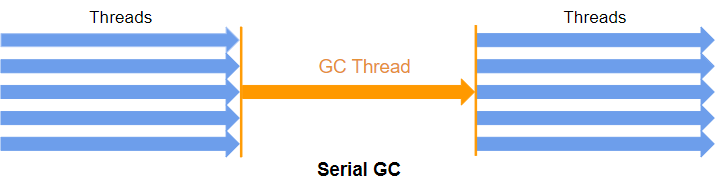
In other words, while the GC thread is running, the Stop-the-World (Pause) duration is long.
The Serial GC-related option is as follows.
-XX:+UseSerialGC
Parallel GC
Parallel GC works on the same principle as Serial GC, but differs in that the Young area GC process is performed with multiple threads.
Therefore, GC thread execution time is relatively shorter than Serial GC, and Stop-the-World (Pause) occurs for a shorter time.
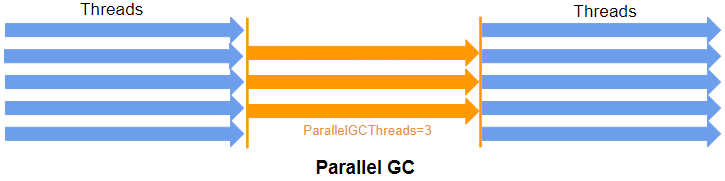
It works quickly by specifying the number of threads and using multiple threads at the same time to perform GC.
It is the default in multi-core environments and performs mark-sweep and compaction with multiple threads.
There are Low-pause and Throughput methods.
- Low-pause: Focuses on minimizing the momentary pause of application execution rather than executing GC quickly.
- Throughput: Focuses on quickly executing Minor GC, and uses only the Mark & Compact algorithm for Full GC.
Parallel GC-related options are as follows.
-XX:+UseParallelGC- This CLI option enables a multi-threaded young generation collector and a single-threaded old generation collector.
-XX:ParallelGCThreads=<desired number>- By default, on a host with N CPUs, parallel GC uses N GC threads. The number of threads can be controlled with the CLI.
Parallel Old GC(Parallel Compacting GC)
Parallel Old GC is a GC method provided since Java 5 update 6. Compared with the Parallel GC described above, only the GC algorithm for the Old area is different. This method goes through Mark-Summary-Compaction.
The Summary step differs from the Sweep step of the Mark-Sweep-Compaction algorithm in that it separately identifies live objects in the area where GC was previously performed, and it goes through a slightly more complex process.
The Parallel Old GC-related option is as follows.
-XX:+UseParallelOldGC- This CLI option enables a multi-threaded collector in both the young generation and old generation. In addition, the compacting collector also runs with multiple threads.
CMS (Concurrent Mark & Sweep) GC
CMS GC aims to minimize application stops (stop-the-world) caused by GC by performing GC work concurrently with application threads. Because it does not perform compaction, it uses more memory.
Because CPU resources are used for cooperation between threads and related processing, application throughput is expected to decrease, but the overall application stop time becomes shorter. As a result, GC has less impact on response time.
If CPU usage is high, performance may degrade; in that case, Parallel GC is used.
Its disadvantages are high CPU resource usage and possible memory fragmentation.
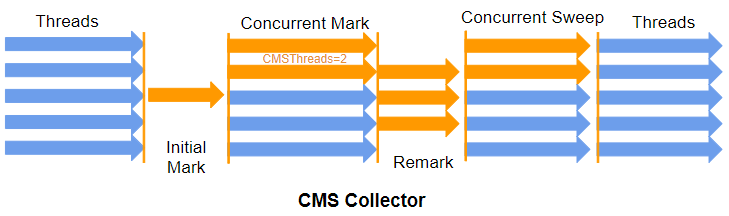
In the Initial Mark stage, objects in a referenced state are marked in a short time. Then, without stopping everything, the Concurrent Mark stage checks referenced objects.
In the Remark stage, changed or newly added objects are checked. In the Concurrent Sweep stage, unreferenced objects are cleaned up.
The CMS GC-related option is as follows.
-XX:+UseConcMarkSweepGC
G1(Garbage First) GC
G1 GC was created to replace CMS. It is not divided into the existing Young and Old areas; instead, it manages the heap by dividing it into small areas called “regions”. It copies objects from one or more regions and moves them to other regions. Unlike CMS, it removes memory fragmentation through the Compaction step. It was officially added in Java 7.
It is intended to use effective GC on multiple CPUs and very large memory. According to Oracle documentation, when the heap size is larger than 6GB, GC latency can be reduced below 0.5sec. According to Oracle G1 GC documentation, Java 9 uses it as the default GC. (Previously, Parallel GC was the default.)
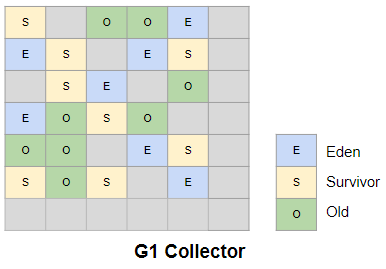
G1 GC is named Garbage First because it first collects regions that contain only garbage.
The G1 GC-related option is as follows.
-XX:+UseG1GC
History of GC
- Before Java 6
- Serial GC, Parallel GC, CMS GC
- Java 8
- Serial GC and Parallel GC are the defaults.
- Java 7
- G1 GC was added.
- Java 9
- G1 GC is the default.
References
- OpenJDK documentation
- 整理 Java GC の仕組み
- Java Garbage Collection
- Garbage Collection Algorithm and JVM Memory Management
- How does Java GC work?
- Java Garbage Collection
- JVM tuning
- Getting Started with the G1 Garbage Collector
- Java Garbage Collection Basics