Python Introduction | Python Development Environment | Running Scripts
Running Scripts
Python programs are usually written in script files and executed with the Python command. A script is a text file containing Python source code.
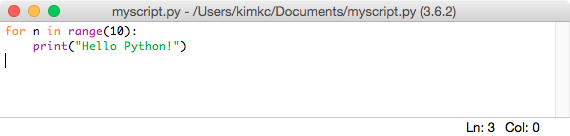
You can write a script with any text editor. IDLE can also be used as a Python editor. Select [File] - [New File] in IDLE and enter the following code.
for n in range(10):
    print("Hello Python!")
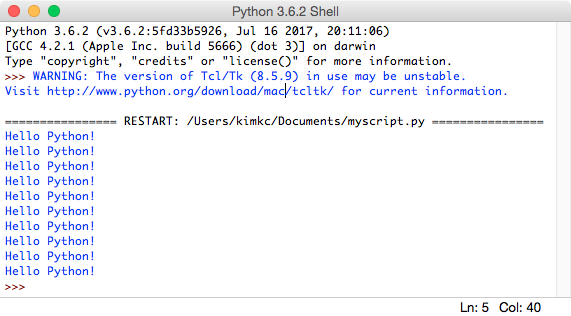
Save the file as myscript.py, then select [Run] - [Run Module]. IDLE runs the open script and displays ten lines of output in the interactive shell.
Running from a Terminal
Move to the directory containing the script.
cd {directory containing the py file}
On Windows, use python or py.
python myscript.py
py myscript.py
On macOS, generally use python3.
python3 myscript.py
Notes for Writing Scripts
1. Source Code Primarily Uses Letters and Numbers
Program source code generally uses English letters and numbers. Other languages can be used in text values and comments.
2. Uppercase and Lowercase Letters Differ
Python is case-sensitive. print and Print are different names. Variable names must also use the correct case.
3. Leading Spaces Have Meaning
Python uses indentation as part of its syntax. Do not add leading spaces arbitrarily. Indent code according to the structure of the program.