Introduction to XML | XML Basics | XML Elements
XML documents are written with data units called elements. This article explains how to write elements.
XML Elements
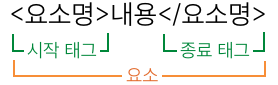
An element has the following syntax.
<elementName>content</elementName>
<elementName> is the start tag, and </elementName> is the end tag. Write text content or child elements between the tags. The start tag, content, and end tag together form an element.
You can choose element names freely, but descriptive names make the data easier to understand.
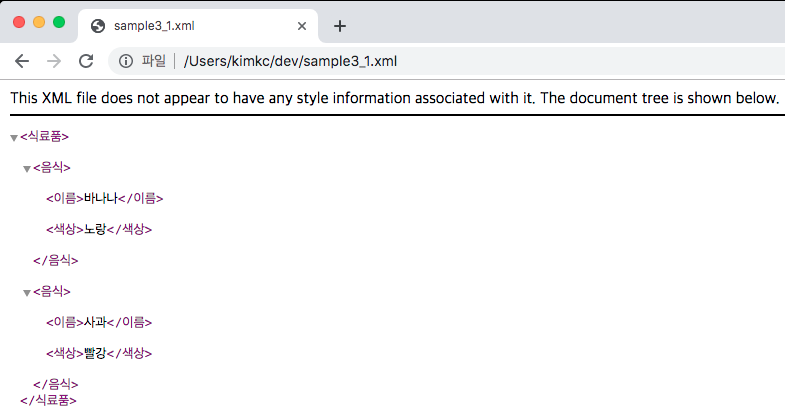
<?xml version="1.0" encoding="UTF-8" ?>
<foods>
  <food>
    <name>banana</name>
    <color>yellow</color>
  </food>

  <food>
    <name>apple</name>
    <color>red</color>
  </food>
</foods>
This document contains elements such as <name>banana</name> and <color>yellow</color>.
Element Naming Rules
Element names can use characters other than English letters and digits, including Korean characters. They should clearly describe the data. Names can contain digits, but cannot begin with a digit.
<?xml version="1.0" encoding="UTF-8" ?>
<groceries>
  <food>
    <name>banana</name>
    <color>yellow</color>
  </food>
</groceries>
Writing Elements Inside Other Elements
An element can contain child elements.
<food>
  <name>banana</name>
  <color>yellow</color>
</food>
Here, food is the parent element, while name and color are child elements. Using child elements makes XML data easier to organize and process.
<?xml version="1.0" encoding="UTF-8" ?>
<foods>
  <food>yellow banana</food>
  <food>red apple</food>
</foods>
Empty Elements
Some elements do not contain text or child elements. These are empty elements. Write one with separate start and end tags:
<elementName></elementName>
You can also use the abbreviated form:
<elementName/>
A space before the slash is allowed.
<elementName />
Root Element
An XML document can contain many elements, and elements can contain child elements. However, except for the XML declaration, the entire document must be enclosed by a single element.
<?xml version="1.0" encoding="UTF-8" ?>
<foods>
  <food>
    <name>banana</name>
    <color>yellow</color>
  </food>

  <food>
    <name>apple</name>
    <color>red</color>
  </food>
</foods>
The outermost foods element contains all other elements. It is called the root element.
The following document is invalid because it has two outermost elements.
<?xml version="1.0" encoding="UTF-8" ?>
<food>
  <name>banana</name>
  <color>yellow</color>
</food>

<food>
  <name>apple</name>
  <color>red</color>
</food>
An XML document must have exactly one root element.