C Language | Introduction to C | Development Environments and Compilers
This article introduces the tools and development environment required for programming in C.
Tools Required for Programming
Every task requires the right tools. Drawing a comic requires paper, ink, pens, rulers, pencils, erasers, and screen tones. Performing music requires not only an instrument but also sheet music, a music stand, a tuner, and a metronome. Programming is no different. A computer alone is not enough. Producing high-quality programs efficiently requires an advanced development environment. A development environment consists of programs used to create other programs, including a debugger for finding errors, an editor for writing code, and CASE tools for automating development processes. These development tools are also programs, so it is possible to create them yourself. However, this article focuses on the basic tools needed for C development.
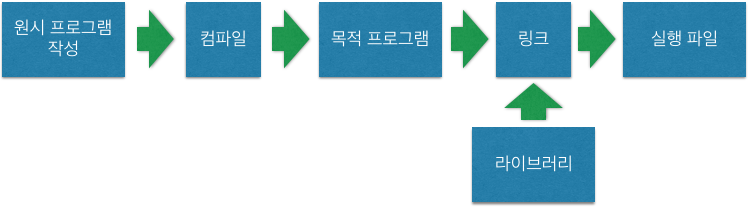
C development involves translating a source program into an object program and then organizing it into an executable format. Converting a source program into an object program is called compilation, and the software that performs this conversion is called a compiler. To run source code written in C, you need a compiler. The usual development process is to write a source program in a text editor and convert it into an object program with a compiler. Finally, a linker combines the required object programs to create an executable file. In most cases, the compiler includes the linker and other tools required to produce executables.
Figure 1. Program Creation Flow
There are various ways to obtain a compiler. A Windows user who is new to computers may prefer an integrated development environment such as Microsoft Visual C++. An integrated development environment provides an editor, compiler, documentation, and tools for developing graphical software. It lets you compile, link, and run a C program with the click of a button, making it approachable for beginners and suitable for serious development.
Free compilers are also available online. One example is Borland C++ Compiler, formerly provided by Embarcadero. It was released for personal development and learning without a warranty. However, because it is not an integrated development environment, it must be used from the command line.
The way you compile and run a C program written in a text editor depends on the compiler. C source files generally use the .C extension. C++ source files use the .CPP extension.
Microsoft Visual C++ and Borland C++ Compiler are C++ compilers, but C++ is compatible with C, so you can compile C programs with a C++ compiler. To compile a program as C, use the .C extension. If you use .CPP, the compiler treats the source as C++, which may produce errors. Some compilers may let you choose the language with an option regardless of the extension. Refer to your compiler documentation for details.