C Language | Computer System Development | Hardware Configuration
This article introduces the standard hardware components of a computer and their relationships.
Computer Structure
If you already understand computers through experience with another programming language or assembling computers, you can skip to the article about development environments and compilers.
C is a high-level language, but it is also close to low-level languages. Using C effectively therefore requires some knowledge of computers. This section explains the basics of computer systems.
A computer receives data, calculates with it, and outputs the result. The five basic components required for this process are input devices, output devices, arithmetic devices, control devices, and storage devices.
Table 1. Five Basic Computer Components
| Component | Description |
|---|---|
| Input device | Sends data to a computer |
| Output device | Outputs calculated results |
| Arithmetic device | Calculates data according to a program |
| Control device | Controls the operation of other devices |
| Storage device | Stores data |
Figure 1. Relationships Between the Five Components
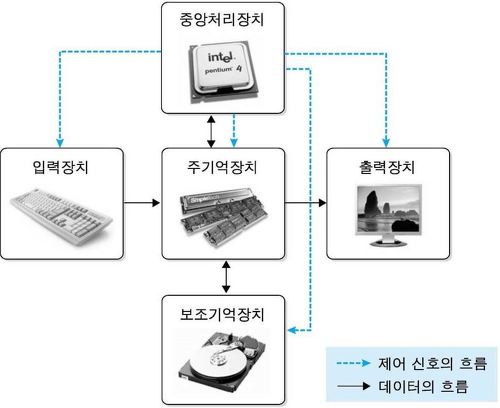
Input devices include keyboards, pointing devices such as mice, pens, and touch screens, scanners, optical mark readers, and timers. Displays are representative output devices, but printers and plotters are also output devices.
The arithmetic device and control device form the central processing unit, or CPU. The CPU manages input and output and controls the computer as a whole.
A storage device stores data and calculation results. Important storage directly connected to the CPU is called main memory. Programs use main memory to store data and results. Other storage devices, such as hard drives and ROM, are called secondary storage. Main memory loses its data when power is removed but provides fast access. Secondary storage retains data without power but is slower.
Storage devices hold binary data. A single binary digit is a bit, but CPUs generally process larger units. The smallest processing unit is called a byte, and a byte is commonly eight bits.
Strictly speaking, a byte is not always eight bits. Its size depends on the computer architecture. The term octet explicitly means eight bits and is common in networking contexts. This book generally treats one byte as eight bits.
Storage devices assign an address to each byte. This number is called a memory address. Programs use memory addresses to access information. Memory addresses are central to pointers in C. Remember that every piece of data processed by a computer must have an address that identifies its location.