SQLite | Joining Data | Outer Joins (OUTER JOIN)
An outer join returns matching rows from two tables and also unmatched rows from one side. This article explains LEFT OUTER JOIN.
Outer Joins
Like an inner join, an outer join matches values in specified columns. Unlike an inner join, it also returns unmatched rows.
In the diagram, the left table’s Department ID is matched with the right table’s ID.
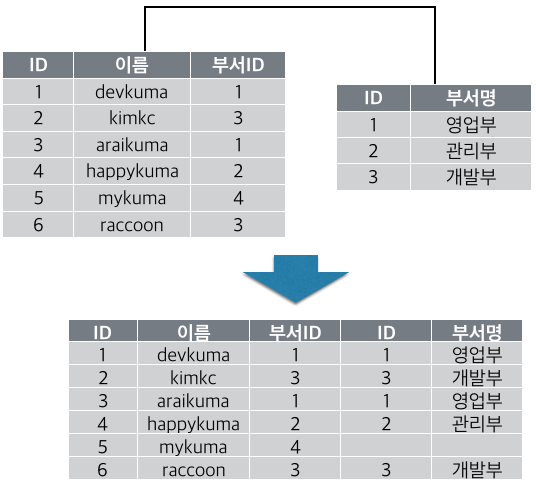
Rows from the left table are returned even when their Department ID has no matching ID in the right table.
Note
A LEFT OUTER JOIN retains unmatched left rows, a RIGHT OUTER JOIN retains unmatched right rows, and a FULL OUTER JOIN retains unmatched rows from both sides.
The SQLite version used here supports only LEFT OUTER JOIN; attempting RIGHT or FULL OUTER JOIN produces an unsupported-join error.
Using LEFT OUTER JOIN
Combine SELECT with LEFT OUTER JOIN to query two tables. The syntax is as follows.
SELECT table_name. column_name, ... FROM table_name1
  LEFT OUTER JOIN table_name2
  ON table_name1.column_name1 = table_name2.column_name2;
A simplified form is shown below.
SELECT (result_columns) FROM table_name1
  LEFT OUTER JOIN table_name2 ON (join_condition);
Qualify selected columns as table_name.column_name when necessary.
Write the join condition as table1.column1 = table2.column2.
A left outer join returns matched rows plus rows from the table after FROM that have no match.
–
Create employee and dept tables and insert sample data.
create table employee (id integer, name text, dept_id integer);

insert into employee values (1, 'dekuma', 1);
insert into employee values (2, 'kimkc', 3);
insert into employee values (3, 'araikuma', 1);
insert into employee values (4, 'happykuma', 2);
insert into employee values (5, 'mykuma', 4);
insert into employee values (6, 'raccoon', 3);
sqlite> create table employee (id integer, name text, dept_id integer);
sqlite>
sqlite> insert into employee values (1, 'dekuma', 1);
sqlite> insert into employee values (2, 'kimkc', 3);
sqlite> insert into employee values (3, 'araikuma', 1);
sqlite> insert into employee values (4, 'happykuma', 2);
sqlite> insert into employee values (5, 'mykuma', 4);
sqlite> insert into employee values (6, 'raccoon', 3);
sqlite>
create table dept (id integer, name text);
insert into dept values (1, 'Sales');
insert into dept values (2, 'Manage');
insert into dept values (3, 'Dev');
sqlite> create table dept (id integer, name text);
sqlite>
sqlite> insert into dept values (1, 'Sales');
sqlite> insert into dept values (2, 'Manage');
sqlite> insert into dept values (3, 'Dev');
sqlite>
–
First, left-join dept to employee.
select * from employee left outer join dept on employee.dept_id = dept.id;
sqlite> select * from employee left outer join dept on employee.dept_id = dept.id;
id          name        dept_id     id          name
----------  ----------  ----------  ----------  ----------
1           dekuma      1           1           Sales
2           kimkc       3           3           Dev
3           araikuma    1           1           Sales
4           happykuma   2           2           Manage
5           mykuma      4
6           raccoon     3           3           Dev
sqlite>
Table order matters because unmatched rows are retained from the table after FROM. Reverse the tables and run the join again.
select * from dept left outer join employee on dept.id = employee.dept_id;
sqlite> select * from employee left outer join employee on dept.id = employee.dept_id;
id          name        id          name        dept_id
----------  ----------  ----------  ----------  ----------
1           Sales       1           dekuma      1
1           Sales       3           araikuma    1
2           Manage      4           happykuma   2
3           Dev         2           kimkc       3
3           Dev         6           raccoon     3
sqlite>
Since dept has no unmatched rows, this result is the same as the inner join.
Selecting Result Columns
Select columns as with an inner join. Qualify names shared by both tables; unique names may omit the table prefix.
Apply this column selection to the outer join.
select employee.id, employee.name, dept.name from employee
  left outer join dept on employee.dept_id = dept.id;
sqlite> select employee.id, employee.name, dept.name from employee
   ...>   left outer join dept on employee.dept_id = dept.id;
id          name        name
----------  ----------  ----------
1           dekuma      Sales
2           kimkc       Dev
3           araikuma    Sales
4           happykuma   Manage
5           mykuma
6           raccoon     Dev
sqlite>