SQL Basics | DML: Data Manipulation Language | JOIN
JOIN is used to combine tables with other tables.
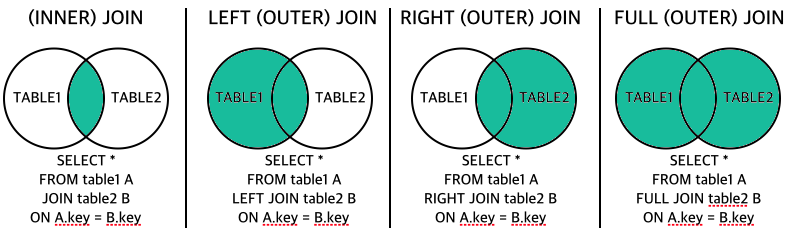
The following are several types of JOIN in SQL.
- (INNER) JOIN: Returns records that have matching values in both tables.
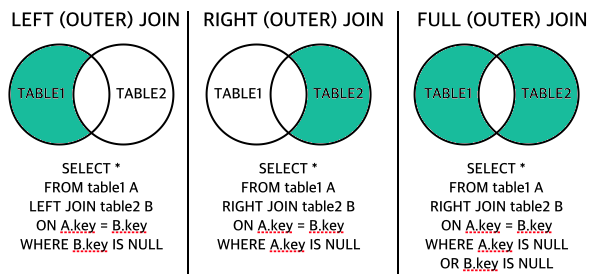
- LEFT (OUTER) JOIN: Returns all records from the left table and matching records from the right table.
- RIGHT (OUTER) JOIN: Returns all records from the right table and matching records from the left table.
- FULL (OUTER) JOIN: Returns all records from the left or right table.
You can also control the returned values as follows.
JOIN syntax
INNER JOIN
SELECT column_name(s)
FROM table1
INNER JOIN table2 ON table1.column_name = table2.column_name;
LEFT (OUTER) JOIN
SELECT column_name(s)
FROM table1
LEFT JOIN table2 ON table1.column_name = table2.column_name;
RIGHT (OUTER) JOIN
SELECT column_name(s)
FROM table1
RIGHT JOIN table2 ON table1.column_name = table2.column_name;
FULL (OUTER) JOIN
SELECT column_name(s)
FROM table1
FULL OUTER JOIN table2 ON table1.column_name = table2.column_name;
INNER JOIN example
This is an example of SQL JOIN.
store_information table
| store_name | sales | txn_date |
|---|---|---|
| Los Angeles | 1500 | Jan-05-2018 |
| San Diego | 250 | Jan-07-2018 |
| Los Angeles | 300 | Jan-08-2018 |
| Boston | 700 | Jan-08-2018 |
geography table
| region_name | store_name |
|---|---|
| East | Boston |
| East | New York |
| West | Los Angeles |
| West | San Diego |
An inner join returns data only when matching values exist in both tables.
We will examine sales by region_name. The geography table shows stores in each region, and the store_information table shows sales for each store. To check sales by region, combine the data from these two tables. Looking closely, you can see that the two tables can be joined by the store_name field.
SELECT A1.region_name REGION, SUM(A2.sales) SALES
FROM geography A1 JOIN store_information A2 ON A1.store_name = A2.store_name
GROUP BY A1.region_name;
Or:
SELECT A1.region_name REGION, SUM(A2.sales) SALES
FROM geography A1, store_information A2
WHERE A1.store_name = A2.store_name
GROUP BY A1.region_name;
The result is as follows.
| REGION | SALES |
|---|---|
| East | 700 |
| West | 2050 |
In the first line, SQL selects two fields. The first is the region_name field from the geography table, aliased as REGION, and the second is the sales field from the store_information table, aliased as SALES. Here, the table alias for Geography is A1 and the alias for store_information is A2. Without table aliases, the first line would look like this.
SELECT Geography.region_name REGION, SUM(Store_Information.Sales) SALES
As you can see, writing out all table names makes the statement longer and more complex. Table aliases make SQL statements easier to understand, especially when a statement includes multiple tables.
Next, in the FROM clause on the second line, the store_name field in the geography table is connected to the store_name field in the store_information table with JOIN.
OUTER JOIN example
Use OUTER JOIN when a data value in one table does not appear at all in another table.
Outer join syntax can differ by database. For example, Oracle places (+) after every table loaded in the WHERE clause to indicate that the table’s data is required.
We will retrieve sales for each store. If an inner join is used, data for the New York store, which does not exist in the store_information table, is omitted. In that case, use an outer join.
The Oracle outer join used here is as follows.
SELECT A1.store_name, SUM(A2.sales) SALES
FROM geography A1, store_information A2
WHERE A1.store_name = A2.store_name (+)
GROUP BY A1.store_name;
The result is as follows.
| store_name | SALES |
|---|---|
| Boston | 700 |
| New York | |
| Los Angeles | 1800 |
| San Diego | 250 |
When there is no matching data in the second table, SQL inserts a NULL value. In this example, because New York does not exist in the store_information table, its SALES field becomes NULL.