git-flow (Git Branching Model)
git flow
git-flow is a branching strategy proposed in Vincent Driessen’s 2010 blog post “A Successful Git Branching Model.”
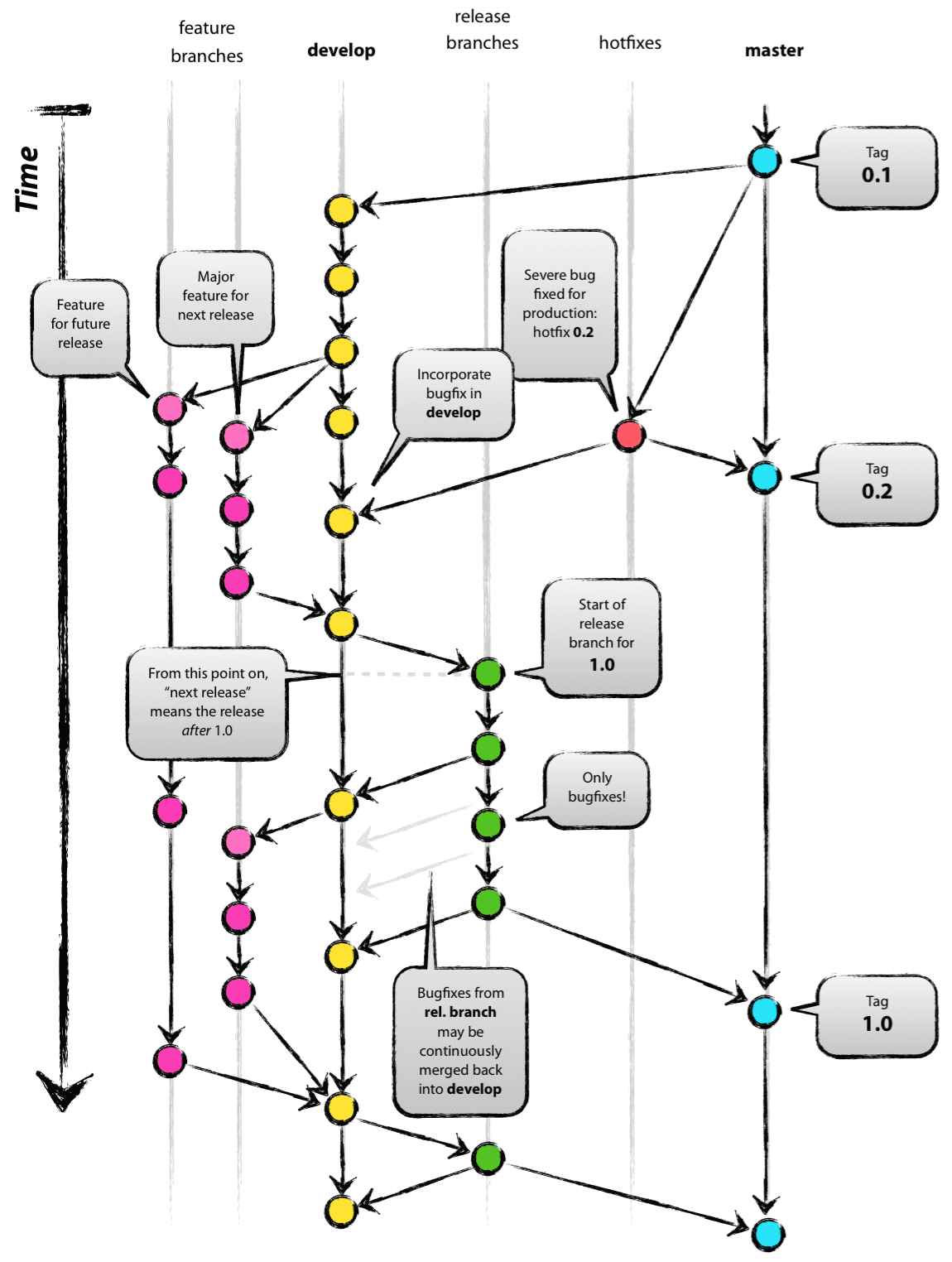
The roles of each branch are as follows.
- Main branches: central branches used by the central repository and by each developer’s cloned repository.
- master
- Branch for releases. A tag is added whenever a release is made.
- develop
- Branch for development. It represents the latest version before release.
- master
- Supporting branches: short-lived branches that generally exist only in each developer’s repository and disappear after their role is finished.
- feature
- A branch created from
developfor developing a specific feature. After feature development is complete, it is merged intodevelopand removed.
- A branch created from
- release
- A branch created from
developto prepare a release. It prevents unnecessary feature work from entering while release preparation is in progress. - After the release is complete, it is merged into both
masteranddevelop, then removed.
- A branch created from
- hotfix
- An emergency branch usually created when a problem occurs in a released product. It is created directly from
master, fixed, merged back intomaster, and tagged. - It is also merged into
developso the bug fix is not missed later. If areleasebranch exists during release work, it is merged there as well.
- An emergency branch usually created when a problem occurs in a released product. It is created directly from
- feature
To use a simpler one-branch flow:
masteris always deployable.- When starting new work, create a branch directly from
master. - Commit work to the branch on the local machine and regularly push it to the remote repository with the same branch name.
- When development is complete, open a pull request to
master. - After the pull request is verified, merge it into
masterand deploy immediately.
- Because the pull request is merged and deployed immediately after verification, testing must be completed before sending the pull request, whether manual or automated.
mastermust always remain deployable. A merge means the code can be deployed immediately.
Git branch network
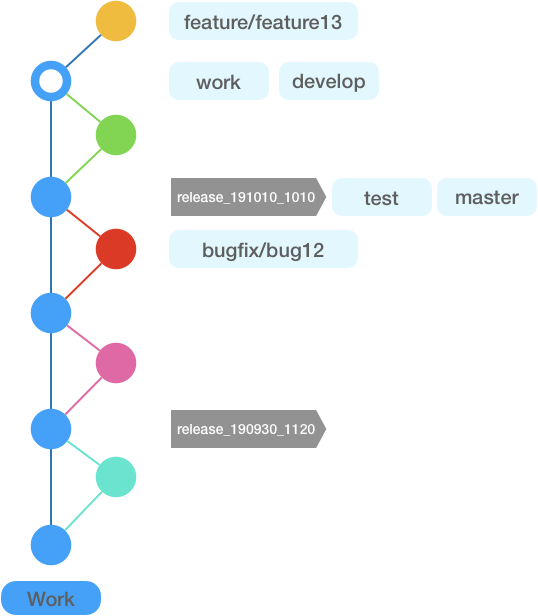
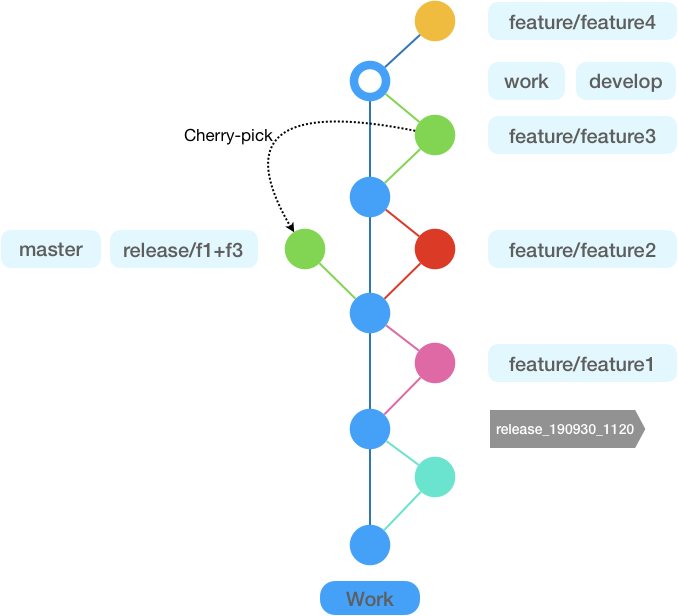
Main branches
| Branch name | Type | Description |
|---|---|---|
| work | Main branch | All work branches are merged into and branched from the work branch.This branch is the main branch that contains all project source work and cannot be deleted. |
| develop | Deployment branch | Branch for deploying to the dev environment. |
| test | Deployment branch | Branch for deploying to the test environment. |
| master | Deployment branch | Branch for deploying to pre-production and live environments. |
| feature/ | Work branch | Branch for new development. |
| bugfix/ | Work branch | Branch for bug fixes. |
| hotfix/ | Work branch | Branch for urgent fixes. |
| release/ | Deployment branch | Branch for custom deployment, used when deployment from the work branch is not possible, such as selective deployment through cherry-pick. |
- The main branch (
work) only allows PR merges, so work from task branches must be merged through pull requests. - Deployment branches (
develop,test,master) can be deleted at any time and recreated from the desired deployment commit. - Work branches (
feature/,bugfix/,hotfix/) are candidates for removal after they are merged into the main branch through a PR.
Branch policy
All work branches must be linked to Jira issues.
Jira issue integration process
- Create a Jira issue.
- Create a branch point with an automatically generated Jira issue tag.
- Example:
feature/PROJ-1
- Example:
- Add the Jira issue number to commit messages for automatic linking.
- Example:
feat(PROJ-1): project init
- Example:
- After work is complete, open a pull request to the
workbranch. - Remove the work branch.
Rebase policy
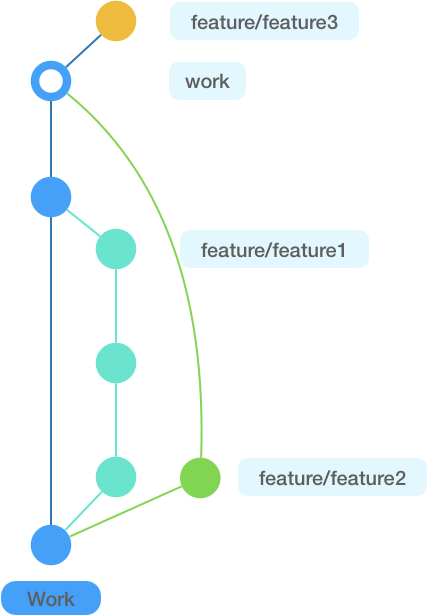
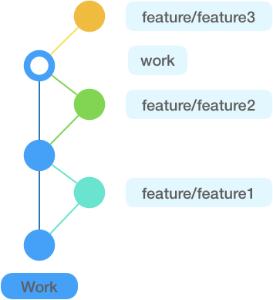
When opening a PR from a work branch to the main branch, always run rebase work, move the base to the latest work, squash into a single commit, and then create the PR.
(git rebase -i: commit squashing)
Why rebase is required
- Keeps the branch network clean.
- Lets the developer resolve conflicts directly before opening the PR to the main branch.
- Guarantees one feature per cherry-pick through one commit per feature.
- Keeps the branch model simple even when many developers work together, reducing the learning curve for new developers.
- Keeps the graph clean and simple, making code flow easier to understand and deployment points easier to identify.
Pull request policy
- Create a work branch.
- Develop on the work branch.
- Rebase after development is complete with
git rebase -i, resolving conflicts and squashing into one commit. - Open a PR to the main branch.
- Perform code review with one default reviewer.
- The author approves the PR directly.
- Remove the work branch after it is merged into the main branch.
Commit message rules
Git commit message convention.
Common rules
- subject
- Required. Summarize the commit contents briefly.
- body
- Optional. Add extra information when needed.
- footer
- Optional. Write the impact area, such as PC/MW/APP.
- Or add issue keys or other information that needs tracking.
By branch type
| type | branch name | message convention | remarks |
|---|---|---|---|
| feature | feature/{ISSUE-KEY}* | feature(ISSUE-KEY): subject body footer |
Add a new feature. |
| bugfix | bugfix/{ISSUE-KEY}* | bugfix(ISSUE-KEY): subject body footer |
Fix issues found during QA. |
| hotfix | hotfix/{ISSUE-KEY}* | hotfix(ISSUE-KEY): subject body footer |
Fix production incidents. |
| release | release/{ISSUE-KEY} or release/yyyymmdd/{ISSUE-KEY} |
release: subject issue-key-list body footer |
Use when marking a deployment point. |
| docs | docs/* | docs: subject body |
Change documentation, such as Javadoc or README.md. |
| refactor | refactor/* | refactor: subject body |
Refactor code. |
| test | test/* | test: subject body |
Add test code or refactoring test code. |
| config | config/* | config: subject body |
Change configuration files, such as *.config, *.properties, or *.yml. |