Simple Usage of Spring WebFlux
Overview
This article introduces simple usage of Spring WebFlux.
Spring WebFlux is a new web framework added in Spring 5 that enables reactive programming on a non-blocking runtime.
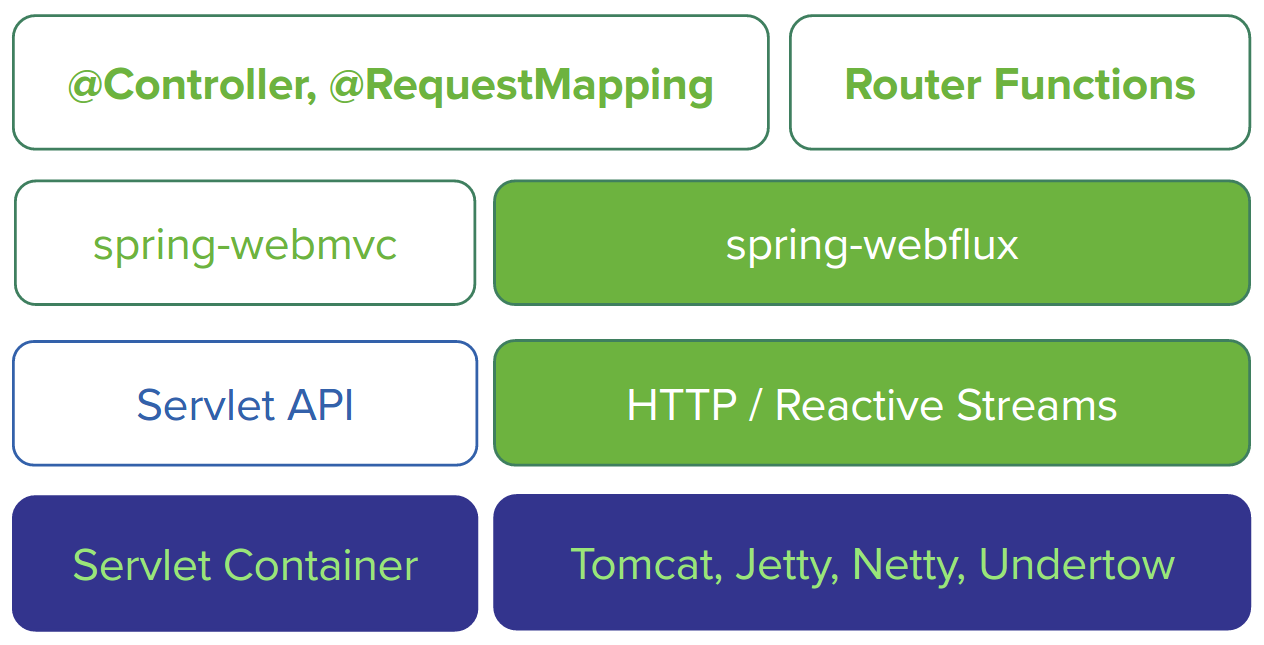
As shown in the diagram above, the existing Spring MVC components are represented well. Spring MVC has been a framework based on the Servlet API in a servlet container, while Spring WebFlux is implemented with a new HTTP API based on Reactive Streams and its implementation, Reactor, without using the Servlet API. As runtimes, WAS options such as Netty and Undertow can be used in a non-blocking way. Tomcat and Jetty implementations are also available by using the non-blocking API introduced in Servlet 3.1.
Spring WebFlux provides the following two programming model patterns.
@Controlller- Router Functions
@Controlller is the annotation-based Controller implementation style that has been used in Spring MVC. In other words, the runtime changes, but the Controller programming style remains the same. Router Functions are a new lambda-based way to implement Controllers. You can think of them as something similar to Express in Node.js.
This article briefly explains both patterns.
Create the Project
First, create a project. Spring Boot supports Spring 5 starting from Spring Boot 2.0.
You can create the project easily with the curl command. On Windows, run it from Bash.
curl https://start.spring.io/starter.tgz  \
       -d bootVersion=2.4.4 \
       -d dependencies=webflux \
       -d baseDir=spring-webflux \
       -d artifactId=webflux \
       -d packageName=com.devkuma.webflux \
       -d applicationName=HelloWebFluxApplication \
       -d type=gradle-project | tar -xzvf -
After the command finishes, you can confirm that a spring-webflux directory has been created.
From here on, Stream means continuous data, and Stream means Java 8’s java.util.stream.Stream.
@Controller Model
First, create Hello World with the @Controller model.
Hello World
Create src/main/java/com/devkuma/webflux/HelloController.java.
package com.devkuma.webflux;

import org.springframework.web.bind.annotation.GetMapping;
import org.springframework.web.bind.annotation.RestController;

import reactor.core.publisher.Flux;

@RestController
public class HelloController {

    @GetMapping("/")
    Flux<String> hello() {
        return Flux.just("Hello", "World");
    }
}
Flux may be unfamiliar, but at a glance this is the same as the Spring MVC Controller style used so far.
Run the main method of the com.devkuma.webflux.HelloWebFluxApplication class to start the Spring WebFlux application.
  .   ____          _            __ _ _
 /\\ / ___'_ __ _ _(_)_ __  __ _ \ \ \ \
( ( )\___ | '_ | '_| | '_ \/ _` | \ \ \ \
 \\/  ___)| |_)| | | | | || (_| |  ) ) ) )
  '  |____| .__|_| |_|_| |_\__, | / / / /
 =========|_|==============|___/=/_/_/_/
 :: Spring Boot ::                (v2.4.4)

2021-04-14 07:07:20.558  INFO 20344 --- [           main] c.d.webflux.HelloWebFluxApplication      : Starting HelloWebFluxApplication using Java 11.0.7 on DESKTOP-A67OEI1 with PID 20344 (D:\dev\spring-webflux--tutorial\build\classes\java\main started by kimkc in D:\dev\spring-webflux--tutorial)
2021-04-14 07:07:20.567  INFO 20344 --- [           main] c.d.webflux.HelloWebFluxApplication      : No active profile set, falling back to default profiles: default
2021-04-14 07:07:22.111  INFO 20344 --- [           main] o.s.b.web.embedded.netty.NettyWebServer  : Netty started on port 8080
2021-04-14 07:07:22.122  INFO 20344 --- [           main] c.d.webflux.HelloWebFluxApplication      : Started HelloWebFluxApplication in 2.103 seconds (JVM running for 3.381)
Access localhost:8080 with curl.
$ curl -i localhost:8080
  % Total    % Received % Xferd  Average Speed   Time    Time     Time  Current
                                 Dload  Upload   Total   Spent    Left  Speed
100    10    0    10    0     0    909      0 --:--:-- --:--:-- --:--:--  1000HTTP/1.1 200 OK
transfer-encoding: chunked
Content-Type: text/plain;charset=UTF-8

HelloWorld
You can confirm that HelloWorld is displayed.
Flux is a Reactor class that represents a stream of N elements and implements the Reactive Streams Publisher. By default, the response was returned as text/plain, but it can also be returned in the following formats.
- Server-Sent Event
- JSON Stream
To return the response as Server-Sent Events, specify text/event-stream in the Accept header and run it again.
$ curl -i localhost:8080 -H 'Accept: text/event-stream'
  % Total    % Received % Xferd  Average Speed   Time    Time     Time  Current
                                 Dload  Upload   Total   Spent    Left  Speed
100    24    0    24    0     0   1846      0 --:--:-- --:--:-- --:--:--  2000HTTP/1.1 200 OK
transfer-encoding: chunked
Content-Type: text/event-stream;charset=UTF-8

data:Hello

data:World
To return it as a JSON Stream, specify application/stream+json in the Accept header. In this case, because it is a string stream, the display is no different from text/plain.
$ curl -i localhost:8080 -H 'Accept: application/stream+json'
  % Total    % Received % Xferd  Average Speed   Time    Time     Time  Current
                                 Dload  Upload   Total   Spent    Left  Speed
100    10    0    10    0     0    714      0 --:--:-- --:--:-- --:--:--   769HTTP/1.1 200 OK
transfer-encoding: chunked
Content-Type: application/stream+json;charset=UTF-8

HelloWorld
Infinite Stream
Next, receive a response that feels more like a Stream.
Flux can be created from Stream.
Next, create a stream method, create an infinite Stream, convert 10 of its elements into a Flux, and return them.
Modify the code as follows and run the com.example.HelloWebFluxApplication class again.
package com.devkuma.webflux;

import org.springframework.web.bind.annotation.GetMapping;
import org.springframework.web.bind.annotation.RestController;

import reactor.core.publisher.Flux;

import java.util.Collections;
import java.util.Map;
import java.util.stream.Stream;

@RestController
public class HelloController {

    @GetMapping("/")
    Flux<String> hello() {
        return Flux.just("Hello", "World");
    }

    @GetMapping("/stream")
    Flux<Map<String, Integer>> stream() {
        Stream<Integer> stream = Stream.iterate(0, i -> i + 1); // Java 8 infinite Stream
        return Flux.fromStream(stream.limit(10))
                .map(i -> Collections.singletonMap("value", i));
    }
}
The three responses for /stream are as follows.
Normal JSON
$ curl -i localhost:8080/stream
  % Total    % Received % Xferd  Average Speed   Time    Time     Time  Current
                                 Dload  Upload   Total   Spent    Left  Speed
100   121    0   121    0     0  11000      0 --:--:-- --:--:-- --:--:-- 12100HTTP/1.1 200 OK
transfer-encoding: chunked
Content-Type: application/json

[{"value":0},{"value":1},{"value":2},{"value":3},{"value":4},{"value":5},{"value":6},{"value":7},{"value":8},{"value":9}]
Server-Sent Event
$ curl -i localhost:8080/stream -H 'Accept: text/event-stream'
  % Total    % Received % Xferd  Average Speed   Time    Time     Time  Current
                                 Dload  Upload   Total   Spent    Left  Speed
100   180    0   180    0     0  12000      0 --:--:-- --:--:-- --:--:-- 12000HTTP/1.1 200 OK
transfer-encoding: chunked
Content-Type: text/event-stream;charset=UTF-8

data:{"value":0}

data:{"value":1}

data:{"value":2}

data:{"value":3}

data:{"value":4}

data:{"value":5}

data:{"value":6}

data:{"value":7}

data:{"value":8}

data:{"value":9}
JSON Stream
$ curl -i localhost:8080/stream -H 'Accept: application/stream+json'
  % Total    % Received % Xferd  Average Speed   Time    Time     Time  Current
                                 Dload  Upload   Total   Spent    Left  Speed
100   120    0   120    0     0   7500      0 --:--:-- --:--:-- --:--:--  7500HTTP/1.1 200 OK
transfer-encoding: chunked
Content-Type: application/stream+json

{"value":0}
{"value":1}
{"value":2}
{"value":3}
{"value":4}
{"value":5}
{"value":6}
{"value":7}
{"value":8}
{"value":9}
Now you can see the difference between normal JSON (application/json) and JSON Stream (application/stream + json).
In fact, you can return the infinite Stream as-is without adding limit here. With a normal Controller, the response would never come back. For application/json, no response is returned, unless perhaps the Integer overflows. That is why limit was added first. Server-Sent Events and JSON Stream can return an infinite Stream. Try it now.
Remove limit as shown in the code below and run it.
package com.devkuma.webflux;

import org.springframework.web.bind.annotation.GetMapping;
import org.springframework.web.bind.annotation.RestController;

import reactor.core.publisher.Flux;

import java.util.Collections;
import java.util.Map;
import java.util.stream.Stream;

@RestController
public class HelloController {

    @GetMapping("/")
    Flux<String> hello() {
        return Flux.just("Hello", "World");
    }

    @GetMapping("/stream")
    Flux<Map<String, Integer>> stream() {
        Stream<Integer> stream = Stream.iterate(0, i -> i + 1); // Java 8 infinite Stream
        return Flux.fromStream(stream) // Remove limit
                .map(i -> Collections.singletonMap("value", i));
    }
}
Both Server-Sent Events and JSON Stream work as follows. Until you stop it with Ctrl+C, you can see Stream results flowing very quickly.
Server-Sent Event
$ curl -i localhost:8080/stream -H 'Accept: text/event-stream'
  % Total    % Received % Xferd  Average Speed   Time    Time     Time  Current
                                 Dload  Upload   Total   Spent    Left  Speed
  0     0    0     0    0     0      0      0 --:--:-- --:--:-- --:--:--     0HTTP/1.1 200 OK
transfer-encoding: chunked
Content-Type: text/event-stream;charset=UTF-8

data:{"value":0}

data:{"value":1}

data:{"value":2}

data:{"value":3}

data:{"value":4}

data:{"value":5}

data:{"value":6}

data:{"value":7}

data:{"value":8}

data:{"value":9}

data:{"value":10}

data:{"value":11}

data:{"value":12}

data:{"value":13}

... omitted ...
JSON Stream
$ curl -i localhost:8080/stream -H 'Accept: application/stream+json'
  % Total    % Received % Xferd  Average Speed   Time    Time     Time  Current
                                 Dload  Upload   Total   Spent    Left  Speed
  0     0    0     0    0     0      0      0 --:--:-- --:--:-- --:--:--     0HTTP/1.1 200 OK
transfer-encoding: chunked
Content-Type: application/stream+json

{"value":0}
{"value":1}
{"value":2}
{"value":3}
{"value":4}
{"value":5}
{"value":6}
{"value":7}
{"value":8}
{"value":9}
{"value":10}
{"value":11}
{"value":12}
If you want Stream to be returned slowly, specify Flux.interval(Duration) and zip, then check the Stream result.
$ curl -i localhost:8080/stream -H 'Accept: application/stream+json'
  % Total    % Received % Xferd  Average Speed   Time    Time     Time  Current
                                 Dload  Upload   Total   Spent    Left  Speed
  0     0    0     0    0     0      0      0 --:--:-- --:--:-- --:--:--     0
kimkc@DESKTOP-A67OEI1 MINGW64 /d
$ curl -i localhost:8080/stream -H 'Accept: application/stream+json'
  % Total    % Received % Xferd  Average Speed   Time    Time     Time  Current
                                 Dload  Upload   Total   Spent    Left  Speed
100    96    0    96    0     0     10      0 --:--:--  0:00:09 --:--:--    11HTTP/1.1 200 OK
transfer-encoding: chunked
Content-Type: application/stream+json

{"value":0}
{"value":1}
{"value":2}
{"value":3}
{"value":4}
{"value":5}
{"value":6}
{"value":7}
POST
Next, look at the POST case.
Create an echo method that returns the request body string in uppercase.
package com.devkuma.webflux;

import org.springframework.web.bind.annotation.GetMapping;
import org.springframework.web.bind.annotation.PostMapping;
import org.springframework.web.bind.annotation.RequestBody;
import org.springframework.web.bind.annotation.RestController;

import reactor.core.publisher.Flux;
import reactor.core.publisher.Mono;

import java.time.Duration;
import java.util.Collections;
import java.util.Map;
import java.util.stream.Stream;

@RestController
public class HelloController {

    @GetMapping("/")
    Flux<String> hello() {
        return Flux.just("Hello", "World");
    }

    @GetMapping("/stream")
    Flux<Map<String, Integer>> stream() {
        Stream<Integer> stream = Stream.iterate(0, i -> i + 1);
        return Flux.fromStream(stream).zipWith(Flux.interval(Duration.ofSeconds(1)))
                .map(tuple -> Collections.singletonMap("value", tuple.getT1() /* first tuple element = Stream<Integer> element */));
    }

    @PostMapping("/echo")
    Mono<String> echo(@RequestBody Mono<String> body) {
        return body.map(String::toUpperCase);
    }
}
As with a normal Controller, you can receive the request body with @RequestBody. Spring WebFlux lets you receive the request body, a string here, wrapped in a Mono, so processing can be chain/composed asynchronously. If you receive it as a String without wrapping it in Mono, it is processed synchronously instead of non-blockingly. In this case, the Mono returned by map, which converts the request body to uppercase, is returned as-is. Mono is a Publisher with one or zero elements.
$  curl -i localhost:8080/echo -H 'Content-Type: application/json' -d devkuma
  % Total    % Received % Xferd  Average Speed   Time    Time     Time  Current
                                 Dload  Upload   Total   Spent    Left  Speed
100    14  100     7  100     7   1166   1166 --:--:-- --:--:-- --:--:--  2800HTTP/1.1 200 OK
Content-Type: text/plain;charset=UTF-8
Content-Length: 7

DEVKUMA
Now replace the Mono part with Flux. If you only need to process one item, using Mono is explicit. Conversely, if you want to process a Stream with multiple items, use Flux.
In the next example, the stream method declared with @PostMapping receives a Stream as Flux, doubles the value whose key is value, stores the result under the key double, converts it to a Map, and returns it.
$  curl -i localhost:8080/stream -d '{"value":1}{"value":2}{"value":3}' -H 'Content-Type: application/stream+json'  -H 'Accept: text/event-stream'
  % Total    % Received % Xferd  Average Speed   Time    Time     Time  Current
                                 Dload  Upload   Total   Spent    Left  Speed
100    90    0    57  100    33   4071   2357 --:--:-- --:--:-- --:--:--  6923HTTP/1.1 200 OK
transfer-encoding: chunked
Content-Type: text/event-stream;charset=UTF-8

data:{"double":2}

data:{"double":4}

data:{"double":6}
Router Functions Model
Next, look at another programming model: Router Functions.
Router Functions define routing as a combination of paths and handler functions (lambdas), instead of declaring annotations such as @RestController and @GetMapping on a POJO.
In Spring Boot 2.0, Router Functions and the @Controller model cannot coexist. If both are used, @Controller is ignored, so remove the HelloController created earlier.
Hello World
As with @Controller, define routing that returns the Flux “Hello World” for GET("/"). In Spring Boot 2.0, if there is a Bean definition of RouterFunction<ServerResponse>, it is treated as a Router Functions routing definition.
First, define routing simply with a Bean declaration.
package com.devkuma.webflux;

import org.springframework.boot.SpringApplication;
import org.springframework.boot.autoconfigure.SpringBootApplication;
import org.springframework.context.annotation.Bean;
import org.springframework.web.reactive.function.server.RequestPredicates;
import org.springframework.web.reactive.function.server.RouterFunction;
import org.springframework.web.reactive.function.server.RouterFunctions;
import org.springframework.web.reactive.function.server.ServerResponse;
import reactor.core.publisher.Flux;

@SpringBootApplication
public class HelloWebFluxApplication {

    public static void main(String[] args) {
        SpringApplication.run(HelloWebFluxApplication.class, args);
    }

    @Bean
    RouterFunction<ServerResponse> routes() {
        return RouterFunctions.route(RequestPredicates.GET("/"), req -> ServerResponse
                .ok().body(Flux.just("Hello", "World!"), String.class));
    }
}
You can write it as above, but you can also static import RouterFunctions.*, RequestPredicates.*, and ServerResponse.*. In IntelliJ IDEA, use the shortcut (Mac: Option + Enter, Windows: Alt+Enter) and select “Add static import for …”.
With static imports, you can write it as follows.
package com.devkuma.webflux;

import org.springframework.boot.SpringApplication;
import org.springframework.boot.autoconfigure.SpringBootApplication;
import org.springframework.context.annotation.Bean;
import org.springframework.web.reactive.function.server.RouterFunction;
import org.springframework.web.reactive.function.server.ServerResponse;
import reactor.core.publisher.Flux;

import static org.springframework.web.reactive.function.server.RequestPredicates.GET;
import static org.springframework.web.reactive.function.server.RouterFunctions.route;
import static org.springframework.web.reactive.function.server.ServerResponse.ok;

@SpringBootApplication
public class HelloWebFluxApplication {

    public static void main(String[] args) {
        SpringApplication.run(HelloWebFluxApplication.class, args);
    }

    @Bean
    RouterFunction<ServerResponse> routes() {
        return route(GET("/"),
                req -> ok().body(Flux.just("Hello", "World!"), String.class));
    }
}
Restart HelloWebFluxApplication and access localhost:8080 with curl.
$ curl -i localhost:8080
  % Total    % Received % Xferd  Average Speed   Time    Time     Time  Current
                                 Dload  Upload   Total   Spent    Left  Speed
100    11    0    11    0     0     59      0 --:--:-- --:--:-- --:--:--    59HTTP/1.1 200 OK
transfer-encoding: chunked
Content-Type: text/plain;charset=UTF-8

HelloWorld!
To return a generic type such as Map<String, Integer>, use BodyInserters.fromPublisher(P publisher, ParameterizedTypeReference<T> elementTypeRef).
This may look a little tedious.
package com.devkuma.webflux;

import java.util.Collections;
import java.util.Map;
import java.util.stream.Stream;

import org.springframework.core.ParameterizedTypeReference;
import org.springframework.core.ResolvableType;
import org.springframework.http.MediaType;
import org.springframework.stereotype.Component;
import org.springframework.web.reactive.function.server.RouterFunction;
import org.springframework.web.reactive.function.server.ServerRequest;
import org.springframework.web.reactive.function.server.ServerResponse;

import reactor.core.publisher.Flux;
import reactor.core.publisher.Mono;

import static org.springframework.web.reactive.function.BodyInserters.fromPublisher;
import static org.springframework.web.reactive.function.server.RequestPredicates.GET;
import static org.springframework.web.reactive.function.server.RouterFunctions.route;
import static org.springframework.web.reactive.function.server.ServerResponse.ok;

@Component
public class HelloHandler {

    public RouterFunction<ServerResponse> routes() {
        return route(GET("/"), this::hello).andRoute(GET("/stream"), this::stream);
    }

    public Mono<ServerResponse> hello(ServerRequest req) {
        return ok().body(Flux.just("Hello", "World!"), String.class);
    }

    public Mono<ServerResponse> stream(ServerRequest req) {
        Stream<Integer> stream = Stream.iterate(0, i -> i + 1);
        Flux<Map<String, Integer>> flux = Flux.fromStream(stream)
                .map(i -> Collections.singletonMap("value", i));
        return ok().contentType(MediaType.APPLICATION_NDJSON)
                .body(fromPublisher(flux, new ParameterizedTypeReference<Map<String, Integer>>(){}));
    }
}
Restart the HelloWebFluxApplication class and access /stream; an infinite JSON Stream is returned.
$ curl -i localhost:8080/stream
  % Total    % Received % Xferd  Average Speed   Time    Time     Time  Current
                                 Dload  Upload   Total   Spent    Left  Speed
  0     0    0     0    0     0      0      0 --:--:-- --:--:-- --:--:--     0HTTP/1.1 200 OK
transfer-encoding: chunked
Content-Type: application/x-ndjson

{"value":0}
{"value":1}
{"value":2}
{"value":3}
{"value":4}
{"value":5}
{"value":6}
{"value":7}
{"value":8}
{"value":9}
{"value":10}

... omitted ...
POST
For POST, there is nothing especially different from what has been explained so far: define routing with RequestPredicates.POST, and use ServerRequest.bodyToMono or ServerRequest.bodyToFlux for the response body.
package com.devkuma.webflux;

import java.util.Collections;
import java.util.Map;
import java.util.stream.Stream;

import org.springframework.core.ParameterizedTypeReference;
import org.springframework.core.ResolvableType;
import org.springframework.http.MediaType;
import org.springframework.stereotype.Component;
import org.springframework.web.reactive.function.server.RouterFunction;
import org.springframework.web.reactive.function.server.ServerRequest;
import org.springframework.web.reactive.function.server.ServerResponse;

import reactor.core.publisher.Flux;
import reactor.core.publisher.Mono;

import static org.springframework.web.reactive.function.BodyInserters.fromPublisher;
import static org.springframework.web.reactive.function.server.RequestPredicates.GET;
import static org.springframework.web.reactive.function.server.RequestPredicates.POST;
import static org.springframework.web.reactive.function.server.RouterFunctions.route;
import static org.springframework.web.reactive.function.server.ServerResponse.ok;

@Component
public class HelloHandler {

    public RouterFunction<ServerResponse> routes() {
        return route(GET("/"), this::hello)
                .andRoute(GET("/stream"), this::stream)
                .andRoute(POST("/echo"), this::echo);
    }

    public Mono<ServerResponse> hello(ServerRequest req) {
        return ok().body(Flux.just("Hello", "World!"), String.class);
    }

    public Mono<ServerResponse> stream(ServerRequest req) {
        Stream<Integer> stream = Stream.iterate(0, i -> i + 1);
        Flux<Map<String, Integer>> flux = Flux.fromStream(stream)
                .map(i -> Collections.singletonMap("value", i));
        return ok().contentType(MediaType.APPLICATION_NDJSON)
                .body(fromPublisher(flux, new ParameterizedTypeReference<Map<String, Integer>>(){}));
    }

    public Mono<ServerResponse> echo(ServerRequest req) {
        Mono<String> body = req.bodyToMono(String.class).map(String::toUpperCase);
        return ok().body(body, String.class);
    }
}
POST /stream is similar, but when receiving the Request Body as a generic Publisher, pass BodyExtractors, the counterpart of BodyInserters, to the ServerRequest.body method instead of using ServerRequest.bodyToFlux.
package com.devkuma.webflux;

import java.util.Collections;
import java.util.Map;
import java.util.stream.Stream;

import org.springframework.core.ParameterizedTypeReference;
import org.springframework.core.ResolvableType;
import org.springframework.http.MediaType;
import org.springframework.stereotype.Component;
import org.springframework.web.reactive.function.server.RouterFunction;
import org.springframework.web.reactive.function.server.ServerRequest;
import org.springframework.web.reactive.function.server.ServerResponse;

import reactor.core.publisher.Flux;
import reactor.core.publisher.Mono;

import static org.springframework.web.reactive.function.BodyExtractors.toFlux;
import static org.springframework.web.reactive.function.BodyInserters.fromPublisher;
import static org.springframework.web.reactive.function.server.RequestPredicates.GET;
import static org.springframework.web.reactive.function.server.RequestPredicates.POST;
import static org.springframework.web.reactive.function.server.RouterFunctions.route;
import static org.springframework.web.reactive.function.server.ServerResponse.ok;

@Component
public class HelloHandler {

    public RouterFunction<ServerResponse> routes() {
        return route(GET("/"), this::hello)
                .andRoute(GET("/stream"), this::stream)
                .andRoute(POST("/echo"), this::echo)
                .andRoute(POST("/stream"), this::postStream);
    }

    public Mono<ServerResponse> hello(ServerRequest req) {
        return ok().body(Flux.just("Hello", "World!"), String.class);
    }

    public Mono<ServerResponse> stream(ServerRequest req) {
        Stream<Integer> stream = Stream.iterate(0, i -> i + 1);
        Flux<Map<String, Integer>> flux = Flux.fromStream(stream)
                .map(i -> Collections.singletonMap("value", i));
        return ok().contentType(MediaType.APPLICATION_NDJSON)
                .body(fromPublisher(flux, new ParameterizedTypeReference<Map<String, Integer>>(){}));
    }

    public Mono<ServerResponse> echo(ServerRequest req) {
        Mono<String> body = req.bodyToMono(String.class).map(String::toUpperCase);
        return ok().body(body, String.class);
    }

    public Mono<ServerResponse> postStream(ServerRequest req) {
        Flux<Map<String, Integer>> body = req.body(toFlux( // BodyExtractors.toFlux must be static imported.
                new ParameterizedTypeReference<Map<String, Integer>>(){}));

        return ok().contentType(MediaType.TEXT_EVENT_STREAM)
                .body(fromPublisher(body.map(m -> Collections.singletonMap("double", m.get("value") * 2)),
                        new ParameterizedTypeReference<Map<String, Integer>>(){}));
    }
}
This completes the HelloHandler class, which behaves the same as HelloController.
RequestPredicates.GETandRequestPredicates.POSTcorrespond to@GetMappingand@PostMapping;RequestPredicates.pathcorresponds to@RequestMappingwithout an HTTP method.Because these are Functional Interfaces, you can write request matching rules selectively as lambda expressions, as shown below.