Spring MVC
What Is Spring MVC?
Spring MVC is based on the MVC pattern, one of the most widely used application development patterns.
MVC stands for Model, View, and Controller. The View is responsible for what is shown on screen, the Model manages data and business state, and the Controller connects the View and the Model.
Spring Framework provides support that makes MVC-style development easier. It is generally structured around Model, View, and Controller, although modern applications often separate the frontend and backend servers for scaling and operational reasons.
Spring MVC Structure And Processing Flow
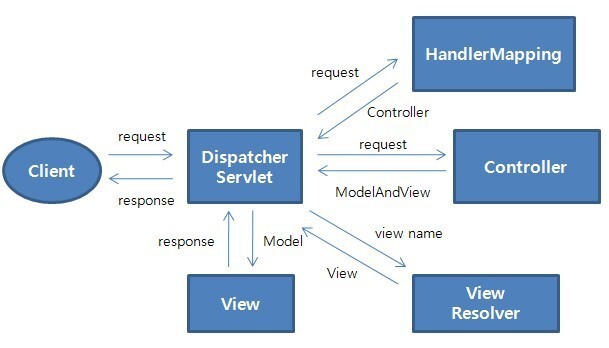
- DispatcherServlet
- The entry point that receives all requests coming into the application.
- It passes the request to the controller that actually handles it, receives the result, and controls the flow so an appropriate response can be rendered by the view.
- HandlerMapping
- Finds which controller should handle each request URL.
- Controller
- Handles the request directly and returns the result to the DispatcherServlet.
- ModelAndView
- Holds the controller result and information about the view that will display it.
- ViewResolver
- Finds the actual view from view-related information.
- View
- Creates the view that displays the result produced by the controller.
Difference Between Filter, Interceptor, And AOP In Spring
Filter
- Filters refine requests and responses before or after they pass through.
- Servlet filters run before the DispatcherServlet, and can modify request data or perform checks in front of configured resources.
- They exist outside the Spring context and operate on resources independently of Spring.
- They are not part of the Spring application layer.
Interceptor
- Interceptors run before and after request handling.
- Because they are placed before and after the Spring DispatcherServlet calls the controller, they handle controller-related requests and responses inside the Spring context.
AOP
- AOP means Aspect Oriented Programming.
- It complements OOP and does not replace it.
- It reduces duplication that is difficult to remove in object-oriented programs by handling cross-cutting concerns from an aspect-oriented point of view.
- It is commonly used when business-layer methods need fine-grained handling such as logging, transactions, or error handling.
- It can be applied freely around method execution points.
Differences Between The Three
- The execution order is generally
Filter > DispatcherServlet > Interceptor > AOP. - Interceptors and filters usually distinguish targets by address, while AOP can target join points in more diverse ways, such as by address, parameters, annotations, and methods.
Create The Spring Configuration File, web.xml
Specify The Spring Configuration File, Bean Definition File
web.xml
<?xml version="1.0" encoding="UTF-8"?>
<web-app xmlns:xsi="http://www.w3.org/2001/XMLSchema-instance"
  xmlns="http://xmlns.jcp.org/xml/ns/javaee"
  xsi:schemaLocation="http://xmlns.jcp.org/xml/ns/javaee http://xmlns.jcp.org/xml/ns/javaee/web-app_3_1.xsd"
  id="WebApp_ID" version="3.1">
 <display-name>springMVC</display-name>

  <listener>
    <listener-class>org.springframework.web.context.ContextLoaderListener</listener-class>
  </listener>
 <servlet>
   <servlet-name>dispatcherServlet</servlet-name>
    <servlet-class>org.springframework.web.servlet.DispatcherServlet</servlet-class>
    <init-param>
      <param-name>contextConfigLocation</param-name>
      <param-value></param-value>
   </init-param>
   <load-on-startup>1</load-on-startup>
  </servlet>
  <servlet-mapping>
   <servlet-name>dispatcherServlet</servlet-name>
    <url-pattern>/</url-pattern>
  </servlet-mapping>

</web-app>
- First, register the
org.springframework.web.context.ContextLoaderListenerclass as a listener. - Because this listener is registered, the Spring configuration file at
/WEB-INF/applicationContext.xmlis loaded. - This path and filename can be changed with
contextConfigLocation.
Change The Spring Configuration Filename
 <context-param>
   <param-name>contextConfigLocation</param-name>
    <param-value>/WEB-INF/spring/app.xml</param-value>
  </context-param>
  <listener>
    <listener-class>org.springframework.web.context.ContextLoaderListener</listener-class>
  </listener>
- The Spring configuration file is changed to
/WEB-INF/spring/app.xml.
Apply A Spring Configuration File To A Servlet
 <servlet>
   <servlet-name>dispatcherServlet</servlet-name>
    <servlet-class>org.springframework.web.servlet.DispatcherServlet</servlet-class>
    <init-param>
      <param-name>contextConfigLocation</param-name>
      <param-value>/WEB-INF/spring/mvc-servlet.xml</param-value>
    </init-param>
   <load-on-startup>1</load-on-startup>
  </servlet>
- A Spring configuration file can be configured per servlet.
- In that case, specify it with the
contextConfigLocationinit parameter. - The Spring configuration file is set to
/WEB-INF/spring/mvc-servlet.xml.
About org.springframework.web.servlet.DispatcherServlet
In a normal web application, developers create servlets directly.
In Spring Web MVC, Spring provides the servlet, so applications use org.springframework.web.servlet.DispatcherServlet instead.
The DispatcherServlet receives client requests, assigns them to controller classes annotated with @Controller, maps the controller return value to a view such as JSP, and returns the response to the client.
It performs overall control for Spring MVC and is configured in web.xml.
For this reason, developers often do not pay much attention to it while building Spring MVC web applications, but it performs many operations behind the scenes.
CharacterEncodingFilter
- The previous example omitted it, but
CharacterEncodingFiltershould also be configured. - It forces data sent from the client to use the specified character encoding.
- Internally, it executes
HttpServletRequest#setCharacterEncoding.
  <filter>
    <filter-name>CharacterEncodingFilter</filter-name>
    <filter-class>org.springframework.web.filter.CharacterEncodingFilter</filter-class>
   <init-param>
      <param-name>encoding</param-name>
     <param-value>utf-8</param-value>
    </init-param>
   <init-param>
      <param-name>forceEncoding</param-name>
      <param-value>true</param-value>
   </init-param>
 </filter>
 <filter-mapping>
    <filter-name>CharacterEncodingFilter</filter-name>
    <url-pattern>/*</url-pattern>
 </filter-mapping>
Bean Definition File
<beans xmlns="http://www.springframework.org/schema/beans"
  xmlns:xsi="http://www.w3.org/2001/XMLSchema-instance"
  xmlns:context="http://www.springframework.org/schema/context"
 xmlns:mvc="http://www.springframework.org/schema/mvc"
 xsi:schemaLocation="
   http://www.springframework.org/schema/beans
   http://www.springframework.org/schema/beans/spring-beans-4.2.xsd
    http://www.springframework.org/schema/context
   http://www.springframework.org/schema/context/spring-context-4.2.xsd
    http://www.springframework.org/schema/mvc
   http://www.springframework.org/schema/mvc/spring-mvc-4.2.xsd">

 <context:component-scan base-package="spring.test" />

 <mvc:annotation-driven />

 <bean
   class="org.springframework.web.servlet.view.InternalResourceViewResolver">
    <property name="prefix" value="/WEB-INF/" />
    <property name="suffix" value=".jsp" />
 </bean>
</beans>
The first element, component-scan, automatically loads classes annotated under the specified package.
The annotations loaded include @Controller, @Service, @Component, and @Repository.
The annotation-driven element automatically loads the configuration needed for Spring Web MVC.
It enables annotations such as @RequestMapping, @ModelAttribute, @SessionAttribute, and @RequestParam.
Finally, org.springframework.web.servlet.view.InternalResourceViewResolver is declared.
This specifies the location of JSP files.
The prefix and suffix are declared, and they are combined with the string returned by the controller to resolve the JSP file.
prefix string + controller return string + suffix string
For example, if the controller returns test, the following path is resolved.
"/WEB-INF/" + test + ".jsp" > "/WEB-INF/test.jsp"
For view downloads such as CSV or Excel downloads, use org.springframework.web.servlet.view.XmlViewResolver.
That topic is covered separately.
The <mvc:resources> Element
When accessing static resources such as images, CSS, or JavaScript, declare the directory to access as follows.
<mvc:resources mapping="/image/**" location="/WEB-INF/image/" />
A JSP that displays an image from the above directory can be written as follows.
<img src="./image/test.png"/>
Using Beans In JSP
To use Spring Java Beans conveniently from JSP, configure and call them as follows.
First, when configuring InternalResourceViewResolver in the Spring configuration file, set the exposeContextBeansAsAttributes property to true.
<bean class="org.springframework.web.servlet.view.InternalResourceViewResolver">
    <property name="exposeContextBeansAsAttributes" value="true" />
    <property name="prefix" value="/WEB-INF/jsp/" />
    <property name="suffix" value=".jsp" />
</bean>
Create a Java Bean file as follows.
A singleton object named foo is created.
@Component
public class Foo  {
    private String name;

    public String getName() {
        return name;
    }
}
Call the Spring Java Bean foo from JSP EL.
<%@page language="java" contentType="text/html; charset=UTF-8"%>
<div class="foo-name">
    <c:out value="${foo.name}"/>
</div>