Spring Security | What Is Spring Security? | Hello World
First, let’s create a simple example.
Create the file structure as shown below, and then create each file. You can use any tool that can create files.
File structure
.
├── build.gradle
└── src
    └── main
        └── webapp
            ├── WEB-INF
            │   ├── applicationContext.xml
            │   └── web.xml
            └── index.jsp
Dependencies in the Build Script
Create the build script file.
build.gradle
apply plugin: 'war'

sourceCompatibility = '1.8'
targetCompatibility = '1.8'
compileJava.options.encoding = 'UTF-8'

repositories {
    mavenCentral()
}

dependencies {
    providedCompile 'javax.servlet:javax.servlet-api:3.1.0'
    compile 'javax.servlet:jstl:1.2'
    compile 'org.springframework.security:spring-security-web:4.2.1.RELEASE'
    compile 'org.springframework.security:spring-security-config:4.2.1.RELEASE'
}

war.baseName = 'spring-security-sample'
In this minimal setup, spring-security-web and spring-security-config are added as dependencies.
    compile 'org.springframework.security:spring-security-web:4.2.1.RELEASE'
    compile 'org.springframework.security:spring-security-config:4.2.1.RELEASE'
spring-security-web
This module contains filters and web application related code. It is required when you need web authentication features and URL-based access control. The main package is org.springframework.security.web.
spring-security-config
This module contains code for parsing the namespace used when writing XML definitions and code for Java configuration. It is required when using XML-based configuration or Java configuration. The main package is org.springframework.security.config. Classes included here are not used directly in applications.
Initializing the Spring Container
Create the traditional Java web configuration file.
src/main/webapp/WEB-INF/web.xml
<?xml version="1.0" encoding="UTF-8"?>
<web-app xmlns="http://xmlns.jcp.org/xml/ns/javaee"
         xmlns:xsi="http://www.w3.org/2001/XMLSchema-instance"
         xsi:schemaLocation="http://xmlns.jcp.org/xml/ns/javaee
         http://xmlns.jcp.org/xml/ns/javaee/web-app_3_1.xsd"
         version="3.1">
    <filter>
        <filter-name>springSecurityFilterChain</filter-name>
        <filter-class>org.springframework.web.filter.DelegatingFilterProxy</filter-class>
    </filter>

    <filter-mapping>
        <filter-name>springSecurityFilterChain</filter-name>
        <url-pattern>/*</url-pattern>
    </filter-mapping>

    <listener>
        <listener-class>org.springframework.web.context.ContextLoaderListener</listener-class>
    </listener>
</web-app>
Initialize the Spring container as follows.
    <listener>
        <listener-class>org.springframework.web.context.ContextLoaderListener</listener-class>
    </listener>
By registering ContextLoaderListener as a listener, the Spring container, or ApplicationContext, is initialized.
If you do not explicitly specify which ApplicationContext class to use, XmlWebApplicationContext is used by default.
The following is defined in org/springframework/web/context/ContextLoader.properties inside spring-web-x.x.x.RELEASE.jar, and ContextLoaderListener is loaded when the servlet container is initialized.
# Default WebApplicationContext implementation class for ContextLoader.
# Used as fallback when no explicit context implementation has been specified as context-param.
# Not meant to be customized by application developers.

org.springframework.web.context.WebApplicationContext=org.springframework.web.context.support.XmlWebApplicationContext
By default, XmlWebApplicationContext reads WEB-INF/applicationContext.xml as the configuration file.
Applying Spring Security to the Application
Define DelegatingFilterProxy as a servlet filter in web.xml. At this time, define the <filter-name> as springSecurityFilterChain. When there is access to a URL defined in <filter-mapping>, Spring Security is applied.
DelegatingFilterProxy uses the name set in its own <filter-name> to obtain a bean that implements javax.servlet.Filter from the Spring container. It is a servlet filter that simply delegates processing to that bean.
Here, springSecurityFilterChain is specified in <filter-name>. This name matches the bean name of FilterChainProxy, which is automatically registered in the container when the <http> tag is used in applicationContext.xml later.
In other words, DelegatingFilterProxy acts as an intermediary between the servlet filter and Spring Security, or FilterChainProxy.
Spring Security Configuration
src/main/webapp/WEB-INF/applicationContext.xml
<?xml version="1.0" encoding="UTF-8"?>
<beans xmlns="http://www.springframework.org/schema/beans"
       xmlns:sec="http://www.springframework.org/schema/security"
       xmlns:xsi="http://www.w3.org/2001/XMLSchema-instance"
       xsi:schemaLocation="
         http://www.springframework.org/schema/beans
         http://www.springframework.org/schema/beans/spring-beans-3.0.xsd
         http://www.springframework.org/schema/security
         http://www.springframework.org/schema/security/spring-security.xsd">

    <sec:http>
        <sec:intercept-url pattern="/login" access="permitAll" />
        <sec:intercept-url pattern="/**" access="isAuthenticated()" />
        <sec:form-login />
        <sec:logout />
    </sec:http>

    <sec:authentication-manager>
        <sec:authentication-provider>
            <sec:user-service>
                <sec:user name="devkuma" password="1234" authorities="ROLE_USER" />
            </sec:user-service>
        </sec:authentication-provider>
    </sec:authentication-manager>
</beans>
applicationContext.xml is a standard Spring configuration file for Spring bean definitions. It is not a special configuration file only for Spring Security.
Because http://www.springframework.org/schema/security is loaded through xmlns, Spring Security tags become available. For reference, using these Spring Security specific tags is called using a namespace. With these tags, Spring Security can be configured in this file.
The configuration above can be summarized as follows.
- Anyone can access
/loginby usingpermitAll. - Access to all other paths,
/**, must be authenticated by usingisAuthenticated(). - The login method is form login.
- Logout is available.
A user is defined with the name
devkuma, password1234, and the roleROLE_USER.
Next, each tag is described in a little more detail.
<http>
When the <http> tag is defined, several beans are automatically registered in the container. Among them, the following two types are important.
- FilterChainProxy
- SecurityFilterChain
FilterChainProxy is registered in the container with the bean name springSecurityFilterChain. This class becomes the entry point for Spring Security processing.
SecurityFilterChain itself is a simple interface, and DefaultSecurityFilterChain is registered in the container as its implementation class. As the name suggests, SecurityFilterChain chains javax.servlet.Filter instances that provide security features and holds several filters internally. Spring Security provides security features through filters.
As you can tell from the word Proxy in the name, FilterChainProxy does not perform the processing itself. It delegates the actual processing to the filters held by SecurityFilterChain.
<intercept-url>
This tag defines the conditions required for access, or access control, for URL patterns.
The pattern attribute can be written in Ant path format.
The access attribute specifies the conditions required to access the URL specified by the pattern attribute. permitAll means all access is allowed and authentication is not required. isAuthenticated() means access is allowed if the user is authenticated, or logged in.
The access attribute is written with Spring Expression Language, or SpEL, Spring’s own expression language.
<form-login>
This tag defines that form authentication is required.
By default, authentication errors redirect to /login.
In the default case, accessing /login displays a simple login page provided by Spring Security.
This default login page is generated by DefaultLoginPageGeneratingFilter inside spring-security-web-x.x.x.RELEASE.jar.
<logout>
Adding this tag makes logout available.
By default, logout is performed when a POST request is sent to /logout.
<authentication-manager>
This tag defines AuthenticationManager as a bean. AuthenticationManager is required for classes that perform authentication processing.
AuthenticationManager itself is an interface, and ProviderManager is used as its implementation class.
ProviderManager does not perform specific authentication processing itself. It delegates authentication processing to an AuthenticationProvider that is created later.
<authentication-manager>
This tag defines AuthenticationManager as a bean.
AuthenticationManager is required for classes that perform authentication processing.
AuthenticationManager itself is an interface, and ProviderManager is used as its implementation class.
ProviderManager does not perform specific authentication processing itself. It delegates authentication processing to an AuthenticationProvider described later.
<authentication-provider>
This tag defines AuthenticationProvider as a bean. This interface provides concrete authentication processing depending on the authentication type.
For example, the class that provides LDAP authentication processing is LdapAuthenticationProvider.
When this tag is declared, DaoAuthenticationProvider is registered in the container. This class obtains user information from UserDetailsService and performs authentication processing.
<user-service>
This tag registers UserDetailsService as a bean. This interface provides the ability to retrieve detailed user information, or UserDetails.
When this tag is declared, InMemoryUserDetailsManager is registered in the container.
As its name suggests, this class can store user information in memory. It is usually implemented for checking behavior.
<user>
This tag defines a UserDetails instance. This interface defines getter methods and similar methods for accessing detailed user information.
When this tag is declared, an instance of the User class is created.
The name, password, and authorities attributes can be used to specify the name that identifies the user, the password, and the authorities.
Display Screen
src/main/webapp/index.jsp
<%@taglib prefix="c" uri="http://java.sun.com/jsp/jstl/core" %>
<%@page contentType="text/html" pageEncoding="UTF-8"%>
<!DOCTYPE html>
<html>
    <head>
        <meta charset="utf-8" />
        <title>Hello Spring Security!!</title>
    </head>
    <body>
        <h1>Hello Spring Security!!</h1>

        <c:url var="logoutUrl" value="/logout" />
        <form action="${logoutUrl}" method="post">
            <input type="submit" value="logout" />
            <input type="hidden" name="${_csrf.parameterName}" value="${_csrf.token}" />
        </form>
    </body>
</html>
CSRF (Cross-site request forgery)
By default, CSRF protection is set to true. Therefore, when sending a request, you must pass a token for CSRF protection.
The token value and parameter name are stored in request scope under the name _csrf.
CSRF protection will be explained in more detail later.
Check the Behavior
Create a WAR file, spring-security-sample.war, with the gradle war command and deploy it to Tomcat.
For deployment, you only need to place the WAR file in {Tomcat installation path}/webapps.
After placing the file, access http://localhost:8080/spring-security-sample in a browser.
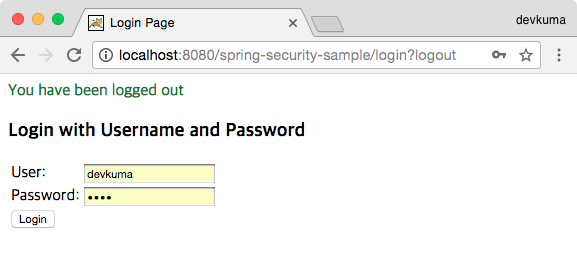
When the login screen appears, enter devkuma and 1234 for User and Password, respectively, and click the Login button.
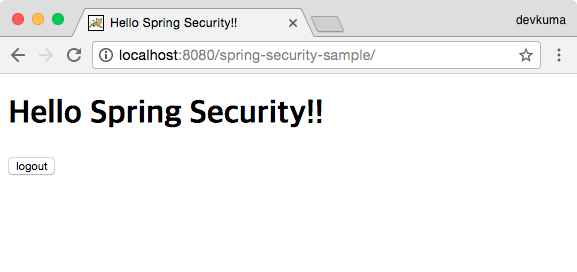
The contents of index.jsp are displayed. Then click the logout button.
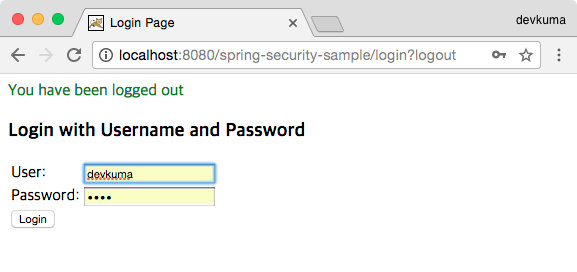
Logout is completed, and you return to the login page.
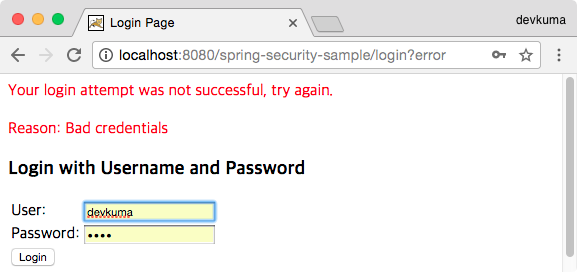
If login fails, an error message is displayed in red as shown above.