Spring Batch Scaling and Parallel Processing | Official Reference Translation

Spring WebFlux, WebClient, WebSocket, RSocket.
This document is a Korean translation of the official reference for Spring Batch Reference Documentation Version 5.0.0.
Scaling and Parallel Processing
Many batch processing problems can be solved with a single-threaded, single-process job, so before considering a more complex implementation, it is a good idea to properly verify whether that approach meets the requirements. Measure the performance of a realistic job and first check whether the simplest implementation meets your needs. Even on standard hardware, files of several hundred megabytes can be read and written in less than a minute.
When you are ready to begin implementing a job with multiple parallel processes, Spring Batch provides several options. These options are described in this chapter. Broadly speaking, parallel processing has two modes.
- Single process, multi-threaded
- Multi-process
They are categorized as follows.
- Multi-threaded step (single-process)
- Parallel steps (single-process)
- Remote chunking of a step (multi-process)
- Partitioning a step (single or multi-process)
First, we look at the single-process options. Then we look at the multi-process options.
Multi-threaded Step
The easiest way to start parallel processing is to add a TaskExecutor to the step configuration.
For example, you can add the property to the tasklet as follows.
<step id="loading">
    <tasklet task-executor="taskExecutor">...</tasklet>
</step>
If you use Java configuration, you can add a TaskExecutor to the step as shown in the following example.
Java Configuration
@Bean
public TaskExecutor taskExecutor() {
    return new SimpleAsyncTaskExecutor("spring_batch");
}

@Bean
public Step sampleStep(TaskExecutor taskExecutor, JobRepository jobRepository, PlatformTransactionManager transactionManager) {
	return new StepBuilder("sampleStep", jobRepository)
				.<String, String>chunk(10, transactionManager)
				.reader(itemReader())
				.writer(itemWriter())
				.taskExecutor(taskExecutor)
				.build();
}
For example, taskExecutor is a reference to another bean definition that implements the TaskExecutor interface. TaskExecutor (Javadoc) is a standard Spring interface. For more information about available implementations, see the Spring user guide. The simplest multi-threaded TaskExecutor is SimpleAsyncTaskExecutor.
The result of the configuration above is that the Step reads, processes, and writes each chunk, or each commit interval, of items in a separate execution thread. This means there is no fixed order for the items being processed, and a chunk may contain items that are not consecutive compared with a single-threaded case. In addition to limits imposed by the task executor, such as whether it is backed by a thread pool, the tasklet configuration has a throttle limit, with a default of 4. You may need to increase this limit so the thread pool is fully used.
For example, you can increase throttle-limit as follows.
<step id="loading"> <tasklet
    task-executor="taskExecutor"
    throttle-limit="20">...</tasklet>
</step>
If you use Java configuration, the builder provides access to the throttle limit as follows.
Java Configuration
@Bean
public Step sampleStep(TaskExecutor taskExecutor, JobRepository jobRepository, PlatformTransactionManager transactionManager) {
	return new StepBuilder("sampleStep", jobRepository)
				.<String, String>chunk(10, transactionManager)
				.reader(itemReader())
				.writer(itemWriter())
				.taskExecutor(taskExecutor)
				.throttleLimit(20)
				.build();
}
Concurrency may also be limited by pooled resources used in the step, such as a DataSource. The pool for such resources should be at least as large as the number of concurrent threads required by the step.
There are some practical limitations when using a multi-threaded Step implementation in common batch use cases.
Many participating objects in a Step, such as readers and writers, are stateful. If state is not separated by thread, these components cannot be used in a multi-threaded Step. In particular, most Spring Batch readers and writers are not designed for multi-threaded use.
However, stateless or thread-safe readers and writers can be used. The Spring Batch samples on GitHub also include a sample called parallelJob that shows how to use a process indicator, such as Preventing State Persistence, to track already processed items in a database input table.
Spring Batch provides several implementations such as ItemWriter and ItemReader. In general, the Javadoc states whether an implementation is thread-safe or what must be done to avoid issues in a concurrent environment. If the Javadoc has no information, check whether the implementation has state. If a reader is not thread-safe, you can decorate it with the provided SynchronizedItemStreamReader or use your own synchronized delegate. It is enough to synchronize calls to read(), and if processing and writing are the most expensive parts of the chunk, the step can finish much faster than with a single-threaded configuration.
Parallel Steps
As long as application logic that requires parallel processing can be split into separate roles and assigned to separate steps, it can be parallelized in a single process. Running parallel steps is simple to configure and use.
For example, steps (step1, step2) and step3 can be run in parallel as follows.
<job id="job1">
    <split id="split1" task-executor="taskExecutor" next="step4">
        <flow>
            <step id="step1" parent="s1" next="step2"/>
            <step id="step2" parent="s2"/>
        </flow>
        <flow>
            <step id="step3" parent="s3"/>
        </flow>
    </split>
    <step id="step4" parent="s4"/>
</job>

<beans:bean id="taskExecutor" class="org.spr...SimpleAsyncTaskExecutor"/>
If you use Java configuration, steps (step1, step2) and step3 can be run in parallel as follows.
Java Configuration
@Bean
public Job job(JobRepository jobRepository) {
    return new JobBuilder("job", jobRepository)
        .start(splitFlow())
        .next(step4())
        .build()        //builds FlowJobBuilder instance
        .build();       //builds Job instance
}

@Bean
public Flow splitFlow() {
    return new FlowBuilder<SimpleFlow>("splitFlow")
        .split(taskExecutor())
        .add(flow1(), flow2())
        .build();
}

@Bean
public Flow flow1() {
    return new FlowBuilder<SimpleFlow>("flow1")
        .start(step1())
        .next(step2())
        .build();
}

@Bean
public Flow flow2() {
    return new FlowBuilder<SimpleFlow>("flow2")
        .start(step3())
        .build();
}

@Bean
public TaskExecutor taskExecutor() {
    return new SimpleAsyncTaskExecutor("spring_batch");
}
The configurable task executor is used to specify the TaskExecutor implementation that runs the individual flows. The default is SyncTaskExecutor, but an asynchronous TaskExecutor is required to run steps in parallel. This work ensures that all flows in the split complete before aggregating and moving the exit status.
For more information, see the Split Flows section.
Remote Chunking
In remote chunking, Step processing is split across multiple processes that communicate with each other through middleware. The following image shows this pattern.
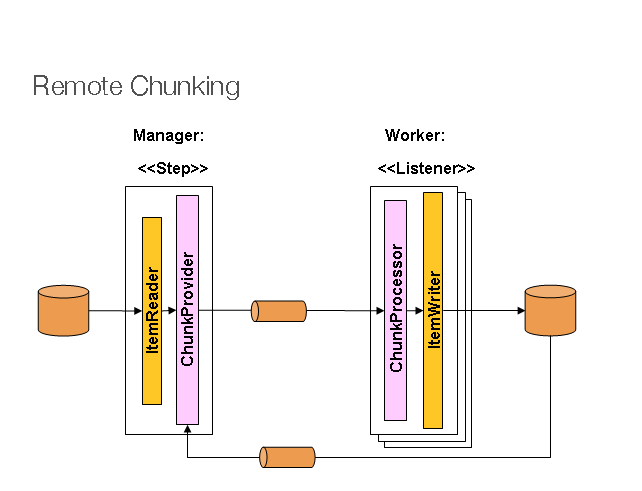
Figure 1: Remote Chunking
The manager component is a single process, and the workers are multiple remote processes. This pattern works best when the manager is not a bottleneck, so processing is more expensive than reading items, which is often the case in practice.
The manager is an implementation of a Spring Batch Step with an ItemWriter replaced by a generic version that knows how to send chunks of items as messages to middleware. A worker is a standard listener for the middleware in use, for example a MesssageListener implementation in JMS, and its role is to process chunks of ItemWriter items through the ChunkProcessor interface by using a standard ItemWriter or ItemProcessor. One advantage of using this pattern is that the reader, processor, and writer components are off-the-shelf, the same ones used to run the step locally. Items are dynamically partitioned and work is shared through middleware, so load balancing is automatic if all listeners are eager consumers.
The middleware must be durable and must guarantee that each message is delivered to one consumer. JMS is the most obvious candidate, but other options used in grid computing and shared memory product spaces, such as JavaSpaces, also exist.
For more information, see Spring Batch integration - Remote Chunking.
Partitioning
Spring Batch also provides an SPI for splitting and remotely executing Step executions. In this case, the remote participating object is a Step instance, and it can be configured and used in the same way as local processing. The following image shows the pattern.
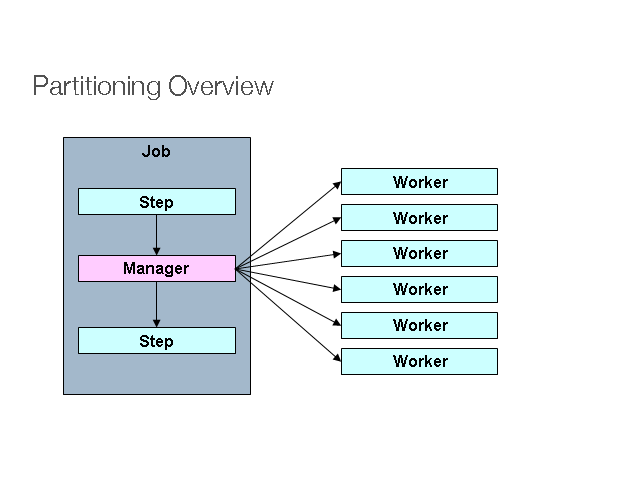
Figure 2: Partitioning
On the left, a Job runs as a series of Step instances, and one of the Step instances is marked as the manager. All workers in this figure are the same instance of the Step, effectively replacing the manager and resulting in the same outcome for the Job. Workers are generally remote services, but they can also be local threads of execution. In this pattern, messages sent by the manager to workers do not have to be durable or guarantee delivery. Spring Batch metadata in the JobRepository allows each worker to run only once for each execution of the Job.
The Spring Batch SPI consists of a special implementation of Step, called PartitionStep, and two strategy interfaces that must be implemented depending on the specific environment. The strategy interfaces are PartitionHandler and StepExecutionSplitter, and the following sequence diagram shows their roles.
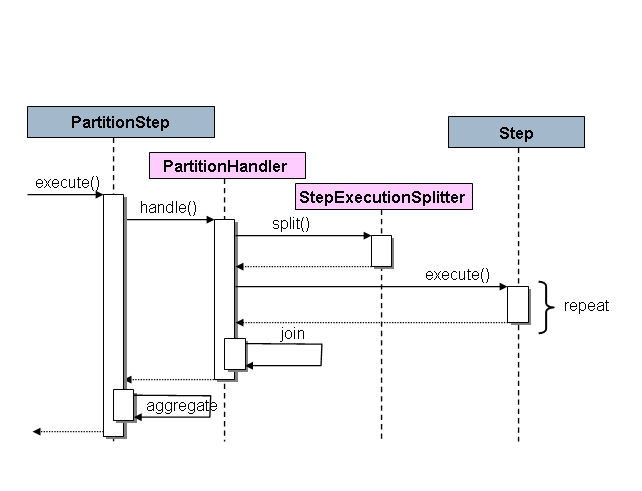
Figure 3: Partitioning SPI
In this case, the Step on the right is a remote worker, so there are many objects and processes playing this role, and the PartitionStep is shown as driving the execution.
The following example shows PartitionStep configuration when XML configuration is used.
<step id="step1.manager">
    <partition step="step1" partitioner="partitioner">
        <handler grid-size="10" task-executor="taskExecutor"/>
    </partition>
</step>
The following example shows PartitionStep configuration when Java configuration is used.
Java Configuration
@Bean
public Step step1Manager() {
    return stepBuilderFactory.get("step1.manager")
        .<String, String>partitioner("step1", partitioner())
        .step(step1())
        .gridSize(10)
        .taskExecutor(taskExecutor())
        .build();
}
Like the throttle-limit property of a multi-threaded step, the grid-size property can prevent the task executor from sending too many requests to a single step.
Like the throttleLimit method of a multi-threaded step, the gridSize method can prevent the task executor from sending too many requests to a single step.
There is a simple example in the unit test suite of the Spring Batch samples on GitHub. See the partition*Job.xml configuration, copy it, and extend it for use.
Spring Batch creates step executions for partitions named like step1:partition0. Many people prefer naming the manager step step1:manager for consistency. A step can use an alias by specifying the name attribute instead of the id attribute.
PartitionHandler
PartitionHandler is the component that understands the structure of a remote or grid environment. It can send StepExecution requests to remote Step instances wrapped in a fabric-specific format such as a DTO. It does not need to know how to partition input data or how to aggregate results from multiple Step executions. Generally speaking, resilience and failover are features of the fabric, so it does not need to know about them. In any case, Spring Batch always provides restartable behavior regardless of the fabric. A failed Job can be restarted at any time, and in that case only the failed Step is run again.
The PartitionHandler interface can have implementations specialized for various fabric types, such as simple RMI remoting, EJB remoting, custom web services, JMS, Java Spaces, shared memory grids such as Terracotta and Coherence, and grid execution fabrics such as GridGain. Spring Batch does not include its own implementation of a grid or remote fabric.
However, Spring Batch provides a convenient implementation of PartitionHandler that uses Spring’s TaskExecutor strategy to run each Step instance locally in a separate execution thread. This implementation is called TaskExecutorPartitionHandler.
TaskExecutorPartitionHandler is the default for steps configured with the XML namespace described earlier. It can also be configured explicitly as follows.
<step id="step1.manager">
    <partition step="step1" handler="handler"/>
</step>

<bean class="org.spr...TaskExecutorPartitionHandler">
    <property name="taskExecutor" ref="taskExecutor"/>
    <property name="step" ref="step1" />
    <property name="gridSize" value="10" />
</bean>
You can explicitly configure TaskExecutorPartitionHandler with Java configuration as follows.
Java Configuration
@Bean
public Step step1Manager() {
    return stepBuilderFactory.get("step1.manager")
        .partitioner("step1", partitioner())
        .partitionHandler(partitionHandler())
        .build();
}

@Bean
public PartitionHandler partitionHandler() {
    TaskExecutorPartitionHandler retVal = new TaskExecutorPartitionHandler();
    retVal.setTaskExecutor(taskExecutor());
    retVal.setStep(step1());
    retVal.setGridSize(10);
    return retVal;
}
Because the gridSize property determines how many pieces the step is split into and executed as, it can be matched to the TaskExecutor thread pool size. Or it can be set larger than the available number of threads to reduce work blocks.
TaskExecutorPartitionHandler is useful for Step instances with heavy I/O processing, such as large file copying and file system replication in content management systems. It can also be used for remote execution by providing a Step implementation that is a proxy for a remote call, such as using Spring Remoting.
Partitioner
The role of Partitioner is simple. It creates an execution context as input parameters for a new step execution, and it does not need to worry about restart. As shown in the interface definition below, it has a single method.
public interface Partitioner {
    Map<String, ExecutionContext> partition(int gridSize);
}
The return value of this method maps the unique name of each step execution, a String, to input parameters of type ExecutionContext. The name later appears in the batch metadata as the step name of the partitioned StepExecution. ExecutionContext simply stores key-value pairs, so it can contain a series of primary keys, row numbers, or positions in input files. The remote Step is then usually bound to the context input by using #{...} placeholders, or late binding in StepScope, as described in the next section.
The step execution name, which is the key in the Map returned by Partitioner, must be unique among step executions in the Job, but there are no other specific constraints. The easiest way to do this, and to make names meaningful to users, is to use a prefix and suffix naming convention. The suffix is a simple counter. The framework provides SimplePartitioner, which uses this convention.
The PartitionNameProvider interface can be used to specify partition names separately from the partitions themselves. If Partitioner implements this interface, only the names are queried during restart. This can be a useful optimization when partitioning is expensive. The names provided by PartitionNameProvider must match the names provided by Partitioner.
Binding Input Data to Steps
It is very efficient when steps performed by PartitionHandler have the same configuration and input parameters are bound from the ExecutionContext at runtime. This can be done easily with Spring Batch’s StepScope feature, which is described in more detail in the late binding section. For example, if a Partitioner creates ExecutionContext instances by using a fileName property key that points to a different file or directory for each step invocation, the Partitioner output might look like the following table.
Table 1: Example step execution names for execution contexts provided by a Partitioner targeting directory processing
| Step execution name (key) | ExecutionContext (value) |
|---|---|
| filecopy:partition0 | fileName =/home/data/one |
| filecopy:partition1 | fileName =/home/data/two |
| filecopy:partition2 | fileName =/home/data/three |
Then the file name can be bound to the step by using late binding with the execution context.
The following example shows how to define late binding in XML.
XML Configuration
<bean id="itemReader" scope="step"
      class="org.spr...MultiResourceItemReader">
    <property name="resources" value="#{stepExecutionContext[fileName]}/*"/>
</bean>
The following example shows how to define late binding in Java.
Java Configuration
@Bean
public MultiResourceItemReader itemReader(
	@Value("#{stepExecutionContext['fileName']}/*") Resource [] resources) {
	return new MultiResourceItemReaderBuilder<String>()
			.delegate(fileReader())
			.name("itemReader")
			.resources(resources)
			.build();
}