Creating Spring REST Docs with Kotlin
Overview
Spring REST Docs is used to document APIs for RESTful services. API documentation is generated from test code.
Here, we will create a simple Spring REST Docs project with Kotlin.
Create the Project
Create a Spring Boot starter project with the following curl command.
curl https://start.spring.io/starter.tgz \
-d bootVersion=2.5.6 \
-d dependencies=web,restdocs \
-d baseDir=spring-rest-docs \
-d groupId=com.devkuma \
-d artifactId=spring-rest-docs \
-d packageName=com.devkuma.rest.docs \
-d applicationName=RestDocsApplication \
-d packaging=jar \
-d language=kotlin \
-d javaVersion=11 \
-d type=gradle-project | tar -xzvf -
Running the command above adds the Spring Web and Spring REST Docs dependencies.
Check the Generated Project
Project File Structure
If the project was generated correctly, its file structure is as follows.
.
├── HELP.md
├── build.gradle.kts
├── gradle
│   └── wrapper
│       ├── gradle-wrapper.jar
│       └── gradle-wrapper.properties
├── gradlew
├── gradlew.bat
├── settings.gradle.kts
└── src
    ├── main
    │   ├── kotlin
    │   │   └── com
    │   │       └── devkuma
    │   │           └── rest
    │   │               └── docs
    │   │                   └── RestDocsApplication.kt
    │   └── resources
    │       ├── application.properties
    │       ├── static
    │       └── templates
    └── test
        └── kotlin
            └── com
                └── devkuma
                    └── rest
                        └── docs
                            └── RestDocsApplicationTests.kt
Build Script
/build.gradle.kts
// ... omitted ...

dependencies {
    implementation("org.springframework.boot:spring-boot-starter-web")
    implementation("com.fasterxml.jackson.module:jackson-module-kotlin")
    implementation("org.jetbrains.kotlin:kotlin-reflect")
    implementation("org.jetbrains.kotlin:kotlin-stdlib-jdk8")
    testImplementation("org.springframework.boot:spring-boot-starter-test")
    testImplementation("org.springframework.restdocs:spring-restdocs-mockmvc")
}

// ... omitted ...
You can see that the Spring REST Docs library (spring-restdocs-mockmvc) is included as a test dependency.
REST Docs Configuration
Fix the Initial Build Script Error
When you first build the project, an error like the following may occur.
> Configure project :
e: /Users/kimkc/develop/tutorial/spring-tutorial/spring-rest-docs/build.gradle.kts:42:14: Unresolved reference: snippetsDir
e: /Users/kimkc/develop/tutorial/spring-tutorial/spring-rest-docs/build.gradle.kts:46:13: Unresolved reference: snippetsDir
e: /Users/kimkc/develop/tutorial/spring-tutorial/spring-rest-docs/build.gradle.kts:47:12: Unresolved reference. None of the following candidates is applicable because of receiver type mismatch:
public val NamedDomainObjectContainer<KotlinSourceSet>.test: NamedDomainObjectProvider<KotlinSourceSet> defined in org.gradle.kotlin.dsl
public val SourceSetContainer.test: NamedDomainObjectProvider<SourceSet> defined in org.gradle.kotlin.dsl
public val TaskContainer.test: TaskProvider<Test> defined in org.gradle.kotlin.dsl
The error occurs because the configuration file was not generated correctly. In the code below, the task uses a variable named snippetsDir, but snippetsDir is not declared properly.
extra["snippetsDir"] = file("build/generated-snippets")

... omitted ...

tasks.test {
    outputs.dir(snippetsDir)
}

tasks.asciidoctor {
    inputs.dir(snippetsDir)
    dependsOn(test)
}
Change it as follows.
//extra["snippetsDir"] = file("build/generated-snippets")
val snippetsDir by extra { file("build/generated-snippets") } // variable change

... omitted ...

tasks.test {
    outputs.dir(snippetsDir)
}

tasks.asciidoctor {
    inputs.dir(snippetsDir)
    //dependsOn(test)
    dependsOn(tasks.test) // changed
}
Run the build again, and the error should disappear.
Add REST Docs Configuration to the Build Script
... omitted ....

dependencies {
    implementation("org.springframework.boot:spring-boot-starter-web")
    implementation("com.fasterxml.jackson.module:jackson-module-kotlin")
    implementation("org.jetbrains.kotlin:kotlin-reflect")
    implementation("org.jetbrains.kotlin:kotlin-stdlib-jdk8")
    testImplementation("org.springframework.boot:spring-boot-starter-test")
    testImplementation("org.springframework.restdocs:spring-restdocs-mockmvc")

    asciidoctor("org.springframework.restdocs:spring-restdocs-asciidoctor") // 1
}

... omitted ....

tasks.asciidoctor {
    inputs.dir(snippetsDir)
    //dependsOn(test)
    dependsOn(tasks.test) // changed

    doFirst { // 2
        delete {
            file("src/main/resources/static/docs")
        }
    }
}

tasks.register("copyHTML", Copy::class) { // 3
    dependsOn(tasks.asciidoctor)
    from(file("build/asciidoc/html5"))
    into(file("src/main/resources/static/docs"))
}

tasks.build { // 4
    dependsOn(tasks.getByName("copyHTML"))
}

tasks.bootJar { // 5
    dependsOn(tasks.asciidoctor)
    dependsOn(tasks.getByName("copyHTML"))
}
The script above is explained below.
- Add the
asciidoctordependency.- If this dependency is not added, the documentation may not be generated correctly.
- Delete the HTML generated by the
asciidoctortask.- This removes the generated HTML documentation.
- Register the
copyHTMLtask.- This task depends on
tasks.asciidoctor. - As its task work, it copies the HTML documents in the build context path (
build/asciidoc/html5) tosrc/main/resources/static/docs. This makes it possible to serve the generated specification documents when the actual application runs.
- This task depends on
- Run
copyHTMLduring the build.- The
dependsOnfunction adds a dependency on thecopyHTMLtask. - When the build task runs,
copyHTMLruns first, and then the build starts.
- The
- Generate and copy the documentation when building an executable jar.
- When the
bootJartask runs, theasciidoctorandcopyHTMLtasks run first.
- When the
Implement the REST API
Let’s create a simple REST API to generate API documentation.
Create the Entity Class
/src/main/kotlin/com/devkuma/rest/docs/contrentityoller/Product.kt
package com.devkuma.rest.docs.entity

data class Product(
    val code: String,
    val name: String,
    val price: Int
)
Create the Controller Class
/src/main/kotlin/com/devkuma/rest/docs/controller/ProductController.kt
package com.devkuma.rest.docs.controller

import com.devkuma.rest.docs.entity.Product
import org.springframework.web.bind.annotation.GetMapping
import org.springframework.web.bind.annotation.PathVariable
import org.springframework.web.bind.annotation.RequestMapping
import org.springframework.web.bind.annotation.RestController

@RestController
@RequestMapping("/v1/products")
class ProductController {

    private var products: List<Product> = listOf(
        Product("1", "Keyboard", 2000),
        Product("2", "Monitor", 3000),
        Product("3", "Mouse", 1000),
    )

    @GetMapping("")
    fun getProducts(): List<Product> {
        return products
    }

    @GetMapping("/{code}")
    fun getProduct(@PathVariable code: String): Product {
        return products.first { p -> p.code.equals(code, true) }
    }
}
Create the Test Code
Now write the test code for the API documentation.
/src/test/kotlin/com/devkuma/rest/docs/controller/ProductControllerTests.kt
package com.devkuma.rest.docs.controller

import org.hamcrest.CoreMatchers.containsString
import org.junit.jupiter.api.Test
import org.springframework.beans.factory.annotation.Autowired
import org.springframework.boot.test.autoconfigure.restdocs.AutoConfigureRestDocs
import org.springframework.boot.test.autoconfigure.web.servlet.WebMvcTest
import org.springframework.restdocs.mockmvc.MockMvcRestDocumentation.document
import org.springframework.restdocs.mockmvc.RestDocumentationRequestBuilders
import org.springframework.restdocs.payload.PayloadDocumentation.fieldWithPath
import org.springframework.restdocs.payload.PayloadDocumentation.responseFields
import org.springframework.restdocs.request.RequestDocumentation.parameterWithName
import org.springframework.restdocs.request.RequestDocumentation.pathParameters
import org.springframework.test.web.servlet.MockMvc
import org.springframework.test.web.servlet.request.MockMvcRequestBuilders.get
import org.springframework.test.web.servlet.result.MockMvcResultMatchers
import org.springframework.test.web.servlet.result.MockMvcResultMatchers.status

@WebMvcTest(ProductController::class)
@AutoConfigureRestDocs
class ProductControllerTests {

    @Autowired
    private lateinit var mockMvc: MockMvc

    @Test
    fun `GET v1-product 200 ok`() { // 1

        // When
        val result = mockMvc.perform(get("/v1/products/2"))

        // Then
        result.andExpect(status().isOk)
            .andExpect(MockMvcResultMatchers.content().string(containsString("Monitor")))
    }

    @Test
    fun `GET v1-product 200 ok document`() { // 2
        // When
        val result = mockMvc.perform(RestDocumentationRequestBuilders.get("/v1/products/{code}", 2))

        // Then
        result.andExpect(status().isOk)
            .andExpect(MockMvcResultMatchers.content().string(containsString("Monitor")))
            .andDo(
                document(
                    "product/get-product-by-id",
                    pathParameters(
                        parameterWithName("code").description("Product Unique Identifier")
                    ), responseFields(
                        fieldWithPath("code").description("Product Unique Identifier"),
                        fieldWithPath("name").description("Name of the product"),
                        fieldWithPath("price").description("Product Price")
                    )
                )
            )
    }
}
The code above is explained below.
- This is simple test code for testing.
- This code runs the test and generates documentation.
After running the test code, check whether the snippet generation folder (build/generated-snippets) was created correctly.
build/generated-snippets
└── product
    └── get-product-by-id
        ├── curl-request.adoc
        ├── http-request.adoc
        ├── http-response.adoc
        ├── httpie-request.adoc
        ├── path-parameters.adoc
        ├── request-body.adoc
        ├── response-body.adoc
        └── response-fields.adoc
Check the Gradle Version If an Error Occurs During Testing
After adding the settings to the build script above, a build may fail with an error like the following.
... omitted ...

FAILURE: Build failed with an exception.

* What went wrong:
Some problems were found with the configuration of task ':asciidoctor' (type 'AsciidoctorTask').
  - In plugin 'org.asciidoctor.convert' type 'org.asciidoctor.gradle.AsciidoctorTask' method 'asGemPath()' should not be annotated with: @Optional, @InputDirectory.

... omitted ...
This is an issue that occurs in Gradle 7. There is a workaround, but it is complicated and not recommended. It may be better to consider upgrading the version after it is officially resolved later.
Change the Gradle version as follows.
distributionBase=GRADLE_USER_HOME
distributionPath=wrapper/dists
#distributionUrl=https\://services.gradle.org/distributions/gradle-7.2-bin.zip
distributionUrl=https\://services.gradle.org/distributions/gradle-6.9.1-bin.zip
zipStoreBase=GRADLE_USER_HOME
zipStorePath=wrapper/dists
Write AsciiDoc
AsciiDoc documents use the .adoc extension and follow the AsciiDoc syntax.
/src/docs/asciidoc/index.adoc
=== Get Product By Id
Obtains a specific products by its unique identifier.

==== Sample Request
include::{snippets}/product/get-product-by-id/http-request.adoc[]

==== Sample Response
include::{snippets}/product/get-product-by-id/http-response.adoc[]

==== CURL sample
include::{snippets}/product/get-product-by-id/curl-request.adoc[]

==== Path Parameters
include::{snippets}/product/get-product-by-id/path-parameters.adoc[]

==== Response Fields
include::{snippets}/product/get-product-by-id/response-fields.adoc[]
Check the asciidoctor Dependency
If you run the build and see an error like the following:
> Task :asciidoctor
asciidoctor: WARNING: dropping line containing reference to missing attribute: snippets
and the HTML document is not generated correctly,
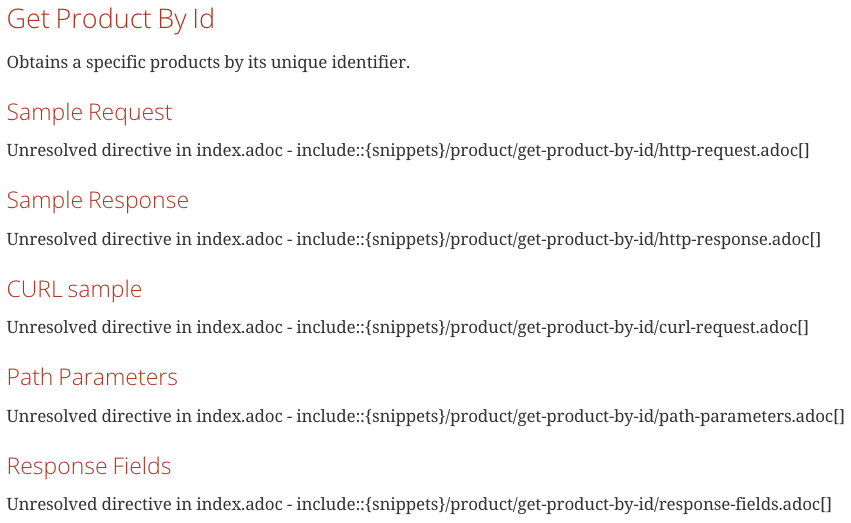
check whether the spring-restdocs-asciidoctor dependency is configured correctly.
dependencies {
    ... omitted ...

    asciidoctor("org.springframework.restdocs:spring-restdocs-asciidoctor") // 1
}
If You Use Git
The generated HTML document does not need to be managed in version control, so remove it from managed files.
Add the excluded folder to the .gitignore file as follows.
**/src/main/resources/static/docs/
Final Check
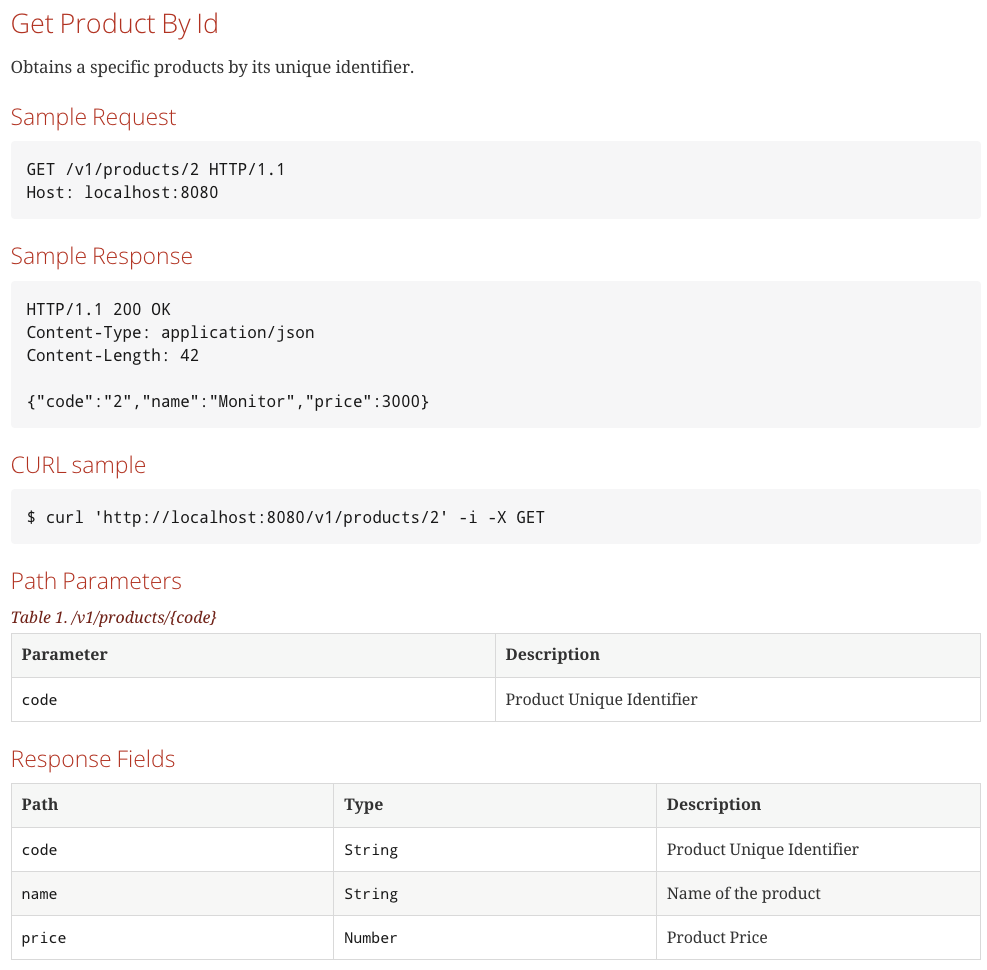
If the documentation is finally generated correctly, you can see a document like the following.
Closing
All source code above is available on GitHub.
References
- JavadevJournal | Spring REST Docs
- Asciidoctor Gradle Plugin Suite 3.1.0
- My First SpringRestDocs Application, Part 1
- Spring REST Docs Basic Configuration and Creating API Documentation