Spring Data Neo4j - Add and Query Neo4j Data
Overview
Neo4j is one of the graph databases, and Spring Data provides a framework that offers an interface for working with Neo4j.
This article creates a simple project that uses Spring Data Neo4j with Kotlin.
Preparing the Neo4j Server
Neo4j is an open source server, so you can install it for free or run it with Docker.
There are three ways to install Neo4j in a macOS environment.
- Install by downloading in a macOS environment
- Install with Homebrew in a macOS environment
- Install with Docker in a macOS environment
Use whichever method you prefer.
Creating the Neo4j Project
Create the initial Spring Boot project with the following curl command.
curl https://start.spring.io/starter.tgz \
-d bootVersion=3.0.6 \
-d dependencies=data-neo4j \
-d baseDir=spring-data-neo4j \
-d groupId=com.devkuma \
-d artifactId=spring-data-neo4j \
-d packageName=com.devkuma.neo4j \
-d applicationName=Neo4jApplication \
-d packaging=jar \
-d language=kotlin \
-d javaVersion=17 \
-d type=gradle-project-kotlin | tar -xzvf -
Running this command creates a project with Java 17 and Spring Boot 3.0.6.
Build Script
Add the libraries required to run Neo4j to the build script as follows.
/build.gradle.kts
dependencies {
	implementation("org.springframework.boot:spring-boot-starter-data-neo4j")
	implementation("org.jetbrains.kotlin:kotlin-reflect")
	testImplementation("org.springframework.boot:spring-boot-starter-test")
}
You can see that the Spring Data Neo4j library (spring-boot-starter-data-neo4j) is included in the dependencies.
Defining the Entity
Neo4j connects entities and relationships between entities, and both directions are equally important. Suppose you are modeling a system that stores records for each person. In this case, you also want to track a specific person’s colleagues. In the entity below, that corresponds to teammates.
src/main/java/com/devkuma/neo4j/entity/Person.java
package com.devkuma.neo4j.entity

import org.springframework.data.neo4j.core.schema.GeneratedValue
import org.springframework.data.neo4j.core.schema.Id
import org.springframework.data.neo4j.core.schema.Node
import org.springframework.data.neo4j.core.schema.Relationship
import java.util.*
import java.util.stream.Collectors

@Node
class Person {

    @Id
    @GeneratedValue
    var id: Long = 0
    var name: String = ""

    @Relationship(type = "TEAMMATE")
    var teammates: MutableSet<Person>? = null

    fun worksWith(person: Person) {
        if (teammates == null) {
            teammates = HashSet()
        }
        teammates!!.add(person)
    }

    override fun toString(): String {
        return ("$name's teammates => " +
                Optional
                    .ofNullable(teammates)
                    .orElse(mutableSetOf()).stream()
                    .map { obj: Person -> obj.name }
                    .collect(Collectors.toList()))
    }
}
Creating the Query Repository
Spring Data Neo4j focuses on storing data in Neo4j. However, it also inherits features from the Spring Data Commons project, including derived query methods. Basically, you do not need to learn Neo4j’s query language. Instead, you can write a few methods so that queries are generated automatically.
src/main/java/com/devkuma/neo4j/repository/PersonRepository.java
package com.devkuma.neo4j.repository

import com.devkuma.neo4j.entity.Person

import org.springframework.data.neo4j.repository.Neo4jRepository

interface PersonRepository : Neo4jRepository<Person, Long> {
    fun findByName(name: String): Person?
    fun findByTeammatesName(name: String): List<Person>
}
The PersonRepository interface extends Neo4jRepository and connects the type you want to work with, Person. This interface comes with many operations, including standard CRUD operations: create, read, update, and delete.
Neo4j Access Credentials
To access Neo4j Community Edition, credential settings are required.
Change Spring’s default configuration file from application.properties to application.yml and add the settings below.
/src/main/resources/application.yml
spring:
  neo4j:
    uri: bolt://localhost:7687
    authentication:
      username: neo4j
      password: secret123
Logging Configuration
Add the kotlin-logging library as a dependency to display logs.
dependencies {
	// .. omitted ..

	implementation("io.github.microutils:kotlin-logging:3.0.5")
}
Then set the log level in the Spring configuration file.
logging:
  level:
    org.springframework.data.neo4j.cypher: ERROR
Without this setting, warnings related to Cypher occur. (It seems Spring Data Neo4j may need an update.)
Creating the Application Class
Spring Initializr creates a simple class for the application.
src/main/java/com/devkuma/neo4j/entity/Person.java
package com.devkuma.neo4j

import org.springframework.boot.autoconfigure.SpringBootApplication
import org.springframework.boot.runApplication

@SpringBootApplication
class Neo4Ajpplication

fun main(args: Array<String>) {
	runApplication<Neo4Ajpplication>(*args)
}
Change the generated application class as follows.
package com.devkuma.neo4j

import com.devkuma.neo4j.entity.Person
import com.devkuma.neo4j.repository.PersonRepository
import mu.KotlinLogging
import org.springframework.beans.factory.annotation.Autowired
import org.springframework.boot.CommandLineRunner
import org.springframework.boot.autoconfigure.SpringBootApplication
import org.springframework.boot.runApplication
import org.springframework.context.annotation.Bean
import org.springframework.data.neo4j.repository.config.EnableNeo4jRepositories
import kotlin.system.exitProcess

private val log = KotlinLogging.logger {}

@SpringBootApplication
@EnableNeo4jRepositories
class Neo4jApplication {

    @Bean
    fun demo(@Autowired personRepository: PersonRepository): CommandLineRunner {
        return CommandLineRunner {

            personRepository.deleteAll()

            var greg = Person()
            greg.name = "Greg"
            var roy = Person()
            roy.name = "Roy"
            val craig = Person()
            craig.name = "Craig"
            val team: List<Person> = listOf(greg, roy, craig)

            log.info("Before linking up with Neo4j...")
            team.stream().forEach { person: Person ->
                log.info("\t${person}")
            }

            personRepository.save(greg)
            personRepository.save(roy)
            personRepository.save(craig)

            greg = personRepository.findByName(greg.name)!!
            greg.worksWith(roy)
            greg.worksWith(craig)
            personRepository.save(greg)

            roy = personRepository.findByName(roy.name)!!
            roy.worksWith(craig)
            personRepository.save(roy)

            log.info("Lookup each person by name...")
            team.stream().forEach { person: Person ->
                log.info("\t${personRepository.findByName(person.name)}")
            }
            val teammates = personRepository.findByTeammatesName(craig.name)
            log.info("The following have ${craig.name} as a teammate...")
            teammates.stream()
                .forEach { person: Person -> log.info("\t${person.name}") }
        }
    }
}

fun main(args: Array<String>) {
    runApplication<Neo4jApplication>(*args)
    exitProcess(0)
}
@EnableNeo4jRepositories- This annotation enables the Neo4j configuration.
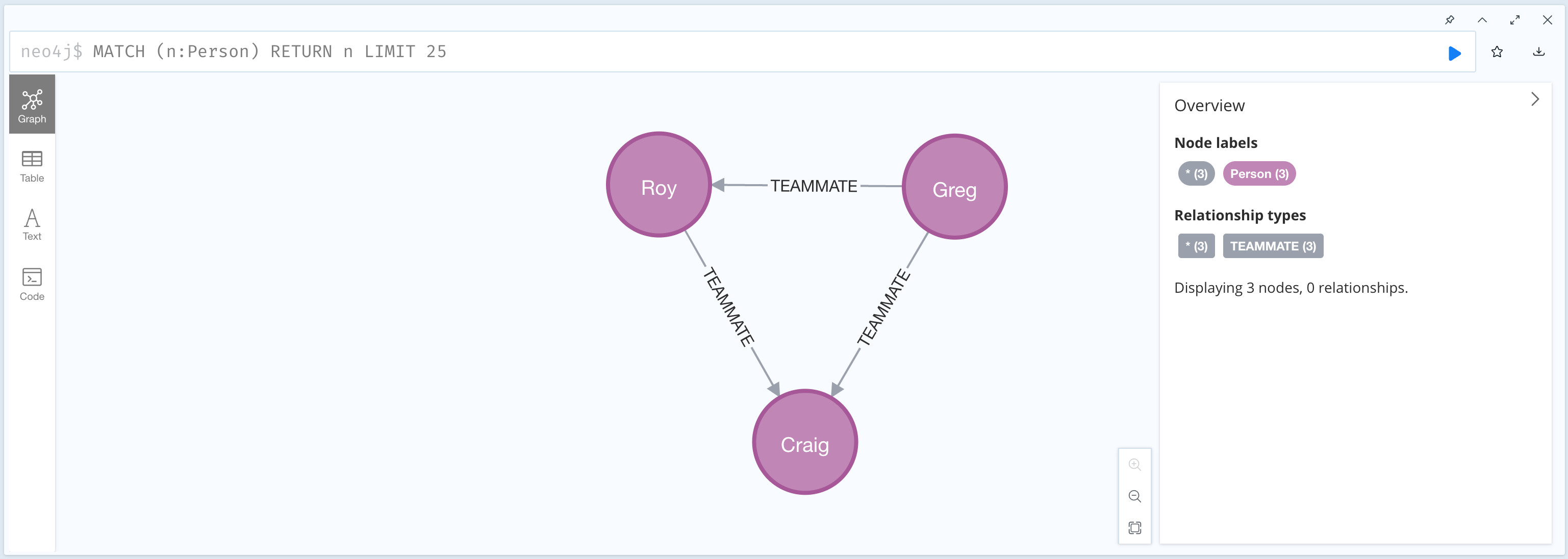
- At the beginning, all data is deleted. Then “Greg”, “Roy”, and “Craing” are inserted, and
TEAMMATErelationships are added with theworkWith(..)function. - The result displays each person’s teammates and, conversely, the people who have “Craig” as a teammate.
Running the Application
Run the application, and you can see the result in the logs.
2023-05-13T01:53:34.640+09:00  INFO 36427 --- [           main] com.devkuma.neo4j.Neo4jApplication       : Before linking up with Neo4j...
2023-05-13T01:53:34.640+09:00  INFO 36427 --- [           main] com.devkuma.neo4j.Neo4jApplication       : 	Greg's teammates => []
2023-05-13T01:53:34.640+09:00  INFO 36427 --- [           main] com.devkuma.neo4j.Neo4jApplication       : 	Roy's teammates => []
2023-05-13T01:53:34.640+09:00  INFO 36427 --- [           main] com.devkuma.neo4j.Neo4jApplication       : 	Craig's teammates => []
2023-05-13T01:53:34.852+09:00  INFO 36427 --- [           main] com.devkuma.neo4j.Neo4jApplication       : Lookup each person by name...
2023-05-13T01:53:34.865+09:00  INFO 36427 --- [           main] com.devkuma.neo4j.Neo4jApplication       : 	Greg's teammates => [Craig, Roy]
2023-05-13T01:53:34.874+09:00  INFO 36427 --- [           main] com.devkuma.neo4j.Neo4jApplication       : 	Roy's teammates => [Craig]
2023-05-13T01:53:34.881+09:00  INFO 36427 --- [           main] com.devkuma.neo4j.Neo4jApplication       : 	Craig's teammates => []
2023-05-13T01:53:34.893+09:00  INFO 36427 --- [           main] com.devkuma.neo4j.Neo4jApplication       : The following have Craig as a teammate...
2023-05-13T01:53:34.894+09:00  INFO 36427 --- [           main] com.devkuma.neo4j.Neo4jApplication       : 	Greg
2023-05-13T01:53:34.894+09:00  INFO 36427 --- [           main] com.devkuma.neo4j.Neo4jApplication       : 	Roy
Open Neo4j Browser (http://localhost:7474/browser/) to check the node list.
References
- Getting Started | Accessing Data with Neo4j
- Even though it is official documentation, there were many mismatches between the content and the code.
The example code above is available on GitHub.