Designing Data-Intensive Applications | Chapter 04. Encoding and Evolution
Presenter: Yunho Hwang
Applications inevitably change over time.
As new products are released, user requirements change, and the business environment changes, application features are added or modified.
These changes also include changes to the database, such as adding or deleting columns and fields.
Changes from the database perspective can be applied immediately. However, application code is generally not applied immediately.
Why application code is not applied immediately
- Code updates are performed through rolling updates.
- For clients, some users do not update immediately.
Compatibility
- Backward compatibility
- New code must be able to read data written by old code.
- New code generally knows about existing data, so this is usually not a major problem.
- Forward compatibility
- Old code must be able to read data written by new code.
- This is harder because old code must be able to ignore additions made in the new version.
Data encoding formats
Programs usually work with data represented in two forms.
In memory, data is maintained as objects, structs, lists, arrays, hash tables, trees, and so on.
These data structures are optimized so the CPU can access and manipulate them efficiently.
To write data to a file or send it over the network, it must be encoded as a sequence of bytes that includes the data itself.
Because pointers cannot be understood by another process, this sequence of bytes is usually quite different from the data structure used in memory.
The conversion from an in-memory representation to a byte sequence is called encoding, serialization, or marshalling.
The reverse is called decoding, parsing, deserialization, or unmarshalling.
Examples: Java Serializable, Ruby Marshal, Python pickle, and so on.
JSON, XML, and binary variants
As standardized encodings, JSON and XML are popular text formats.
JSON and XML are widely known and supported in many places, but they also have strong likes and dislikes.
XML in particular is often criticized as unnecessary and complex.
CSV is not powerful, but it is also a popular language-independent format.
There is a lot of ambiguity in encoding numbers. It does not distinguish integers from floating-point numbers and does not specify precision.
This ambiguity is a problem when handling large numbers. Integers larger than 2^53 can become inaccurate.
JSON and XML support Unicode strings well, but they do not support binary strings.
Despite these shortcomings, JSON, XML, and CSV are useful enough and popular.
They are especially good for data exchange formats.
Binary Encoding
Compared with JSON and XML, binary encoding uses less space, is more compact, and can be parsed faster. With a small data set this may not matter much, but at terabyte scale the situation changes.
JSON also uses more space than binary formats.
From this perspective, binary encodings usable with JSON, such as MessagePack, BSON, BJSON, BISON, and Smile, were developed.
However, they are not used as widely as JSON.
Example 4-1:
{ //1 byte
	"userName" :"Martin", // 20 byte
	"favoriteNumber" :1337, // 22  byte
	"interests":["daydreaming", "hacking"] // 37 byte
} // 1 byte
Even if JSON is binary-encoded, the object’s field names must still be included. This makes 81 bytes.
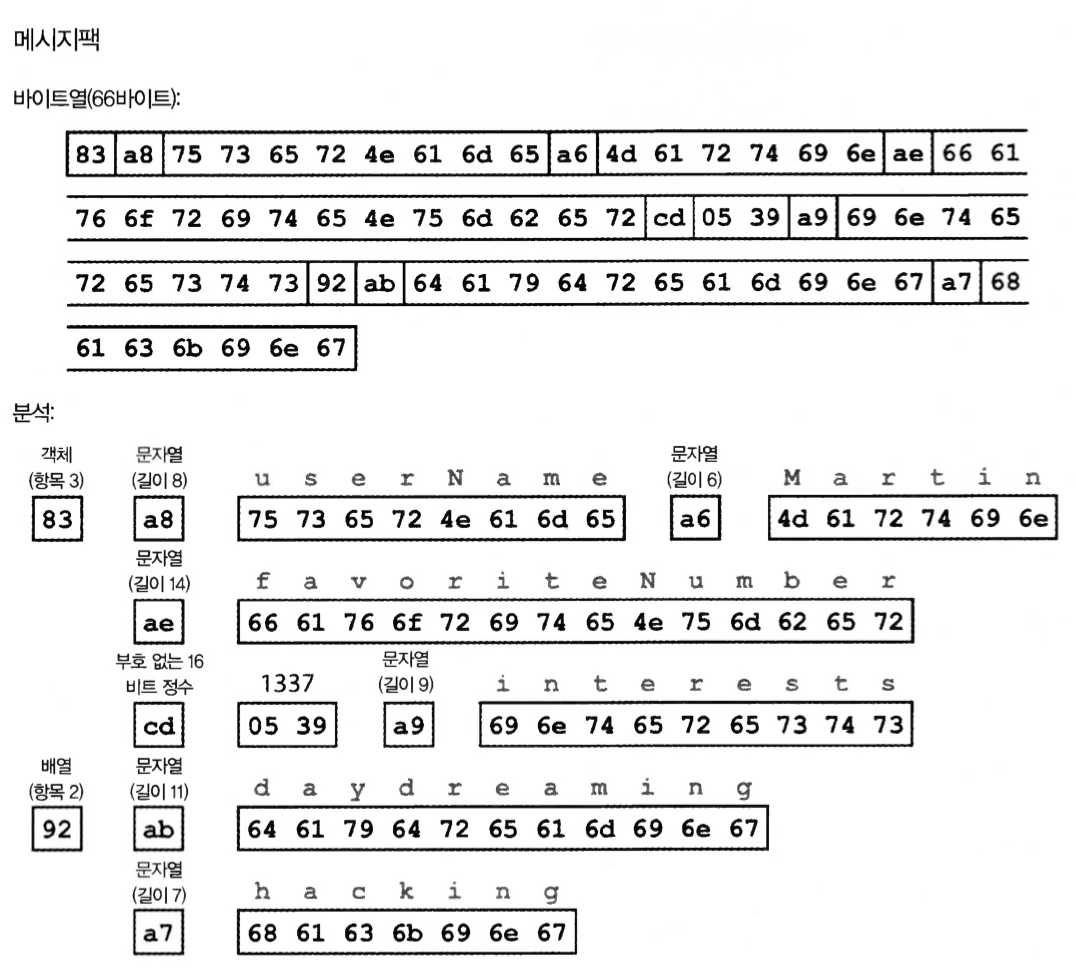
Figure 4-1. Example record encoded with MessagePack (Example 4-1)
JSON binary encoding: 66 bytes in hexadecimal.
Notes:
- 0x83 = 0x80 (object), 0x03 (field): an object with three fields
- 0xa8 = 0xa0 (string), 0x08 (8 bytes)
- cd = 16-byte number, 16^2 * 5 = 1280. 16 * 3 = 48. 9 = 1337
ASCII - Wikipedia msgpack/spec.md at master | msgpack/msgpack | GitHub
Thrift and Protocol Buffers
Apache Thrift and Protocol Buffers are binary encoding libraries based on the same principles.
Protocol Buffers were developed by Google, and Thrift was developed by Facebook. Both are now open source.
Both require a schema for the data to be encoded.
# Thrift schema
struct Person {
	1:required string userName,
	2:optional i64 favoriteNumber,
	3:optional list<string> interests
}


# Protocol Buffers schema
message Person {
	required string user_name = 1;
	optional int64 favorite_number = 2;
	repeated string interests = 3;
}
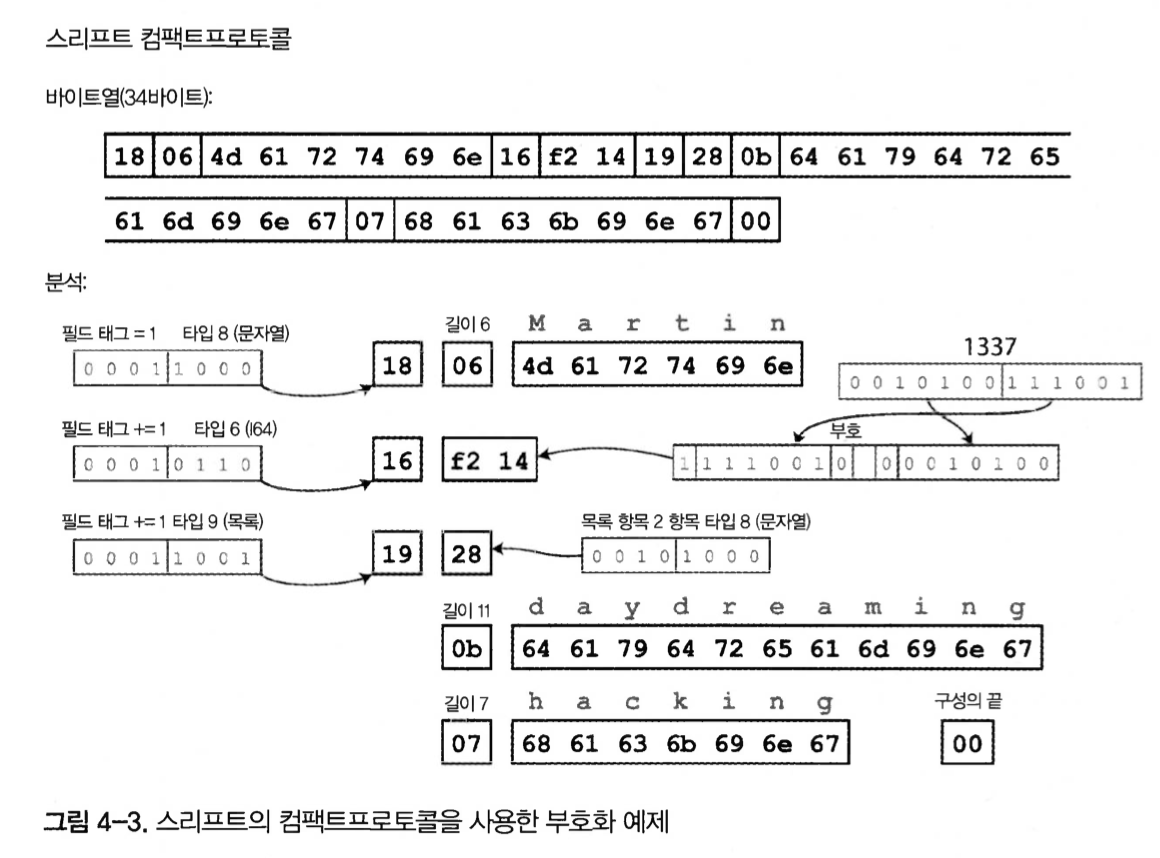
Figure 4-3. Encoding example using Thrift’s Compact Protocol
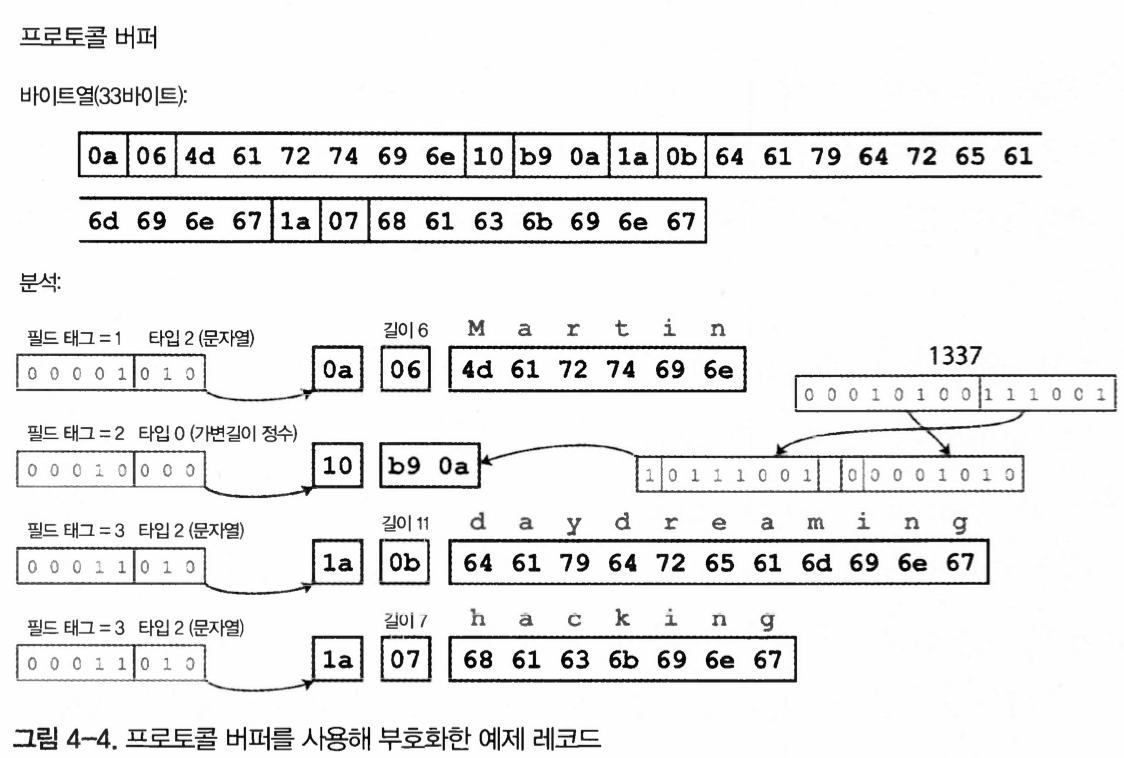
Figure 4-4. Example record encoded using Protocol Buffers
In both protocols, the schema drastically reduces the number of bytes.
The biggest difference is that they include field tags, such as 1, 2, and 3, instead of field names.
These numbers are the numbers shown in the schema definition.
Field tags and schema evolution
Schemas inevitably change over time. This is called schema evolution.
How can changes be made while maintaining forward and backward compatibility?
- Forward compatibility, where old code must be able to read current data
- When reading data written by new code, the old code checks whether it recognizes the tag number and naturally ignores tags it does not recognize.
- Backward compatibility, where current code must be able to read data created by old code
- After the initial deployment, fields cannot be added as required fields, because data created by old code could not be read.
- Only optional fields can be deleted.
Avro
Apache Avro is another binary encoding format that differs from Protocol Buffers and Thrift, but competes with them.
It started in 2009 as a Hadoop subproject because Thrift did not fit Hadoop use cases well.
record Person {
	string userName;
	union { null, long } favoriteNumber = null;
	array<string> interests;
}

{
  "type": "record",
  "name": "Person",
  "fields": [
    {"name": "userName", "type": "string"},
    {"name": "favoriteNumber", "type": ["null","long"], "default": null},
    {"name": "interests","type": {"type": "array","items": "string"}}
  ]
}
Figure 4-5. Example record encoded using Avro
It is the shortest at 32 bytes.
- There is no information to identify fields or data types.
- To parse with Avro, you must first read the schema and remember each field’s data type.
Writer schema and reader schema
- Used to encode data for transmission through files, databases, and networks.
- The schema is generated while the application is being built.
- The writer schema and reader schema can be different. The order of fields can also differ without causing a problem.
- If a missing field is created, the field is ignored and filled with a default value.
Avro schema evolution rules:
- Forward compatibility
- You can have a new version of the writer schema and an old version of the reader schema.
- Field names cannot be changed.
- Backward compatibility, where old data can still be read now
- You can have a new version of the reader schema and an old version of the writer schema.
- Field names can be changed because field-name changes can be tracked.
To maintain this compatibility, only fields with default values can be added or deleted.
If a value that does not exist in the old schema exists in the reader schema, it is replaced with the default value.
Avro was designed with the possibility of dynamic schema changes in mind.
Code generation and dynamically typed languages
- Thrift and Protocol Buffers depend on code generation.
- This is useful in statically typed languages such as Java, C++, and C#.
- If the schema changes, recompilation is required. Avro can be used with compiled and interpreted languages from this perspective.
Advantages of schemas
- Protocol Buffers, Thrift, and Avro use schemas to describe binary encoding formats.
- These schema languages are much simpler than XML and JSON schemas and support more detailed validation rules.
- Encoded data can omit field names, so the data size can be smaller than JSON.
- If a schema database is used, forward and backward compatibility can be checked.
Dataflow modes
Ways to pass data from one process to another:
- Through a database
- Through service calls
- Through asynchronous message passing
Dataflow through databases
- The process that writes to the database encodes the data, and the process that reads it decodes the data.
- Accessing the database from a single process
- Storing data in the database is like sending a message to your future self.
- Backward compatibility is clearly needed.
- Accessing the database from various processes
- This is common in applications and services.
- If deployment is done in a rolling manner, some instances where the new version is being deployed may still be saving and updating data with old code.
- Forward compatibility is needed.
- Encoding may leave unknown fields untouched, but from the database perspective data can still be lost.
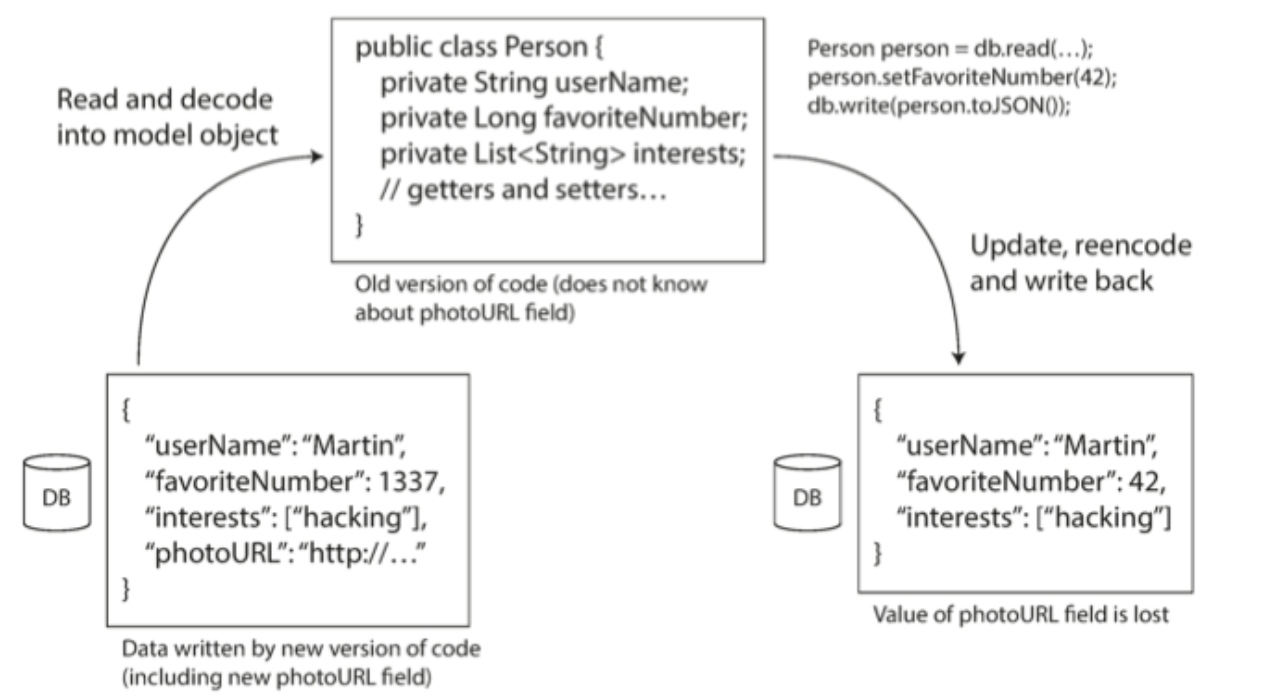
Figure 4-7. If an old version of an application updates data written by a new version, data can be lost unless care is taken.
If care is not taken, data in new fields can be lost during updates like this.
Different values written at different times
- Databases can update data at any time.
- This data may have been written five years ago or five milliseconds ago.
- If the database does not run any special feature, the data will remain in its original encoding.
- Data can be rewritten with a new schema, but migration work is costly.
Archival storage
- Database snapshots are often created for backup purposes or for loading into a data warehouse.
- In this case, the latest schema is used for encoding.
Dataflow through services: REST and RPC
- When processes need to communicate over the network, there are several ways to arrange that communication.
- The most common method is to arrange two roles: client and server.
- The server exposes an API over the network, and the client connects to the server by making requests to that API.
- The API exposed by the server is called a service.
The web works as follows:
- The client sends a request to the web server.
- It sends a GET request and receives HTML, CSS, JS, images, and so on.
- The server receives POST requests to transfer data.
- Web browsers are not the only clients on the web.
- Mobile devices and native desktop apps can also make network requests to servers.
- A server itself can also be a client of another service.
- For example, if one service needs some feature or data from another service, it sends a request to that service.
- This application development style was traditionally called service-oriented architecture, or SOA.
- More recently, this has been improved and reborn under the name microservice architecture.
Services and databases are similar in many ways. The difference is that a service restricts input and output based on business logic, allows only defined input and output, and exposes an API.
The goal of MSA and SOA is to make services independent in deployment and change so applications become easier to maintain.
In other words, they are designed to deal with frequent change, and because new versions are released quickly, compatibility between APIs is needed. This is the key point of this chapter.
Web services
- When HTTP is used as the basic protocol for communicating with a service, it is called a web service.
- There are two popular approaches to web services: REST and SOAP.
REST
- A set of principles designed based on HTTP principles.
- Emphasizes simple data types.
- Uses URLs to identify resources and supports cache control, authentication, and content type negotiation.
- More popular than SOAP.
SOAP
- An XML-based protocol for network API requests.
- It is generally used over HTTP, but it is independent of HTTP and does not use HTTP features.
- Instead, it provides a broad and complex set of related standards that add many features.
- It is designed not to be human-readable and depends heavily on tools or IDEs.
- Most people prefer the simpler approach of RESTful APIs.
Problems with remote procedure calls (RPC)
- Web services are only the latest form of several technologies for calling APIs over the network.
- Web services are based on the idea of remote procedure calls (RPC), which has been used since the 1970s.
- The RPC model lets a remote network service request be used as if it were calling a specific method in the same process.
- RPC may seem convenient at first, but the RPC approach is fundamentally flawed.
- A local function call may return a result or may not return an exception.
- When retrying a failed network request, the request may actually have been processed and only the response may have been lost.
- Each local function call usually takes almost the same execution time.
- When calling a local function, references, or pointers, can be passed efficiently to objects in local memory.
- The client and service can be implemented in different programming languages.
Current direction of RPC Despite these problems, RPC has not disappeared, and RPC frameworks have been developed on top of the binary encodings mentioned so far.
- Thrift and Avro have built-in RPC support.
- gRPC implements RPC using Protocol Buffers.
- Finagle uses Thrift, and Rest.li uses JSON over HTTP.
Data encoding and RPC evolution
- To be evolvable, RPC clients and servers must be changeable and deployable independently.
- Compared with dataflow through databases, assumptions about evolvability can be simplified.
- Assume that all servers can be updated first and then all clients can be updated without problems.
- Then requests need only backward compatibility, and responses need only forward compatibility.
There is no agreement that API versioning must work in a particular way, but using a version number in the HTTP Accept header is generally common.
Message-passing dataflow
- Message-passing dataflow is an asynchronous message-passing system between RPC and databases.
- It is similar to RPC in that it delivers a client request to another process with low latency.
- It does not send messages through a direct network connection.
- It uses a message broker that temporarily stores messages.
- Or it sends messages through an intermediate stage called message-oriented middleware.
Advantages of using a message broker:
- If the receiver is unavailable or overloaded, the message broker can act as a buffer.
- Messages can be redelivered to a process that died, helping prevent message loss.
- The sender does not need to know the receiver’s IP address or port number.
- One message can be sent to multiple receivers.
- Logically, the sender is separated from the receiver and does not care who consumes the message.
Message-passing communication differs from RPC in that it is generally one-way. In other words, the sending process usually does not expect a response to the message.
Message brokers
- Recently, open source implementations such as RabbitMQ, ActiveMQ, HornetQ, and Apache Kafka have become popular.
- Detailed delivery semantics vary depending on implementation and configuration.
- However, a typical message broker is used as follows:
- A message is sent to a named queue or topic.
- The broker delivers the message to one or more consumers or subscribers of that queue or topic.
- Multiple producers and consumers can exist on the same topic.
- A topic provides only one-way dataflow.
Distributed actor frameworks
- The actor model is a programming model for concurrency within a single process.
- Instead of directly handling thread race conditions, locks, and deadlocks, logic is encapsulated in actors.
- Each actor represents one client or entity.
- An actor can have local state and communicates with other actors by sending and receiving asynchronous messages.
- Actors do not guarantee message delivery.
A distributed actor framework is used to scale applications across nodes, and it uses the same message-passing structure regardless of whether the sender and receiver are on the same node. If they are on different nodes, the message is encoded and sent over the network.
Because the actor model assumes that messages may be lost, location transparency works better in the actor model than in RPC, reducing the mismatch between local and remote communication.
Summary
Various data encoding formats and compatibility properties:
- Programming-language-specific encodings are limited to a single programming language and may not provide forward or backward compatibility.
- Text formats such as JSON, XML, and CSV are widely used.
- Compatibility among them depends on how data types are used, so schemas can be useful but can also be inconvenient.
- Binary schema-based formats such as Thrift, Protocol Buffers, and Avro are efficient because they encode data in a short length.
- However, binary encoding requires a decoding process to make it human-readable.
Dataflow mode scenarios for data encoding:
- A database, where the process writing to the database encodes data and the process reading from the database decodes it.
- RPC and REST APIs, where the client encodes a request, the server decodes the request, encodes a response, and finally the client decodes the response.
- Asynchronous message passing, where nodes communicate by sending messages to each other, with the sender encoding and the receiver decoding, using a message broker or actors.