Introduction to Apache Kafka Concepts
What Is Kafka?
Kafka is known as a distributed messaging system. It acts as an intermediary between message or data senders and receivers. It is a message platform designed to process very large volumes of message data quickly, and it is also a Pub-Sub model message queue. Kafka is especially well suited to distributed environments.
As “big data” and “IoT” became major trends, LinkedIn found it increasingly difficult to manage many message queue systems created by service growth, so Kafka began as an internal project. In early 2011, it was released publicly as an official Apache open source project. Today it is developed as open source software and is used by many companies and communities, including Confluent, LinkedIn, Uber, and Alibaba.
What Is a Messaging System?
A messaging system is a broad term for a system that receives data from senders and delivers it to receivers at an appropriate time.
For example, when collecting website logs, multiple web servers may send logs to a relay server, and the relay server may forward those logs to a database through batch processing. This can also be considered a messaging system. To make the idea clearer, let us use the Pub-Sub messaging model as an example.
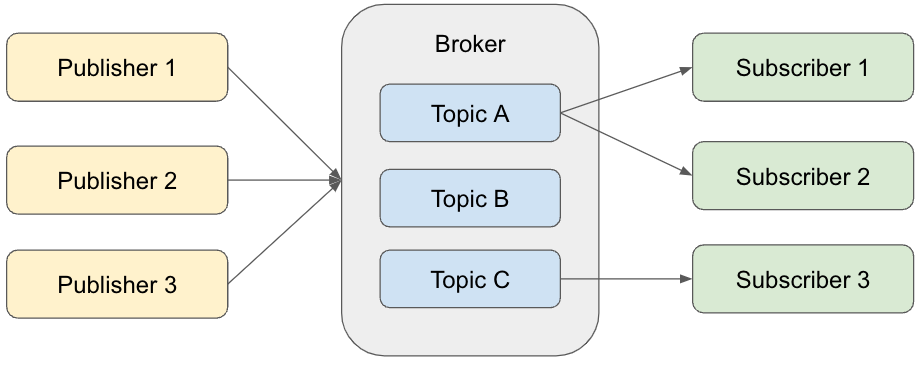
In the Pub-Sub messaging model, a Publisher sends messages to a Broker, and a Subscriber receives messages from the Broker. Instead of sending messages directly to Subscribers, the Publisher always goes through the Broker. Messages sent by the Publisher are stored in a Broker Topic. There can be many Topics, and the Publisher specifies which Topic should store each message according to its content. Each Subscriber selectively receives messages only from specific Topics. This structure is similar to everyday services and products. They are usually made available to everyone, even when a target audience exists, but users naturally choose only what matches their interests. The Pub-Sub messaging model follows the same idea.
Why Does a Broker Mediate?
If the goal is to send data from a Publisher to a Subscriber, it may seem at first that a Broker is unnecessary. However, the Broker is very important from the following two perspectives.
1. Publishers and Subscribers Only Need to Communicate with the Broker
If there were no Broker, a Publisher would need to know every Subscriber. Conversely, a Subscriber would need to know every Publisher that sends data. With a Broker, the Publisher does not need to be aware of Subscribers and can simply send messages to the Broker.
2. The Messaging Model Is Easier to Change
When communication goes through the Broker, Publishers and Subscribers can be added or removed more easily. Without a Broker, every Publisher and Subscriber must be considered whenever something is added or removed, which makes the work harder.
What Is Publish/Subscribe?
Different messaging systems use Publish/Subscribe terminology differently, but the meaning is generally similar.
- Message creation and sending
- Publisher
- Producer: the term used in Kafka
- Writer
- Message consumption and receiving
- Subscriber
- Consumer: the term used in Kafka
- Reader
How Is It Different from a Message Queuing System?
A Publish/Subscribe messaging system can allow messages to be consumed multiple times, while the Producer only needs to send each message once. In contrast, a message queuing system usually allows each message to be consumed only once, and the Producer must send the message as many times as it needs to be consumed. This is the major difference.
Kafka Features
The following are Kafka’s main features.
1. It Can Process Large Amounts of Data Quickly
Earlier, we mentioned that Kafka was developed in the context of trends such as “big data” and “IoT.” Considering that background, the ability to process large volumes of data quickly is very important. Kafka differs slightly from the basic Pub-Sub messaging model and is commonly configured with multiple Brokers, making it easy to scale out. Easier scale-out directly improves processing speed.
2. Data Can Be Used at Flexible Times
The “high speed” mentioned earlier refers to real-time processing, but Kafka is not limited to real-time use. Consumers connected to Kafka, which correspond to Subscribers in the Pub-Sub model, can be diverse, and some may perform batch processing. Data is also not always used immediately. Sometimes it must be retained in the Broker for a long period. Kafka enables persistent storage by writing data not only to memory but also to disk. This makes data available for flexible use.
3. It Can Guarantee Message Delivery While Maintaining Speed
When people hear “delivery guarantee,” they may think it is easy to handle transactions one record at a time. In practice, doing that while processing data at high speed is very difficult. Naturally, data loss during processing must also be avoided. The strictest delivery guarantee is “send each record exactly once,” but Kafka balances speed and delivery guarantees by providing “at least once” delivery, meaning that each record is sent reliably at least once even if duplicates may occur.
4. It Provides Rich APIs for Sending and Receiving Data
There is rarely only one Producer or Consumer connected to Kafka. Producers and Consumers often belong to different systems. In such cases, connection APIs between Publisher/Subscriber applications and Kafka become important. Kafka provides Kafka Connect and Connector plugins for this role. Developing these APIs yourself can be tedious, so rich APIs help improve development efficiency.
Kafka also has the following characteristics.
- Separation of Producer and Consumer
- Kafka uses the Pub-Sub approach, where the role of sending messages and the role of receiving messages are completely separated.
- Because the roles are fully separated, problems in one side are far less likely to cascade to the other side.
- Multiple Producers and multiple Consumers
- Kafka allows multiple Producers or Consumers to access a single Topic.
- In data analysis and processing, the need to use the same data for many purposes has increased, and this multi-client structure makes that easy.
- Messages stored on disk
- Kafka stores and retains messages on disk.
- Even after a Consumer reads a message, the message remains on disk during the retention period.
- Scalability
- Kafka is designed to scale easily. A Kafka cluster can start with three Brokers and expand to many Brokers.
- Scaling can be performed online without stopping the Kafka service.
- High performance
- Kafka uses several internal techniques, including distributed processing and batch processing, to maintain high performance.
Kafka Components
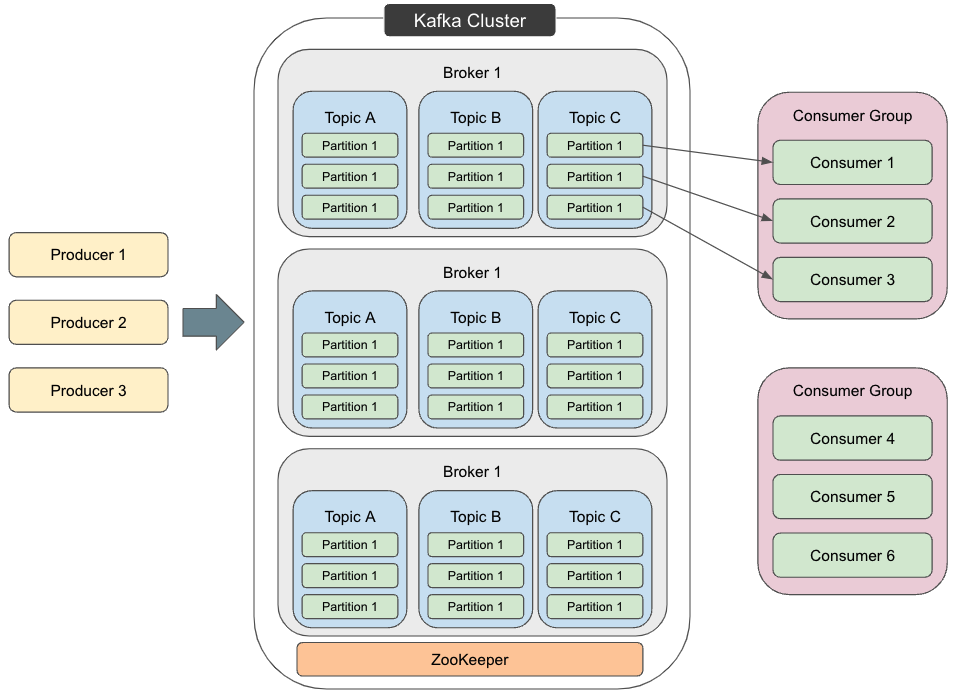
So far, we have looked at Kafka’s broad characteristics. Now let us examine its concrete structure. Kafka can be represented by the following diagram, and each term in the diagram is explained below.
Message
Although it does not appear in the diagram, each piece of data is called a Message or Event. A Message consists of a key and a value, and it is the unit of data exchanged between Producers and Consumers in Kafka.
Producer
A Producer is a client application that posts events to Kafka. It corresponds to a Publisher in the Pub-Sub messaging model and sends Messages to Brokers. To integrate with Kafka in practice, you need to create a communication application using an API or use open source software that provides Producer functionality.
Consumer
A Consumer is a client application that subscribes to Topics and processes the events obtained from them. It corresponds to a Subscriber in the Pub-Sub messaging model and receives Messages from Brokers. Kafka uses a pull model, so Messages arrive from the Broker when the Consumer sends a request. As mentioned earlier, Kafka writes data to disk and stores it persistently, so Consumers can start requesting data at arbitrary times. As with Producers, integrating with Kafka requires either an application built with an API or open source software that provides Consumer functionality.
Broker
A Broker receives and transfers Messages according to requests from Producers and Consumers. To enable high-speed processing, it is common to use multiple Brokers as shown in the diagram. Brokers also write received messages to disk.
Topic
A Topic is the storage area for Messages inside a Broker. Messages in the same category are stored in the same Topic. Producers send messages to specific Topics, and Consumers fetch and process Messages from specific Topics. A Topic is similar to a folder in a file system, and events are similar to files in that folder. Messages stored in a Topic can be read again when needed.
Partition
Topics are distributed and stored across multiple Brokers, and these divided parts of a Topic are called Partitions. As shown in the diagram, Messages in a Topic are divided into Partition units. This is important in relation to Consumer Groups, which will be explained later. The Message key determines which Partition stores a Message, and Messages with the same key are always stored in the same Partition. Kafka guarantees that a Consumer assigned to a Topic Partition reads events from that Partition in exactly the same order.
Consumer Group
Multiple Consumers can form a Consumer Group. Consumers in the same Consumer Group receive Messages from the same Topic, but the source Partitions differ for each Consumer. In this way, Kafka enables distributed processing of messages. This is where Kafka differs from the Pub-Sub model described earlier. In the Pub-Sub model, every Subscriber that receives from a specific Topic receives the same messages.
ZooKeeper
ZooKeeper is a tool for storing and managing information related to distributed message processing, such as Topics and Partitions. The diagram shows only one ZooKeeper instance, but multiple instances are commonly used.
Kafka Cluster
A message relay system consisting of ZooKeeper and Brokers is called a Kafka cluster.
Key Kafka Concepts
- Separation of Producer and Consumer
- Producers and Consumers operate independently.
- Producers only publish messages to Broker Topics.
- Consumers only fetch and process messages from specific Broker Topics.
- Producers and Consumers operate independently.
- Push and pull models
- Tracking consumed messages: commit and offset
- Consumer Group
- Message or event delivery concepts