Linux Kernel | CPU and Process Management
What Is a Process?
A process is a program loaded into memory so that it can be executed by the CPU.
Checking Processes
Running processes can be checked with the following command.
$ ps aux
The output includes the user name, process ID, CPU and memory usage, virtual memory size, resident memory size, terminal, process status, start time, accumulated CPU time, and command.
Process Structure in Memory
A process is placed in the memory address space by segments.
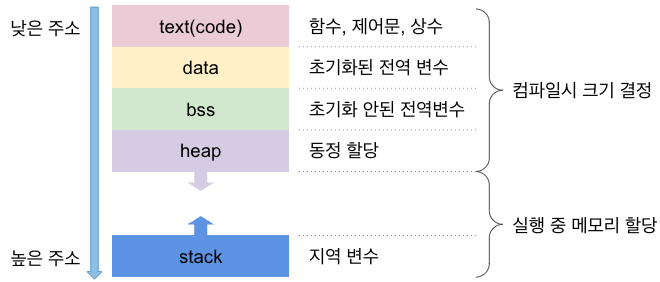
The text segment contains machine instructions executed by the CPU. The data segment contains initialized static or global variables. The bss segment contains uninitialized static or global variables. The heap is dynamically allocated while the process runs, and the stack contains data such as local variables, function arguments, and method frames.
Difference Between Processes and Threads
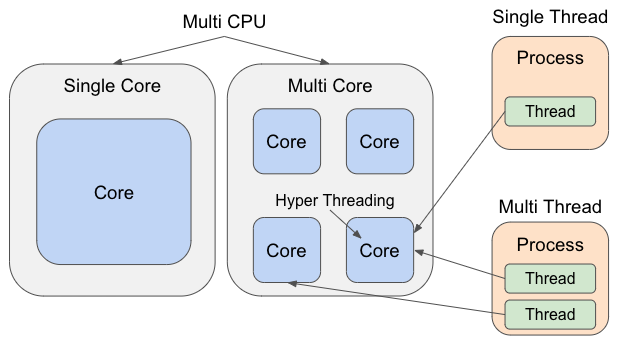
One process has one or more threads. A process is a unit of program execution, while a thread is a unit that uses CPU cores. A child process receives a new memory area, while child threads share memory with the parent thread except for the stack segment.
Parallel Processing
Processes and threads can be processed in parallel through multiple CPUs, multiple cores, hyper-threading, or multiple threads inside one process.
CPU Information
The CPU in use can be checked with lscpu or cat /proc/cpuinfo.
$ lscpu
Process Management
Process management controls when and to which process the CPU is allocated. If one process monopolizes the CPU, other processing cannot proceed. By switching the process handled by the CPU after a certain time, the OS prevents CPU monopolization and lets multiple processes run concurrently.
Process management uses process state transitions, the PCB (Process Control Block), and the process scheduler.
Process State Transitions
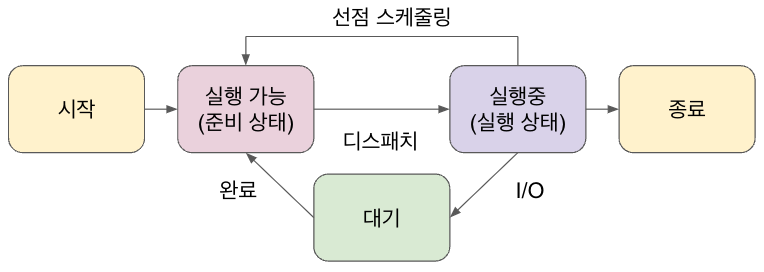
A process lifecycle has states such as start, runnable, running, waiting, and terminated.
PCB
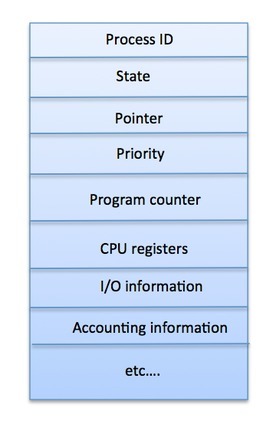
Information about a process, including its state, is managed in memory as a PCB. It includes the process ID, state, parent process pointer, priority, program counter, CPU registers, I/O information, and accounting information.
CPU Scheduler
The CPU scheduler decides which runnable process receives CPU time. When it makes a decision, the dispatcher performs preemption and dispatching through interrupts. Saving and restoring the program counter and register values during this switch is called a context switch.
Major scheduling algorithms include First Come First Serve, Shortest Job Next, Priority Based Scheduling, and Round Robin Scheduling.