HBase BloomFilter
What is BloomFilter?
BloomFilter is a fast search algorithm for multi-hash-function mapping proposed by Bloom in 1970. This algorithm is generally used in situations where it is necessary to quickly determine whether an element belongs to a set, starting from the premise that strict 100% accuracy is not required.
For detailed theory, refer to the Bloom Filter data structure explained simply page.
HBase BloomFilter
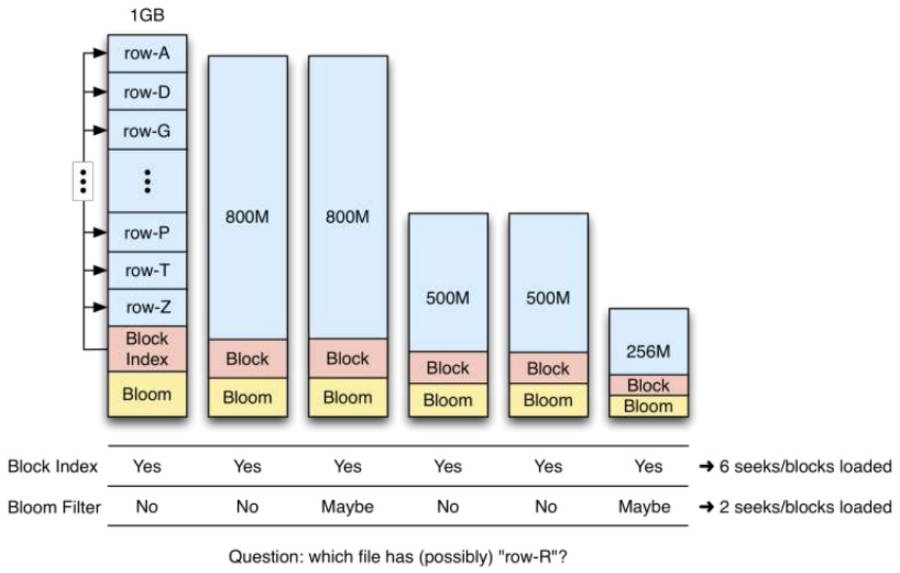
HBase BloomFilter data is stored in StoreFile metadata, and once written, a StoreFile is immutable, so it cannot be updated.
BloomFilter is a configuration property at the Column family level. If BloomFilter is configured on a table, HBase includes a data fragment of the BloomFilter structure when creating a StoreFile called a MetaBlock. MetaBlock and DataBlock, which contain actual KeyValue data, are used together in LRU BlockCacheMaintenance.
Therefore, configuring BloomFilter introduces specific storage and memory cache overhead.
How to configure HBase BloomFilter
When searching for whether a specific Row key is included, it reduces unnecessary block loading compared to the existing block index, improving overall cluster throughput.
Bloom filters should be selected according to cell size, number of cells, data storage method, read method, and similar factors.
According to the HBase documentation, BloomFilter is recommended in most cases.
BloomFilter has three parameters: NONE (default), ROW, and ROWCOL.
ROW: Indicates a row-level Bloom filter that filters StoreFiles based on the KeyValue row.ROWCOL: Indicates a column-level Bloom filter that filters StoreFiles based on the KeyValue row plus column.
Therefore, the space overhead of ROWCOL is higher than that of ROW.
The more StoreFiles there are in the Region, the better the BloomFilter effect. The fewer StoreFiles there are in the Region, the better HBase read performance becomes.
Configure the Column family in HBase to enable the BloomFilter command as follows.
create 't1',{name => 'c1', BLOOMFILTER => '<ROW or ROWCOL>'}