Basic Elasticsearch Concepts
Elasticsearch
- Elasticsearch is an open source search engine developed in Java and based on Apache Lucene.
- Elasticsearch is a distributed engine that searches for specific strings across multiple documents or files.
- Because it stores data in an inverted index structure, it provides excellent performance for full-text search compared with an RDBMS.
- It is usually used with Logstash, Kibana, and Beats as the ELK stack rather than on its own.
- It is used for many purposes, including data storage, document search, location search, machine-learning-based search, log analysis, and security inspection analysis.
Full-text Search
Searching for a specific string across multiple documents or files is called full-text search.
Full-text search technologies include the grep type and the index type. Elasticsearch provides fast search by distributing index-type full-text search across multiple computers.
Grep type
This method searches multiple files sequentially. As the search target grows, search speed drops significantly. The UNIX string search command grep is an example.
Index type
Like a book index, this method creates indexes for multiple documents in advance to improve search speed. Examples using index-type full-text search are as follows.
- Elasticsearch document search
- Google Search: searches for specific strings across multiple documents or web pages
- GitHub code search: searches for specific strings across multiple source-code documents
Here is an example of building an index from the following two documents.
- Document 1: I Like search engine.
- Document 2: I search keywords by google.
If a word is included in a document, mark it as 1; if it is not included, mark it as 0. The following index is created.
Index
| I | like | search | engine | keywords | by | ||
|---|---|---|---|---|---|---|---|
| Document 1 | 1 | 1 | 1 | 1 | 0 | 0 | 0 |
| Document 2 | 1 | 0 | 1 | 0 | 1 | 1 | 1 |
However, this index can only be searched row by row from left to right. Therefore, to find documents that use the word google, every row must be scanned.
Elasticsearch uses an index called an inverted index. An inverted index is an inverted matrix where the rows and columns of the index are swapped, as shown below.
Inverted Index
| Document 1 | Document 2 | |
|---|---|---|
| I | 1 | 1 |
| like | 1 | 0 |
| search | 1 | 1 |
| engine | 1 | 0 |
| keywords | 0 | 1 |
| by | 0 | 1 |
| 0 | 1 |
In an inverted index, to search for documents where the word google appears, only the google row needs to be scanned.
Index and Inverted Index
In Elasticsearch, an index corresponds to a database in an RDBMS.
- Index
- A sorted or listed collection that makes keywords easy to find.
- Inverted Index
- A method for finding documents through keywords.
The benefit of an inverted-index structure is very fast search. Simply put, the table of contents at the front of a book corresponds to an index, while the keyword lookup at the back of a book corresponds to an inverted index. Elasticsearch parses text, creates a search-term dictionary, and stores text with the inverted-index method.
Elasticsearch Features
Elasticsearch has the following features.
- Scale out
- It can scale horizontally through shards.
- Availability
- Replicas ensure data stability.
- Schema free
- Because searches are performed on JSON documents, there is no schema concept.
- RESTful
- Data CRUD operations are performed through HTTP RESTful APIs.
Elasticsearch Use Cases
Internal and external document search
Elasticsearch is used to search company documents or service documents. Corporate use cases include the following.
- Wemakeprice: an online web store that can search products for sale, including product catalogs, inventory storage, and autocomplete
- GitHub: source-code search
Anomaly detection
Elasticsearch can detect anomalies in access logs and similar data. Corporate use cases include the following.
- Wemakeprice: unstructured threat detection through machine learning
- 11st: monitoring and anomaly detection
- Netflix: security log monitoring
- Elasticsearch in Netflix from Danny Yuan
Comparing Elasticsearch and RDBMS
The concepts correspond to a relational database as follows.
| Relational Database | Elasticsearch |
|---|---|
| Database | Index |
| Table | Type |
| Row | Document |
| Column | Field |
| Index | Analyze |
| Primary key | _id |
| Schema | Mapping |
| Physical partition | Shard |
| Logical partition | Route |
| Relational | Parent/Child Nested |
| SQL | Query DSL |
Source: https://www.slideshare.net/deview/2d1elasticsearch
Index structure differences
- Elasticsearch
- Stores data in an inverted-index structure.
- Like a book index, it stores documents that contain a specific word.
- RDBMS
- Uses B-Tree or similar indexes.
Elastic Stack
Elastic Stack consists of Elasticsearch and the following three open source projects. Elasticsearch is sometimes used alone for search, but it is often used as the ELK stack.
While being used together with Logstash and Kibana, Elastic was widely known for a time as the ELK Stack (Elasticsearch, Logstash, Kibana). In 2013, it formally absorbed the Logstash and Kibana projects and began developing them together under one roof. In 2015, the company changed its name from Elasticsearch to Elastic and officially named the product Elastic Stack instead of ELK Stack, while continuing to develop and expand features such as monitoring, cloud services, and machine learning. Excerpt from the official documentation
Logstash
- A tool that transforms the format of data sent to Elasticsearch. It handles the Transform and Load parts of ETL.
- It is used to convert logs into an appropriate data format when sending logs from application servers to Elasticsearch servers.
- It collects, aggregates, parses, and delivers logs or transaction data from various sources such as databases and CSV files to Elasticsearch.
Beats
- A shipper that transfers data. It handles the Extract part of ETL.
- It sends data from application servers to Logstash or Elasticsearch.
Elasticsearch
- Searches and aggregates data received from Logstash and returns the information of interest.
Kibana
- Visualizes and monitors data through Elasticsearch’s fast search.
- It is a BI-like tool for visualizing Elasticsearch documents.
Elasticsearch Architecture
Elasticsearch architecture is divided into the following two concepts.
- Logical concepts, which are software-level terms
- Physical concepts, which are hardware-level terms
Logical concepts
The overall diagram of Elasticsearch logical concepts is as follows.
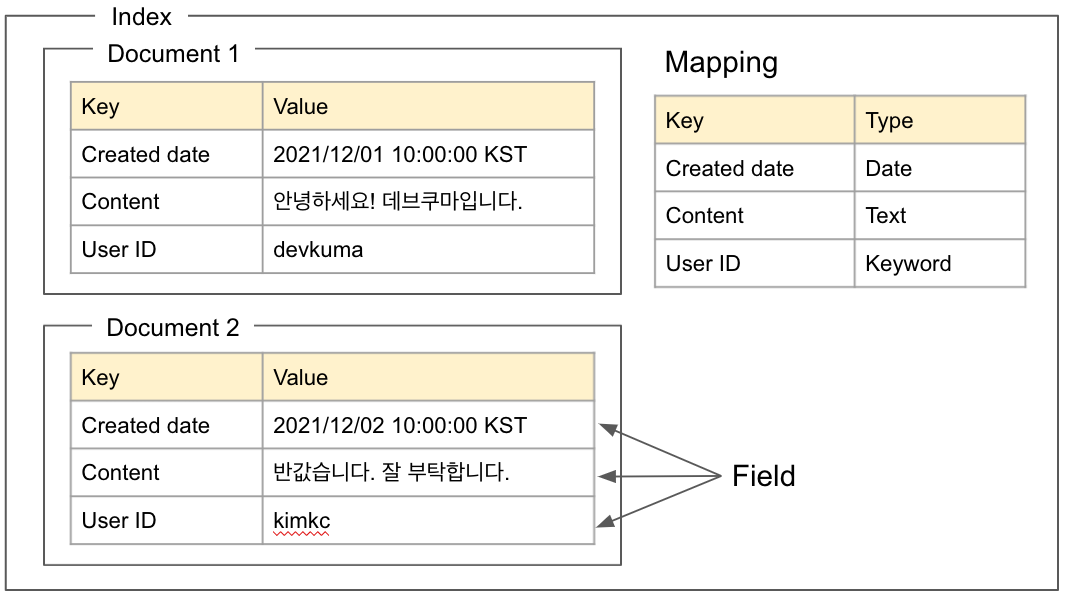
Logical concept diagram
Each term is described below.
Field
A field is a pair of an item name, or key, and a value. It corresponds to the contents of a file in a file system. Each key has a type.
texttype for stringsdatetype for time values
Document
A set of fields is called a document. It corresponds to a file in a file system. A document is a JSON object.
Index
A set of documents is called an index. It corresponds to a folder in a file system. When a document is stored in an index, an inverted index is created.
Mapping
Mapping defines the value data type and similar information for each field key. One mapping exists per index.
In the mapping shown in the logical concept diagram above, the Content key is defined as the Text type, so the value of the Content key is always a string of the Text type.
Physical concepts
The overall diagram of Elasticsearch physical concepts is as follows. It also shows the relationship with the logical index concept.
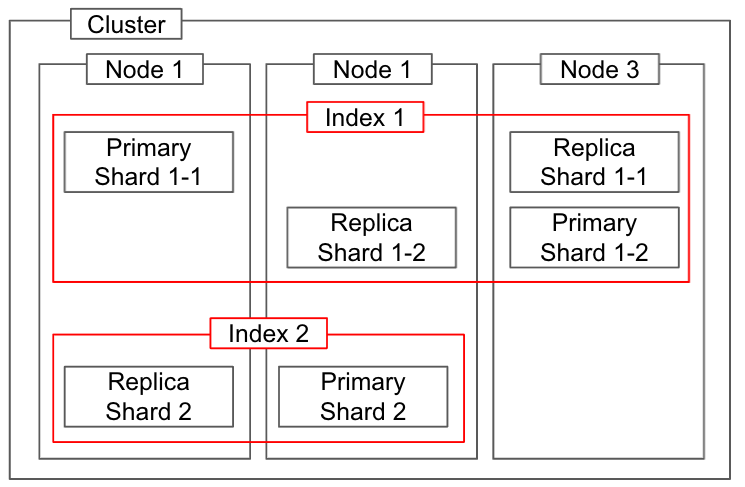
Relationship between physical and logical concepts
Node
A node is one unit process that makes up Elasticsearch, and it is one Elasticsearch server.
Multiple Elasticsearch nodes can be started on one OS.
Nodes have the following four role attributes, and one node can have multiple attributes.
- Master Node
- A node that manages cluster metadata and similar information.
- Only one master node exists per cluster.
- Nodes that can be promoted to master are called master-eligible nodes, but they are not master nodes.
- Data Node
- A node that stores actual data.
- It handles requests such as search and aggregation.
- It routes requests to other nodes, for example when a shard exists on another node.
- Ingest Node
- Performs data transformation and processing, then stores data on data nodes.
- It has the same role as Logstash.
- Coordinating Node
- Handles request routing, which data nodes can also do.
- This role is used when you want a node dedicated to routing so that routing workload is not added to data nodes.
Cluster
In Elasticsearch, a cluster is the largest system unit and means a group of nodes made up of at least one node. When a search request is sent to a cluster, search processing is distributed across each node.
Different clusters remain independent systems that cannot access or exchange data with each other. Multiple servers can form one cluster, and multiple clusters can exist on one server.
A computer cluster is a group of computers connected together so that they operate like one system.
Shard
A shard is data created by splitting the index data described as a logical concept and storing it on nodes. This allows search processing to be distributed across nodes. The actual substance of a shard is a Lucene index file.
There are two types of shards.
- Primary shard
- The original data.
- The shard where update processing is first performed.
- Replica shard
- A copy of the primary shard.
- It is replicated after the primary shard update finishes.
- It is used for distributing search load and backing up data.
Shards and replicas
Shards and replicas are not concepts that exist only in Elasticsearch; they also exist in distributed database systems.
- Shard
- Sharding means distributing and storing data. In other words, an index is split into multiple shards for scale-out.
- At least one shard exists by default, and the number of shards in a cluster is sometimes tuned to improve search performance.
- There is a limit to the amount of data that can be stored on a single node.
- A cluster can split the data of a single index and use cluster storage, memory, and processing capacity automatically.
- By default, the number of shards is set to 5. You can specify the number of shards for splitting index data when creating an index. After an index is created, the number of shards cannot be changed.
- Replica
- A replica can be seen as another type of shard.
- Preparing replicas, or copies, helps resolve failures and continue operation without problems. In other words, shards are replicated for data reliability when a node is lost. Therefore, replicas are recommended to exist on different nodes.
- Each shard in an index can have zero or more replicas.
- Summary
- The smallest Elasticsearch unit is a node, and a node stores data and executes queries.
- One or more nodes make up a cluster.
- Inside a node, data can be managed more efficiently through shards. Replicas can also be added in preparation for failures, increasing failover capability and data availability.
- Availability means the degree to which information systems such as servers, networks, and programs can be used normally. It has a similar meaning to uptime.