HBase Compression, Compaction, and Data Block Encoding
Compression and Compaction
Regions stored on an HBase RegionServer have an HStore for each Column Family, and this consists of MemStore and HFile for that CF.
MemStore is Column Family data in memory, and HFile is Column Family data stored on local disk, meaning HDFS. The reason for this layered structure is that data must be sorted by Row key according to the HBase table structure, so it cannot be written directly to disk and must be sorted in memory first.
When write operations such as put or update are performed in HBase, data is first recorded in the WAL (Write Ahead Log), then written to MemStore. For read operations such as scan, HBase checks MemStore first and then searches HFiles for the requested content.
When repeated writes cause MemStore data size to exceed the configured threshold, MemStore data is stored as an HFile. In a Region composed of many HFiles, as HFiles increase, compaction occurs and merges multiple HFiles into larger ones. As a result, many small HFiles are reduced to fewer large HFiles. This operation is called compaction.
HBase compaction is performed as minor compaction and major compaction.
Minor Compaction
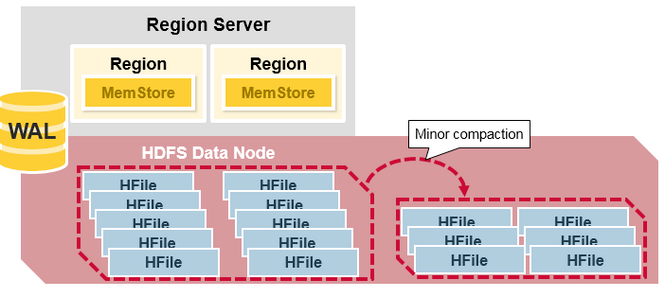
- Minor compaction is the process of merging several recently created small files into a larger configured HFile size.
- As data is inserted, many small HFiles are created. Too many files can reduce performance, so HBase automatically manages the number of HFiles by remaking multiple HFiles into a few larger HFiles.
- Because data stored in HFiles is sorted, it can be merged quickly using merge sort.
Major Compaction
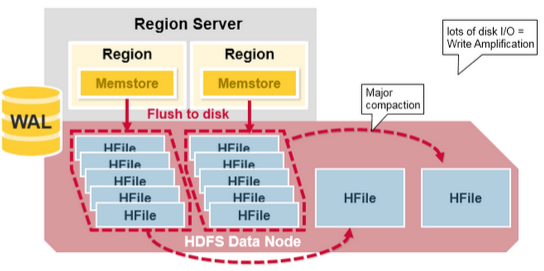
- Major compaction gathers all HFiles for a Column Family in a specific Region and creates one HFile per column. It runs once every 7 days by default.
- During this process, unnecessary cells and expired cells are removed to improve overall read performance. Data with Tombstone Markers is finally deleted at this time.
- When this work is performed, large amounts of file read/write activity occur, which can increase disk I/O and network traffic.
- It can be scheduled to run automatically, and this can be used to schedule it on weekends or at night to minimize the impact of sudden I/O increases on the service.
Compaction settings
Minor compaction uses the following settings to configure the number of HFiles that will be compacted.
hbase.hstore.compaction.min- Sets the minimum number of HFiles for minor compaction.
- The default is 3, and it must be set to 2 or higher.
- If the value is too large, minor compaction is delayed and later processing all at once can create load.
hbase.hstore.compaction.max- Sets the maximum number of HFiles for minor compaction.
The following settings specify the size of HFiles to compact.
hbase.hstore.compaction.min.size: HFiles smaller than this value are always included when searching for minor compaction through ExploringCompactionPolicy. This value is used together withhbase.hstore.compaction.ratioto choose HFiles for compaction.hbase.hstore.compaction.max.size: HFiles larger than this size are excluded from minor compaction. If minor compaction occurs often but does not have much effect, this value can be reduced so large files are excluded from minor compaction. Default:9223372036854775807, LONG.MAX_VALUE, bytes.
Other settings:
hbase.hregion.majorcompaction- HBase can have multiple StoreFiles for one Region. Periodically, to improve performance, it gathers these files and combines them into one larger file. This process involves significant CPU usage and disk I/O, and response time may decrease. Therefore, when response time matters, it is better to run Major compaction manually during off-peak time.
- The default is 86,400,000 ms. If this value is changed to 0, periodic Major Compaction will not run.
hbase.hregion.majorcompaction.jitter- The property defaults to 0.2, or 20%. It spreads out the timing when Major compaction runs for each stored file.
- Without it, major compaction runs simultaneously every 24 hours.
HBase compression and data block encoding
The codecs mentioned in this section are for encoding and decoding data blocks or row keys. For more information about replication codecs, see cluster.replication.preserving.tags.
HBase supports several compression algorithms that can be enabled for a ColumnFamily. Data block encoding uses HBase’s underlying design and patterns, such as sorted row keys and the schema of a given table, to limit information duplication in keys. Compressors can reduce the size of large opaque byte arrays in Cells and significantly reduce the storage space needed for uncompressed data.
Compressors and data block encoding can be used together in the same ColumnFamily.
Changes are applied during compaction
If compression or encoding is changed for a ColumnFamily, the change is applied during compaction.
Some codecs use features built into Java, such as GZip compression. Other codecs depend on native libraries. Native libraries can be provided through codec dependencies installed in the HBase library directory, or as part of Hadoop when using Hadoop codecs. Hadoop codecs usually have native code components, so follow the Hadoop native binary support installation instructions to use Hadoop native libraries in HBase.
This section describes common codecs used and tested in HBase.
Whichever codec you use, you must test that the codec is installed correctly and available on all nodes in the cluster. Additional operational steps may be needed to verify codec availability on newly deployed nodes. The compression.test utility can be used to verify that a specified codec is installed correctly.
To configure HBase to use compressors, see compressor.install. To enable a compressor for a ColumnFamily, see changing.compression. To enable data block encoding for a ColumnFamily, see data.block.encoding.enable.
Block Compressors
NONE
This compression type constant selects no compression and is the default.
BROTLI
- Brotli is a general-purpose lossless compression algorithm. It combines a modern variant of LZ77, Huffman coding, and second-order context modeling, and provides compression ratios comparable to the best general-purpose compression methods currently available. It has similar speed to GZ but provides denser compression.
BZIP2
- Bzip2 compresses files using the Burrows-Wheeler block-sorting text compression algorithm and Huffman coding. It usually has a much better compression ratio than dictionary-based compression such as LZ, but both compression and decompression may be slower than other options.
GZ(GZIP)
- Focuses on compression ratio.
- gzip is based on the DEFLATE algorithm, a combination of LZ77 and Huffman coding. This algorithm is universally available in the Java runtime environment, so it is a good lowest-common-denominator option. However, it is quite slow compared with newer algorithms such as Zstandard.
LZ4
- Focuses on compression/decompression speed.
- LZ4 is a lossless data compression algorithm focused on compression and decompression speed. It belongs to the LZ77 family of compression algorithms, like Brotli, DEFLATE, and Zstandard. In microbenchmarks, LZ4 is the fastest option in that family for both compression and decompression and is generally recommended.
LZMA
- LZMA is a dictionary compression method somewhat similar to LZ77. It achieves a very high compression ratio with a computationally expensive prediction model and variable-size compression dictionary, while maintaining decompression speed similar to other commonly used compression algorithms. LZMA beats all other options at typical compression ratios, but as a compressor it can be very slow, especially when configured to operate at high compression levels.
LZO
- Focuses on compression/decompression speed and requires additional library installation.
- LZO is another LZ-variant data compression algorithm implemented with a focus on decompression speed. It is not as fast as LZ4 but is close.
SNAPPY
- Focuses on compression/decompression speed.
- SNAPPY is based on LZ77 ideas but optimized for very fast compression speed, achieving only a reasonable level of compression in the tradeoff. It is as fast as LZ4, but its compression ratio is not very high. HBase provides a pure Java Snappy codec that can be used instead of GZ as a universally available option for all Java runtimes on all hardware architectures.
ZSTD
- Zstandard combines a dictionary matching stage (LZ77) with a large search window and fast entropy coding stage using both finite-state entropy and Huffman coding. Compression speed can differ by more than 20x between the fastest and slowest levels, but decompression is uniformly fast, with less than a 20% difference between the fastest and slowest levels.
- ZStandard is the most flexible available compression codec option. At level 1 it provides compression ratio similar to LZ4, with slightly lower performance. At mid levels it provides compression ratio similar to DEFLATE with better performance, and at high levels it provides dense compression similar to LZMA with LZMA-like compression speed, while providing universally fast decompression.
Data Block Encoding Types
HBase provides five data block encoding types:
- NONE
- Prefix
- Diff
- Fast Diff
- Prefix Tree
None
None means no encoding is applied and is the default.
ColumnFamily without encoding
The following table shows a hypothetical ColumnFamily without data block encoding.
| Key Length | Value Length | Key | Value |
|---|---|---|---|
| 24 | … | RowKey:Family:Qualifier0 | … |
| 24 | … | RowKey:Family:Qualifier1 | … |
| 25 | … | RowKey:Family:QualifierN | … |
| 25 | … | RowKey2:Family:Qualifier1 | … |
| 25 | … | RowKey2:Family:Qualifier2 | … |
| … | … | … | … |
Prefix
Usually keys often have the same prefix and only the last part differs.
For example, the first key may be RowKey:Family:Qualifier0, and the next key may be RowKey:Family:Qualifier1. Prefix encoding adds an extended column that stores the length of the prefix shared between the current key and the previous key. In this example, if the first key is completely different from the previous key, the prefix length is 0. Since the first 23 characters of the second key are the same, the prefix length becomes 23.
Of course, if two keys have nothing in common, Prefix provides no benefit.
ColumnFamily with Prefix encoding
The following is the same data with Prefix data encoding applied.
| Key Length | Value Length | Prefix Length | Key | Value |
|---|---|---|---|---|
| 24 | … | 0 | RowKey:Family:Qualifier0 | … |
| 1 | … | 23 | 1 | … |
| 1 | … | 23 | N | … |
| 19 | … | 6 | 2:Family:Qualifier1 | … |
| 1 | … | 24 | … | … |
| … | … | … | … | … |
Diff
Diff encoding extends Prefix encoding. Rather than treating the Key as one sequence of bytes, it splits each Key Field so each part of the Key can be compressed more efficiently.
Two new fields, timestamp and type, are added.
If the ColumnFamily is the same as the previous row, it is omitted from the current row. If key length, value length, and type are the same as the previous row, the fields are omitted.
Also, to improve compression, timestamp is not stored in full but as a difference from the previous row’s timestamp. In the prefix example, if there are two row keys and timestamp matches exactly and type is the same, the second row does not need to store value length or type, and the timestamp value in the second row becomes 0 instead of a full timestamp.
Because write and scan speed become slower, Diff encoding is disabled by default even though more data can be cached.
ColumnFamily with Diff encoding
This table shows the same ColumnFamily with Diff encoding applied.
| Flags | Key Length | Value Length | Prefix Length | Key | Timestamp | Type Value | ||
|---|---|---|---|---|---|---|---|---|
| 0 | 24 | 512 | 0 | RowKey:Family:Qualifier0 | 1340466835163 | 4 | … | |
| 5 | - | 320 | 23 | 1 | 0 | - | … | |
| 3 | - | - | 23 | N | 120 | 8 | … | |
| 0 | 25 | 576 | 6 | 2:Family:Qualifier1 | 25 | 4 | … | |
| 5 | - | 3384 | 24 | 2 | 1124 | - | … | |
| … | … | … | … | … | … | … | … |
Fast Diff
Fast Diff works similarly to Diff but is implemented faster. It also adds one more field that stores a single bit to track whether the data itself is the same as the previous row. If it is the same, the data is not stored again.
Use the Fast Diff codec when keys are long or there are many columns.
The data format is almost the same as Diff encoding, so there is no separate image to explain.
Prefix Tree
Prefix Tree encoding was introduced as an experimental feature in HBase 0.96. Prefix Tree encoding provides memory savings similar to Prefix, Diff, and Fast Diff encoders, but provides faster random access at the cost of slower encoding speed. It was a good idea, but it was rarely used and was removed in HBase 2.0.0.