HBase Data Manipulation Commands - put, get, delete, deleteall, scan, count, truncate
Data Manipulation commands
This section introduces HBase Shell commands for manipulating data.
put - Insert/Update Data
This section introduces how to create and update data in an HBase table.
The following HBase table will be created.
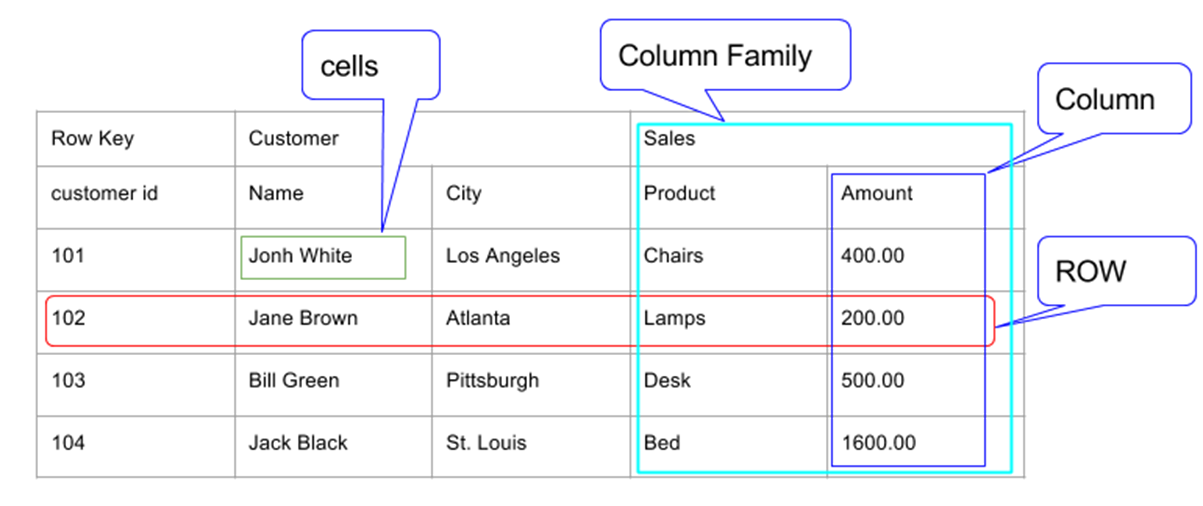
You can insert and update a row in a table by using the put command. The syntax is as follows.
put '<table name>', '<row id>', '<column family>:<column name>', '<value>'
Insert the First Row
create 'order', 'customer', 'sales'

put 'order', '101', 'customer:name', 'John White'
put 'order', '101', 'customer:city', 'Los Angeles'
put 'order', '101', 'sales:product', 'Chairs'
put 'order', '101', 'sales:amount', '400.00'
First, create the table.
hbase(main):001:0> create 'order', 'customer', 'sales'
Created table order
Took 5.0510 seconds
=> Hbase::Table - order
Then insert the first row values into the table.
hbase(main):002:0> put 'order', '101', 'customer:name', 'John White'
Took 0.6725 seconds
hbase(main):003:0> put 'order', '101', 'customer:city', 'Los Angeles'
Took 0.0318 seconds
hbase(main):004:0> put 'order', '101', 'sales:product', 'Chairs'
Took 0.0988 seconds
hbase(main):005:0> put 'order', '101', 'sales:amount', '400.00'
Took 0.0423 seconds
If you scan the whole table, the following result is displayed.
hbase(main):006:0> scan 'order'
ROW                               COLUMN+CELL
 101                              column=customer:city, timestamp=1686908392705, value=Los Angeles
 101                              column=customer:name, timestamp=1686908388954, value=John White
 101                              column=sales:amount, timestamp=1686908401071, value=400.00
 101                              column=sales:product, timestamp=1686908398256, value=Chairs
1 row(s)
Took 0.4121 seconds
Update Data
You can change an existing cell value by using the put command. The syntax is the same as when inserting data.
Specify a new value as follows.
put 'order','101','customer:city','LA'
The command execution is as follows.
hbase(main):007:0> put 'order','101','customer:city','LA'
Took 0.0677 seconds
hbase(main):008:0> scan 'order'
ROW                               COLUMN+CELL
 101                              column=customer:city, timestamp=1686909532774, value=LA
 101                              column=customer:name, timestamp=1686908388954, value=John White
 101                              column=sales:amount, timestamp=1686908401071, value=400.00
 101                              column=sales:product, timestamp=1686908398256, value=Chairs
1 row(s)
Took 0.1186 seconds
get - Retrieve Data
The get command is used to read data from an HBase table. The syntax is as follows.
get '<table name>', '<row id>'
The following example uses the get command to retrieve row 101 from the order table.
hbase(main):009:0> get 'order', '101'
COLUMN                            CELL
 customer:city                    timestamp=1686909532774, value=LA
 customer:name                    timestamp=1686908388954, value=John White
 sales:amount                     timestamp=1686908401071, value=400.00
 sales:product                    timestamp=1686908398256, value=Chairs
1 row(s)
Took 0.3162 seconds
Retrieve a Specific Row
The following is the syntax for using the get command to retrieve a specific column.
get '<table name>', '<row id>', {COLUMN => '<column family>:<column name>'}
The following is an example of retrieving a specific column from an HBase table.
hbase(main):010:0> get 'order', '101', {COLUMN => 'customer:name'}
COLUMN                            CELL
 customer:name                    timestamp=1686908388954, value=John White
1 row(s)
Took 0.1450 seconds
delete - Delete a Specific Cell from a Table
You can delete a specific cell from a table by using the delete command. The syntax of the delete command is as follows.
delete '<table name>', '<row id>', '<column name>', '<timestamp>'
The following is an example of deleting a specific cell. Here, city is deleted.
hbase(main):011:0> delete 'order', '101', 'customer:city', 1686909532774
Took 0.0917 seconds
If you query again, you can see that the 'LA' value changed with the previous put command has been deleted and the existing 'Los Angeles' value is visible again.
hbase(main):012:0> get 'order', '101'
COLUMN                            CELL
 customer:city                    timestamp=1686908392705, value=Los Angeles
 customer:name                    timestamp=1686908388954, value=John White
 sales:amount                     timestamp=1686908401071, value=400.00
 sales:product                    timestamp=1686908398256, value=Chairs
1 row(s)
Took 0.2196 seconds
deleteall - Delete All Cells in a Table Row
You can delete all cells in a row by using the deleteall command. The following is the syntax of the deleteall command.
deleteall '<table name>', '<row id>'
The following is an example of the deleteall command that deletes all cells in row 1 of the order table.
hbase(main):013:0> deleteall 'order','101'
Took 0.1271 seconds
hbase(main):015:0>
Check the table by using the scan command. After deleting the table data, the table snapshot is as follows.
hbase(main):015:0> scan 'order'
ROW                               COLUMN+CELL
0 row(s)
Took 0.0518 seconds
scan - Retrieve Data
The scan command is used to view data in HTable. You can use the scan command to fetch table data. The syntax is as follows.
scan '<table name>'
First, insert data as follows.
put 'order', '101', 'customer:name', 'John White'
put 'order', '101', 'customer:city', 'Los Angeles'
put 'order', '101', 'sales:product', 'Chairs'
put 'order', '101', 'sales:amount', '400.00'
The following example uses the scan command to retrieve data from the table.
hbase(main):019:0> scan 'order'
ROW                               COLUMN+CELL
 101                              column=customer:city, timestamp=1686912065208, value=Los Angeles
 101                              column=customer:name, timestamp=1686912059341, value=John White
 101                              column=sales:amount, timestamp=1686912074891, value=400.00
 101                              column=sales:product, timestamp=1686912070718, value=Chairs
1 row(s)
Took 0.2649 seconds
count - Count Data
You can count the number of rows in a table by using the count command. The syntax is as follows.
count ‘<table name>'
hbase(main):020:0> count 'order'
1 row(s)
Took 0.2992 seconds
=> 1
truncate - Delete All
The truncate command disables, drops, and recreates a table. The syntax of truncate is as follows.
truncate ‘<table name>'
The following is an example of the truncate command. Here, the order table was deleted and recreated.
hbase(main):021:0> truncate 'order'
Truncating 'order' table (it may take a while):
Disabling table...
Truncating table...
Took 5.6828 seconds
After deleting the table data with truncate, check it by using the scan command. You can confirm that the table has no rows.
hbase(main):023:0> scan 'order'
ROW                               COLUMN+CELL
0 row(s)
Took 1.6790 seconds