HBase Data Versioning
Data Versioning
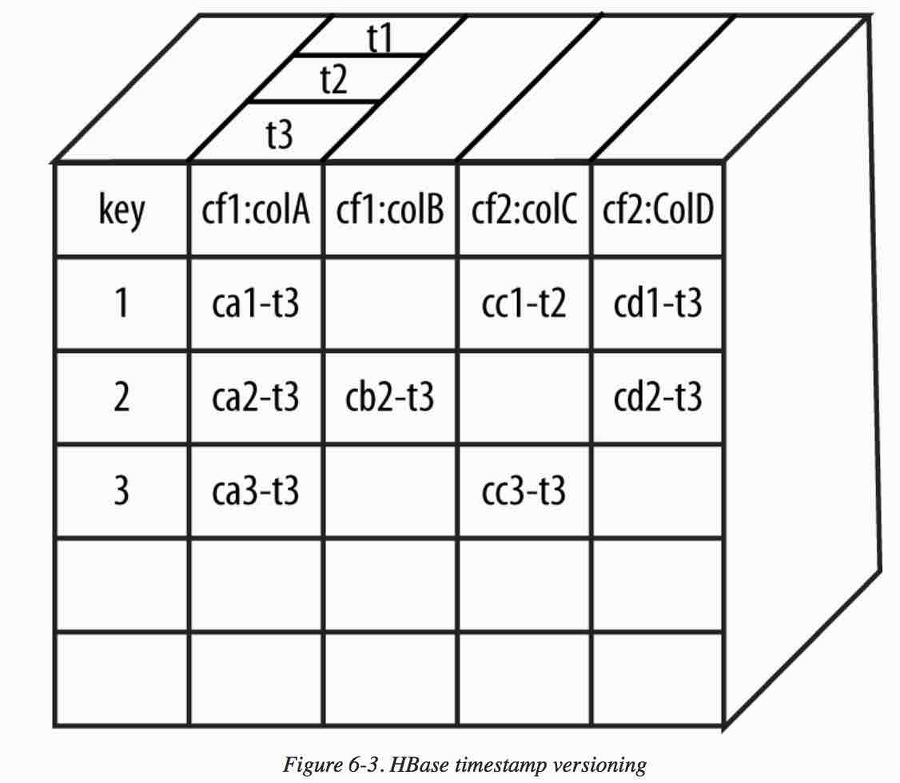
As one of HBase’s special features, multiple versions can be stored for a specific column value in each cell.
This is implemented using a timestamp for each version and is sorted in descending order. It uses Unix time converted to milliseconds as a long integer type.
HBase manages data versions by default. When data is stored with the same Row key, the most recent data is versioned by timestamp and stored in descending order, so the most recent value is found first when reading from storage files.
Timestamp can also be entered explicitly. By default, HBase keeps up to three changes for each cell, and because scan queries in descending order, the latest data is queried.
You can also query all stored versions of data as follows.
get 't1', 'rowkey1', {COLUMN => 'cf1', TIMESTAMP => ts1}
It is also possible to set a timestamp range and view the value at that point.
get 't1', 'rowkey1', {TIMERANGE => [start_timestamp, end_timestamp]}
Versioning is usually assigned automatically, but it can also be specified manually.
- Automatic versioning
- Version differences can occur if server times in the cluster are not the same.
- Timestamp can be set when executing the Put method, but generally automatic versioning within the server is recommended.
- The most recent three versions are managed by default, but because Major Compaction has a long cycle, old versions that have not yet been deleted may still exist.
- Manual versioning
- Can be implemented by overriding the timestamp.
Does deleting reveal an older version of a column even when HBase VERSIONS=1?
Earlier, it was mentioned that the most recent three versions are managed by default, but because Major Compaction has a long cycle, old versions that have not yet been deleted may still exist.
This section introduces a related issue that can occur.
Applying VERSIONS
Apply VERSIONS to the ColumnFamily as follows.
create 't1', {NAME => 'f1', VERSIONS => 2}
hbase(main):001:0> create 't1', {NAME => 'f1', VERSIONS => 2}
Created table t1
Took 5.9091 seconds
=> Hbase::Table - t1
Next, register data in order.
put 't1', '101', 'f1:name1', 'test1'
put 't1', '101', 'f1:name1', 'test2'
put 't1', '101', 'f1:name1', 'test2'
put 't1', '101', 'f1:name1', 'test4'
hbase(main):002:0> put 't1', '101', 'f1:name1', 'test1'
Took 0.7153 seconds
hbase(main):003:0> put 't1', '101', 'f1:name1', 'test2'
Took 0.0318 seconds
hbase(main):004:0> put 't1', '101', 'f1:name1', 'test3'
Took 0.0418 seconds
hbase(main):005:0> put 't1', '101', 'f1:name1', 'test4'
Took 0.0255 seconds
Then delete one by one with the delete command and check the result.
delete 't1', '101', 'f1:name1'
hbase(main):013:0> scan 't1'
ROW                                                                  COLUMN+CELL
 101                                                                 column=f1:name1, timestamp=1687426826665, value=test4
1 row(s)
Took 0.3049 seconds
hbase(main):014:0> delete 't1', '101', 'f1:name1'
Took 0.0160 seconds
hbase(main):015:0> scan 't1'
ROW                                                                  COLUMN+CELL
 101                                                                 column=f1:name1, timestamp=1687426822568, value=test3
1 row(s)
Took 0.1760 seconds
hbase(main):016:0> delete 't1', '101', 'f1:name1'
Took 0.0605 seconds
hbase(main):017:0> scan 't1'
ROW                                                                  COLUMN+CELL
 101                                                                 column=f1:name1, timestamp=1687426817569, value=test2
1 row(s)
Took 0.0710 seconds
hbase(main):018:0> delete 't1', '101', 'f1:name1'
Took 0.0337 seconds
hbase(main):019:0> scan 't1'
ROW                                                                  COLUMN+CELL
 101                                                                 column=f1:name1, timestamp=1687426813634, value=test1
1 row(s)
Took 0.0265 seconds
hbase(main):020:0>
You can see that the previously registered data is queried in order.
Question about VERSIONS
The question here is that VERSIONS was said to store only one version, but even when VERSIONS => 2 is specified, more versions of the column appear to be maintained. At first glance, this looks suspiciously like a bug.
Searching online, a person with the same question was found.
Delete reveals older version of a column even when VERSIONS=1
The answer to that question says the following.
Older versions do not actually disappear until compaction occurs. Compaction should be performed once a day unless the major compaction setting is changed, or whenever a Region is split.
This issue occurs because Major Compaction has not yet been performed.
How to check VERSIONS application
Then how can VERSIONS be checked? Use the get command and query details with VERSIONS => 4 as follows.
get 't1', '101', {COLUMN=>'f1:name1',VERSIONS => 4 }
hbase(main):005:0> get 't1', '101', {COLUMN=>'f1:name1', VERSIONS => 4 }
COLUMN                                                               CELL
 f1:name1                                                            timestamp=1687427184339, value=test4
 f1:name1                                                            timestamp=1687427181122, value=test2
1 row(s)
Took 0.5028 seconds
hbase(main):006:0>
As shown above, you can see two records according to VERSIONS => 2 specified when creating the table.