HBase Table Management Commands - create, list, exists, disable/enable, describe, alter, drop
Table Management commands
This section introduces HBase Shell commands for table management.
create - Create a Table
You can create a table by using the create command. Here, you must specify the table name and Column Family name. The syntax for creating a table in the HBase shell is as follows.
create '<table name>', '<column family>'
The following is a sample schema for a table named order. It has two column families: customer and sales.
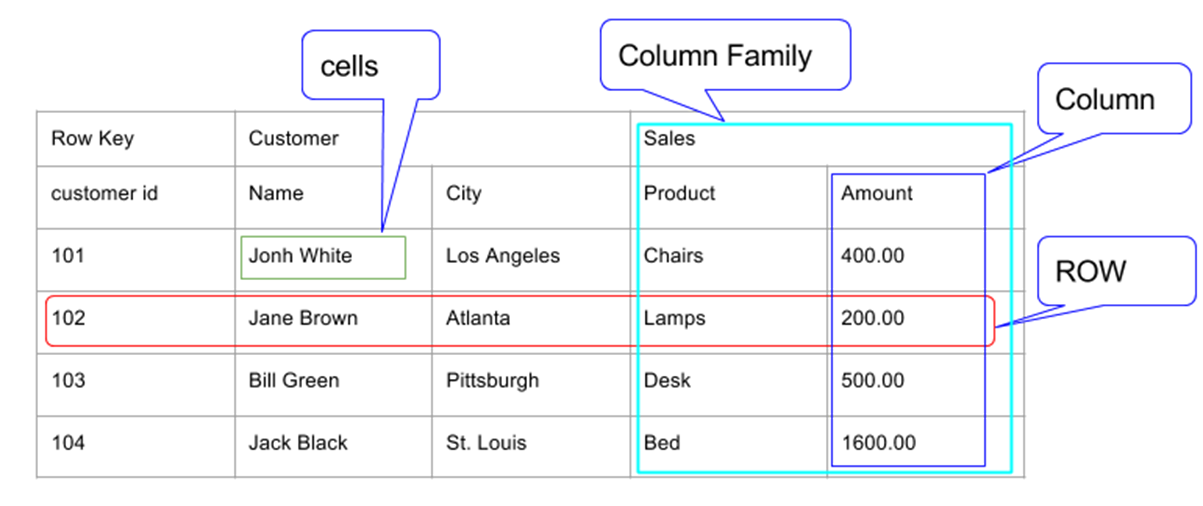
You can create this table in the HBase shell as follows.
create 'order', 'customer', 'sales'
When executed, it runs as follows.
hbase(main):002:0> create 'order', 'customer', 'sales'
Created table order
Took 2.4344 seconds
=> Hbase::Table - order
create Options
You can also add options when creating a table.
Create t1 and create column family cf1, storing up to 5 latest version values.
create 't1', {NAME => 'f1', VERSIONS => 5}
Create t1 and create column families cf1, cf2, and cf3.
create 't1', {NAME => 'f1', NAME => 'f2', NAME => 'f3'}
The following commands specify other options.
create 't1', {NAME => 'cf2', VERSION => 1, TTL => 2592000, BLOCKCACHE =>true}
create 't1', {NAME => 'cf2', CONFIGURATION => {'hbase.hstore.blockingStoreFiles' ='10'}}
list - View Table List
list is a command used to list all tables in HBase. The syntax of the list command is as follows.
list
If you enter this command and run it at the HBase prompt, all HBase tables are displayed as follows.
hbase(main):004:0> list
TABLE
order
1 row(s) in 0.1070 seconds
=> ["order"]
You can also add options as follows.
hbase(main):005:0> list 'customer.*'
TABLE
order
1 row(s) in 0.0140 seconds
=> ["order"]
exists - Check Table Existence
You can check whether a table exists by using the exists command. The following is the syntax for checking whether a table exists.
exists '<table name>'
The following example checks whether the order table exists.
hbase(main):022:0> exists 'order'
Table order does exist
0 row(s) in 0.0680 seconds
The following example checks whether the user table exists, where it does not actually exist.
hbase(main):023:0> exists 'user'
Table user does not exist
0 row(s) in 0.0110 seconds
disable - Disable a Table
To delete a table or change its settings, you must first disable the table by using the disable command. You can enable it again by using the enable command.
The syntax for disabling a table is as follows.
disable '<table name>'
The following example shows how to disable the order table.
hbase(main):004:0> disable 'order'
0 row(s) in 1.4570 seconds
Even after disabling a table, you can check that the table exists with the list and exists commands.
hbase(main):009:0> list
TABLE
order
1 row(s) in 0.0140 seconds
=> ["order"]
A disabled table cannot be scanned. The following error occurs.
hbase(main):010:0> scan 'order'
ROW                                         COLUMN+CELL

ERROR: order is disabled.

// omitted
is_disabled
This command is used to check whether a table is disabled. The syntax is as follows.
is_disabled '<table name>'
The following example checks whether a table named order is disabled. It returns true if disabled and false otherwise.
hbase(main):011:0> is_disabled 'order'
true
0 row(s) in 0.0360 seconds
disable_all
The disable_all command is used to disable all tables matching a given regular expression. The syntax of the disable_all command is as follows.
disable_all ‘<regex table name>’
A simple example is shown below. The following command disables all tables that start with r.
disable_all 'r.*'
Assume HBase has four tables that start with dev: dev_follow, dev_friend, dev_test, and dev_user. The following code disables all tables that start with dev.
hbase(main):017:0> disable_all 'dev.*'
dev_follow
dev_friend
dev_test
dev_user

Disable the above 4 tables (y/n)?
y
4 tables successfully disabled
enable - Enable a Table
To enable a disabled table, use the enable command. The syntax for enabling a table is as follows.
enable '<table name>'
The following is an example of enabling a table.
hbase(main):018:0> enable 'order'
0 row(s) in 0.6580 seconds
After enabling the table, scan it. If no error occurs, the table has been enabled normally.
hbase(main):020:0> scan 'order'
ROW                                         COLUMN+CELL
0 row(s) in 0.0730 seconds
is_enabled
The is_enabled command is used to check whether a table is enabled. The syntax is as follows.
is_enabled '<table name>'
The following command checks whether a table named order is enabled. It returns true if enabled and false otherwise.
hbase(main):021:0> is_enabled 'order'
true
0 row(s) in 0.0750 seconds
describe - Describe a Table
The describe command returns a description of a table. The syntax is as follows.
describe '<table name>'
The following is the output of the describe command for the order table.
hbase(main):006:0> describe 'order'
DESCRIPTION                                                                                                  ENABLED
 'order', {NAME => 'customer', DATA_BLOCK_ENCODING => 'NONE', BLOOMFILTER => 'ROW', REPLICATION_SCO true
 PE => '0', VERSIONS => '1', COMPRESSION => 'NONE', MIN_VERSIONS => '0', TTL => 'FOREVER', KEEP_DELETED_CELL
 S => 'false', BLOCKSIZE => '65536', IN_MEMORY => 'false', BLOCKCACHE => 'true'}, {NAME => 'sales', DATA_BLO
 CK_ENCODING => 'NONE', BLOOMFILTER => 'ROW', REPLICATION_SCOPE => '0', VERSIONS => '1', COMPRESSION => 'NON
 E', MIN_VERSIONS => '0', TTL => 'FOREVER', KEEP_DELETED_CELLS => 'false', BLOCKSIZE => '65536', IN_MEMORY =
 > 'false', BLOCKCACHE => 'true'}
1 row(s) in 0.1450 seconds
alter - Change a Table
alter is a command used to change an existing table. You can use this command to change the maximum number of cells in a column family, set and remove table-scope operators, and delete column families from a table.
Change the Maximum Number of Cells in a Column Family
The following is the syntax for changing the maximum number of cells in a column family.
alter '<table name>', NAME => '<column family>', VERSIONS => 5
The following example sets the maximum number of cells to 5.
hbase(main):007:0>alter 'order', NAME => 'customer', VERSIONS => 5
Updating all regions with the new schema...
0/1 regions updated.
1/1 regions updated.
Done.
0 row(s) in 2.4240 seconds

hbase(main):009:0>
Table-Scope Operators
With alter, you can set and remove table-scope operators such as MAX_FILESIZE, READONLY, MEMSTORE_FLUSHSIZE, and DEFERRED_LOG_FLUSH.
READONLY - Set Read-Only
The following is the syntax for making a table read-only.
alter '<table name>', READONLY(option)
The following example makes the order table read-only.
hbase(main):009:0> alter 'order', READONLY
Updating all regions with the new schema...
0/1 regions updated.
1/1 regions updated.
Done.
0 row(s) in 2.3650 seconds
MAX_FILESIZE - Change Region Setting
Change the region setting with MAX_FILESIZE.
alter 't1', MAX_FILESIZE => '123217728'
This changes the maximum region size to 128 MB.
Delete a Column Family
With alter, you can also delete a column family. The syntax for deleting a column family with alter is as follows.
alter '<table name>', 'delete' => '<column family>'
The following is an example of deleting a column family from the order table.
hbase(main):010:0> alter 'order', 'delete' => 'sales'
Updating all regions with the new schema...
0/1 regions updated.
1/1 regions updated.
Done.
0 row(s) in 2.3790 seconds
If you check with the describe command, you can see that 'sales' has disappeared.
hbase(main):011:0> describe 'order'
DESCRIPTION                                                                                                  ENABLED
 'order', {NAME => 'READONLY', DATA_BLOCK_ENCODING => 'NONE', BLOOMFILTER => 'ROW', REPLICATION_SCO true
 PE => '0', COMPRESSION => 'NONE', VERSIONS => '1', TTL => 'FOREVER', MIN_VERSIONS => '0', KEEP_DELETED_CELL
 S => 'false', BLOCKSIZE => '65536', IN_MEMORY => 'false', BLOCKCACHE => 'true'}, {NAME => 'customer', DATA_
 BLOCK_ENCODING => 'NONE', BLOOMFILTER => 'ROW', REPLICATION_SCOPE => '0', VERSIONS => '5', COMPRESSION => '
 NONE', MIN_VERSIONS => '0', TTL => 'FOREVER', KEEP_DELETED_CELLS => 'false', BLOCKSIZE => '65536', IN_MEMOR
 Y => 'false', BLOCKCACHE => 'true'}
1 row(s) in 0.0850 seconds
drop - Delete a Table
You can delete a table by using the drop command. The syntax is as follows.
drop '<table name>'
The table must be disabled before it is deleted.
hbase(main):024:0> disable 'order'
0 row(s) in 1.3960 seconds
hbase(main):025:0> drop 'order'
0 row(s) in 0.2860 seconds
Use the exists command to check whether the table has been deleted.
hbase(main):026:0> exists 'order'
Table order does not exist
0 row(s) in 0.0710 seconds
drop_all
The drop_all command is used to delete all tables matching a given regular expression. The syntax is as follows.
drop_all '<regex table name>'
A simple example is shown below. The following command deletes all tables that start with t.
drop_all 't.*'
Note: All target tables must be disabled before deletion.