Kotest Project Setup
Adding Dependencies
To use Kotest, you first need to add the library to your project. The Kotest testing framework is supported on JVM, JavaScript, and Native. To use Kotest across multiple platforms, configure the steps for each platform as described below.
JVM/Gradle
Kotest in a JVM/Gradle project uses the JUnit Platform Gradle plugin.
In Gradle 4.6 or later, you only need to add useJUnitPlatform() to tasks whose test type is Test and add the Kotest JUnit 5 launcher dependency.
When using Gradle + Groovy (build file: build.gradle):
test {
  useJUnitPlatform()
}
Or when using Gradle + Kotlin (build file: build.gradle.kts):
tasks.withType<Test>().configureEach {
   useJUnitPlatform()
}
Then add the Kotest dependency as follows:
repositories {
    mavenCentral()
}

dependencies {
    testImplementation("io.kotest:kotest-runner-junit5:${kotestVersion}")
    // Add dependencies for other modules if needed.
}
JVM/Maven
For a JVM/Maven project, the following configuration is required in the build file (pom.xml).
Configure the Surefire plugin for JUnit tests:
<plugin>
   <groupId>org.apache.maven.plugins</groupId>
   <artifactId>maven-surefire-plugin</artifactId>
   <version>2.22.2</version>
</plugin>
Then add the Kotest JUnit 5 runner dependency:
<dependencies>
    <dependency>
        <groupId>io.kotest</groupId>
        <artifactId>kotest-runner-junit5</artifactId>
        <version>{kotestVersion}</version>
        <scope>test</scope>
    </dependency>
</dependencies>
Kotlin/JS
For example:
plugins {
  id("io.kotest.multiplatform") version "5.0.2"
}
Add the engine dependency to the commonTest dependency block:
kotlin {
  targets {
    js(IR) { // LEGACY or BOTH are unsupported
      browser() // to compile for the web
      nodejs() // to compile against node
    }
  }

  sourceSets {
    val commonTest by getting {
      dependencies {
        implementation("io.kotest:kotest-framework-engine:$version")
      }
    }
  }
}
You can write tests using FunSpec, ShouldSpec, or StringSpec. Tests can be placed in the commonTest or jsTest source set. Use the gradle check command to run the tests.
The JavaScript test engine has limited functionality compared with the JVM test engine. The biggest limitation is that Kotlin does not expose annotations to JavaScript code at runtime, so annotation-based configuration does not work.
Kotlin/Native
In Kotlin/Native projects, as with Kotlin/JS projects, you need to add the Kotest multiplatform Gradle plugin.
plugins {
  id("io.kotest.multiplatform") version "5.0.2"
}
Add the engine dependency to the commonTest dependency block:
kotlin {
  targets {
    linuxX64() // can add any supported native targets such as linux, mac, windows etc
  }
}
sourceSets {
  val commonTest by getting {
    dependencies {
      implementation("io.kotest:kotest-framework-engine:$version")
    }
  }
}
Tests can be placed in commonTest or in a specific Native source set. Use the gradle check command to run tests.
The Native test engine has limited functionality compared with the JVM test engine. The biggest limitation is that Kotlin does not expose annotations to Native code at runtime, so annotation-based configuration does not work.
Note The IntelliJ Kotest plugin does not support running regular, Native, or JS tests from the IDE. You must use the Gradle check task.
Android
Kotest on Android uses the JUnit Platform Gradle plugin. To use it, configure the Android test options block in the build file, then add the Kotest JUnit 5 launcher dependency.
android.testOptions {
   unitTests.all {
      it.useJUnitPlatform()
   }
}
dependencies {
   testImplementation 'io.kotest:kotest-runner-junit5:{version}'
}
Kotest Version
Here, specify the Kotest version you want to use in ${kotestVersion}.
As of April 2024, the latest Kotest version is 5.8.1, released on March 11, 2024. https://central.sonatype.com/artifact/io.kotest/kotest-runner-junit5
Creating a Kotest Environment in IntelliJ IDEA
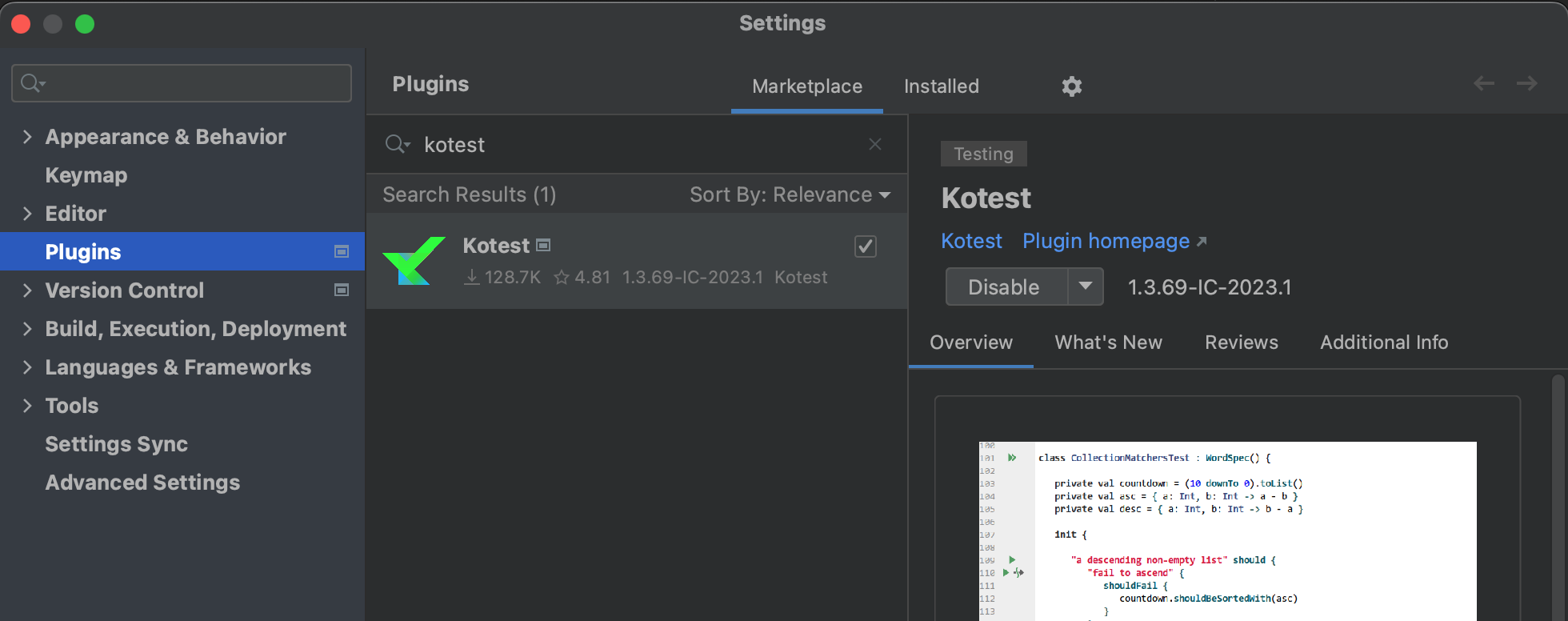
To run Kotest in IntelliJ IDEA, you need to install the Kotest plugin.
Go to [Setting]-[Plugins], search for kotest, and install it.