Introduction to Testcontainers
Overview
The test environment is one of the most important parts of project setup. Testing in an environment that matches production as closely as possible is important.
However, it is not possible to build the same environment every time, and it is not easy to align the environment across all developers.
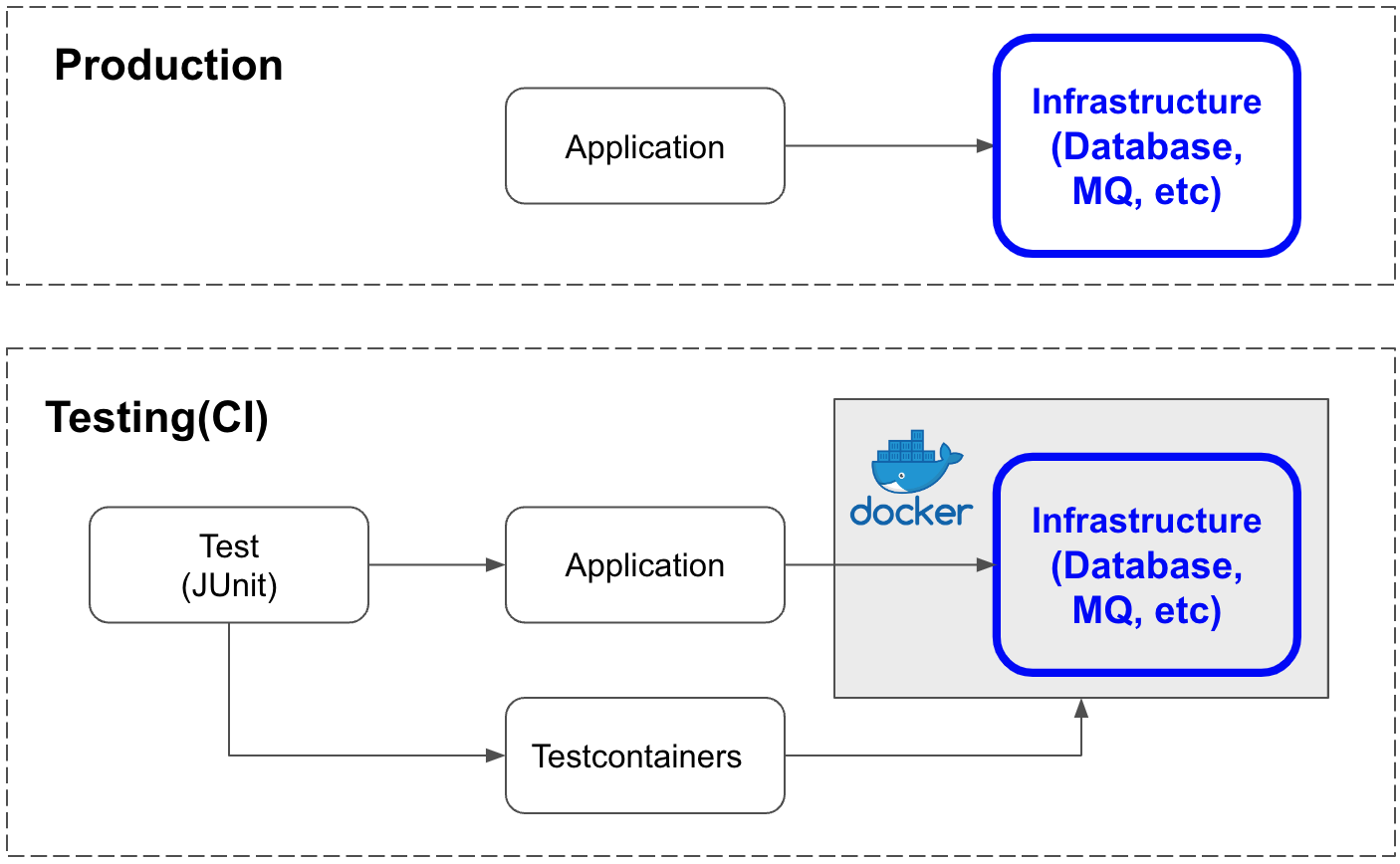
Ideally, each time test code runs, Docker would start containers for the test, the test would run, and then the containers would be stopped and removed afterward. Testcontainers makes this possible.
What is Testcontainers?
Testcontainers is a Java library that runs Docker containers for tests.
It lets you build infrastructure with Docker and supports a wide range of services.
It also helps satisfy the Repeatable principle in FIRST.
Testcontainers Sites
- Official documentation: https://www.testcontainers.org/
- GitHub: https://github.com/testcontainers/testcontainers-java/
Why Use Testcontainers?
The test environment is one of the most important parts of project setup.
It can also be one of the most difficult and tedious tasks, but if it is set up well once, you can write clean test code later without worrying about the environment. At the same time, it is one of the areas that tends to take the most time during project setup and often involves many rounds of trial and error.
Testcontainers provides an environment where systems such as MySQL, PostgreSQL, Redis, Apache Kafka, Amazon SQS, and many others can be created as Docker containers and used for testing.
Without Testcontainers, you would need to create a real system environment and initialize test data every time you run tests. Also, if someone else accesses the system environment created for testing at the same time, another test could cause your test to fail. External modules could also make tests fail intermittently.
In other words, results can change depending on the situation or external influences. When this happens, it is very hard to find the failing area. This is often described as idempotency not being maintained, and idempotency is a very important concept in tests. Preserving idempotency has a large impact on overall test productivity.
Support for Various Modules
Testcontainers supports many modules. A few examples are listed below.
Using Testcontainers
This section briefly explains how to use it.
Add Libraries
To use Testcontainers with JUnit 5 in Gradle, add the following libraries.
testImplementation "org.junit.jupiter:junit-jupiter:5.8.1"
testImplementation "org.testcontainers:testcontainers:1.17.3"
testImplementation "org.testcontainers:junit-jupiter:1.17.3"
Write Test Code
@Testcontainers
public class RedisBackedCacheIntTest {

    private RedisBackedCache underTest;

    // container {
    @Container
    public GenericContainer redis = new GenericContainer(DockerImageName.parse("redis:5.0.3-alpine"))
        .withExposedPorts(6379);

    // }

    @BeforeEach
    public void setUp() {
        String address = redis.getHost();
        Integer port = redis.getFirstMappedPort();

        // Now we have an address and port for Redis, no matter where it is running
        underTest = new RedisBackedCache(address, port);
    }

    @Test
    public void testSimplePutAndGet() {
        underTest.put("test", "example");

        String retrieved = underTest.get("test");
        assertThat(retrieved).isEqualTo("example");
    }
}
@Testcontainers
To run a Redis container during the test, first add @Testcontainers to the test class.
@Testcontainers
public class RedisBackedCacheIntTest {
Create the Container
@Container
public GenericContainer redis = new GenericContainer(DockerImageName.parse("redis:5.0.3-alpine"))
    .withExposedPorts(6379);
The @Container annotation tells JUnit to notify this field about various events in the test lifecycle.
Here, the container is a Testcontainers GenericContainer, configured to use a specific Redis image from Docker Hub and expose the specified port, 6379.
Check Whether the Code Can Communicate with the Container
Ask Testcontainers for the container address.
String address = redis.getHost();
Ask Testcontainers for the container port.
Integer port = redis.getFirstMappedPort();
Container Reuse (Option)
When using Testcontainers, a new Docker container is created every time tests run, which can take a long time.
To address this, Testcontainers provides a container reuse option, although it is still not a publicly supported feature. This relates to the Fast principle.
Requirements:
- Configure the
.testcontainers.propertiesfile in the developer’s home directory.testcontainers.reuse.enable=true - Specify the
TC_REUSABLE=trueoption in the JDBC URL.jdbc:tc:mysql:///test?TC_REUSABLE=true&TC_INITSCRIPT=file:src/test/resources/schema.ddl
Container reuse is possible only when both settings above are configured.