Kotest Data-Driven Testing
Data-Driven Testing
Data-Driven Testing is a way to run the same test code repeatedly against several data sets, similar to parameterized tests in JUnit 5. Instead of writing several tests for different input data, you can provide multiple inputs to a single test case and verify many cases.
When writing logic-based tests, one or two specific code paths that work in a particular scenario may be enough. In other cases, tests are more example-based, and testing many parameter combinations can be useful.
In these situations, data-driven testing, also called table-driven testing, is an easy technique for avoiding tedious boilerplate.
Kotest provides first-class support for data-driven testing built into the framework. It automatically creates test case entries based on the input values you provide.
Getting Started with Data-Driven Testing
Let’s look at data-driven testing with a simple example.
Testing Pythagorean Triples
We will write a test for a Pythagorean triple function that returns true when the input values form a valid triangle, where a squared plus b squared equals c squared.
fun isPythagTriple(a: Int, b: Int, c: Int): Boolean = a * a + b * b == c * c
Since each row needs at least one element, and here it needs three, start by defining a data class that holds a single row of values. In this case, it contains two inputs and the expected result.
data class PythagTriple(val a: Int, val b: Int, val c: Int)
Use instances of this data class to generate tests, and pass them to the withData function, which accepts a lambda containing the test logic for each row.
For example:
package com.devkuma.kotest.tutorial.datadriven

import io.kotest.core.spec.style.FunSpec
import io.kotest.datatest.withData
import io.kotest.matchers.shouldBe

class PythagTripleTest : FunSpec({
    context("Pythag triples tests") {
        withData(
            PythagTriple(3, 4, 5),
            PythagTriple(6, 8, 10),
            PythagTriple(8, 15, 17),
            PythagTriple(7, 24, 25)
        ) { (a, b, c) ->
            isPythagTriple(a, b, c) shouldBe true
        }
    }
})
Because a data class is used, the input row can be destructured into member properties. When this runs, four test cases are created, one for each input row.
Kotest automatically creates a test case for each input row, as if you had manually written a separate test case for every row.
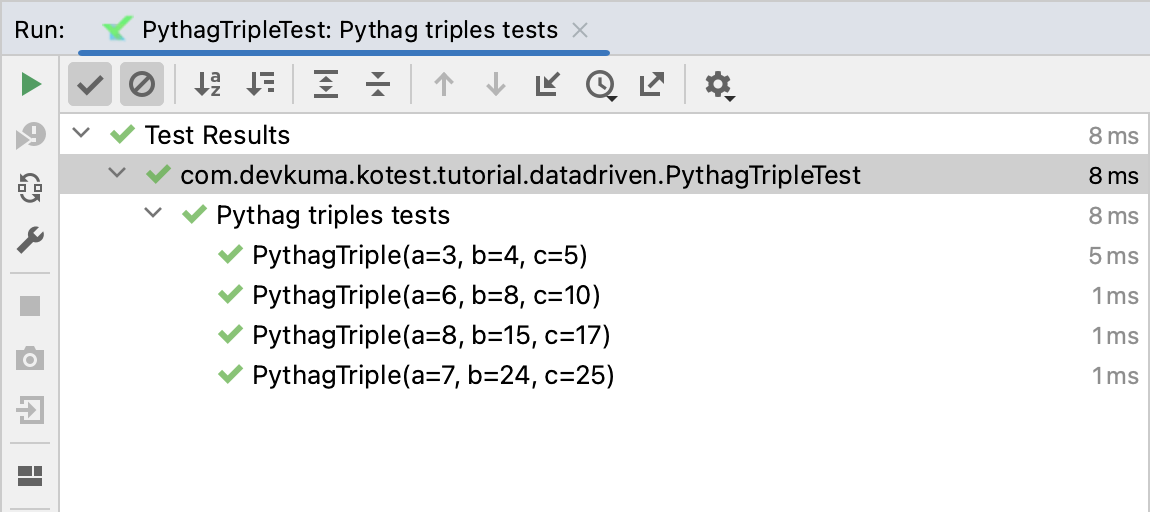
The test name is generated from the data class itself, but it can be customized.
If a specific input row has an error, the test fails and Kotest prints the failed value. For example, if you change the previous example to include the row PythagTriple(5, 4, 3), that test is shown as failed.
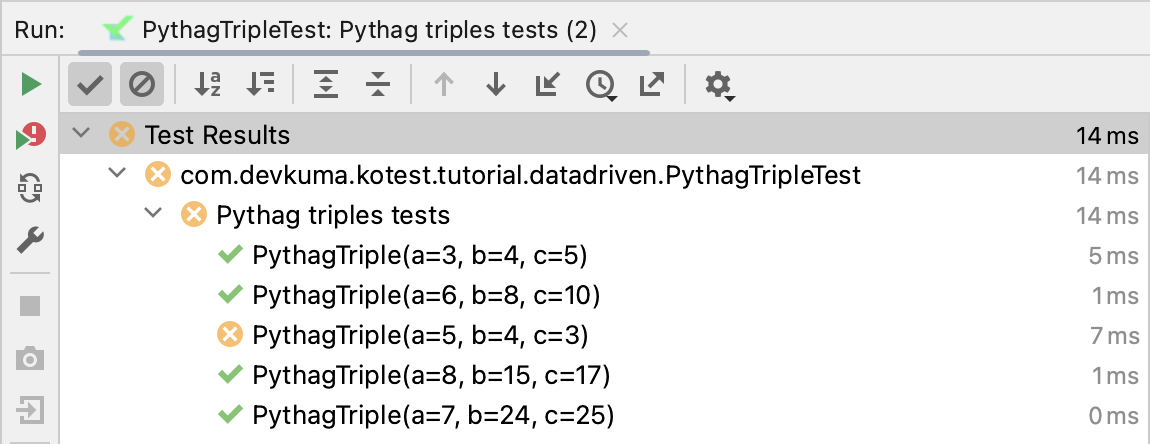
The error message includes the error and the input row details:
expected:<true> but was:<false>
Expected :true
Actual   :false
In detail, when a=5, b=4, c=3, 5 * 5 + 4 * 4 = 41 and 3 * 3 = 9 are not equal, so false is returned and the test fails.
In the previous example, the withData call was wrapped in a parent test, so an extra context, context("Pythag triples tests"), appears when the test results are shown. The syntax depends on the spec style being used. Here, a FunSpec with a context block was used as the container. In practice, data tests can be nested inside containers as much as needed.
However, this is optional, and data tests can also be defined at the root level.
For example:
class PythagTripleTest : FunSpec({
    withData(
        PythagTriple(3, 4, 5),
        PythagTriple(6, 8, 10),
        //PythagTriple(5, 4, 3),
        PythagTriple(8, 15, 17),
        PythagTriple(7, 24, 25)
    ) { (a, b, c) ->
        isPythagTriple(a, b, c) shouldBe true
    }
})
Testing Different Values
Another example of testing data of various types is shown below:
package com.devkuma.kotest.tutorial.datadriven

import io.kotest.core.spec.style.FunSpec
import io.kotest.datatest.withData
import io.kotest.matchers.shouldBe

class WithDataTest : FunSpec({

    context("verify string length") {
        withData(
            ValueExpected("Hello", 5), // first data set: string "Hello"
            ValueExpected("World", 5)  // second data set: string "World"
        ) { (str, expected) ->
            str.length shouldBe expected // verify that the string length matches the expected value for each data set
        }
    }

    context("verify set size") {
        withData(
            ValueExpected(setOf(1, 2, 3), 3),   // first data set: integer set {1, 2, 3}
            ValueExpected(setOf(4, 5, 6, 7), 4) // second data set: integer set {4, 5, 6, 7}
        ) { (set, expected) ->
            set.size shouldBe expected // verify that the set size matches the expected value for each data set
        }
    }

    context("verify map size") {
        withData(
            ValueExpected(mapOf("a" to 1, "b" to 2), 2),             // first data set: map {"a" -> 1, "b" -> 2}
            ValueExpected(mapOf("x" to 10, "y" to 20, "z" to 30), 3) // second data set: map {"x" -> 10, "y" -> 20, "z" -> 30}
        ) { (map, expected) ->
            map.size shouldBe expected // verify that the map size matches the expected value for each data set
        }
    }
})

data class ValueExpected<T>(
    val value: T,
    val expected: Int,
)
Using the forAll Function
You can also perform data-driven testing by using the forAll function for data verification.
package com.devkuma.kotest.tutorial.datadriven

import io.kotest.core.spec.style.StringSpec
import io.kotest.data.forAll
import io.kotest.data.row
import io.kotest.matchers.shouldBe

class ForAllTest : StringSpec({

    "verify string length" {
        forAll(
            row("Hello", 5),
            row("World", 5)
        ) { str, expected ->
            str.length shouldBe expected
        }
    }

    "verify set size" {
        forAll(
            row(setOf(1, 2, 3), 3),
            row(setOf(4, 5, 6, 7), 4)
        ) { set, expected ->
            set.size shouldBe expected
        }
    }

    "verify map size" {
        forAll(
            row(mapOf("a" to 1, "b" to 2), 2),
            row(mapOf("x" to 10, "y" to 20, "z" to 30), 3)
        ) { map, expected ->
            map.size shouldBe expected
        }
    }
})
In the example above, the forAll function is used to generate integer data and run the test repeatedly with that data.
Callbacks
To use before and after callbacks in data-driven tests, you can use the standard beforeTest and afterTest. Every test created with data-driven testing behaves the same as a normal test, so all standard callbacks work as if each test had been written directly.
For example:
package com.devkuma.kotest.tutorial.datadriven

import io.kotest.core.spec.style.FunSpec
import io.kotest.datatest.withData

class CallbackTest : FunSpec({

    beforeTest {
        println("beforeTest")
    }

    context("callback test") {
        withData("X", "Y", "Z") { a ->
            println(a)
        }
    }
})
The following is the result of running the example:
beforeTest
beforeTest
X
beforeTest
Y
beforeTest
Z
Data Test Names
By default, the name of each test is simply the toString() value of the input row. This usually works well for JVM data classes, but the input row must be stable.
However, if you are not using a stable data class, are running on a non-JVM target, or simply want to customize names, you can specify how test names are generated.
Stable Names
When Kotest creates tests, it needs stable test names while the test suite runs. Test names are used as the basis for identifiers when reporting test status to Gradle or IntelliJ. If a name is not stable, the ID can change and cause errors where tests do not appear or seem unfinished.
Kotest uses the input class’s toString() only when it determines that the value is stable. Otherwise, it uses the class name.
You can force Kotest to use toString() for test names by annotating the type with @IsStableType. Then toString() is used regardless.
Alternatively, you can fully customize the display name of the test.
Using mapOf
In Kotest, you can specify test names by passing a map to the withData function, where the key is the test name and the value is the input value for that row.
package com.devkuma.kotest.tutorial.datadriven

import io.kotest.core.spec.style.FunSpec
import io.kotest.datatest.withData
import io.kotest.matchers.shouldBe

class PythagTripleMapOfTest : FunSpec({

    context("Pythag triples tests") {
        withData(
            mapOf(
                "3, 4, 5" to PythagTriple(3, 4, 5),
                "6, 8, 10" to PythagTriple(6, 8, 10),
                "8, 15, 17" to PythagTriple(8, 15, 17),
                "7, 24, 25" to PythagTriple(7, 24, 25)
            )
        ) { (a, b, c) ->
            a * a + b * b shouldBe c * c
        }
    }
})
Test Name Function
Alternatively, you can pass a function to withData that receives a row as input and returns a test name. Depending on how generous Kotlin type inference feels, you may need to specify a type parameter on the withData function.
package com.devkuma.kotest.tutorial.datadriven

import io.kotest.core.spec.style.FunSpec
import io.kotest.datatest.withData
import io.kotest.matchers.shouldBe

class PythagTripleNameTest : FunSpec({

    context("Pythag triples tests") {
        withData<PythagTriple>(
            nameFn = { "${it.a}, ${it.b}, ${it.c}" },
            PythagTriple(3, 4, 5),
            PythagTriple(6, 8, 10),
            PythagTriple(8, 15, 17),
            PythagTriple(7, 24, 25)
        ) { (a, b, c) ->
            a * a + b * b shouldBe c * c
        }
    }
})
The output of this example is now a little clearer:
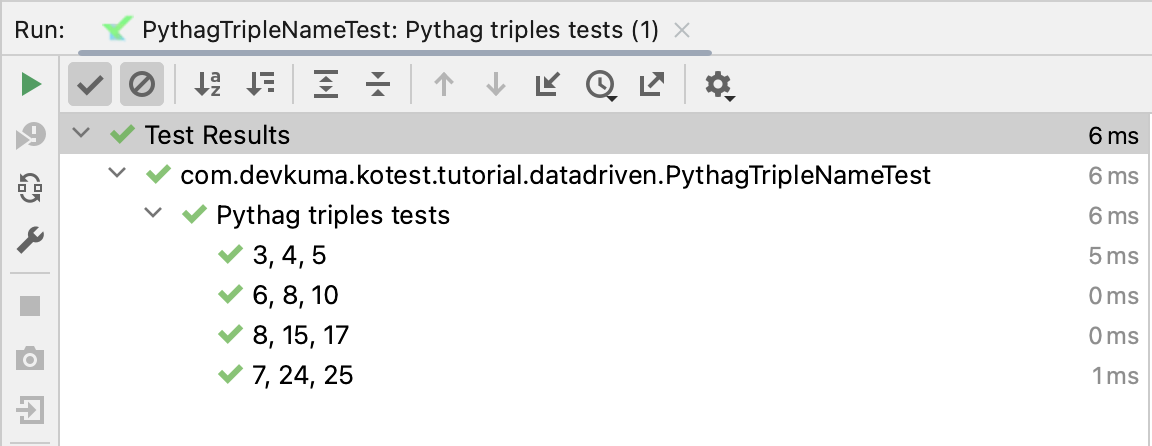
WithDataTestName
Another alternative is to implement the WithDataTestName interface. If this interface is provided, toString() is not used. Instead, the interface’s dataTestName() function is called for each row.
package com.devkuma.kotest.tutorial.datadriven

import io.kotest.datatest.WithDataTestName

data class PythagTriple(val a: Int, val b: Int, val c: Int) : WithDataTestName {
    override fun dataTestName() = "wibble $a, $b, $c wobble"
}
The output of this example becomes a little simpler:
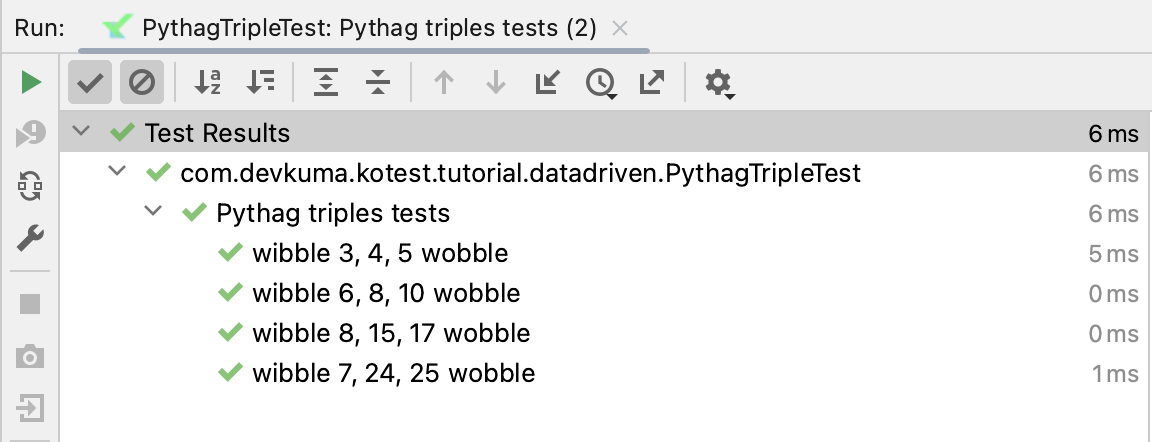
Nested Data Tests
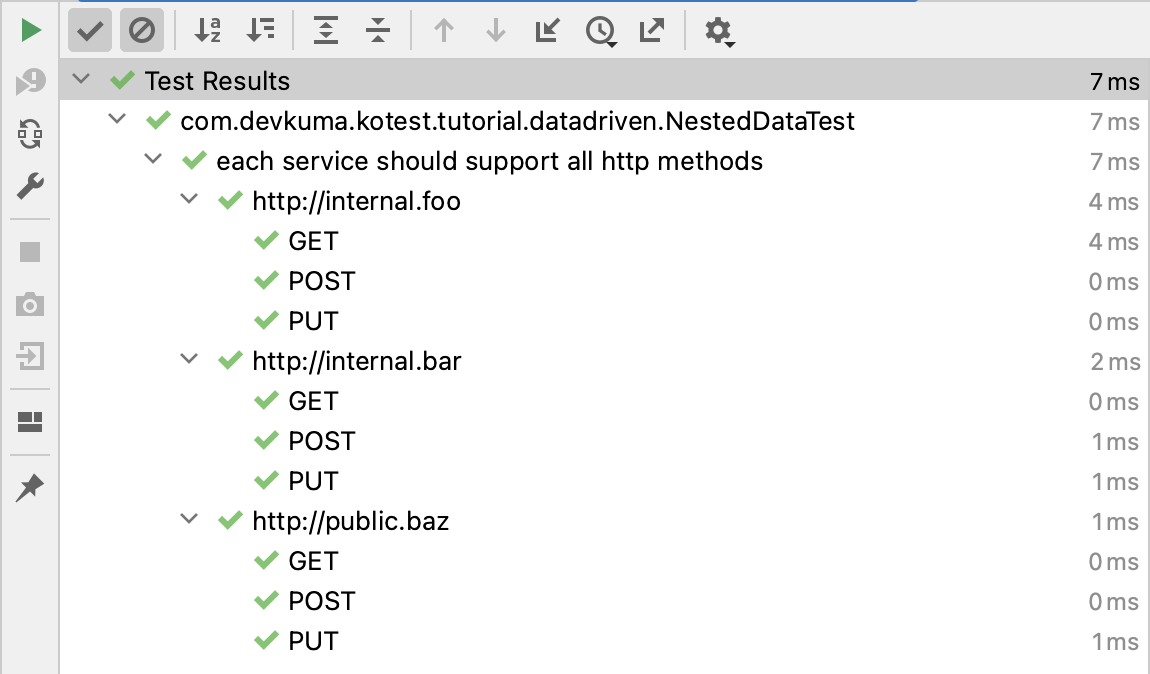
Kotest data tests are very flexible and can be nested with unlimited data test configurations. Each additional nesting level creates another nested layer in the test output, producing a Cartesian join of all inputs.
For example, the following code snippet has two nested layers.
package com.devkuma.kotest.tutorial.datadriven

import io.kotest.core.spec.style.FunSpec
import io.kotest.datatest.withData

class NestedDataTest : FunSpec({

    context("each service should support all http methods") {
        val services = listOf(
            "http://internal.foo",
            "http://internal.bar",
            "http://public.baz",
        )

        val methods = listOf("GET", "POST", "PUT")

        withData(services) { service ->
            withData(methods) { method ->
                // test service against method
            }
        }
    }
})
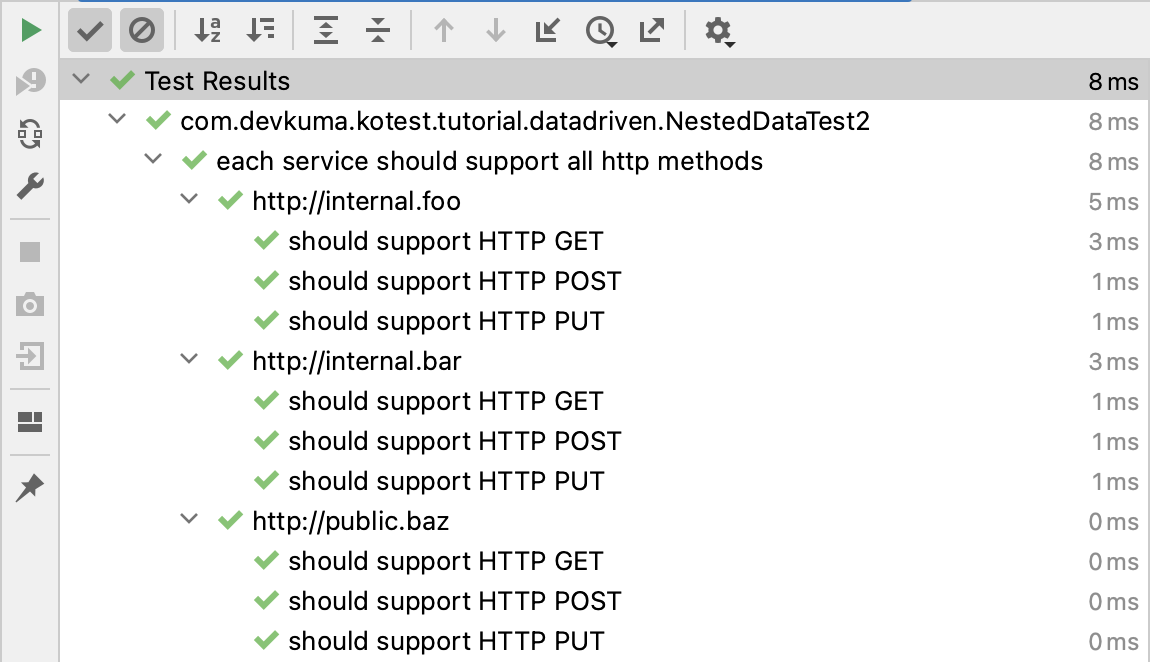
The following is the same example, but with custom test names added at the second level:
package com.devkuma.kotest.tutorial.datadriven

import io.kotest.core.spec.style.FunSpec
import io.kotest.datatest.withData

class NestedDataTest2 : FunSpec({

    context("each service should support all http methods") {

        val services = listOf(
            "http://internal.foo",
            "http://internal.bar",
            "http://public.baz",
        )

        val methods = listOf("GET", "POST", "PUT")

        withData(services) { service ->
            withData<String>({ "should support HTTP $it" }, methods) { method ->
                // test service against method
            }
        }
    }
})
Other Data Testing
The previous sections described tests using the withData function. This section explains basic ways to use data in Kotest.
Creating Test Data
Creating test data plays an important role in ensuring test reliability and completeness. Kotest lets you create test data in various ways. For example, you can define data directly inside a test function, or define data as member variables inside a test case class.
package com.devkuma.kotest.tutorial.datadriven

import io.kotest.core.spec.style.StringSpec
import io.kotest.matchers.shouldBe

class DataTest : StringSpec({

    val testData = listOf(1, 2, 3, 4, 5)

    "test using predefined test data" {
        testData.size shouldBe 5
    }

    "test using data generated from a range" {
        val generatedData = (1..10).toList()
        generatedData.size shouldBe 10
    }
})
In the example above, the member variable testData defines test data. It also uses generatedData to create data from a range.
Setting Up and Cleaning Up Test Data
Setting up the data needed before a test runs and cleaning it up after the test completes is important for test stability. In Kotest, you can use beforeTest and afterTest blocks to set up and clean up test data.
package com.devkuma.kotest.tutorial.datadriven

import io.kotest.core.spec.style.StringSpec

class DataSetupAndCleanupTest : StringSpec({

    val database = setupDatabase()

    beforeTest {
        database.connect()
    }

    afterTest {
        database.disconnect()
    }

    "Test with database connection" {
        // test logic using the database connection
    }
})

fun setupDatabase(): Database {
    // Setup database and return
}
In the example above, the beforeTest block connects to the database, and the afterTest block disconnects from it.
Creating, managing, and cleaning up test data are important elements for securing test reliability. By managing test data effectively with Kotest, you can run stable and robust tests and improve software quality.