Design Pattern | Builder Pattern
What Is the Builder Pattern?
- The word build means to build something large with structure.
- When creating something with a complex structure, it is difficult to complete it all at once. First, each part that makes up the whole is created, and then it is assembled step by step.
- The same construction process can create different representation objects.
- Whether there are many or few parameters for the constructor, parameters are accepted one after another, and after all parameters are received, they are integrated and used at once.
- The Builder pattern is a way to build instances that have structure.
- In GoF design patterns, it is classified as a creational design pattern.
Builder Pattern Example Program
This example program outputs a document in plain text and HTML formats.
Class Diagram
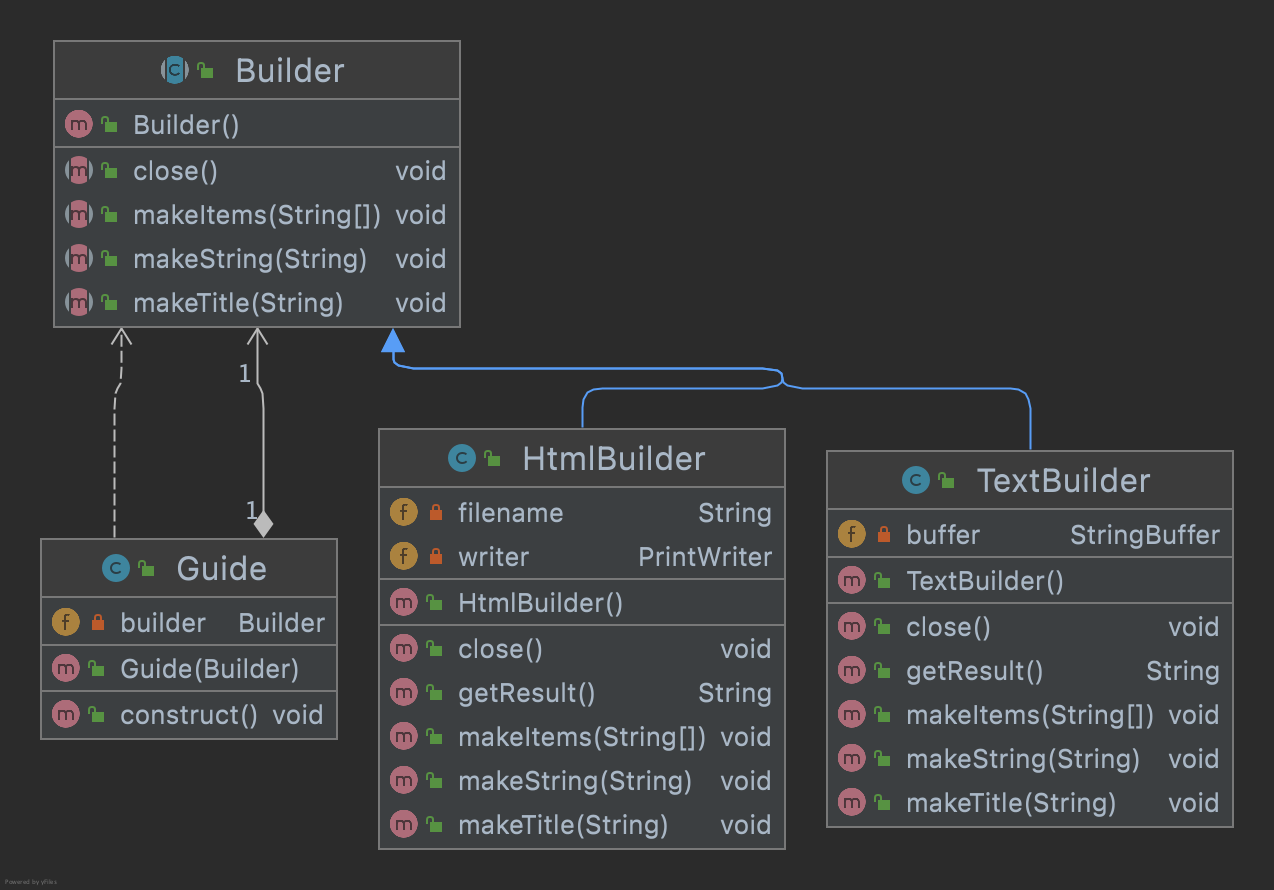
1. Builder Class
This abstract class defines methods for composing a document.
Builder.java
public abstract class Builder {
    public abstract void makeTitle(String title);
    public abstract void makeString(String str);
    public abstract void makeItems(String[] items);
    public abstract void close();
}
2. Guide Class
This class creates one document.
Guide.java
package com.devkuma.designpattern.creational.builder;

public class Guide {

    private Builder builder;

    public Guide(Builder builder) {
        this.builder = builder;
    }

    public void construct() {
        builder.makeTitle("야유회에 대해서");
        builder.makeString("일시");
        builder.makeItems(new String[]{
                "2022/3/14 (월)",
                "11:00~",
        });
        builder.makeString("장소");
        builder.makeItems(new String[]{
                "xxx 캠핌장",
        });
        builder.makeString("준비물");
        builder.makeItems(new String[]{
                "회비",
                "고기",
                "음료수",
        });
        builder.close();
    }
}
3. TextBuilder Class
This class creates a document as plain text.
TextBuilder.java
package com.devkuma.designpattern.creational.builder;

public class TextBuilder extends Builder {

    private StringBuffer buffer = new StringBuffer();

    public void makeTitle(String title) {
        buffer.append("==============================\n");
        buffer.append("'" + title + "'\n");
        buffer.append("\n");
    }

    public void makeString(String str) {
        buffer.append("- " + str + "\n");
    }

    public void makeItems(String[] items) {
        for (int i = 0; i < items.length; i++) {
            buffer.append(" - " + items[i] + "\n");
        }
        buffer.append("\n");
    }

    public void close() {
        buffer.append("==============================\n");
    }

    public String getResult() {
        return buffer.toString();
    }
}
4. HTMLBuilder Class
This class creates a document as an HTML file.
HTMLBuilder.java
package com.devkuma.designpattern.creational.builder;

import java.io.FileWriter;
import java.io.IOException;
import java.io.PrintWriter;

public class HtmlBuilder extends Builder {

    private String filename;
    private PrintWriter writer;

    public void makeTitle(String title) {
        filename = title + ".html";
        try {
            writer = new PrintWriter(new FileWriter(filename));
        } catch (IOException e) {
            e.printStackTrace();
        }
        writer.println("<html><head><title>" + title + "</title></head><body>");
        writer.println("<h1>" + title + "</h1>");
    }

    public void makeString(String str) {
        writer.println("<p>" + str + "</p>");
    }

    public void makeItems(String[] items) {
        writer.println("<ul>");
        for (int i = 0; i < items.length; i++) {
            writer.println("<li>" + items[i] + "</li>");
        }
        writer.println("</ul>");
    }

    public void close() {
        writer.println("</body></html>");
        writer.close();
    }

    public String getResult() {
        return filename;
    }
}
5. Main Class
This is the main class that runs the example program.
Main.java
package com.devkuma.designpattern.creational.builder;

public class Main {
    public static void main(String[] args) {

        if (args.length != 1) {
            System.exit(0);
        }
        if (args[0].equals("plain")) {
            TextBuilder textbuilder = new TextBuilder();
            Guide guide = new Guide(textbuilder);
            guide.construct();
            String result = textbuilder.getResult();
            System.out.println(result);
        } else if (args[0].equals("html")) {
            HtmlBuilder htmlbuilder = new HtmlBuilder();
            Guide guide = new Guide(htmlbuilder);
            guide.construct();
            String filename = htmlbuilder.getResult();
            System.out.println(filename + "이 작성되었습니다.");
        } else {
            System.exit(0);
        }
    }
}
6. Execution Result
Text
==============================
'야유회에 대해서'

- 일시
 - 2022/3/14 (월)
 - 11:00~

- 장소
 - xxx 캠핌장

- 준비물
 - 회비
 - 고기
 - 음료수

==============================
HTML
<html><head><title>야유회에 대해서</title></head><body>
<h1>야유회에 대해서</h1>
<p>일시</p>
<ul>
<li>2022/3/14 (월)</li>
<li>11:00~</li>
</ul>
<p>장소</p>
<ul>
<li>xxx 캠핌장</li>
</ul>
<p>준비물</p>
<ul>
<li>회비</li>
<li>고기</li>
<li>음료수</li>
</ul>
</body></html>
7. Advantages of the Builder Pattern
In the example program, the Main class does not know how to build the document, that is, the methods of the Builder class. The Main class can build the document simply by calling the construct method of the Guide class.
The Guide class uses the Builder class to create the document, but it does not know which class it is actually using, whether TextBuilder or HtmlBuilder.
An instance of TextBuilder or an instance of HTMLBuilder can both be passed to Guide and still work correctly because the Guide class does not know the concrete class of the Builder class.
Because it does not know the concrete class, replacement is possible, and because replacement is possible, its value as a component increases.