Design Pattern | Prototype Pattern
What Is the Prototype Pattern?
- The English word prototype means an original form or model.
- The Prototype pattern does not create an instance from a class using
new Xxx(). Instead, it creates another instance from an existing instance. In other words, it creates an instance by copying. - The work of making a copy is called
clone. - In GoF design patterns, it is classified as a creational design pattern.
Prototype Pattern Example Program
This example program underlines or surrounds an input string.
Class Diagram
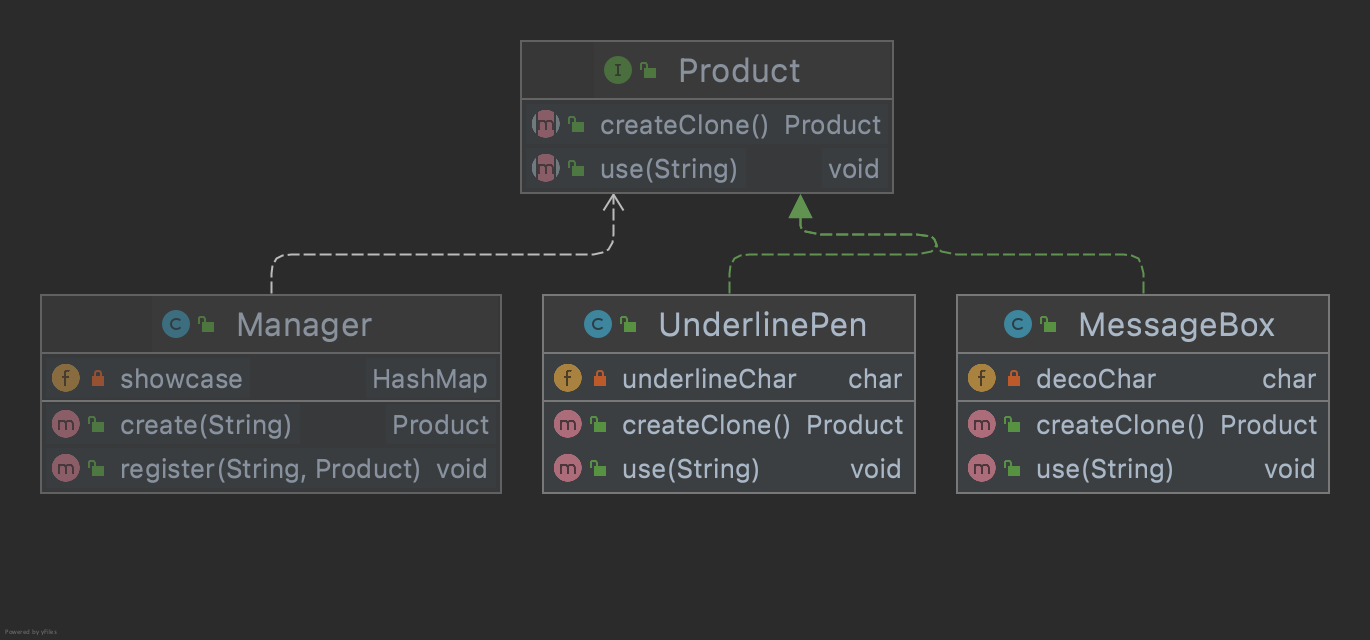
1. Product Interface
This interface defines the cloning method. It extends Java’s Cloneable interface.
Product.java
package com.devkuma.designpattern.creational.prototype.framework;

import java.lang.Cloneable;

public interface Product extends Cloneable {
    void use(String s);

    Product createClone();
}
2. Manager Class
This class instructs and manages the creation of Products.
Manager.java
package com.devkuma.designpattern.creational.prototype.framework;

import java.util.HashMap;

public class Manager {

    private HashMap showcase = new HashMap();

    public void register(String name, Product prototype) {
        showcase.put(name, prototype);
    }

    public Product create(String prototypeName) {
        Product p = (Product) showcase.get(prototypeName);
        return p.createClone();
    }
}
3. UnderlinePen Class
This class implements the Product interface. It is a class that “underlines text.”
UnderlinePen.java
package com.devkuma.designpattern.creational.prototype.product;

import com.devkuma.designpattern.creational.prototype.framework.Product;

public class UnderlinePen implements Product {

    private char underlineChar;

    public UnderlinePen(char underlineChar) {
        this.underlineChar = underlineChar;
    }

    public void use(String s) {

        int length = s.getBytes().length;

        System.out.println(s);

        for (int i = 0; i < length; i++) {
            System.out.print(underlineChar);
        }

        System.out.println();
    }

    public Product createClone() {
        Product p = null;
        try {
            p = (Product) clone();
        } catch (CloneNotSupportedException e) {
            // Exception thrown when the object's class does not implement the Cloneable interface.
            e.printStackTrace();
        }
        return p;
    }
}
4. MessageBox Class
This class implements the Product interface. It is a class that “surrounds text.”
MessageBox.java
package com.devkuma.designpattern.creational.prototype.product;

import com.devkuma.designpattern.creational.prototype.framework.Product;

public class MessageBox implements Product {

    private char decoChar;

    public MessageBox(char decoChar) {
        this.decoChar = decoChar;
    }

    public void use(String s) {

        int length = s.getBytes().length;

        for (int i = 0; i < length + 2; i++) {
            System.out.print(decoChar);
        }

        System.out.println();
        System.out.println(decoChar + s + decoChar);

        for (int i = 0; i < length + 2; i++) {
            System.out.print(decoChar);
        }

        System.out.println();
    }

    public Product createClone() {
        Product p = null;
        try {
            p = (Product) clone();
        } catch (CloneNotSupportedException e) {
            // Exception thrown when the object's class does not implement the Cloneable interface.
            e.printStackTrace();
        }
        return p;
    }
}
5. Main Class
This is the main class that executes the main processing.
Main.java
package com.devkuma.designpattern.creational.prototype;

import com.devkuma.designpattern.creational.prototype.framework.Manager;
import com.devkuma.designpattern.creational.prototype.framework.Product;
import com.devkuma.designpattern.creational.prototype.product.MessageBox;
import com.devkuma.designpattern.creational.prototype.product.UnderlinePen;

public class Main {
    public static void main(String[] args) {

        Manager manager = new Manager();
        UnderlinePen upen = new UnderlinePen('~');
        MessageBox mbox = new MessageBox('*');
        MessageBox pbox = new MessageBox('+');
        manager.register("strong message", upen);
        manager.register("warning box", mbox);
        manager.register("slash box", pbox);

        Product p1 = manager.create("strong message");
        p1.use("Hello world");
        System.out.println();
        Product p2 = manager.create("warning box");
        p2.use("Hello world");
        System.out.println();
        Product p3 = manager.create("slash box");
        p3.use("Hello world");
    }
}
6. Execution Result
Hello world
~~~~~~~~~~~

*************
*Hello world*
*************

+++++++++++++
+Hello world+
+++++++++++++
Advantages of the Prototype Pattern
The example program is relatively simple, but creating an instance may require complex processing or time-consuming processing. Creating an instance with new Xxx() every time can be very inefficient.
By creating a prototype and copying it, instances can be created easily.