Design Pattern | Bridge Pattern
What Is the Bridge Pattern?
- The English word bridge means a bridge.
- Just as a real-world bridge connects both sides of a river, the Bridge pattern connects two places.
- It separates implementation from abstraction. It is a pattern that places a bridge between the feature class hierarchy and the implementation class hierarchy.
- The two places crossed by the Bridge pattern are the feature class hierarchy and the implementation class hierarchy.
- Feature class hierarchy: a hierarchy where the superclass has basic features and subclasses add new features.
- Implementation class hierarchy: a hierarchy where the superclass defines the interface through abstract methods and subclasses implement that interface through concrete methods.
- In GoF design patterns, it is classified as a structural design pattern.
Bridge Pattern Example Program
This example program displays an input string a specified number of times and a random number of times.
Class Diagram
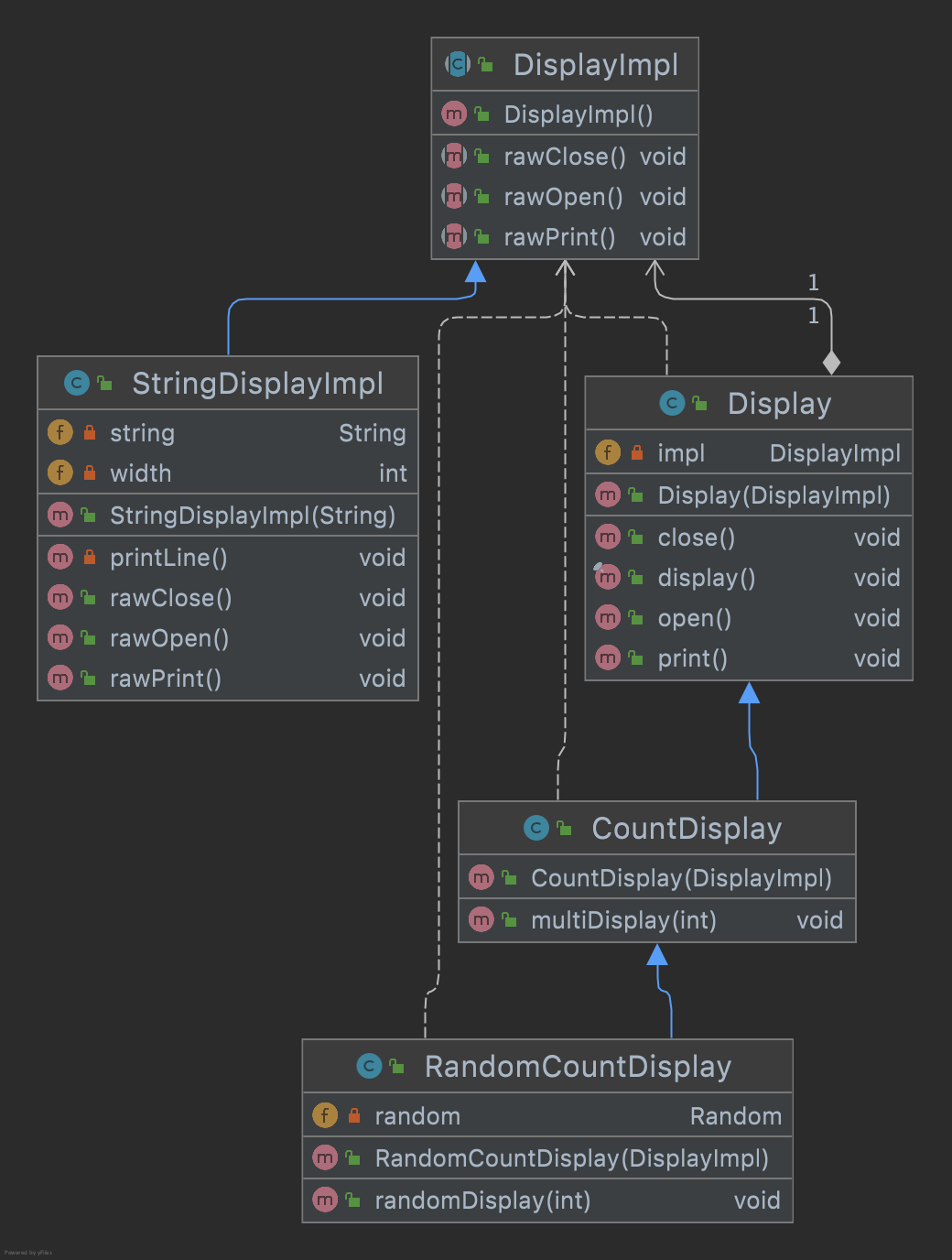
1. Display Class
This is the class that performs “display” and belongs to the feature class hierarchy.
The impl field held by this class becomes the “bridge” between the two class hierarchies.
Display.java
package com.devkuma.designpattern.structural.bridge;

public class Display {

    private DisplayImpl impl;

    public Display(DisplayImpl impl) {
        this.impl = impl;
    }

    public void open() {
        impl.rawOpen();
    }

    public void print() {
        impl.rawPrint();
    }

    public void close() {
        impl.rawClose();
    }

    public final void display() {
        open();
        print();
        close();
    }
}
2. CountDisplay Class
This class belongs to the feature class hierarchy and adds the feature “display a specified number of times.”
CountDisplay.java
package com.devkuma.designpattern.structural.bridge;

public class CountDisplay extends Display {

    public CountDisplay(DisplayImpl impl) {
        super(impl);
    }

    public void multiDisplay(int times) {
        open();
        for (int i = 0; i < times; i++) {
            print();
        }
        close();
    }
}
3. RandomCountDisplay Class
This class belongs to the feature class hierarchy and adds the feature “display a random number of times.”
RandomCountDisplay.java
package com.devkuma.designpattern.structural.bridge;

import java.util.Random;

public class RandomCountDisplay extends CountDisplay {

    private Random random = new Random();

    public RandomCountDisplay(DisplayImpl impl) {
        super(impl);
    }

    public void randomDisplay(int times) {
        multiDisplay(random.nextInt(times));
    }
}
4. DisplayImpl Class
This class defines methods for “display” and belongs to the implementation class hierarchy.
DisplayImpl.java
public abstract class DisplayImpl {
    public abstract void rawOpen();
    public abstract void rawPrint();
    public abstract void rawClose();
}
5. StringDisplayImpl Class
This class belongs to the implementation class hierarchy and displays using a string.
StringDisplayImpl.java
package com.devkuma.designpattern.structural.bridge;

public class StringDisplayImpl extends DisplayImpl {

    private String string;
    private int width;

    public StringDisplayImpl(String string) {
        this.string = string;
        this.width = string.getBytes().length;
    }

    public void rawOpen() {
        printLine();
    }

    public void rawPrint() {
        System.out.println("|" + string + "|");
    }

    public void rawClose() {
        printLine();
    }

    private void printLine() {
        System.out.print("+");
        for (int i = 0; i < width; i++) {
            System.out.print("-");
        }
        System.out.println("+");
    }
}
6. Main Class
This is the class that executes the main processing.
Main.java
package com.devkuma.designpattern.structural.bridge;

public class Main {

    public static void main(String[] args) {
        Display display = new Display(new StringDisplayImpl("Display Test"));
        CountDisplay countDisplay = new CountDisplay(new StringDisplayImpl("CountDisplay Test"));
        RandomCountDisplay randomCountDisplay = new RandomCountDisplay(new StringDisplayImpl("RandomCountDisplay Test"));
        display.display();
        countDisplay.multiDisplay(5);
        randomCountDisplay.randomDisplay(10);
    }
}
7. Execution Result
+------------+
|Display Test|
+------------+
+-----------------+
|CountDisplay Test|
|CountDisplay Test|
|CountDisplay Test|
|CountDisplay Test|
|CountDisplay Test|
+-----------------+
+-----------------------+
|RandomCountDisplay Test|
|RandomCountDisplay Test|
|RandomCountDisplay Test|
|RandomCountDisplay Test|
|RandomCountDisplay Test|
|RandomCountDisplay Test|
+-----------------------+
Advantages
As mentioned earlier, the characteristic of the Bridge pattern is that it separates the feature class hierarchy and the implementation class hierarchy. If these two class hierarchies are separated, each class hierarchy can be extended independently.
To add a feature, add a class to the feature class hierarchy. At this time, the implementation class hierarchy does not need to be modified at all. Moreover, the added feature becomes available to all implementations.
In the example program, adding the CountDisplay class or RandomCountDisplay class corresponds to adding features.
In this way, the Bridge pattern makes class extension easier to anticipate and manage.